
A laptop cooling stand lifts your computer and moves air beneath it to help manage heat. It can suit gamers, remote workers, students, and anyone using a large notebook for long sessions. The best 17 inch laptop cooling stand also adds comfort and a steadier work setup.
A cheap cooling pad can seem like a quick fix, then disappoint with weak airflow, a wobbly frame, or fans that sound like a tiny engine. Some stands also lack enough room for a 17-inch laptop, while others block ports or offer awkward height settings. These problems matter during long work or game sessions, when heat and poor posture can wear you down. Check size, stability, fan noise, and power needs before buying. The right stand should fit your desk and routine, not just look good in a listing.
I focus on laptop accessories and practical details that affect daily use. For this guide, I compared the listed size ranges, fan counts, adjustment options, materials, and connection features, while avoiding claims that the specs cannot support. My goal is to help you find the best 17 inch laptop cooling stand for your space, comfort, and budget.
What you’ll learn
- How to match a cooling stand to a 17-inch laptop.
- Which features matter most for airflow, comfort, and stability.
- How the five listed cooling stands differ in design and use.
- What to check before choosing a cooling pad for work or gaming.
In This Article
How to Choose the Best 17 Inch Laptop Cooling Stand
A cooling stand should fit your laptop, desk, and work style. A common mistake is to buy by fan count alone. More fans do not always mean better cooling, and a low-cost frame may wobble under a large laptop. Check the size range, stand support, height options, and fan controls first. Also consider noise and how the pad gets power. The best 17 inch laptop cooling stand is the one that feels stable and useful in your daily setup.
Check Laptop Size and Stand Stability
Start by checking that the stand supports laptops up to 17 inches. A large laptop needs a broad, steady surface and secure stops so it will not slide when you type or adjust the screen. Do not assume that a pad marked for 17-inch models fits every laptop shape; compare its listed size with your computer. A stable stand matters most for heavy gaming laptops and frequent typing. For a desk setup, a height-adjustable model can also help you find a more natural viewing angle.
Balance Fan Airflow and Noise
Fan count is only one part of cooling. Look for a mesh or open surface that lets air reach the laptop vents, and consider whether the fan layout suits your computer. Quiet operation matters in a shared room, a class, or a video call. A stand with speed controls can help you balance airflow and sound, while a basic dual-fan pad may suit lighter use. Avoid expecting a cooling stand to fix blocked vents or heavy dust inside a laptop; it can support airflow, but it cannot replace routine care.
Choose Useful Height and USB Features
Height settings can ease neck strain by raising the display, but the stand must stay firm at each level. If you type on the laptop itself, check that the angle feels secure and comfortable. USB ports can be handy, though they may serve as pass-through ports rather than a full hub. Check the listed connections and how the stand draws power before you buy. A phone holder or extra port can be useful for some desks, while a slimmer pad may be better for travel.
Quick Comparison
| Model | Category | Best For | Key Spec | Amazon |
|---|---|---|---|---|
| Amazon Basics Cooling Pad Stand | Best Overall | Adjustable desk setups | Six fans; height adjustable | Amazon |
| Targus 17 Inch Lap Chill Mat | Lap Use | Couch and lap use | Soft neoprene; dual fans | Amazon |
| TECKNET Laptop Cooling Pad | Slim Pick | Simple portable cooling | Slim alloy mesh; dual USB | Amazon |
| 3-Fan Adjustable Laptop Cooling Pad | Ergonomic Value | Work, class, and gaming | Three fans; five height levels | Amazon |
| LIANGSTAR 6-Fan Laptop Cooling Pad | Feature Rich | Flexible fan and height settings | Six fans; seven height levels | Amazon |
In-Depth Reviews for the Best 17 Inch Laptop Cooling Stand
1.Amazon Basics 6-Fan Cooling Stand
 Amazon Basics 6-Fan Cooling Stand
” />
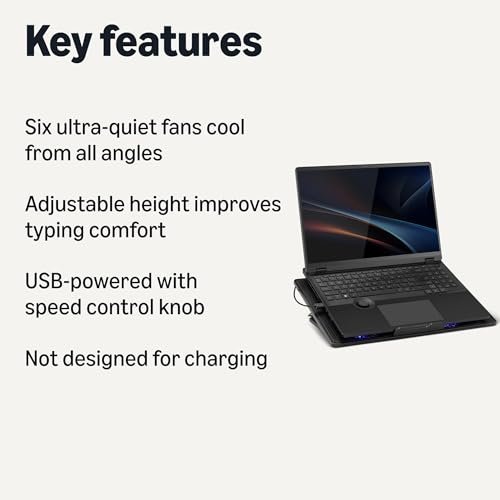
The Amazon Basics cooling stand supports laptops from 12 to 17 inches and uses six quiet fans to move air under the computer. Its adjustable height lets you raise the screen to suit your desk. USB-A and USB-C ports add handy connections. This mix of airflow and flexibility makes it a strong best 17 inch laptop cooling stand choice.
The stand suits a home office, study desk, or gaming setup where a large laptop needs a firm base. Height adjustment can help you set a more comfortable viewing angle, while the six-fan layout spreads airflow across the base. It is best for users who want an adjustable stand and extra ports, rather than a soft pad for lap use.
The design offers useful features in one desk accessory, though the listed details do not specify its materials or cleaning method. Keep the mesh and fan area clear of dust for airflow. For shoppers who want several fans, height adjustment, and USB ports, it offers broad value in a single stand.
Why It’s Great
- Six quiet fans provide broad airflow beneath the laptop.
- Height adjustment helps tailor the screen position to your desk.
- USB-A and USB-C ports add connection options.
- Fits laptops from 12 to 17 inches.
- Combines cooling and desk ergonomics in one stand.
Good to Know
- The listed details do not state the number of height positions.
- A stand-style design may be less comfortable than a soft lap pad.
- Fan performance can vary with laptop vent placement and room conditions.
2.Targus 17-Inch Dual-Fan Lap Chill Mat
 Targus 17-Inch Dual-Fan Lap Chill Mat
” />
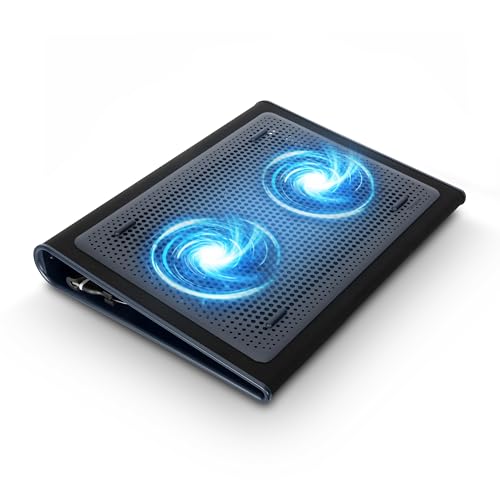
The Targus Lap Chill Mat uses two USB-A-connected fans to help move heat away from a laptop. Its soft neoprene design is made for lap use, and it fits most laptops up to 17 inches. Unlike a rigid desk stand, this cooling mat puts comfort first. It is a useful best 17 inch laptop cooling stand option for relaxed use.
The soft base suits couch use, a favorite chair, or a lap desk when a hard stand feels awkward. The dual fans connect by USB-A, so check that your laptop or power setup has a suitable port. It is best for users who want a cushioned cooling surface more than several height settings or extra desk features.
The neoprene surface is suited to casual use, but it may need gentle care to stay clean. The simple design has fewer adjustment features than a desk stand. If you value lap comfort and a known 17-inch fit over a tall, adjustable frame, this mat offers a focused alternative.
Why It’s Great
- Soft neoprene makes it suitable for lap use.
- Fits most laptops up to 17 inches.
- Dual fans help disperse heat beneath the computer.
- USB-A power keeps the setup simple.
- Offers a cushioned alternative to a rigid desk stand.
Good to Know
- It has two fans, fewer than several multi-fan desk pads.
- The listed details do not mention height adjustment.
- USB-A connection may require an adapter on some newer laptops.
3.TECKNET Slim Laptop Cooling Pad
 TECKNET Slim Laptop Cooling Pad
” />
The TECKNET cooling pad is a slim cooler for laptops from 12 to 17 inches. Its alloy mesh surface supports airflow, while two USB ports add convenience. The product listing describes high-efficiency cooling and whisper-quiet operation, though real results depend on laptop vents and use. Its simple build makes it a practical best 17 inch laptop cooling stand for compact desks.
This pad suits users who want a low-profile cooler without a large stand frame. The mesh surface gives the laptop a ventilated base, and the LED indicator offers a quick sign that it is working. It is best for students, home workers, and travelers who want a simple cooling surface with USB ports.
The alloy mesh should be easy to wipe when powered off, though care around the fans is wise. Its slim shape favors easy storage over extensive height changes. For buyers who want a compact cooler for a 17-inch laptop, it provides useful airflow features without a bulky design.
Why It’s Great
- Supports laptops from 12 to 17 inches.
- Slim profile can suit compact desks and storage.
- Alloy mesh gives air room to flow beneath the laptop.
- Dual USB ports add useful connections.
- LED working indicator offers a quick status cue.
Good to Know
- The listed details do not mention height adjustment.
- Two fans may offer less airflow coverage than six-fan models.
- The product’s cooling claims are not a guarantee of a set temperature drop.
4.3-Fan Adjustable Laptop Cooling Pad
 3-Fan Adjustable Laptop Cooling Pad
” />
This cooling pad pairs three quiet fans with five height levels for laptops from 12 to 17 inches. It also lists two USB ports and a phone holder, giving it useful desk features beyond airflow. The adjustable design makes it a flexible best 17 inch laptop cooling stand for work, online classes, and casual gaming.
The height settings let users lift the screen to a position that feels more natural at a desk. A phone holder can keep a second device in view, while the two USB ports add connection options. It is best for students and home users who want a practical stand with comfort features.
The design brings several daily-use features together, though the listed details do not name the frame material. Wipe the surface with a soft cloth and keep the fan openings clear. Its five height levels and phone holder add value for shoppers seeking an adjustable desk setup.
Why It’s Great
- Five height levels offer options for desk posture.
- Three quiet fans support airflow under the laptop.
- Fits laptops from 12 to 17 inches.
- Includes a phone holder for a nearby device.
- Two USB ports add practical connectivity.
Good to Know
- Three fans may offer less coverage than six-fan options.
- The listed details do not specify the stand’s material.
- The phone holder may not suit every device or desk layout.
5.LIANGSTAR 6-Fan Adjustable Cooling Pad
 LIANGSTAR 6-Fan Adjustable Cooling Pad
” />
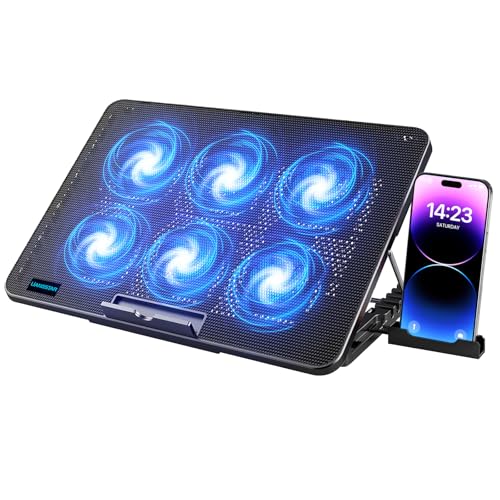
The LIANGSTAR cooling pad supports 12- to 17-inch laptops and has six quiet fans. Seven height settings and adjustable fan speed give users more ways to tune their setup. It also includes two USB ports and a phone holder. These features make it a versatile best 17 inch laptop cooling stand for users who like choice.
The stand is suited to desk work, study, or gaming when both screen height and fan speed need adjustment. Its phone holder keeps a small device nearby, and the two USB ports add convenience. It is best for users who want more control than a basic cooling pad provides.
The listed details identify a black stand but do not state its material or care instructions. Keep dust away from the fan openings and wipe the surface gently. Seven height levels and adjustable fan speed offer strong feature value for buyers seeking a customizable setup.
Why It’s Great
- Six fans provide a broad cooling layout.
- Seven height settings allow fine position changes.
- Adjustable fan speed helps balance airflow and sound.
- Includes two USB ports and a phone holder.
- Fits laptops from 12 to 17 inches.
Good to Know
- More settings can take time to adjust to personal needs.
- The listed details do not specify the stand material.
- A phone holder and extra controls may be unnecessary for simple setups.
Final Thoughts: The Verdict
My personal top pick is the Amazon Basics Laptop Cooling Pad Stand. Its six fans, height adjustment, and USB-A and USB-C ports make it a well-rounded choice for many desk setups. It earns the lead in this best 17 inch laptop cooling stand guide because it combines cooling features with useful flexibility. Check that its stand design suits your desk and laptop before ordering.
For lap use, consider the Targus 17 Inch Dual Fan Lap Chill Mat and its soft neoprene base. The TECKNET pad suits buyers who want a slim mesh design, while LIANGSTAR offers more height and fan-speed settings. Choose the stand that best fits your laptop, daily habits, and budget.