
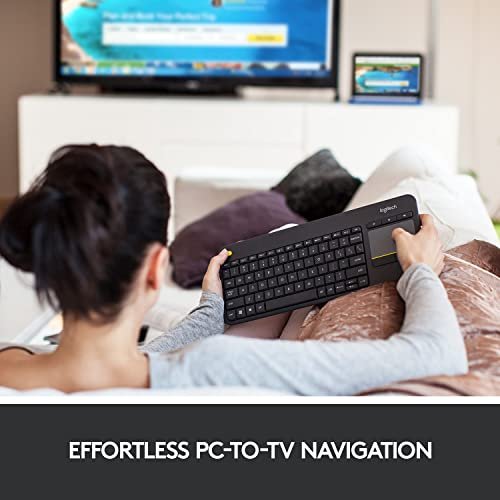
A Bluetooth touchpad keyboard combines typing and cursor control in one compact tool. It suits people who use a TV, tablet, phone, or computer from a couch or small desk. Buyers choose one to reduce clutter, skip a separate mouse, and make media control or mobile work feel easier.
A poor pick can turn a tidy setup into a daily hassle. Keys may feel cramped, a touchpad may miss taps, or the connection may not work with your device. Some wireless keyboards use a USB receiver rather than Bluetooth, a detail that can spoil a TV or tablet setup. Foldable models also vary in stability and layout. Checking these basics before buying can spare you lag, awkward typing, and a return trip. The best bluetooth touchpad keyboard should fit your devices and the way you actually work.
I focus on wireless keyboards and practical input tools, with an eye on the details that matter during daily use. I compared the listed features, connection types, layouts, portability, and device support rather than claiming hands-on testing. This guide highlights clear strengths and trade-offs, so you can find the best bluetooth touchpad keyboard for your screen, space, and budget.
What you’ll learn
- How connection type affects use with TVs, tablets, and computers
- Which keyboard features suit couch use, travel, and desk work
- What to check before choosing a built-in touchpad
- How these five models differ in size, layout, and device support
In This Article
How To Choose The Best best bluetooth touchpad keyboard
The right keyboard can make a TV, tablet, or small desk far easier to use. The wrong one can bring missed clicks, cramped keys, or a connection that does not match your device. A common mistake is to assume every wireless model uses Bluetooth; some need a USB receiver. Check your device ports and operating system first. Then compare the touchpad, layout, size, and charging needs. The best bluetooth touchpad keyboard is the one that fits your real setup, not just the one with the longest feature list.
Check Bluetooth and Device Support
Start by checking how the keyboard connects. Bluetooth models pair with compatible phones, tablets, and computers without taking up a USB port. Some wireless keyboards use a USB receiver instead, which may not work with a tablet or TV that lacks a matching port. The Logitech K400 Plus, for example, connects through a USB receiver rather than Bluetooth. Also check operating-system support and whether special keys work on your device. A multi-device model can suit people who switch screens, while a receiver-based keyboard may fit a fixed PC or TV setup.
Match the Touchpad and Layout to Your Use
A built-in touchpad saves space, but its size and controls affect everyday comfort. Look for clear click areas and gestures that your operating system supports. A full-size layout can help with longer typing, while a small foldable model is easier to pack. Number pads are useful for data entry but add bulk. Do not assume a touchpad will feel like a full-size mouse; it is best for basic cursor work, menus, and media control. For couch use, prioritize easy reach. For travel, balance key size with a compact folded shape.
Consider Portability, Power, and Build
Think about where the keyboard will live. A slim or foldable model fits a bag, while a wider board may feel steadier on a desk or lap. Check whether it charges by USB-C, how many devices it can pair with, and whether it includes a phone stand. These details can matter more than extra lighting or media keys. Foldable hinges and covers also add parts that need care. Choose a compact design for travel, or a larger layout for frequent typing. The best bluetooth touchpad keyboard should be easy to charge, carry, and keep clean.
Quick Comparison
| Model | Category | Best For | Key Spec | Amazon |
|---|---|---|---|---|
| Logitech K400 Plus | TV keyboard | PC-connected TV use | Built-in touchpad; USB receiver | Amazon |
| Arteck Backlit Bluetooth Keyboard | Backlit | Dim-room typing | Seven-color backlight; touchpad | Amazon |
| TECKNET Foldable Keyboard | Portable | Multi-device mobile work | Number pad; three-device switching | Amazon |
| Samsers Foldable Keyboard | Compact | Phone and tablet use | Multi-touch pad; phone holder | Amazon |
| CZUR K5S Keyboard | Wired and wireless | Flexible device setups | Bluetooth and wired modes | Amazon |
In-Depth Reviews for best bluetooth touchpad keyboard
1.Logitech K400 Plus Touch TV Keyboard
 Logitech K400 Plus Touch TV Keyboard
” />
The Logitech K400 Plus pairs a keyboard and touchpad for simple PC-connected TV control. Its wireless link uses a USB receiver, not Bluetooth, so check your device before buying. Media keys make common tasks easy from a couch. For a compatible computer and TV setup, it keeps basic typing and cursor control close at hand.
Its broad layout is made for relaxed browsing, searches, and media menus rather than travel. The built-in touchpad removes the need to balance a mouse on your lap. This model suits people who use a computer connected to a TV and want easy control from across the room. It is not the right pick for a Bluetooth-only tablet setup.
The smooth top surface is easy to wipe with a soft, slightly damp cloth. Keep liquid away from the keys and receiver. Logitech is a known input-device brand, and the simple layout offers useful value for a fixed TV setup. Its receiver-based connection is the main trade-off.
Why It’s Great
- Combines typing and cursor control in one board.
- Media keys simplify common TV and PC tasks.
- A practical fit for couch-based browsing.
- Works with listed Windows, Android, and Chrome OS devices when the receiver is supported.
- Avoids the need to keep a separate mouse nearby.
Good to Know
- It uses a USB receiver, not Bluetooth.
- A suitable USB port or adapter is needed.
- Its larger shape is less convenient for travel.
2.Arteck Backlit Bluetooth Touchpad Keyboard
 Arteck Backlit Bluetooth Touchpad Keyboard
” />
This Arteck Bluetooth keyboard combines a touchpad with seven-color backlighting for typing in dim rooms. The listed support covers smart TVs, computers, laptops, tablets, and several common operating systems. Its media controls add convenience for couch use. If you want the best bluetooth touchpad keyboard for a darker room, its lighting is a useful extra.
The integrated pad keeps basic pointer tasks close to the keys, so you can browse without a separate mouse. The backlight can help when a room is dark, though bright settings may not suit every space. This model is a good match for people who type from a couch or use a TV-connected computer. Check your device’s pairing support first.
The flat surface should be easy to clean with a dry, soft cloth. Keep dust and spills away from the touchpad and keys. Its backlight and wireless layout offer a useful set of features in one board. Confirm charging and battery details on the current product listing before purchase.
Why It’s Great
- Seven-color backlighting helps in low light.
- Built-in touchpad saves desk and couch space.
- Bluetooth connection avoids a dedicated USB receiver.
- Designed for a range of listed devices and systems.
- Media controls add quick access to common tasks.
Good to Know
- Backlighting can use power faster than typing without it.
- Compatibility and key functions may vary by operating system.
- It is less compact than a folding travel keyboard.
3.TECKNET Foldable Bluetooth Touchpad Keyboard
 TECKNET Foldable Bluetooth Touchpad Keyboard
” />
The TECKNET foldable keyboard brings a touchpad and number pad into a portable Bluetooth design. It supports switching among three paired devices, which can help people move between a phone, tablet, and laptop. USB-C charging adds a familiar charging option. The layout stands out for users who want compact storage without giving up number keys.
Its folding form and PU leather cover make it easier to pack than a full-size board. The touchpad supports cursor work without a separate mouse, while the number pad can help with figures and forms. This model suits mobile workers who switch devices often. Check the folded dimensions and key layout against your bag and typing needs.
Wipe the cover and keys with a soft cloth, and keep the folding joints free of grit. A foldable build needs more care than a solid one-piece board. The number pad and device switching add practical value for travel, though the compact form may take time to adjust to.
Why It’s Great
- Pairs with and switches among three devices.
- Includes a number pad for data entry.
- Folding design saves bag space.
- USB-C charging is convenient for many users.
- A touchpad keeps basic pointer control built in.
Good to Know
- A compact folding layout may feel less natural at first.
- The hinge and cover need gentle handling.
- Check support for touchpad gestures on each device.
4.Samsers Foldable Bluetooth Touchpad Keyboard
 Samsers Foldable Bluetooth Touchpad Keyboard
” />
The Samsers foldable Bluetooth keyboard combines a touchpad with a phone holder in a slim, portable design. Its multi-touch pad adds pointer control, and the keyboard is listed for Android, Windows, iOS, and Mac OS. USB-C charging keeps the power setup simple. It offers a useful all-in-one option for mobile typing and basic navigation.
The foldable shape helps it fit in a bag, while the holder can keep a phone upright during short work sessions. Its listed single-device connection suits someone who mainly types on one screen at a time. This model is best for phone or tablet users who want a compact keyboard and cursor pad without carrying a mouse.
Use a soft cloth to remove dust, and fold the keyboard only as directed. Its slim build favors portability, so it may not feel like a large desk keyboard. The phone holder and trackpad give it good mobile value if the compact layout fits your typing style.
Why It’s Great
- Folds for easier packing and storage.
- Multi-touch trackpad supports pointer tasks.
- Phone holder can keep a mobile screen upright.
- USB-C charging reduces the need for a special cable.
- Listed support covers several popular operating systems.
Good to Know
- The product is listed for one connected device.
- Compact keys may feel cramped during long typing sessions.
- Touchpad gestures can differ across operating systems.
5.CZUR K5S Bluetooth Touchpad Keyboard
 CZUR K5S Bluetooth Touchpad Keyboard
” />
The CZUR K5S is listed as a rechargeable keyboard with a touchpad and both Bluetooth and wired connection options. This gives users a choice of wireless pairing or a cable-based setup. Its stated compatibility includes PC, laptop, tablet, and phone use across common systems. It may suit buyers who value connection flexibility in the best bluetooth touchpad keyboard.
A built-in trackpad handles basic cursor work without adding a separate mouse to your desk or bag. The wired option can be useful when you prefer a cable, while Bluetooth can help with compatible mobile devices. This model is a flexible pick for users who move between device types. Confirm the wired cable and pairing details before purchase.
Wipe the keys and pad with a soft, dry cloth, and unplug the cable before cleaning. A rechargeable design means you should plan to keep it charged. Its wired and wireless options offer practical flexibility, but review the current listing for exact contents and supported features.
Why It’s Great
- Offers both Bluetooth and wired connection modes.
- Built-in touchpad handles basic cursor control.
- Rechargeable design avoids disposable batteries.
- Listed for phones, tablets, laptops, and PCs.
- Flexible connection options can suit mixed device setups.
Good to Know
- Check which cable is included and what wired mode supports.
- Rechargeable use requires periodic charging.
- Confirm operating-system support for touchpad gestures.
Final Thoughts: The Verdict
My personal top pick is the Arteck Backlit Bluetooth Touchpad Keyboard for its Bluetooth link, touchpad, and seven-color backlight. It offers a strong mix for TV, tablet, and computer use. The best bluetooth touchpad keyboard still depends on your device, so check system support before you buy.
For travel, the TECKNET Foldable Bluetooth Touchpad Keyboard is a better fit if you want a number pad and three-device switching. The Samsers suits phone users who value a holder, while the Logitech is for PC-connected TVs with a USB port. Choose the layout and connection that match your needs and budget.