
A computer dock turns one laptop connection into a more useful desk setup, with ports for screens, charging, storage, and wired internet. It can help remote workers, students, and office teams connect faster. This best computer dock guide compares four options for different needs and budgets.
A dock can look perfect on paper and still cause daily headaches. A weak power supply may not charge your laptop well, and the wrong video setup can leave a second screen blank or mirrored. Some buyers also assume every USB-C port supports video, or that every dock works the same with Mac and Windows. Those mistakes cost time and money. The right dock should fit your laptop, screens, and desk habits, so your workday starts with one easy connection instead of a search for adapters.
I focus on practical laptop accessories and compare docks by their listed ports, charging claims, display support, and likely desk use. I also check where host laptop limits or operating system settings may affect the result, since a dock cannot add features a computer lacks. This best computer dock guide prioritizes clear trade-offs, useful connections, and a sensible fit for your setup.
What you’ll learn
- How to match a dock’s ports and power delivery to your laptop.
- Which dock may suit a simple home office or a multi-screen desk.
- Why operating system and laptop limits matter for external displays.
- What trade-offs to check before choosing the best computer dock.
In This Article
How To Choose The Best best computer dock
A dock should make your desk simpler, not add a new round of troubleshooting. Start with your laptop model, the screens you plan to use, and the ports you need each day. Common mistakes include buying by port count alone, overlooking the dock’s power needs, or assuming a USB-C port always carries video. Lower-quality docks may also have unclear display limits or lack a needed charger. Check compatibility and real use first. That small bit of planning can save money and help you find the best computer dock for your work.
Check Laptop Compatibility and Charging
First, check what your laptop’s USB-C or Thunderbolt port can do. Some USB-C ports carry data only, while others also support video and charging. Compare the dock’s power delivery with your laptop’s needs, and note whether a power adapter is included. A dock that offers less power than your laptop needs may charge slowly during heavy work. The Dell WD25 advertises up to 100W, while the Anker 8-in-1 lists up to 85W and does not include a charger. The best computer dock is the one that matches your exact computer, not just its connector shape.
Match the Dock to Your Monitors
Count your screens and check their resolution and refresh rate before you buy. A dock’s number of HDMI or DisplayPort sockets does not guarantee that every laptop can run all of them at once. Windows laptops and Macs can handle multi-screen connections differently, and some systems may mirror displays instead of extending them. Check both the dock’s display limits and your laptop’s support page. The LIONWEI and Anker Prime offer several display ports, but host limits still apply. For a single monitor, a simpler dock may be easier and less costly.
Choose Useful Ports, Not Just More Ports
Think through what stays on your desk: keyboard, mouse, webcam, storage, wired network, and memory cards. Then choose a dock with enough of the right ports and a sensible layout. More sockets can help a busy desk, but they do not always mean faster data or better performance. Check whether USB-A or USB-C ports support the speeds your devices need. An Ethernet port can make a steady connection useful for calls and large file transfers. For travel, a compact hub may suit you better than a large desktop dock. This step helps keep your best computer dock practical.
Quick Comparison
| Model | Category | Best For | Key Spec | Amazon |
|---|---|---|---|---|
| Dell Pro WD25 USB-C Dock | Best Overall | Office desks and compatible laptops | Up to 100W; HDMI and DisplayPort | Amazon |
| Anker 8-in-1 USB-C Dock | Compact Pick | A simple dual-screen setup | Up to 85W PD; dual HDMI | Amazon |
| LIONWEI 13-in-1 USB-C Dock | Port-Rich Pick | Desks with many connected devices | HDMI and DP; up to 100W PD | Amazon |
| Anker Prime 14-in-1 Dock | Premium Pick | Feature-rich home and office desks | Up to 160W total output; dual 4K HDMI | Amazon |
In-Depth Reviews for best computer dock
1. Dell Pro WD25 USB-C Dock

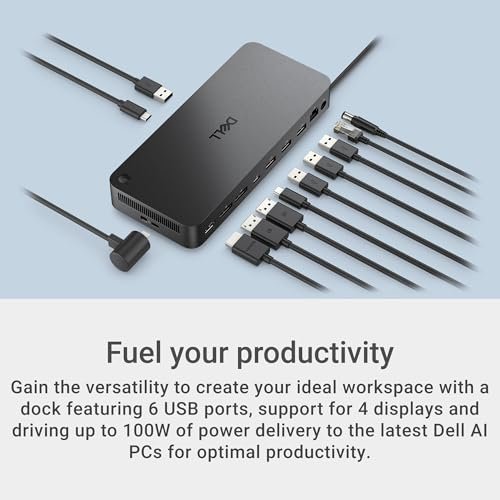
The Dell Pro WD25 is a USB-C laptop dock built for a tidy work desk. It offers up to 100W power delivery, Ethernet, USB-A, USB-C, HDMI, and DisplayPort connections. Its mix of ports can reduce adapter clutter and support a useful multi-screen setup. For compatible laptops, it is a strong best computer dock choice for office use.
Connect a laptop once, then keep your screens, network cable, and desk gear ready to go. The range of ports suits workers who move between meetings and a fixed desk. It is best for people with a compatible laptop who want one central connection point. Check your computer’s display and charging support before relying on every listed feature.
The upright desk setup helps keep cables in one place, while the mix of ports can replace several small adapters. Value depends on the price and the laptop features you will use. Confirm included power accessories and display limits before buying, especially if your setup depends on multiple high-resolution screens.
Why It’s Great
- Up to 100W power delivery can suit many work laptops.
- HDMI and DisplayPort offer flexible screen connections.
- Ethernet provides a wired network option.
- USB-A and USB-C ports support common desk accessories.
- A single laptop connection can reduce cable clutter.
Good to Know
- Your laptop must support the charging and video features you plan to use.
- The number of displays and resolutions depends on the host computer.
- Check the package details for the power adapter and included accessories.
2. Anker 8-in-1 USB-C Dock

This Anker 8-in-1 USB-C hub combines dual HDMI, Gigabit Ethernet, USB ports, SD and TF card readers, and up to 85W power delivery. It offers a helpful spread of connections in a compact package. For laptop users who need screens and card access without a large desktop dock, it can be a practical best computer dock option.
Its smaller design suits a home office, shared desk, or light travel bag. Plug in a compatible laptop and connect common accessories through the hub. It is best for users who want dual HDMI connections and card readers in one unit. The charger is not included, so plan to supply a suitable power source for laptop charging.
The compact hub keeps a simple desk easy to manage, though attached cables and adapters still need space. Its port mix can offer good value if you use the card readers and Ethernet. Check your laptop’s support for external screens, since the dock cannot bypass system limits or guarantee an extended display mode.
Why It’s Great
- Dual HDMI ports allow a flexible monitor connection setup.
- Gigabit Ethernet supports a wired network connection.
- SD and TF readers are handy for photo workflows.
- Compact size works well on smaller desks.
- Up to 85W power delivery can charge many compatible laptops.
Good to Know
- A charger is not included with this dock.
- The host laptop may limit the number or mode of external displays.
- Up to 85W may not meet the needs of every high-power laptop.
3. LIONWEI 13-in-1 USB-C Dock

The LIONWEI 13-in-1 USB-C dock is made for desks that need many connections. It lists HDMI and DisplayPort outputs, up to 100W power delivery, Ethernet, audio, and a mix of USB-A and USB-C ports. Its broad port selection helps reduce extra hubs. It may suit buyers seeking a best computer dock for a busy setup.
This dock can keep displays, storage, network, and audio gear close to one laptop connection. It is best suited to users who have several devices attached at once and want fewer separate adapters. The switching button may help manage supported modes, but check the product instructions and laptop support before planning your screen layout.
A single dock can make desk cables easier to sort, though many attached devices can still crowd a small space. Its value comes from using the varied ports, not simply owning them. Verify display support, charging needs, and the package contents for your laptop before you commit to this port-rich option.
Why It’s Great
- A large selection of USB-A and USB-C ports serves busy desks.
- HDMI and DisplayPort add screen connection options.
- Up to 100W power delivery may suit many compatible laptops.
- Ethernet and audio ports support common office needs.
- One dock can replace several small adapters.
Good to Know
- Display behavior depends on the laptop, operating system, and port support.
- A high port count does not mean every port runs at top speed at once.
- Check the setup instructions and included accessories before use.
4. Anker Prime 14-in-1 Dock

The Anker Prime 14-in-1 is a feature-rich laptop dock with dual 4K HDMI, Ethernet, audio, and 10Gbps data transfer listed among its features. Its 160W figure is maximum total output, not a promise that one laptop receives 160W. This premium best computer dock pick aims to connect many devices through one desk hub.
A smart interface and broad port selection make this dock appealing for a permanent desk with several connected devices. It is best suited to users who value a fuller set of connections and want to keep screens, network, and accessories together. Confirm your laptop’s video support, since the dock alone cannot ensure a particular multi-monitor mode.
The dock can help reduce small adapters and keep a complex workstation organized. Its value is strongest when you will use several of its ports and data features. Compare the price with your actual needs, and check power delivery per port and package details before treating total output as laptop charging power.
Why It’s Great
- Dual HDMI ports support a two-screen desk setup when the host allows it.
- 10Gbps data transfer is useful for compatible devices.
- Ethernet and audio ports add practical desk connections.
- The 14-in-1 layout can handle many accessories.
- A smart interface adds a more guided way to use the dock.
Good to Know
- The 160W rating is maximum total output, not laptop-only charging power.
- Display support depends on the laptop and operating system.
- Its premium feature set may be more than a simple desk needs.
Final Thoughts: The Verdict
My personal top pick is the Dell Pro WD25 USB-C Dock. Its useful mix of ports, Ethernet, and up to 100W power delivery makes it a balanced choice for many compatible office laptops. It stands out as the best computer dock here for a straightforward work desk, though you should confirm your laptop’s charging and display support first.
For a smaller setup, the Anker 8-in-1 USB-C Dock offers dual HDMI and card readers in a compact hub, but you need your own charger. Choose LIONWEI for more ports, or Anker Prime for its premium feature set. Match the dock to your laptop, screens, and budget.