
A best computer for two monitors can mean a desktop bundle with two screens or a capable computer paired with a matched monitor set. These options suit home workers, students, and small offices that want more room for documents, calls, and daily tasks without juggling windows on one screen.
A bargain can turn into a desk full of frustration if the computer lacks two usable display outputs, the screens need adapters, or the included desktop feels slow with modern apps. Some listings focus on monitors rather than the computer, which can make it easy to buy only half a setup. Older refurbished PCs also need extra care: check the exact processor, ports, included cables, and software support before you order. A well-matched setup saves time every day and keeps the two-screen workspace simple, not stressful.
I focus on practical home-office gear and compare the details that shape a real two-screen setup: what is included, stated display features, connection options, and likely limits. I reviewed these listings as a buyer’s guide, not as hands-on lab tests, and I flag where a listing leaves key details unclear. This guide prioritizes reliable fit, clear value, and the best computer for two monitors for your needs.
What you’ll learn
- How to tell a full desktop bundle from a monitor-only package
- Which display and connection details to check before you buy
- What to consider when choosing a renewed desktop PC
- Which option may suit work, study, or a compact desk
In This Article
How To Choose The Best best computer for two monitors
The best computer for two monitors is not just a fast PC; it must connect to both screens in a way that suits your desk and daily work. A common mistake is buying two monitors and assuming the computer has the right outputs, or buying an older refurbished PC without checking its limits. Read the listing closely to see what is included, then confirm the computer’s ports and the screens’ inputs. Focus on the tasks you do, the space you have, and the support you can count on.
Check That You Are Buying a Computer
Some listings are for two monitors only, while others include a desktop and a pair of screens. That difference changes the real cost of your setup. The Dell OptiPlex listing names a desktop and two LCD monitors; the Okaysonic listings are monitor pairs, not computers. Before you choose the best computer for two monitors, check the included items and read the listing details for the exact configuration. A monitor bundle can be a good fit if you already own a computer, but it will not replace one.
Confirm Ports and Two-Screen Support
A computer needs two display connections that work with your chosen screens. Check the exact computer configuration for its video outputs, then match those outputs to the inputs listed for each monitor. Do not assume that a port, adapter, or cable is included just because a listing shows a complete desk setup. The Philips monitors list HDMI, and the 22-inch model also lists VGA, but the Okaysonic listings name HDMI input. For office tasks, a clear, stable picture matters more than a high refresh rate.
Match Performance, Size, and Support
Think about your daily apps before choosing a desktop. Email, web pages, and documents need less power than large creative projects or demanding games. The renewed OptiPlex listing includes an Intel Core i5, 16GB RAM, and a 2TB hard drive, but it does not state the processor generation in the supplied title. Confirm the exact system details, warranty, and return terms, especially for a renewed PC. For a smaller desk, compare screen size and VESA support; for long workdays, consider flicker-free and low-blue-light features.
Quick Comparison
| Model | Category | Best For | Key Spec | Amazon |
|---|---|---|---|---|
| Dell OptiPlex 9020 SFF with Dual Monitors | Complete bundle | A ready-made basic office setup | Core i5, 16GB RAM, two 24-inch LCDs | Amazon |
| Okaysonic 24-inch Monitor 2 Pack | Monitor pair | Buyers who already own a PC | Two FHD 1080p screens, FreeSync HDR | Amazon |
| Okaysonic 24-inch 120Hz Monitor 2 Pack | Fast monitor pair | A smoother-feeling two-screen desk | Two FHD 1080p screens, 120Hz | Amazon |
| Philips 241V8LB 24-inch Monitor | Single monitor | Adding one screen to a setup | FHD, 100Hz, VA panel | Amazon |
| Philips 22E2N1100 22-inch Monitor | Single monitor | Compact desks and mixed connections | FHD, 120Hz overclocked IPS, HDMI and VGA | Amazon |
In-Depth Reviews for best computer for two monitors
1. Dell OptiPlex 9020 Dual-Monitor Desktop Bundle

This renewed Dell OptiPlex 9020 SFF bundle is the only listed option that includes a computer and two monitors. The listing names an Intel Core i5 processor, 16GB of RAM, a 2TB hard drive, Wi-Fi, Bluetooth 4.0, and Windows 11 Pro. It is a practical starting point for a basic two-screen office setup.
The small-form-factor desktop can help keep a work area tidy, while the included 24-inch LCD screens provide room for side-by-side tasks. This bundle may suit home users, students, or small offices that want a ready-made workstation. Check the exact ports and included cables before buying, as the listing title does not spell them out.
As a renewed system, condition and included accessories can vary by seller and listing. A 2TB hard drive offers ample listed storage, though it may feel slower than an SSD for some tasks. Review the warranty and return terms, then weigh the full bundle’s value against a newer PC.
Why It’s Great
- Includes a desktop and two 24-inch LCD monitors.
- 16GB of RAM is useful for common office tasks.
- The 2TB hard drive provides substantial listed storage.
- Built-in Wi-Fi and Bluetooth 4.0 are listed.
- Small-form-factor design can save desk space.
Good to Know
- The listing does not state the exact Core i5 generation or display ports.
- A hard drive may feel less responsive than a modern SSD.
- Renewed condition, accessories, and warranty terms should be checked before purchase.
2. Okaysonic 24-Inch FHD Monitor Pair

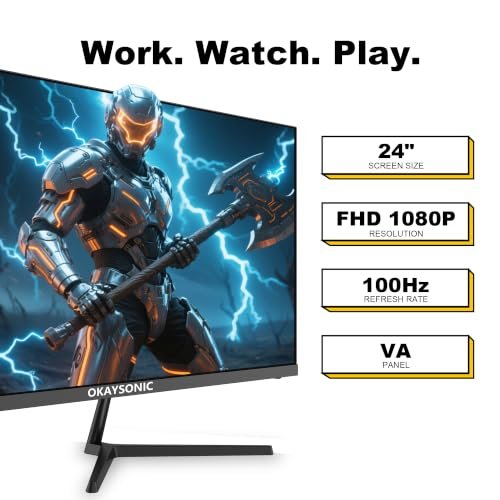
This Okaysonic package pairs two 24-inch monitors, each described as a Full HD 1080p computer screen. The listing names FreeSync HDR, low-blue-light eye care, HDMI input, and VESA mount support. It is a screen bundle, not a computer, so pair it with a desktop that can drive two displays for a full setup.
Two matching screens can make it easier to keep a call open beside a document or spread out research and notes. Their 24-inch size is a familiar fit for many home-office desks, while VESA support gives buyers a mounting option. This pair suits people who already own a compatible PC and want a matched workspace.
The simple monitor format should be easy to keep neat with careful cable routing and a clean desk. Check the stand details, included cables, and warranty in the seller listing before ordering. For two matching FHD screens, the pair may offer useful value, but it does not include a computer.
Why It’s Great
- Two matched 24-inch screens make a consistent desk layout.
- Full HD 1080p resolution suits everyday office work.
- FreeSync HDR is listed as a display feature.
- Low-blue-light eye care is included in the listing.
- VESA mount support offers more placement choices.
Good to Know
- This is a monitor pair, not a computer bundle.
- The listing title gives no refresh-rate figure.
- Confirm that your PC has two compatible display outputs and check which cables are included.
3. Okaysonic 24-Inch 120Hz Monitor Pair

This Okaysonic two-pack lists a pair of 24-inch Full HD 1080p monitors with a 120Hz refresh rate, FreeSync HDR, low-blue-light eye care, HDMI input, and VESA mount support. The higher refresh rate may make supported motion look smoother than on a basic screen. The package includes monitors only, not a PC.
The matching screens can keep a two-monitor desk looking balanced, and the listed VESA support can help with arm mounting. This set may suit people who value smoother motion as well as everyday work, provided their computer supports the desired refresh rate on both displays. Check the ports, cables, and setup details before purchase.
The pair offers a compact way to add two screens without mixing models. Keep the panels free of dust with a soft, suitable cloth, and avoid harsh cleaners. The overall value depends on the current price and seller terms; remember to budget for a compatible computer if you do not already own one.
Why It’s Great
- Two screens provide a broad workspace for multitasking.
- The listing specifies a 120Hz refresh rate.
- FreeSync HDR is listed for compatible use.
- Low-blue-light eye care is a stated feature.
- VESA support gives buyers a mounting option.
Good to Know
- The package does not include a desktop computer.
- Your computer and connections must support the target refresh rate.
- The listing title does not state panel type or response time.
4. Philips 241V8LB 24-Inch FHD Monitor

The Philips 241V8LB is a 24-inch Full HD monitor with a VA panel and a listed 100Hz refresh rate. Its stated features include Adaptive Sync, flicker-free technology, low blue light, HDMI 1.4, VESA support, and tilt adjustment. It is one screen, so buy a second display or pair it with an existing monitor.
This Philips model may suit office users who want a larger single screen to add to a two-monitor desk. Tilt adjustment can help set a comfortable viewing angle, while VESA support offers a mounting choice. The listed HDMI connection should be matched to your computer’s available outputs before you build your setup.
The monitor’s flat-screen design is straightforward to maintain with gentle cleaning and sensible cable care. Philips lists a four-year advance replacement warranty, but check the exact terms and regional coverage before purchase. As a single screen, its value depends on whether you need one addition or a matched pair.
Why It’s Great
- 24-inch Full HD size gives work and text room to breathe.
- The listing specifies a 100Hz refresh rate.
- Flicker-free and low-blue-light features are listed.
- VESA support allows compatible monitor-arm mounting.
- A four-year advance replacement warranty is stated in the listing.
Good to Know
- This is one monitor, not a two-screen bundle.
- The listing names HDMI 1.4 but does not list a second video input.
- Check warranty coverage and return terms for your location.
5. Philips 22E2N1100 22-Inch FHD Monitor
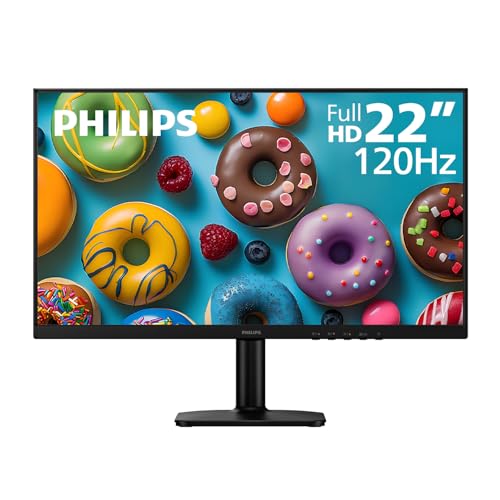
The Philips 22E2N1100 is a 22-inch Full HD LED monitor with an IPS panel and a listed 120Hz overclocked refresh rate. The title also names 1ms MPRT, Adaptive Sync, HDMI 1.4, VGA, flicker-free technology, low blue light, and VESA support. It is a single display for a separate two-screen setup.
Its smaller size can suit a compact desk or work area where two large panels would feel crowded. HDMI and VGA inputs give buyers more connection types to check against their computer, though the exact setup still matters. This screen may work well as a second display for study, documents, and daily office use.
The compact panel is easy to fit into many desk layouts, and VESA mounting can free up more space. Clean it gently and confirm the stand and cable details in the listing. Philips states a four-year advance replacement warranty; review the terms to judge the monitor’s overall value.
Why It’s Great
- Compact 22-inch size can fit a smaller desk.
- The listing specifies an IPS panel and Full HD resolution.
- HDMI and VGA inputs provide two connection types.
- VESA support offers a mounting option.
- Flicker-free and low-blue-light features are listed.
Good to Know
- This is a single monitor, not a computer or monitor pair.
- The 120Hz figure is described as overclocked; confirm device support.
- Check the warranty terms and included cables before ordering.
Final Thoughts: The Verdict
My personal top pick is the Dell OptiPlex 9020 SFF Computer Desktop PC with Dual Monitors because it is the only option here listed as a computer-and-two-screen bundle. Its 16GB RAM and two included 24-inch monitors make it a convenient starting point for basic office work. Still, check its exact processor, ports, renewed condition, and support terms before you buy. For anyone seeking the best computer for two monitors, those details matter as much as the screen count.
If you already own a computer, the Okaysonic 24-inch 120Hz Monitor Pair is a useful runner-up for a matched two-screen desk. Choose the Philips 22-inch monitor if you need one compact screen, or the Philips 24-inch model if you want a larger single display. Pick based on your computer’s ports, desk space, and budget.