
A computer keyboard holder lifts or tilts a typing keyboard, while a wrist rest cushions your hands. For keyboardists who work, practice, or write at a desk, the best computer holder for keyboardists can improve comfort, free desk space, and make long sessions feel less tiring.
A stand that slides, wobbles, or sits at the wrong height can turn a useful desk tool into one more daily annoyance. Acrylic may look sleek, but a poor fit or slick surface can let a keyboard shift as you type. Buyers also sometimes mistake a wrist cushion for a keyboard riser, or assume a computer keyboard stand will hold a full-size music keyboard. Choosing carefully matters: comfort, fit, and a secure setup can make focused work easier and help prevent small frustrations from breaking your flow.
I focus on desk setups for people who spend long hours typing and making music at a computer. For this guide, I compared the listed product details, materials, stated features, and intended use, while separating keyboard risers from wrist support. My aim is to help you find the best computer holder for keyboardists by prioritizing fit, comfort, and honest expectations.
What you’ll learn
- How to tell a keyboard riser from a wrist rest.
- Which size and design details matter for a steady desk setup.
- What each listed product is best suited for.
- How to choose a stand that fits your keyboard and work style.
In This Article
How To Choose The Best Computer Holder for Keyboardists
The right holder should suit your keyboard, desk, and the way you work. A common mistake is buying a wrist rest when you need a riser, or choosing a stand without checking its size. Thin acrylic can also shift if it lacks grip or sits on a slick desk. Before you buy the best computer holder for keyboardists, check the product type, dimensions, tilt, and non-slip details. These simple checks help you avoid a poor fit and build a setup that feels steady during daily use.
Match the Stand to Your Keyboard
Check your keyboard’s width and depth before choosing a holder. One listed acrylic tray measures 17 by 5.7 inches, but that size may not suit every model, especially a wide keyboard with a number pad. A compact board may leave spare space, while a larger one can overhang. Measure the keyboard, then compare those numbers with the product details. Also confirm that the holder is meant for a computer keyboard, not a full-size electronic music keyboard. A wrist rest is a different tool: it supports your hands but does not raise the keyboard.
Consider Tilt, Grip, and Desk Space
A tilted keyboard stand changes the typing angle, so think about how your wrists and hands feel at your current desk height. Silicone strips or a non-slip case can help limit movement, but they do not make every setup wobble-proof. Check that the stand has a stable place on your desk and that its footprint leaves room for a mouse, music gear, or notes. Clear acrylic keeps a desk looking open; black acrylic may blend in better. Choose the best computer holder for keyboardists based on the space you have and the angle you prefer, not just its appearance.
Choose the Right Kind of Comfort
A riser changes keyboard height and angle; a wrist rest adds a soft place to rest your hands between keystrokes. They solve different problems, and one cannot replace the other. The Ospelelf product is a wrist rest pad, while the other options are tilted acrylic keyboard stands. If your keyboard already sits at a comfortable height but your hands need cushioning, a pad may make sense. If you want a raised or tilted board, choose a stand. Avoid assuming that a product labeled ergonomic will fit your body; comfort depends on your chair, desk, and typing posture.
Quick Comparison
| Model | Category | Best For | Key Spec | Amazon |
|---|---|---|---|---|
| Ospelelf Keyboard Wrist Rest Pad | Wrist Support | Cushioned support while typing | Soft keyboard wrist pad | Amazon |
| Vaydeer Acrylic Keyboard Stand | Keyboard Riser | A clear, tilted desk setup | Acrylic tilted stand | Amazon |
| Richboom Clear Acrylic Keyboard Holder | Keyboard Riser | Clear stand with added grip | Silicone anti-slip case | Amazon |
| Black Acrylic Keyboard Holder, 17 x 5.7 in | Keyboard Riser | Users who want a black tray | 17 x 5.7-inch tray | Amazon |
| KOTEMON Acrylic Keyboard Stand | Keyboard Riser | A simple black tilted stand | Silicone non-slip case | Amazon |
In-Depth Reviews for the Best Computer Holder for Keyboardists
1.Ospelelf Keyboard Wrist Rest Pad
 Ospelelf Keyboard Wrist Rest Pad
” />
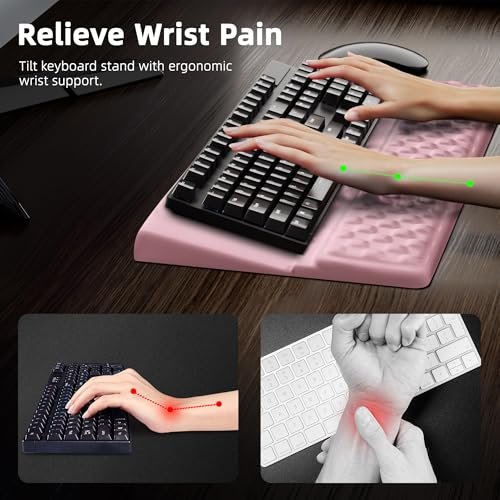
The Ospelelf Keyboard Wrist Rest Pad is a cushion for computer typing, not a keyboard riser. Its soft support is designed to sit near the keyboard and give your wrists a place to rest between keystrokes. The light pink finish adds a gentle color accent. For keyboardists who want wrist comfort rather than a tilted stand, this fills a different role.
Its simple pad design should be easy to add to a home, school, or office desk. It suits typists who already like their keyboard height but want a cushioned resting spot nearby. The soft support may feel more welcoming than a hard desk edge during long sessions. Check the listed size and your keyboard layout before buying, since the supplied details do not state exact dimensions.
The pad’s surface should be simple to keep tidy with routine care, though follow the maker’s cleaning guidance. As a comfort add-on, it may offer useful value if you need wrist support. It will not lift, tilt, or hold a keyboard, so buy it for cushioning alone.
Why It’s Great
- Adds a cushioned place to rest wrists while typing.
- Light pink color offers a softer look than plain black desk gear.
- Simple pad format is easy to place beside a keyboard.
- Can suit office, home, or school typing setups.
- Useful when the keyboard’s current height already feels right.
Good to Know
- This is a wrist rest, not a keyboard stand or holder.
- The provided product details do not list its exact dimensions.
- A wrist pad does not correct keyboard height or desk posture.
2.Vaydeer Acrylic Tilted Keyboard Stand
 Vaydeer Acrylic Tilted Keyboard Stand
” />
The Vaydeer Keyboard Stand is a clear acrylic riser made to tilt a computer keyboard on a desk. Its open look can keep a workspace feeling light, while the raised layout may suit people who prefer an angled typing surface. The product is described for office, home, school, and gaming use. It is a computer keyboard stand, not a holder for a music keyboard.
This design may appeal to keyboardists who want a neat desk and a tilted board without a bulky frame. It can fit a home office, study area, or desktop gaming setup, provided its dimensions suit your keyboard. Check the product listing for measurements before ordering. Place it on a flat surface and test the fit before a long session or busy workday.
Acrylic can be wiped clean with a soft cloth, and its clear finish is easy to pair with many desk styles. Treat the stand with care to avoid scratches or impact damage. Its value depends on fit, desk grip, and whether the tilt feels comfortable to you.
Why It’s Great
- Clear acrylic keeps the desk from looking visually crowded.
- Tilted design offers an angled position for a computer keyboard.
- Product listing describes use at home, school, and work.
- Can suit users who prefer a simple, open stand design.
- Acrylic surface is easy to wipe as part of desk care.
Good to Know
- The provided details do not state exact dimensions or tilt angle.
- Acrylic can scratch or crack if handled roughly.
- Confirm keyboard fit and desk grip before relying on it.
3.Richboom Clear Acrylic Keyboard Holder
 Richboom Clear Acrylic Keyboard Holder
” />
The Richboom Clear Acrylic Tilted Computer Keyboard Holder is designed to give a computer keyboard an angled place on a desk. The product listing calls this an upgraded version and notes a silicone anti-slip case. That grip feature may help keep the keyboard from shifting during normal typing. Its clear acrylic style suits users who want a stand that feels visually light.
The stand is intended for office, home, and school desks. It may work well for keyboardists who want a tilted typing surface and prefer a clear look over a dark accessory. As with any stand, compare its listed size with your keyboard before buying. The silicone detail is useful, but it does not replace checking that the stand sits securely on your own desk.
A clear surface can be wiped with a soft cloth, while the silicone part may need occasional dust removal. Acrylic needs gentle handling to avoid damage. The anti-slip feature adds practical appeal, though overall value still depends on a comfortable angle and a good fit.
Why It’s Great
- Silicone anti-slip case is included in the product description.
- Clear acrylic offers a low-visual-clutter desk look.
- Tilted design is made for computer keyboard typing.
- Listed for office, home, and school use.
- May suit buyers who want both a riser and added grip.
Good to Know
- The product details provided do not specify its dimensions.
- A clear acrylic surface may show dust, marks, or scratches.
- The listed grip feature cannot ensure a perfect fit on every desk.
4.Black Acrylic Keyboard Holder, 17 x 5.7 in
 Black Acrylic Keyboard Holder, 17 x 5.7 in
” />
This black acrylic tilted keyboard holder is listed with a 17 by 5.7-inch tray and a silicone anti-slip strip. The stated size gives buyers a clear starting point for checking keyboard fit. Its tilted layout is intended for ergonomic typing at an office, home, or school desk. The black finish offers a simple, low-key look for many setups.
The defined tray size can help keyboardists compare this stand with a compact or standard computer keyboard before they buy. Measure your keyboard rather than guessing, and allow for any overhang. The silicone strip may help limit movement during normal use. This is a desk accessory for a computer keyboard, not a full-size instrument stand or a wrist rest.
The smooth acrylic tray should be easy to wipe with a soft cloth, while gentle handling can help limit scratches. Its stated dimensions and grip strip are practical features. Value depends on whether your keyboard fits the tray and whether the tilt feels right at your desk.
Why It’s Great
- The 17 x 5.7-inch tray size is stated in the product name.
- Silicone anti-slip strip may help reduce keyboard movement.
- Black finish blends into many desk and computer setups.
- Tilted tray is intended for ergonomic computer typing.
- Clear dimensions make keyboard fit easier to assess before purchase.
Good to Know
- A keyboard wider or deeper than the tray may not fit well.
- The listing details provided do not state the tilt angle.
- Acrylic can be damaged by hard impact or rough handling.
5.KOTEMON Acrylic Tilted Keyboard Stand
 KOTEMON Acrylic Tilted Keyboard Stand
” />
The KOTEMON Acrylic Tilted Computer Keyboard Stand is a black tray-style holder for ergonomic typing. Its listing describes a silicone non-slip case, which may help keep a keyboard in place on the stand. The dark finish gives it a more subdued look than clear acrylic. It is designed for computer keyboards, rather than full-size music keyboards or wrist support.
This stand may suit keyboardists who want a straightforward, dark accessory for a home office, school desk, or typing area. The tilted design can change how the keyboard sits, so consider your desk height and comfort before choosing it. Check the product listing for dimensions and compare them with your keyboard. A secure fit matters more than a neat photo.
The acrylic tray can be wiped clean with a soft cloth, and the silicone part may need a quick dust check. Handle the stand with care to protect the material. Its value comes from the simple tilted design and grip feature, if both match your desk and keyboard.
Why It’s Great
- Black acrylic gives the stand a clean, understated look.
- Silicone non-slip case is a stated feature.
- Tilted design is made for computer keyboard typing.
- Simple form can suit a home or office desk.
- May be a practical choice for users who want a basic riser.
Good to Know
- The supplied product information does not give exact dimensions.
- Acrylic may scratch or crack if dropped or struck.
- A tilted stand may not feel comfortable at every desk height.
Final Thoughts: The Verdict
My personal top pick is Richboom Clear Acrylic Tilted Computer Keyboard Holder for keyboardists who want a computer keyboard riser with a stated silicone anti-slip case and a clear design. It offers a useful blend of tilt, grip, and a light look. Remember, the best computer holder for keyboardists must fit your board and desk, so check measurements before you buy.
For a tray with a stated size, consider the Black Acrylic Keyboard Holder, 17 x 5.7 Inch. Choose the Ospelelf pad instead if you need wrist cushioning, not a riser. Each option serves a different need, so pick the one that suits your keyboard, comfort, and budget.