
A computer hub adds useful ports to a laptop, from USB connections to video, network, and memory-card slots. Students, remote workers, and travelers buy one to connect more gear without replacing their computer. This guide to the best computer hub for laptop needs compares five options for different desks and budgets.
A hub can look perfect online and still cause a headache at your desk. A weak cable may drop a drive, a port may not support the speed you expect, or a laptop may not send video through USB-C at all. Some buyers also assume that two HDMI ports always mean two separate screens; that depends on the laptop and its operating system. These mismatches waste time and money. Picking the right hub means checking your laptop’s ports, screen needs, and power setup before you buy.
I write about practical computer gear and focus on the details that matter after setup: port types, display support, power needs, and everyday fit. I compared the listed features of these hubs and considered where each one makes sense, while noting compatibility limits buyers should verify. This guide to the best computer hub for laptop prioritizes clear trade-offs, useful connections, and fewer surprises.
What you’ll learn
- How to match a hub to your laptop’s USB-C or USB-A ports.
- Which features matter for external screens, charging, and wired internet.
- Where each reviewed hub fits best in a home, school, or travel setup.
- What to check before buying to avoid display and power surprises.
In This Article
How To Choose The Best best computer hub for laptop
Choosing a hub is about more than counting ports. A low-cost model may lack the video or charging support your laptop needs, while a large dock can take up desk space for features you never use. Before choosing the best computer hub for laptop, check your laptop’s port type, the number of screens you plan to connect, and whether you need power delivery. Also confirm the limits of your computer and operating system. A little checking now can prevent a messy setup later.
Check Laptop Port and Display Support
Start by checking the ports on your laptop. A USB-C-shaped port does not always support video, charging, or fast data; your laptop’s manual or maker’s site can confirm what it does. If you want an external screen, check whether your computer supports video over that port and what resolution and refresh rate it can handle. Dual HDMI ports on a hub do not guarantee two separate displays on every laptop. This is a common buying mistake. A simple USB-A hub suits basic devices, while a USB-C dock is better for compatible laptops that need screens and more ports.
Match Ports, Speed, and Daily Gear
List the gear you use each day before picking a hub. A mouse, keyboard, printer, flash drive, memory card, headset, and wired network cable all call for different ports. USB-A hubs can be a neat fit for older accessories, while USB-C docks may add HDMI, SD, Ethernet, and more. Check port speeds if you move large files, and do not assume every USB-C port carries data at the same rate. A compact hub works well for travel and light use. For a home office, choose enough ports to avoid unplugging devices all day.
Understand Power and Heat Needs
Power delivery can charge a laptop through a compatible hub, but the wattage shown is often a maximum input or pass-through figure, not a promise of full power to every computer. Many hubs need your own USB-C charger, and the hub itself uses some power. Check your laptop’s charging needs and the maker’s notes before you rely on pass-through charging. Also consider airflow: a small hub with many active ports can become warm during use. A basic hub may suit accessories that need no extra power; a full dock is more useful for a busy desk.
Quick Comparison
| Model | Category | Best For | Key Spec | Amazon |
|---|---|---|---|---|
| 14-in-1 USB-C Dual-Monitor Dock | Feature-rich dock | A busy desk with several devices | HDMI, DisplayPort, Ethernet, 100W PD input | Amazon |
| Denlane 8-in-2 USB-C Hub | Everyday hub | Laptop users needing mixed ports | USB-A, USB-C, SD/TF, 3.5mm audio | Amazon |
| Acer 4-Port USB-A Hub | Simple expansion | Keyboards, mice, and USB devices | Four USB-A ports, 2-foot cable | Amazon |
| Anker 8-in-1 Dual-Monitor Dock | Desk dock | A compatible multi-screen work setup | Dual HDMI, Ethernet, SD/TF, up to 85W PD | Amazon |
| Anker 5-in-1 USB-C Hub | Compact hub | Travel and everyday USB-C use | HDMI, two USB-A, USB-C data, up to 85W PD | Amazon |
In-Depth Reviews for best computer hub for laptop
1.14-in-1 USB-C Dual-Monitor Dock
 14-in-1 USB-C Dual-Monitor Dock
” />
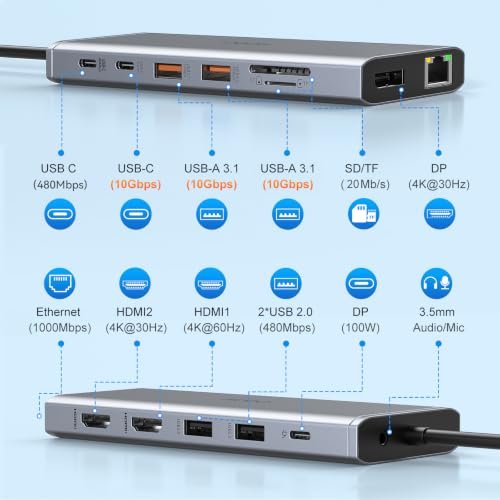
This 14-in-1 USB-C docking station brings a broad range of connections to one laptop port. Its listed features include two HDMI ports, DisplayPort, Ethernet, four USB-A ports, two USB-C ports, and SD and TF card slots. It also supports up to 100W power delivery input. That makes it a strong option for a well-equipped desk.
The many ports can help keep screens, storage, and accessories connected at once. Ethernet offers a wired network option, while the card slots help move photos from compatible cards. It is best for laptop owners who need a broad set of connections in one place. Check laptop video support and display limits before planning a multi-screen setup.
The dock can reduce cable clutter by bringing several connections together, though the listed features do not confirm its dimensions or materials. A separate compatible charger may be needed for power delivery. Its value depends on whether you will use the extra ports, so check your laptop and screen needs first.
Why It’s Great
- Many port types support a fuller desk setup.
- HDMI and DisplayPort offer flexible video connections.
- Ethernet provides a wired network option.
- SD and TF slots help transfer card-based files.
- Up to 100W PD input supports compatible charging setups.
Good to Know
- The listing does not guarantee that every laptop can run two extended displays.
- The 100W figure is a maximum; actual laptop charging depends on the setup.
- Check that your laptop’s USB-C port supports video output.
2.Denlane 8-in-2 USB-C Laptop Hub
 Denlane 8-in-2 USB-C Laptop Hub
” />
The Denlane USB-C hub is listed as an 8-in-2 adapter with USB-C and four USB-A ports, plus SD and TF card slots and a 3.5mm audio connection. That mix makes it useful when a laptop has few built-in ports. It focuses on everyday device access rather than a full desktop docking setup.
Use the USB-A ports for common accessories and the card slots for compatible memory cards. The audio jack may also help when your laptop lacks a handy headset connection. This hub is best suited to people who want several basic ports in one adapter. Confirm the exact port layout and laptop fit before buying.
Its compact, multi-port design can make a travel or study setup easier to manage. The product details supplied do not state charging wattage, cable length, or housing material. It may offer good value if its ports match your gear, but it is not a replacement for a dock with confirmed video and network features.
Why It’s Great
- Combines USB-A and USB-C connections in one hub.
- SD and TF slots support common card workflows.
- A 3.5mm audio jack offers another way to connect a headset.
- Useful for laptops with a limited number of built-in ports.
- The mix of ports suits study, travel, and general use.
Good to Know
- The supplied product details do not list HDMI or Ethernet.
- Charging support and maximum power are not specified here.
- Confirm that the hub’s layout suits your laptop and connected devices.
3.Acer 4-Port USB-A Hub with 2-Foot Cable
 Acer 4-Port USB-A Hub with 2-Foot Cable
” />
This Acer USB hub adds four USB-A ports to a laptop or desktop computer. The listed 2-foot cable gives it some room to sit beside a computer, and a Type-C power port is included. It is a straightforward way to connect common USB gear without buying a larger dock full of features you may not need.
A keyboard, mouse, printer, or flash drive can be easier to keep connected when ports are scarce. Its USB-A focus makes it most useful for older or standard accessories, rather than laptop owners seeking HDMI or card slots. The extra cable reach can help place the hub where your devices sit. Check device power needs before use.
A simple four-port hub is easy to keep tidy and offers clear value when USB-A is all you need. The supplied details do not specify housing material, data rate, or a power adapter. Treat the USB-C power port as a feature to verify for your setup, not proof of laptop charging.
Why It’s Great
- Adds four USB-A ports for common accessories.
- The 2-foot cable gives flexible placement.
- Works with laptops and desktop computers, per the listing.
- A simple choice when video and card readers are not needed.
- USB-C power port is available for compatible power input.
Good to Know
- It does not list HDMI, Ethernet, or memory-card slots.
- The supplied details do not specify USB data speed.
- Do not assume the USB-C power port charges a laptop.
4.Anker 8-in-1 Dual-Monitor USB-C Dock
 Anker 8-in-1 Dual-Monitor USB-C Dock
” />
This Anker 8-in-1 USB-C dock offers dual HDMI, Ethernet rated up to 1Gbps, an SD and TF card reader, and up to 85W power delivery. It is aimed at laptop users who want several desk connections in one adapter. The listing says the charger is not included, so plan for a compatible power source.
Dual HDMI can simplify connecting two screens, but the laptop and operating system determine whether they can show separate images. Ethernet is handy for a wired network, while card slots suit photo and file transfers. This dock is best for compatible USB-C laptops used at a desk. Check display support before you buy.
The mix of video, network, and card connections makes this a capable alternative to a larger dock. You will need to supply a charger if you want pass-through charging. The listed features offer useful desk value, though actual charging and display performance depend on your laptop, screens, and setup.
Why It’s Great
- Dual HDMI ports support a multi-screen connection plan.
- Ethernet offers wired networking at up to 1Gbps.
- SD and TF card slots support common media workflows.
- Up to 85W PD can suit compatible laptop charging setups.
- The 8-in-1 design balances desk features and portability.
Good to Know
- A charger is not included.
- Two HDMI ports do not ensure two extended displays on every computer.
- Actual charging power depends on the charger and laptop.
5.Anker 5-in-1 USB-C HDMI Hub
 Anker 5-in-1 USB-C HDMI Hub
” />
This compact Anker USB-C hub combines HDMI output, up to 85W power delivery, one USB-C data port, and two USB-A data ports. The HDMI connection is listed for 4K display output. It keeps the core features simple, making it a practical choice for laptop users who need a screen and a few everyday accessories.
The small port set can suit a desk, classroom, or travel bag without adding a full dock. Use the HDMI port with a compatible display and the USB data ports for accessories or storage. It is best for people who want basic expansion rather than Ethernet or card slots. Check laptop display support and bring a charger for pass-through power.
With fewer ports to manage, this hub can help keep a small setup neat. The product details do not state the included charger or housing material, and the 85W figure is a maximum. It can offer good value for basic needs, but users with many devices may prefer a larger dock.
Why It’s Great
- 4K HDMI adds a video connection in a compact hub.
- Two USB-A data ports support common accessories.
- A USB-C data port adds another connection option.
- Up to 85W PD can support compatible pass-through charging.
- The simple layout suits travel and light desk use.
Good to Know
- It does not list Ethernet or SD and TF card slots.
- An external charger may be needed for pass-through charging.
- The laptop must support video output through its USB-C port.
Final Thoughts: The Verdict
My personal top pick is the 14-in-1 USB-C Dual-Monitor Dock for a busy desk that needs varied ports, Ethernet, and multiple video connections. Its broad port selection makes it a strong contender for the best computer hub for laptop use, as long as your laptop supports the displays and charging you plan to use.
For a simpler desk dock, the Anker 8-in-1 Dual-Monitor Dock is a good runner-up, while the Anker 5-in-1 USB-C Hub suits lighter, more portable needs. Check your laptop’s port support and power needs, then choose the hub that fits your setup and budget.
1 thought on “Best Computer Hub For Laptop: Find The Right Fit”
Comments are closed.