
A computer hub station adds useful ports to a laptop, such as HDMI, USB, Ethernet, and card readers. It suits remote workers, students, and creators who want fewer adapters on their desk. The best computer hub station can make a laptop easier to connect at home, work, or on the go.
A hub can look perfect online, then cause headaches at your desk. A screen may not work at its full resolution, a port may only transfer data, or a laptop may not support the display setup you expected. Some buyers also assume that a power-delivery rating means a wall charger comes in the box. It often does not. These small details matter when your work depends on stable screens, quick file transfers, and a charged laptop. Choosing carefully can save time, money, and the daily scramble for another adapter.
I compared the listed port layouts, power ratings, display features, and stated compatibility for these hubs. I also considered the practical trade-offs that matter in daily laptop use, including charger needs and operating-system limits. This guide does not claim hands-on testing; it focuses on clear product details and realistic use cases. My priority is helping you find the best computer hub station for your laptop, screens, and budget.
What you’ll learn
- How to match a hub’s ports to your laptop and desk setup
- What to check before buying a single- or multi-monitor hub
- Which models include Ethernet, card readers, and fast USB ports
- How power delivery and charger needs affect your choice
In This Article
How To Choose The Best Computer Hub Station
The right hub should make your laptop setup simpler, not add new snags. Check your laptop’s USB-C features and the hub’s display details before you buy. A port that fits does not always support video or charging. Also look closely at what comes in the box; many hubs need a separate wall charger. Focus on the screens, ports, and power you will use each day. That quick check can help you avoid a weak link and find the best computer hub station for your desk.
Check Laptop and Display Compatibility
Start with your laptop’s manual or maker support page. Find out whether its USB-C port supports video output and what display modes it allows. Then compare those details with the hub’s HDMI or DisplayPort setup. A hub may list two or three outputs, yet your laptop or operating system may limit how many separate screens can run. Some systems may mirror displays instead of extending them. Do not assume that two video ports mean two independent screens on every laptop. A simple single-screen hub may suit travel, while a dock with more outputs is better for a desk setup that your computer can support.
Match Ports and Data Speeds to Your Work
List the devices you plan to connect before choosing a computer hub station. A keyboard and mouse need little speed, while external drives and large file transfers benefit from faster data ports. Ethernet can help when you want a wired network, and SD or TF readers are handy for camera cards. Check which ports carry data and which are meant for video, power, or audio. Many hubs mix port types, so a high port count alone does not guarantee the right layout. A compact hub works well for basic tasks; creators and desk users may prefer a dock with more USB and network options.
Understand Power Delivery and Charger Needs
Power delivery can keep a laptop charged while the hub is connected, but the stated maximum is not always the power your laptop receives. The hub may use some power itself, and you may need to supply a compatible wall charger and cable. Check the hub’s included items, the laptop’s charging needs, and the power rating of your charger. Do not mistake a power-delivery port for a fast data port; its main job may be charging. For a tidy desk, choose a hub that supports suitable pass-through power. For light travel, a small hub without pass-through charging may be enough.
Quick Comparison
| Model | Category | Best For | Key Spec | Amazon |
|---|---|---|---|---|
| Anker 8-in-1 Dual Monitor Dock | Best Overall | Laptop users wanting key desk ports | Dual HDMI, Ethernet, 85W max PD | Amazon |
| LIONWEI 13-in-1 USB-C Dock | Multi-Display | Users needing many ports | HDMI and DP, 10Gbps, 100W PD | Amazon |
| Anker 5-in-1 USB-C Hub | Compact Pick | Travel and simple setups | HDMI, USB-A, USB-C data, 85W max PD | Amazon |
| 14-in-1 Dual Monitor USB-C Dock | Port-Rich Pick | Desk users with varied devices | Dual HDMI, DisplayPort, Ethernet, 100W PD | Amazon |
In-Depth Reviews for the Best Computer Hub Station
1.Anker 8-in-1 Dual Monitor Dock
 Anker 8-in-1 Dual Monitor Dock
” />
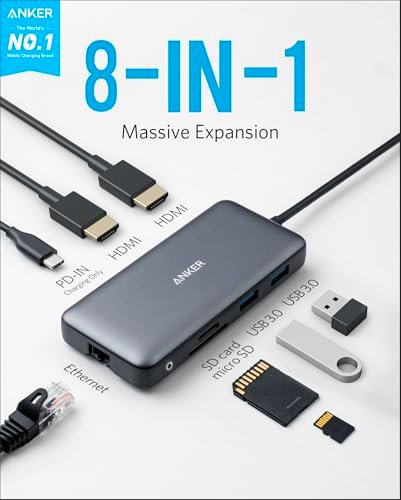
This Anker 8-in-1 USB-C hub brings two HDMI outputs, Gigabit Ethernet, USB ports, and SD and TF card readers to a laptop. It supports up to 85W power delivery when paired with a suitable charger, which is not included. Its mix of display and desk ports makes it a strong best computer hub station choice for a tidy work setup.
The compact dock suits people who move between a laptop and a desk, or who want fewer loose adapters at home. Connect a wired network, card, or screen through one hub rather than hunting for a separate dongle. Check your laptop and operating system before relying on both HDMI outputs for separate displays. It is best for compatible USB-C laptops.
Anker’s small hub keeps common connections in one place and is easy to pack away. Its port range offers good value for office and home use. Remember to budget for a compatible charger if you want pass-through power, and check your laptop’s display limits before purchase.
Why It’s Great
- Two HDMI ports offer more display connection options than a basic single-screen hub.
- Gigabit Ethernet provides a wired network connection when Wi-Fi is unreliable.
- SD and TF readers help transfer files from common camera cards.
- USB ports support everyday accessories such as a keyboard, mouse, or drive.
- Compact design keeps a laptop desk or travel bag less cluttered.
Good to Know
- The listed 85W maximum power delivery requires a suitable charger, which is not included.
- Two HDMI ports do not guarantee two extended screens; laptop and operating-system support matters.
- Display resolution and refresh rate depend on the laptop, connected screens, and hub setup.
2.LIONWEI 13-in-1 USB-C Dock
 LIONWEI 13-in-1 USB-C Dock
” />
The LIONWEI 13-in-1 dock combines HDMI and DisplayPort outputs with Ethernet, audio, and a broad mix of USB-A and USB-C ports. It lists 10Gbps data transfer and up to 100W power delivery. Those features make it a flexible best computer hub station for users who want many connections from one laptop cable. Confirm screen support with your device.
This dock is suited to a desk where a laptop connects to several accessories, wired network gear, or external screens. Its large port selection can cut down on adapter swaps during work. The product title lists a switching button, but display behavior still depends on the laptop and operating system. Check compatibility and port needs before counting on a multi-screen setup.
A single dock can help reduce cable clutter and keep frequently used gear close at hand. Its wide selection may offer strong value for a busy desk, especially if you will use many ports. As with other USB-C docks, verify charging needs and display support before buying.
Why It’s Great
- The mix of HDMI and DisplayPort gives users more ways to connect compatible screens.
- Multiple USB-A and USB-C ports suit desks with many peripherals.
- Ethernet adds a wired network option for work or streaming.
- Listed 10Gbps data support is useful for compatible high-speed devices.
- Up to 100W power delivery can support laptop charging with a suitable setup.
Good to Know
- The 100W rating is a maximum; actual laptop power depends on the charger and setup.
- A high port count does not ensure every port can run at its top speed at once.
- Multi-display support varies by laptop, operating system, and graphics hardware.
3.Anker 5-in-1 USB-C Hub
 Anker 5-in-1 USB-C Hub
” />
This compact Anker 5-in-1 hub offers HDMI for a display, two USB-A data ports, one USB-C data port, and up to 85W power delivery. Its simple set of useful connections makes it a practical best computer hub station for basic laptop setups. The power rating is a maximum, and a wall charger is needed for pass-through charging.
The small form works well for students, travelers, and laptop users who need one screen and a few accessories. It can connect common USB gear without the bulk of a full docking station. The HDMI output is for a display connection, not a promise of multiple independent screens. Check your computer’s video support and the hub’s charging needs.
Its simple layout is easy to pack and should suit users who want fewer adapters in a bag. The modest port count keeps the hub focused and can make it a good-value choice for everyday tasks. It is less suited to a desk with many screens or a long list of wired devices.
Why It’s Great
- Small size makes it easy to carry with a laptop.
- HDMI adds a convenient connection for a compatible external screen.
- Two USB-A ports support common accessories and data devices.
- A USB-C data port adds another connection for compatible gear.
- Pass-through power support can reduce the need to unplug the hub to charge.
Good to Know
- A compatible charger is needed to use power delivery, and it is not included.
- This hub has one HDMI output, so it is not a dual-monitor dock.
- USB-C data and charging functions should not be confused; check the listed port roles.
4.14-in-1 Dual Monitor USB-C Dock
 14-in-1 Dual Monitor USB-C Dock
” />
This 14-in-1 USB-C docking station lists two HDMI outputs, DisplayPort, Ethernet, USB-A and USB-C ports, card readers, and up to 100W power delivery. Its wide connection range makes it a contender for the best computer hub station at a busy desk. Check laptop support before planning a multi-screen setup, since port count alone cannot confirm display behavior.
The dock is aimed at users who connect several accessories and screens to a laptop in one place. Its mix of video, data, network, and card-reader ports can make a work area easier to manage. Before buying, match its ports to your actual gear and confirm your computer can support the display arrangement you want.
A multiport dock can reduce the pile of separate adapters on a desk. Its broad feature set may be useful value if you will use the ports regularly. Check the included accessories and power needs, since the listed 100W rating does not by itself confirm a charger is included.
Why It’s Great
- Dual HDMI and DisplayPort offer several video connection options.
- Ethernet supports a wired network connection.
- The listed USB-A and USB-C ports cover a range of common accessories.
- SD and TF readers can simplify camera-card transfers.
- Up to 100W power delivery is useful for compatible laptop charging setups.
Good to Know
- Display output depends on the laptop, its USB-C capabilities, and operating system.
- The listed 100W maximum does not confirm that a wall charger is included.
- A large dock may be more than needed for travel or a simple one-screen setup.
Final Thoughts: The Verdict
My personal top pick is Anker Laptop Docking Station Dual Monitor. It balances HDMI, Ethernet, card readers, and useful USB ports in a compact hub. Its 85W max power delivery adds flexibility, though you need a suitable charger. For many laptop users, it is the best computer hub station because it covers common desk needs without an oversized port list.
For a more connected desk, consider the LIONWEI 13-in-1 USB-C Dock, with more ports and HDMI plus DisplayPort options. The compact Anker 5-in-1 USB-C Hub suits travel and simpler setups. Before choosing, check your laptop‘s video support, charger needs, and budget so your best computer hub station fits the way you work.