
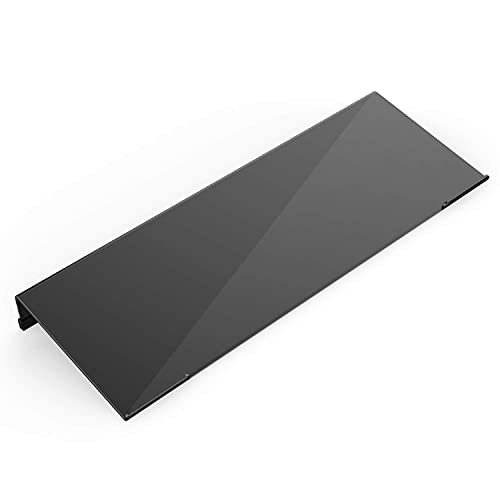
A computer keyboard stand raises or tilts your keyboard to change its typing angle, and some models add a wrist rest. It can help desk workers, students, and home users shape a more comfortable setup. The best computer keyboard stand balances a stable hold, useful support, and a fit that suits your desk.
A stand that slides, wobbles, or sits at the wrong angle can make typing feel like a chore. Hard edges may press into your wrists, while a soft pad without a secure base can shift during fast work. Buyers can also overlook keyboard size, desk space, and whether a fixed tilt feels right for them. These small misses matter in daily use: a poor fit can add strain instead of easing it. Choosing the right stand helps create a steadier, more comfortable setup, but it is not a cure for pain or a substitute for good posture.
I focus on practical desk gear and the details that shape daily comfort, from surface grip to wrist support and ease of fit. For this guide, I compared the listed product features, styles, and intended uses rather than assuming unverified test results. My aim is to help you find the best computer keyboard stand for your keyboard, desk, and budget, with clear trade-offs.
What you’ll learn
- How tilt, grip, and wrist support affect everyday typing comfort.
- Which stand styles may suit compact desks and full-size keyboards.
- What to check before buying an acrylic or padded keyboard stand.
- How the five options differ in design and intended use.
In This Article
How To Choose The Best Computer Keyboard Stand
The right keyboard stand should make your desk feel more natural, not add a new annoyance. A low-quality base may slip, flex, or feel rough, and a fixed tilt may not suit every user. Before you buy, check the stand’s size, surface grip, support style, and fit with your keyboard. Do not assume that a wrist rest will suit your body or that more height always means better posture. The best computer keyboard stand is the one that fits your setup and feels comfortable during normal use.
Choose a Comfortable Tilt and Height
A keyboard stand can raise or tilt your board, but the best angle depends on your desk, chair, and typing style. A fixed acrylic riser is simple and compact, while an adjustable model offers more choice. Check whether the product lists its levels or height range, and do not guess from a product name alone. Too much tilt can bend your wrists upward, so start with a mild angle and assess how it feels. A fixed stand suits users who already know their preferred position; an adjustable stand may suit those still refining their setup.
Check Grip, Size, and Keyboard Fit
A stable stand should hold its place while you type. Look for silicone or other non-slip contact points, then compare the stand’s size with your keyboard and desk space. A small riser may work well with a compact keyboard but leave a full-size board poorly supported. Also check how the keyboard sits on the surface and whether the stand blocks access to feet, ports, or controls. Clear product details matter: do not assume every stand fits every keyboard. For a shared desk or a keyboard that moves often, firm grip and a suitable footprint should come first.
Decide Whether You Need a Wrist Rest
Some keyboard stands include a padded wrist rest, while others focus on a hard, tilted surface. A soft pad can add a place to rest your hands between keystrokes, but it should not force your wrists into a bent position. Check the pad material, shape, and how it joins the stand. A separate or attached rest may suit people who want extra cushioning; a bare acrylic stand may be easier to wipe and take up less room. Keep in mind that comfort varies, and a wrist rest cannot fix poor desk height or replace breaks.
Quick Comparison
| Model | Category | Best For | Key Spec | Amazon |
|---|---|---|---|---|
| KOTEMON Acrylic Tilted Keyboard Stand | Tilted Acrylic | Simple tilted typing setup | Silicone non-slip case | Amazon |
| Vaydeer Wrist Rest Keyboard Stand | Padded Support | Users seeking a soft wrist pad | Memory foam wrist support | Amazon |
| Richboom Clear Acrylic Keyboard Holder | Clear Acrylic | A clear, low-profile desk look | Tilted acrylic with silicone case | Amazon |
| Adjustable Two-Level Keyboard Stand | Adjustable Acrylic | Users who want two height choices | Two-level adjustment | Amazon |
| Laborio Purple Keyboard Wrist Rest Stand | Padded Acrylic | Colorful setup with wrist padding | Purple stand with non-slip pad | Amazon |
In-Depth Reviews for the Best Computer Keyboard Stand
1.KOTEMON Acrylic Tilted Keyboard Stand
 KOTEMON Acrylic Tilted Keyboard Stand
” />
The KOTEMON acrylic keyboard stand gives your keyboard a tilted surface for a more angled typing position. Its silicone non-slip case is designed to help keep the keyboard steady on the stand. The clear, simple format avoids bulky parts, making it a practical choice for shoppers who want a basic riser with a clean look.
This stand suits home offices, study desks, and users who prefer a fixed keyboard angle. Its simple design should be easy to place and use without extra setup, though you should check the stand dimensions against your keyboard before buying. It may suit people who want a raised typing surface without an attached wrist cushion.
The smooth acrylic style should be straightforward to wipe with a soft cloth. The silicone case adds a useful grip-focused detail, while the fixed design keeps the setup simple. Check the listing for fit and care guidance. It offers practical value if its tilt and size meet your needs.
Why It’s Great
- Tilted surface gives the keyboard a defined typing angle.
- Silicone case is intended to reduce slipping.
- Acrylic design has a clean, simple appearance.
- No complex adjustment steps are needed.
- Works for users who want a basic riser without a built-in cushion.
Good to Know
- The fixed angle may not suit every wrist or desk setup.
- Confirm the stand size fits your keyboard before ordering.
- It does not include a padded wrist rest.
2.Vaydeer Wrist Rest Keyboard Stand
 Vaydeer Wrist Rest Keyboard Stand
” />
The Vaydeer keyboard stand combines a riser-style holder with a soft memory foam wrist support pad. That paired design may appeal to people who want a cushioned place for their hands as part of their desk setup. It stands out from plain acrylic risers by putting wrist padding at the center of its offer.
This model may suit office workers, students, and home users who prefer a soft surface near the keyboard. The attached support can keep the main pieces together, but fit and comfort depend on your keyboard, hand position, and desk height. Check the product details and dimensions before deciding whether its shape suits your setup.
A soft wrist pad may need more care than a smooth acrylic surface, so follow the maker’s cleaning instructions. The combined design can reduce the need to buy separate parts. Its value depends on whether the pad feels comfortable and the stand fits your keyboard.
Why It’s Great
- Combines a keyboard stand and wrist support in one product.
- Memory foam offers a softer feel than a bare hard surface.
- May suit people who prefer padding near their keyboard.
- Integrated design keeps the support and riser together.
- Useful option for home, office, or school desks.
Good to Know
- A soft pad may feel warm or too firm for some users.
- Check the dimensions and keyboard fit before purchase.
- The pad may need gentler cleaning than acrylic.
3.Richboom Clear Acrylic Keyboard Stand
 Richboom Clear Acrylic Keyboard Stand
” />
The Richboom clear acrylic keyboard holder is a tilted stand designed for desk, home, or school use. Its clear finish keeps the stand visually light, while the silicone anti-slip case is intended to help hold the keyboard in place. The straightforward design suits buyers who want an angled keyboard surface without a large accessory.
This keyboard stand may fit users who value a neat, open desk and a simple fixed tilt. The acrylic form is easy to place, but it does not offer the height choices of an adjustable riser. Check the listed size and keyboard compatibility, especially if you use a wide or unusually shaped board.
Clear acrylic can be wiped with a soft cloth, and its low-profile look may blend into many desks. The silicone case adds a practical grip feature. Since there is no built-in cushion or adjustment, its value comes from a simple design that fits your typing and space needs.
Why It’s Great
- Clear finish keeps the stand visually subtle.
- Tilted design offers an angled keyboard position.
- Silicone case is intended to help prevent sliding.
- Compact style can suit a tidy desk.
- Simple construction avoids extra parts and controls.
Good to Know
- The fixed angle offers no height adjustment.
- Clear acrylic may show dust or marks more readily.
- It has no attached wrist cushion.
4.Adjustable Two-Level Keyboard Stand
 Adjustable Two-Level Keyboard Stand
” />
This desktop keyboard stand offers two height settings, giving users more choice than a fixed riser. Its acrylic construction and non-slip design are aimed at a steady keyboard setup. The two-level format is its key draw: it lets buyers compare positions without moving to a fully adjustable arm or a more complex desk accessory.
The stand may suit users who are unsure which keyboard height feels best or who want a choice for different tasks. Two settings keep use simple, though they do not provide fine adjustment. Check the product dimensions, keyboard fit, and how the height options work before buying for a shared or compact desk.
Acrylic is generally easy to wipe with a soft cloth, but follow the product care details. The non-slip feature is useful in daily typing, though actual grip depends on the desk and keyboard. Its value rests on the usefulness of its two height choices for your setup.
Why It’s Great
- Two height settings offer more choice than a fixed stand.
- Acrylic format keeps the design straightforward.
- Non-slip feature is intended to steady the keyboard.
- May help users compare two typing positions.
- Useful for buyers who want adjustment without complex controls.
Good to Know
- Two settings may not provide enough fine tuning.
- Check the exact dimensions and keyboard fit.
- The listing should be reviewed for setup and care details.
5.Laborio Purple Keyboard Wrist Rest Stand
 Laborio Purple Keyboard Wrist Rest Stand
” />
The Laborio keyboard wrist rest stand pairs an acrylic keyboard holder with a non-slip wrist pad. Its purple color gives it a more playful look than clear or black risers. The combination is designed for people who want a keyboard stand and a padded support area in one desk accessory.
This model may suit students, home users, or anyone building a colorful desk setup. The included pad offers a different feel from a bare acrylic riser, but comfort is personal and depends on your wrist position. Check the listing dimensions and color details to make sure the product fits your keyboard and workspace.
Acrylic should be easy to wipe with a soft cloth, while the wrist pad may need separate care. The color and combined design add character, but value depends on fit and comfort. Review the care notes before cleaning, and avoid assuming the pad will suit every user.
Why It’s Great
- Purple finish adds color to a keyboard setup.
- Combines an acrylic holder and wrist pad.
- Non-slip pad is designed to support a steadier position.
- Offers an alternative to plain clear or black stands.
- May suit users seeking padding without buying a separate rest.
Good to Know
- The purple color may not match every workspace.
- Wrist pad comfort and firmness are personal.
- Check keyboard fit and cleaning guidance before purchase.
Final Thoughts: The Verdict
My personal top pick is the KOTEMON Acrylic Tilted Computer Keyboard Stand for its simple tilted design and silicone non-slip case. It is a practical starting point for shoppers who want a basic riser without extra bulk. The best computer keyboard stand should fit your board and feel comfortable at your desk, so check the dimensions before you buy.
For wrist padding, consider the Vaydeer Wrist Rest Keyboard Stand; the Richboom is a good fit for a clear look, while the two-level stand suits users who want height options. Choose based on your comfort, space, and budget.