

A computer tower stand lifts your desktop PC off the floor and can make it easier to move, clean around, and reach. It suits home office users, students, and gamers who want a tidier setup. The best computer tower stand can also help keep the case away from dust and spills.
A wobbly frame, stiff wheels, or a stand that does not fit your case can turn a simple upgrade into a daily annoyance. Some buyers focus only on price, then find that the PC blocks a vent, sits at an awkward height, or rolls when they do not want it to. A poor fit can also make cables harder to manage. Choosing the right computer tower stand matters because your PC is heavy, valuable, and often tucked into a tight space. Check the size, wheel design, and floor type before you buy.
I focus on practical desk gear and compare the details that matter in daily use. For this guide, I reviewed the listed features, adjustability, mobility, and stated fit details for each stand, while avoiding claims the product information does not confirm. My aim is to help you find the best computer tower stand for your case, room, and budget, with clear trade-offs and useful buying advice.
What you’ll learn
- How to match a stand to your PC case size and weight.
- When wheels, locks, and adjustable feet are useful.
- Which models add a power outlet or height adjustment.
- How to choose a stand for carpet, hard floors, or a tight desk area.
In This Article
How To Choose The Best Computer Tower Stand
The right stand keeps your tower stable, gives you room to clean, and makes it easier to move your PC when needed. A cheap frame may wobble, while a stand that is too small can leave the case unsupported. Buyers also miss key details such as wheel locks, height range, and whether the stand suits carpet. Before choosing the best computer tower stand, measure your case and the space under your desk. Then compare the stand’s adjustment range, stability, and useful extras against your daily needs.
Check Case Size and Stand Adjustment
Measure the width and depth of your PC case, including any feet or cables that stick out. Compare those numbers with the stand’s stated fit range, not just the product name. An adjustable computer tower stand can fit more than one case, but adjustment does not mean unlimited size or weight support. Avoid buying by guesswork, especially for a large gaming tower. A compact fixed setup may suit a small office PC, while adjustable length and width can help if you upgrade cases. The best computer tower stand leaves a little space around the case and supports it evenly.
Choose Wheels and Stability for Your Floor
Wheels make it easier to pull a tower out for cable work or floor cleaning. On hard floors, smooth rolling can be handy, but locks help stop unwanted movement. Carpet can make small casters harder to push, so check the wheel design and consider how often you truly need to move the PC. Adjustable feet can be a useful alternative when a stand should stay put. Do not assume every rolling computer tower stand has locks or a stated load rating. For a heavy gaming PC, prioritize a stable base and follow the maker’s weight guidance.
Consider Height, Ventilation, and Extras
A raised tower can be easier to reach and less exposed to dust on the floor, but it still needs clear airflow around its vents. Check the stand’s height range against your desk, cables, and room layout. A ventilated platform may help avoid blocking the case base, while an outlet can reduce the need to reach a wall socket. Still, confirm outlet details and keep power cords safely routed. The best computer tower stand is not always the one with the most features. Choose only the extras that solve a real problem in your setup.
Quick Comparison
| Model | Category | Best For | Key Spec | Amazon |
|---|---|---|---|---|
| Adjustable Ventilated Mobile CPU Holder | Simple and mobile | Everyday desktop users | Ventilated platform; mobile design | Amazon |
| 10-Level Tower Stand with Power Outlet | Feature-rich | Users who want height choice and an outlet | 10 height levels; locking wheels and feet | Amazon |
| ZUAVIALA Stand with Power Outlet | Adjustable with outlet | Home office and gaming setups | 6 levels; stated 21.34–28.3-inch range | Amazon |
| ZUAVIALA Six-Level Tower Stand | Adjustable mobile | Buyers who do not need an outlet | 6 levels; stated 21.34–28.3-inch range | Amazon |
| Liitrton Adjustable Mobile CPU Stand | Flexible fit | Users with changing case sizes | Adjustable length and width; four wheels | Amazon |
In-Depth Reviews for best computer tower stand
1.Adjustable Ventilated Computer Tower Stand
 Adjustable Ventilated Computer Tower Stand
” />
This adjustable computer tower stand has a ventilated platform and a mobile design for moving a desktop PC. Its product title says it fits most PC towers, though buyers should still check their case size before ordering. The open platform can keep the stand from covering the case base. It is a straightforward choice for a clean, raised setup.
The simple format suits students, office workers, and gamers who want to move a tower for cleaning or cable access. A mobile computer tower stand can save effort when a PC sits under a desk. Check the wheels and your floor type before relying on frequent movement. This model is best for users who value a basic holder over added power features.
The open design should make dust and crumbs around the stand easier to clear than a closed shelf. Confirm the material and weight rating on the product page, as the supplied details do not specify them. For buyers who need a mobile, ventilated base, it offers useful core features without extra controls.
Why It’s Great
- Ventilated platform helps avoid covering the case base.
- Mobile design makes it easier to reach cables and clean the floor.
- Fits most PC towers according to the product title.
- Simple setup suits desks without room for a fixed cabinet.
- Focuses on core stand functions without an added outlet.
Good to Know
- The product details do not state exact size limits or a weight rating.
- Wheel locks are not confirmed in the supplied title.
- Measure your case and check your floor type before buying.
2.10-Level Computer Tower Stand with Outlet
 10-Level Computer Tower Stand with Outlet
” />
This computer tower stand pairs a power outlet with ten height levels, giving users more setup choices than a basic floor cart. The listing also names locking wheels and adjustable feet, which can help with both movement and a steadier parked position. These features make it a flexible option for a home office or gaming space.
The height settings may help place a tower where it is easier to reach, while the wheels can assist when you need to clean or check cables. Use the locks when the PC should stay in place. This computer tower stand is best for buyers who want adjustment and an outlet in one unit. Check outlet details and case fit before purchase.
The listed feet and wheel locks offer useful ways to position the stand, but the supplied information does not give its materials or load limit. Keep the outlet and cables clear of dust and strain. It may be a good value for users who will use its added features.
Why It’s Great
- Ten height levels offer many placement options.
- Built-in power outlet can make power access more convenient.
- Locking wheels help prevent unwanted rolling.
- Adjustable feet provide another way to steady the stand.
- Useful feature mix for home office and gaming setups.
Good to Know
- The listing details provided do not state the outlet’s electrical rating.
- Confirm the height range and case fit before ordering.
- The extra features may be unnecessary for a fixed, simple setup.
3.ZUAVIALA Tower Stand with Power Outlet
 ZUAVIALA Tower Stand with Power Outlet
” />
The ZUAVIALA computer tower stand adds a power outlet and six height levels to a rolling PC holder. Its title gives a height range of 21.34 to 28.3 inches, a helpful detail for planning a desk-side setup. The combination of mobility, height choice, and power access makes it stand out among simpler floor stands.
This stand is aimed at gaming, office, and home users who want a tower in a chosen position and easier access to power. Six levels provide several height choices, but check that the stated range suits your desk and cable reach. As with any computer tower stand with an outlet, route cords neatly and avoid pulling them when moving the cart.
The rolling design can help with floor care and access behind the PC. The supplied details do not confirm its load rating, materials, or outlet specifications, so review those before use. It may offer good value if you will use both the outlet and adjustable height.
Why It’s Great
- Power outlet is included in the stand.
- Six levels give users a choice of height.
- Product title states a 21.34–28.3-inch range.
- Rolling design can help with cleaning and cable access.
- Made for home, office, and gaming use.
Good to Know
- Verify the outlet rating and safety details before plugging in devices.
- Check that the stated height range works with your desk and cables.
- The supplied details do not list a weight capacity.
4.ZUAVIALA Six-Level Computer Tower Stand
 ZUAVIALA Six-Level Computer Tower Stand
” />
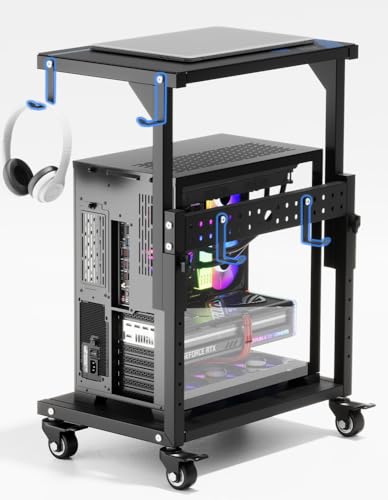
This ZUAVIALA computer tower stand offers six height levels and a stated range of 21.34 to 28.3 inches. The product title describes it as a mobile floor stand for gaming, office, and home use. It shares the adjustable format of the outlet model but does not list a power outlet, making it a simpler option for buyers who do not need one.
The rolling stand can make it easier to reach the rear of a PC or clean around the desk. Its height range may suit users who want more choice than a fixed riser offers. Before buying, compare the listed dimensions with your space and tower. This computer tower stand is best for users who want height adjustment without paying for an outlet feature.
A mobile base can help keep routine floor cleaning simple, though the product details do not confirm its materials or load rating. Check those points and the wheel design on the current listing. It can be a practical value when its adjustment range fits your room and computer.
Why It’s Great
- Six height levels support several setup positions.
- The stated range helps with space planning.
- Mobile format can make cleaning around the PC easier.
- No outlet feature to pay for if you do not need one.
- Suitable for home, office, and gaming spaces.
Good to Know
- This version does not list a power outlet.
- The supplied information does not state a weight limit.
- Check the height range against your desk and cable length.
5.Liitrton Adjustable Mobile CPU Stand
 Liitrton Adjustable Mobile CPU Stand
” />
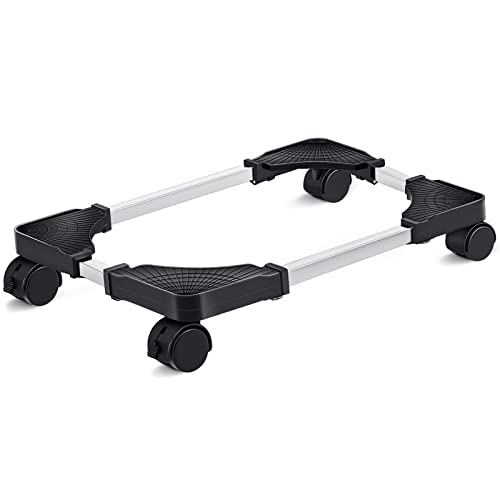
The Liitrton computer tower stand is designed with adjustable length and width to fit a range of PC cases. Four wheels make it a mobile floor stand, and the listing names both office and gaming use. Its main strength is flexible sizing, which can be useful when replacing a case or sharing a stand between computers.
Adjust the frame to match your tower, then use the wheels when you need to move the PC for cleaning or cable work. This design suits users who want a flexible fit and do not need a height-adjustable platform. Measure your case carefully and confirm the stand’s adjustment limits before purchase. It is a practical pick for changing setups.
The open, adjustable design should leave access around the tower, but check that the case sits securely within the frame. The supplied title does not give a load rating or wheel-lock details. For users who need width and length adjustment, the simple format can offer solid everyday value.
Why It’s Great
- Adjustable length and width can fit different case sizes.
- Four wheels help move the PC during cleaning.
- Useful for office and gaming computers.
- Can adapt if you change to a different tower case.
- Simple design focuses on fit and mobility.
Good to Know
- The product details provided do not state exact adjustment limits.
- Wheel locks are not confirmed in the supplied title.
- Check the case fit and weight guidance before loading the stand.
Final Thoughts: The Verdict
My personal top pick is the 10-Level Computer Tower Stand with Power Outlet. Its ten height levels, outlet, locking wheels, and adjustable feet make it the most flexible choice in this group. It is a strong contender for the best computer tower stand if you want one cart to handle several setup needs. Check the outlet details and case fit before you buy.
For a flexible case fit, consider the Liitrton Adjustable Mobile CPU Stand; it offers adjustable length and width with four wheels. The ZUAVIALA options suit buyers who want height adjustment, with one adding an outlet. Choose the best computer tower stand based on your PC size, floor, and budget.