
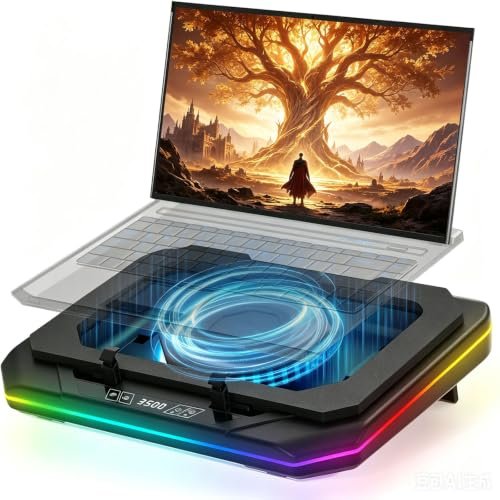
A laptop cooling pad raises your HP Pavilion and moves air around its base to help manage heat during long work or gaming sessions. It can suit students, home workers, and gamers who want a steadier setup. People buy one for extra airflow, a more comfortable angle, or both.
A cheap pad can disappoint: its fans may be loud, its stand may wobble, or its airflow may miss the Pavilion’s intake vents. A model that is too small can leave a large laptop poorly supported. Bright lights and many fans may look impressive, but they do not guarantee useful cooling. These missteps matter when you are working through a deadline or playing a long session. Check your laptop size, vent location, noise needs, and desk space before you buy. The right fit can make daily use feel less frustrating.
I focus on laptop cooling gear and practical fit, not flashy claims. I compared the listed sizes, fan layouts, height settings, controls, and extras for these five pads, then considered how those features may suit common HP Pavilion setups. I have not treated product listings as lab tests. This guide prioritizes fit, useful airflow, comfort, and clear trade-offs to help you choose the best cooling pad for hp pavilion laptop.
What you’ll learn
- How to match a cooling pad to your Pavilion screen size and vent layout.
- Which fan, height, and control features matter for daily use.
- How five cooling pads compare for gaming, work, and value.
- What limits to check before choosing a cooling pad.
In This Article
How To Choose The Best best cooling pad for hp pavilion laptop
Choosing the right pad matters because your Pavilion needs a stable base and airflow that can reach its vents. A crowded fan layout, weak support, or noisy motor can turn a useful accessory into desk clutter. Do not buy by fan count alone, and do not assume every 15-inch pad fits every Pavilion. Check your laptop’s size, underside intake points, desk space, and preferred working angle. For the best cooling pad for hp pavilion laptop, compare those basics first, then weigh extras such as USB ports and lighting.
Match the Pad to Your Pavilion Size
Start with the exact size of your HP Pavilion, then check the cooling pad’s stated range. The models here cover different sizes, from 12-inch laptops to larger gaming systems, so fit is not universal. A pad that is too small may leave the laptop unstable, while a very large one can take up needless desk space. Also look at the underside of your Pavilion. Fans help most when their airflow can reach the laptop’s intake area. Avoid choosing the best cooling pad for hp pavilion laptop by screen size alone; check the maker’s fit range and your vent layout.
Consider Fan Layout, Noise, and Control
Fan count is only one part of cooling. A few well-placed fans may suit your laptop better than a larger number that do not line up with its vents. Adjustable speed can help you balance airflow and noise, while a quiet design is useful in shared rooms or calls. Check whether the listing gives clear control details, and remember that fan noise can vary by speed and desk surface. For gaming, a multi-fan pad may be appealing; for quiet study, a simpler pad with speed control may be a better fit.
Check Stand Comfort and Useful Extras
A cooling pad also changes your laptop’s angle, so look for a stable stand with height settings that suit your desk and posture. A phone holder or extra USB ports can be handy, but they should not outweigh comfort and fit. Check how the pad draws power and whether it uses a USB port you need for other devices. RGB lights add style, not cooling power. If you move between rooms, also consider the pad’s footprint and setup. The best cooling pad for hp pavilion laptop should support your typing or gaming position without sliding or blocking access.
Quick Comparison
| Model | Category | Best For | Key Spec | Amazon |
|---|---|---|---|---|
| Turbo RGB Laptop Cooling Pad | Best Overall | Pavilion gaming and flexible controls | Adjustable speed, touch control, RGB | Amazon |
| Eight-Fan Adjustable Cooling Pad | Versatile Pick | Work, study, and phone use | Eight fans, five height levels | Amazon |
| Kootek Five-Fan Cooling Pad | Quiet Utility | Everyday laptops from 12 to 17 inches | Five fans, six height settings | Amazon |
| ICE COOREL Eight-Fan Pad | Gaming Pick | 15- to 17.3-inch gaming laptops | Eight fans, six height settings | Amazon |
| ChillCore Nine-Fan Cooling Pad | Large-Laptop Pick | Larger laptops and broad coverage | Nine fans, eight height stands | Amazon |
In-Depth Reviews for best cooling pad for hp pavilion laptop
1.Turbo RGB Laptop Cooling Pad
 Turbo RGB Laptop Cooling Pad
” />
This cooling pad is listed for HP Pavilion laptops from 14 to 17 inches, along with several other HP lines. Its turbo fan, adjustable speed, RGB light modes, and touch start give it a feature-rich setup. For the best cooling pad for hp pavilion laptop, its broad fit range and controls make it a flexible choice.
Touch start keeps basic control close at hand, while adjustable speed lets you choose a setting for work or play. RGB lighting adds a gaming look, though it does not improve cooling. This pad may suit Pavilion owners who want visible style and simple fan control, especially those who use their laptop at a desk for long sessions.
The listing highlights a cooling stand with lighting and fan controls, but does not state detailed material or cleaning guidance. Keep vents free of dust and wipe the surface with a soft cloth. Its mix of fit options and controls may offer good value if those extras match your setup.
Why It’s Great
- Listed fit covers Pavilion laptops from 14 to 17 inches.
- Adjustable speed gives you control over airflow and fan noise.
- Touch start offers a simple way to operate the pad.
- RGB modes suit a gaming desk setup.
- Works with several named HP Omen and Victus models too.
Good to Know
- The listing does not state exact fan count or airflow figures.
- RGB lighting may not suit a quiet, plain workspace.
- Check your laptop’s vent placement and exact size before ordering.
2.Eight-Fan Adjustable Cooling Pad
 Eight-Fan Adjustable Cooling Pad
” />
This adjustable laptop cooling pad lists eight fans and support for several HP families, including Pavilion models from 11 to 15 inches. Five height levels let you change the viewing angle, and the built-in phone stand adds desk utility. It stands out for pairing broad HP fit claims with many fans and a practical accessory.
The stand may work well for a compact Pavilion used for school, calls, or daily office tasks. Its height settings can help you find a more comfortable screen position, while the phone holder keeps a second device nearby. This best cooling pad for hp pavilion laptop option may suit users who value desk comfort over gaming lights.
The listing describes a silent design, though actual fan noise can depend on speed and surroundings. Keep the fan area clear and wipe the stand as needed. Its fan count, height range, and phone holder make it a useful all-in-one choice if the stated laptop size fits.
Why It’s Great
- Eight fans offer a broad fan layout.
- Five height settings allow a more tailored desk angle.
- Built-in phone stand keeps a mobile device close.
- The listing names several HP Pavilion size options.
- No RGB feature is listed, which may suit a plain workspace.
Good to Know
- The listed Pavilion range tops out at 15 inches, so larger models may not fit.
- The product title does not specify fan speed control.
- Confirm that the phone holder will not crowd your desk.
3.Kootek Five-Fan Cooling Pad
 Kootek Five-Fan Cooling Pad
” />
The Kootek cooling pad supports laptops from 12 to 17 inches and uses five fans for broad airflow. Its listing also notes six adjustable height positions, two extra USB hubs, and blue LED lighting. That mix makes it a practical choice for many Pavilion sizes, with useful desk features beyond basic laptop cooling.
The height range can help you set a comfortable viewing angle for work or study. Two USB hubs may help when your laptop has limited ports, though they do not replace a dedicated hub for every setup. This best cooling pad for hp pavilion laptop is suited to users who want flexible positioning and useful extras.
The listing calls the fans quiet, but noise can vary with use and room conditions. Dust can collect around the fan openings, so clean them gently and keep the pad on a firm surface. Its wide size range and built-in hubs offer solid everyday value for compatible laptops.
Why It’s Great
- Fits laptops listed from 12 to 17 inches.
- Five fans provide a multi-fan cooling layout.
- Six height positions offer flexible screen elevation.
- Two extra USB hubs add convenient connectivity.
- Blue LED lighting gives a simple visual cue.
Good to Know
- Blue LEDs may be distracting in a dark room.
- The product title does not list adjustable fan speed.
- Check whether the stand supports your Pavilion’s weight and size.
4.ICE COOREL Eight-Fan Cooling Pad
 ICE COOREL Eight-Fan Cooling Pad
” />
ICE COOREL lists this cooling pad for 15- to 17.3-inch laptops, with eight fans and six height settings. RGB lighting, two USB ports, and a phone stand add gaming desk appeal. Pavilion owners with a larger model may like its feature set, but should confirm the pad size and fan position before purchase.
The raised stand can help create a more comfortable angle for gaming or long work sessions. Its phone holder and USB ports add convenient extras, while RGB lights match a gaming setup. This best cooling pad for hp pavilion laptop is best suited to larger Pavilion models and users who want a feature-packed desk accessory.
The wide stand and fan openings may need occasional dusting, and the listing does not give detailed material care instructions. Keep the pad on a stable desk and avoid blocking its intake. Its many features may be good value if you want lighting, ports, and height adjustment together.
Why It’s Great
- Eight fans give it a dense cooling layout.
- Six height settings support different desk positions.
- Two USB ports provide extra connection options.
- Phone stand keeps a second device in view.
- RGB lighting suits a gaming setup.
Good to Know
- The listed size range starts at 15 inches, which may be too large for smaller Pavilion models.
- The listing does not specify adjustable fan speeds.
- RGB lighting may be unnecessary if you prefer a simple desk.
5.ChillCore Nine-Fan Cooling Pad
 ChillCore Nine-Fan Cooling Pad
” />
ChillCore lists nine fans for laptops from 15.6 to 19.3 inches, making this the largest-fit option in this group. It also has RGB lights, eight height stands, and two USB ports. For a large HP Pavilion, that broad range and many adjustment points may make it a strong desk-based cooling pad choice.
Eight height options can help you find a useful angle for a larger laptop, while two USB ports add basic convenience. Its size range is aimed at big laptops, not compact Pavilion models. The best cooling pad for hp pavilion laptop may be this one if your priority is a broad stand and a large screen fit.
A larger pad takes more desk room, and its fan openings need routine dust checks. The listing does not give detailed care or material information. If your Pavilion falls within the stated range, its stand settings and port options may offer good value for a fixed desk.
Why It’s Great
- Nine fans provide a broad multi-fan layout.
- Listed fit reaches laptops up to 19.3 inches.
- Eight height stands give many angle choices.
- Two USB ports add convenient connections.
- RGB lights can complement a gaming desk.
Good to Know
- The listed minimum size of 15.6 inches excludes smaller Pavilion laptops.
- Its larger footprint may crowd a small desk.
- The listing does not provide fan noise or airflow measurements.
Final Thoughts: The Verdict
My personal top pick is the Turbo RGB Laptop Cooling Pad. Its listed 14- to 17-inch fit, adjustable speed, and touch control make it the most flexible choice for many Pavilion owners. It also adds RGB lighting for a gaming desk. It earns my top spot among these options, though you should still check the size and vent layout of your exact laptop before you order.
For a phone stand and eight fans, consider the Eight-Fan Adjustable Cooling Pad. The Kootek suits users who want two USB hubs and six height settings, while ChillCore better fits larger laptops. Each can be the best cooling pad for hp pavilion laptop for a different desk and budget. Check size first, then choose the features you will use.