
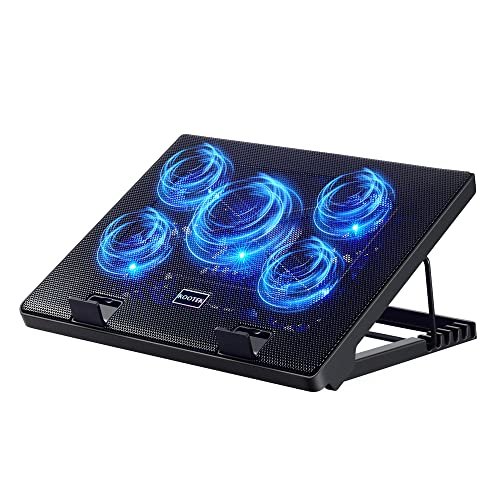
A laptop cooling pad is a raised stand with fans that helps move air around a warm computer. It can suit students, remote workers, and gamers who use a laptop for long stretches. People buy the best cooling device for laptop use to improve airflow, lift the screen, and make a hot desk setup more comfortable.
A flimsy pad can wobble, buzz, or miss the laptop’s air intake, leaving you with noise and little benefit. Some buyers focus only on fan count, though fan placement, laptop fit, and a steady base matter just as much. A pad also cannot fix blocked vents or a worn-out laptop fan. Choosing the wrong model can mean wasted money and a hotter, less pleasant work or gaming session. The right match helps airflow without adding needless fuss to your desk.
I cover laptop gear and compare the practical details that shape daily use, from size and stand angles to USB ports and fan layouts. For this guide, I reviewed the supplied product specifications and considered fit, features, and likely use cases rather than claiming lab-tested temperature results. My priority is to help you choose the best cooling device for laptop use with clear expectations.
What you’ll learn
- How to match a cooling pad to your laptop size and vent layout
- Which fan designs suit daily work or demanding gaming
- What adjustable stands, USB ports, and lights add to a setup
- How to set realistic expectations for laptop cooling
In This Article
How To Choose The Best best cooling device for laptop
The best cooling device for laptop use is the one that fits your computer and suits the way you work. A low-cost pad may have loud fans, a loose stand, or poor airflow where your laptop needs it. More fans do not always mean better cooling. Check the size range, fan position, height settings, and power setup before you buy. Also keep the laptop vents clear and clean; a cooling stand cannot repair blocked vents or a failing internal fan.
Match the Pad to Your Laptop Size
Start with your laptop’s screen size and the shape of its base. A pad that is too small can leave the computer unstable, while a broad stand may take up more desk space than you want. Check the listed fit range, then compare the fan positions with your laptop’s air intake and exhaust vents. These details matter more than a high fan count. Smaller laptops and work machines may do well on a basic multi-fan pad; larger gaming laptops may need a wide, sturdy base. Do not assume that a listed size range guarantees an exact fit.
Choose Fan Design for Your Needs
Fan layout affects where air moves, while fan speed and noise shape how pleasant the pad is to use. Several small fans can spread airflow across a broad area. A large turbine-style fan is designed to focus airflow, but its results depend on a good seal and a matching laptop base. Look for speed control if you want to balance cooling and sound. Avoid buying on fan count alone, since airflow claims do not guarantee a specific temperature drop. For quiet office use, favor simple controls and a noise level you can live with; gamers may value stronger airflow.
Check Stand, Ports, and Desk Fit
A raised stand can help you find a more comfortable screen angle, but it should stay firm when you type or use an external keyboard. Check the number of height settings and whether the laptop has a secure front stop. USB hubs can be handy, though some pads use a laptop port for power and may offer limited extra connections. RGB lights are a style choice, not a cooling feature. Measure your desk and consider cable reach before buying. A stable stand with useful ports often makes a better daily choice than extra lights or features you will not use.
Quick Comparison
| Model | Category | Best For | Key Spec | Amazon |
|---|---|---|---|---|
| Kootek Laptop Cooling Pad | Best Overall | Everyday work and gaming | Five fans, six height settings | Amazon |
| ICE COOREL Gaming Cooling Pad | Feature Rich | RGB gaming setups | Eight fans, phone stand | Amazon |
| ChillCore A21 Cooling Pad | Large Laptop Pick | Large laptops and flexible angles | Nine fans, eight height settings | Amazon |
| llano V12 Cooling Pad | Gaming Focus | Focused airflow for gaming | 5.5-inch turbine fan | Amazon |
| AICHESON S035 Cooling Pad | Simple Value | Basic cooling and screen lift | Five fans, two USB ports | Amazon |
In-Depth Reviews for best cooling device for laptop
1.Kootek Five-Fan Laptop Cooling Pad
 Kootek Five-Fan Laptop Cooling Pad
” />
The Kootek pad uses five fans to spread airflow across a laptop base, with a stated fit for 12- to 17-inch models. Its six height settings let you raise the screen or change the typing angle. Two extra USB hubs add handy connections. This flexible layout makes it a strong best cooling device for laptop users seeking everyday versatility.
The stand is USB powered and has blue LED lights, while the fan design aims to keep noise low. Its broad size range may suit students, home workers, and casual gamers with compatible laptops. The adjustable frame can help lift a screen closer to eye level. Check your laptop’s vent layout and desk space before choosing this cooling pad.
The open fan layout should be simple to dust with a soft cloth when the pad is unplugged. Its stand and added ports offer useful value for a basic desk setup. Treat the listed features as specifications, not a promise of a set temperature drop.
Why It’s Great
- Five fans spread airflow across a wide laptop base.
- Six height settings give users several screen and typing angles.
- Two extra USB hubs can help with simple desk connections.
- The stated 12- to 17-inch range covers many common laptops.
- Blue LED lighting gives the pad a clear visual style.
Good to Know
- It may not fit laptops larger than the stated 17-inch range.
- Blue lights cannot be switched off based on the supplied product details.
- The best cooling result depends on vent placement and laptop design.
2.ICE COOREL Eight-Fan RGB Cooling Pad
 ICE COOREL Eight-Fan RGB Cooling Pad
” />
The ICE COOREL pad has eight fans and is listed for 15- to 17.3-inch laptops. It combines adjustable height with RGB lighting, two USB ports, and a phone stand. The extra features make it an appealing best cooling device for laptop owners who want cooling and a gaming desk style in one stand.
Its six height positions let you set the laptop at a more comfortable angle for play or work. The built-in phone stand keeps a second screen close by, which may help during calls or gaming. This model best suits users with a compatible mid-size laptop who enjoy RGB accents. Check the pad’s footprint and your laptop’s vent positions first.
The open fan surface is easy to wipe once power is disconnected. The built-in stand and ports add practical touches, though the RGB look may not suit every desk. Its value depends on whether you will use the extra features.
Why It’s Great
- Eight fans provide broad airflow across a compatible laptop base.
- Six height positions allow a more tailored screen angle.
- The phone stand keeps a mobile device within easy view.
- Two USB ports add useful connection options.
- RGB lighting suits users building a coordinated gaming setup.
Good to Know
- Its stated fit begins at 15 inches, so many smaller laptops may not suit it.
- RGB lights and multiple fans may be more than a plain work setup needs.
- The product details do not state a measured noise level or temperature reduction.
3.ChillCore A21 Nine-Fan Cooling Pad
 ChillCore A21 Nine-Fan Cooling Pad
” />
The ChillCore A21 lists nine fans and support for laptops from 15.6 to 19.3 inches. Eight height settings give it a wide range of screen angles, and two USB ports add basic connectivity. For a large machine, this best cooling device for laptop use offers plenty of fan coverage and a flexible stand.
The broad fit range is aimed at users with large gaming or work laptops, rather than owners of compact notebooks. RGB lights add a gaming look, while the raised stand can help improve desk posture. Its many fans may appeal to people who want airflow across a wide base. Measure your laptop and desk before committing to its larger form.
Dust can collect around the fan openings, so regular light cleaning will help keep the surface clear. The adjustable frame and two ports add daily-use value. Consider its size and lighted design when deciding whether it suits your workspace.
Why It’s Great
- Nine fans cover a wide area beneath larger laptops.
- Eight height settings allow many viewing and typing angles.
- The stated fit extends to laptops up to 19.3 inches.
- Two USB ports provide extra connection options.
- RGB lighting adds a gaming-focused look.
Good to Know
- Its large stated fit range may make it bulky on a small desk.
- The listing does not provide measured cooling or noise results.
- Smaller laptops may not align well with the fan layout.
4.llano V12 Turbofan Laptop Cooling Pad
 llano V12 Turbofan Laptop Cooling Pad
” />
The llano V12 uses a 5.5-inch turbofan and an airtight pressure chamber, rather than several small fans. It is listed for 15.6- to 19-inch laptops and includes adjustable speed and a three-port USB hub. This best cooling device for laptop gaming setups is designed for focused airflow on larger machines.
Speed control lets users adjust the fan to suit their session, while the stand raises the laptop off the desk. Its listed fit makes it a better match for large gaming notebooks than compact work laptops. The focused fan design may be useful for compatible vent layouts, but buyers should check how their laptop draws air before choosing it.
The fan chamber needs occasional dust care, and the device should be unplugged before cleaning. Its adjustable controls and hub offer useful features for a gaming desk. The focused design may justify its footprint for users who need those features.
Why It’s Great
- The 5.5-inch turbofan focuses airflow in a distinct design.
- Adjustable speed helps users balance airflow and sound.
- The stated fit covers larger laptops from 15.6 to 19 inches.
- Three USB hub ports add connection flexibility.
- The pressure chamber is designed to direct airflow around the laptop.
Good to Know
- A focused fan may not suit every laptop vent layout.
- The large chamber can take up more desk space than a slim pad.
- The product details do not give a verified noise or temperature figure.
5.AICHESON S035 Five-Fan Cooling Pad
 AICHESON S035 Five-Fan Cooling Pad
” />
The AICHESON S035 uses five fans and is listed for laptops up to 17.3 inches. Blue LED lights and two USB ports round out its simple feature set. Its straightforward layout can make it a sensible best cooling device for laptop buyers who want a basic stand without a large set of gaming extras.
This cooling pad suits users who want to raise a compatible notebook and add fan airflow during daily tasks. Its five-fan setup may fit a range of mid-size laptops, but the exact result depends on vent placement. The design is a practical option for home or school use. Check the laptop dimensions and preferred stand angle before ordering.
The open top should be easy to wipe and dust with the pad unplugged. Its simple features may offer good value for buyers who need basic cooling support and USB ports. Do not expect the listed fan count alone to guarantee lower temperatures.
Why It’s Great
- Five fans provide airflow across a laptop base.
- The listed fit supports laptops up to 17.3 inches.
- Two USB ports add basic connection options.
- Blue LED lights give the stand a simple gaming touch.
- Its feature set stays focused on core cooling-pad needs.
Good to Know
- The supplied details do not state the number of height settings.
- Blue LED lighting may not appeal to users who prefer a plain setup.
- Its cooling effect will depend on the laptop’s intake and vent design.
Final Thoughts: The Verdict
My personal top pick is the Kootek Laptop Cooling Pad. Its five fans, six height settings, and extra USB hubs make it a flexible fit for many everyday desks. It is my leading choice for the best cooling device for laptop users who want useful features without a highly specialized design. Remember, airflow gains depend on your laptop’s vents and condition.
For a large gaming laptop, consider the llano V12 Turbofan Cooling Pad for its focused fan and speed control. The ICE COOREL is a better match for RGB fans who want a phone stand. Compare your laptop size, vent layout, desk space, and budget, then choose the pad that fits your needs.