
A laptop cooling pad lifts your computer and moves air beneath its case. It can help gamers with hot, large machines enjoy steadier airflow and a more comfortable setup. This guide to the best cooling pad for 17 inch gaming laptop compares five options, from simple dual-fan mats to feature-rich gaming stands.
A pad that is too small can leave your laptop wobbling, while weak fans may add noise without moving much air. Some stands also block the laptop’s intake vents or take up more desk space than expected. Those mistakes can make a long gaming session feel even more frustrating. The right choice should fit your laptop, support it securely, and suit how you play. A cooling pad can aid airflow, but it cannot fix clogged vents, failing fans, or a laptop that needs service.
I focus on practical laptop accessories and compare the details that matter at a real desk: size support, fan layout, angle options, USB needs, and ease of use. I selected these models from their listed features and intended uses, not from claims of lab testing. This guide prioritizes clear trade-offs so you can choose the best cooling pad for 17 inch gaming laptop with confidence.
What you’ll learn
- How to check whether a cooling pad can support your laptop’s size and weight.
- Which fan styles and stand designs suit gaming, work, or lap use.
- How USB ports, noise, and extra features affect daily use.
- Which listed model best fits your needs and budget.
In This Article
How To Choose The Best Cooling Pad for a 17 Inch Gaming Laptop
A cooling pad should fit your laptop and your routine, not just look good in a product photo. A weak stand may wobble under a large gaming machine, and a poorly placed fan may not line up with its air intakes. Buyers can also overlook USB use, noise, or how much desk space a wide pad needs. Before choosing the best cooling pad for 17 inch gaming laptop, check the fit, fan layout, stand support, and the features you will actually use.
Check Laptop Fit and Stand Support
Start with your laptop’s exact width, depth, and weight. A listed 17-inch fit is a helpful guide, but gaming laptops vary in size and shape. Make sure the pad’s surface can support your machine without hanging over the edges or covering its air intakes. Look for stable stops or a lip that helps hold the laptop in place when you raise the stand. Adjustable height can improve screen position, but a high angle is not useful if the laptop feels loose. For a large, heavy model, favor a broad, sturdy platform over a compact travel design.
Match the Fan Layout to Your Laptop
More fans do not always mean better cooling. Check where your laptop draws air, then compare those intake areas with the pad’s fan positions. A larger fan or a multi-fan design may spread airflow across more of the base, while a focused fan can suit a laptop with one main intake zone. Fan speed and noise matter during play, too. Product listings do not always provide comparable airflow or sound data, so avoid assuming that a fan count proves performance. The best cooling pad for 17 inch gaming laptop is one that fits your vent layout and feels acceptable in your room.
Consider Ports, Noise, and Daily Comfort
Think about where and how you use the pad. USB-powered fans draw power from a laptop port, so check whether the model offers pass-through ports or a hub if you need to connect other devices. RGB lighting and phone holders can be handy, but they are extras rather than cooling essentials. A soft lap mat may suit casual use on a couch, while a rigid adjustable stand is usually better for a desk. Check the listed height settings, surface materials, and cleaning needs. Pick features that solve a real problem instead of paying more for a long list you will not use.
Quick Comparison
| Model | Category | Best For | Key Spec | Amazon |
|---|---|---|---|---|
| ICE COOREL 8-Fan RGB Cooling Pad | Feature-Rich | Gamers who want adjustable height and RGB | Eight fans, six height settings | Amazon |
| Targus 17-Inch Dual Fan Lap Chill Mat | Lap-Friendly | Casual users who prefer a soft mat | Two USB-A fans, neoprene surface | Amazon |
| AICHESON 5-Fan Cooling Pad | Multi-Fan | Users who want broad airflow and a stand | Five fans, two USB ports | Amazon |
| HAVIT HV-F2056 3-Fan Cooling Pad | Slim and Simple | Quiet everyday use and easy setup | Three USB-powered fans, two height settings | Amazon |
| LLANO V12 Turbofan Cooling Pad | High-Airflow | Gamers seeking a focused, adjustable fan | 5.5-inch turbofan, three-port USB hub | Amazon |
In-Depth Reviews for best cooling pad for 17 inch gaming laptop
1.ICE COOREL 8-Fan RGB Cooling Pad
 ICE COOREL 8-Fan RGB Cooling Pad
” />
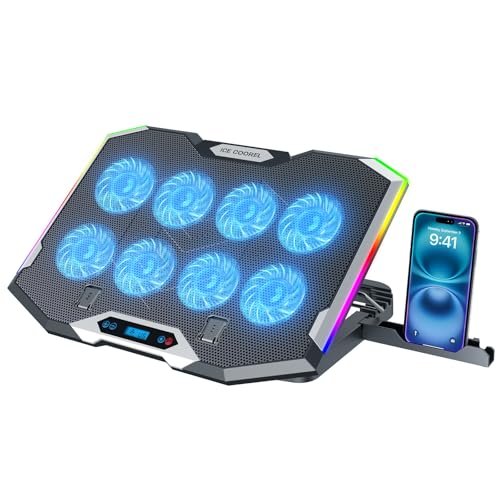
The ICE COOREL cooling pad supports laptops from 15 to 17.3 inches and pairs eight fans with RGB lighting. Its adjustable fan setup aims to move air across a broad base, while six height settings let you raise the screen. For gamers seeking the best cooling pad for 17 inch gaming laptop, it packs many useful features into one stand.
This stand suits desk-based players who want an angled screen, a phone holder, and two USB ports in one place. The broad fan layout may appeal to large laptops, but check that your machine’s intake vents line up with the airflow. RGB lights add gaming style, and the height choices make it easier to find a comfortable view for long sessions.
The stand has several moving parts, so keep its surface clear and wipe away dust as needed. Its listed size range and adjustable height offer good flexibility. If you value lighting, ports, and many fans in one product, this cooling pad may offer strong value for a gaming desk.
Why It’s Great
- Eight fans provide airflow across a wide laptop base.
- Fits listed laptop sizes up to 17.3 inches.
- Six height settings help adjust screen position.
- Two USB ports add practical connectivity.
- RGB lighting and a phone holder suit gaming desks.
Good to Know
- The listing does not state a comparable airflow or noise rating.
- RGB lights and a multi-fan layout may not suit users who want a plain, quiet pad.
- Check the pad’s footprint and your laptop’s vent locations before buying.
2.Targus 17-Inch Dual Fan Lap Chill Mat
 Targus 17-Inch Dual Fan Lap Chill Mat
” />
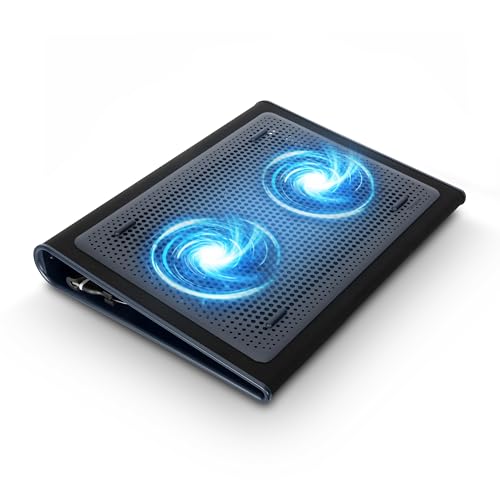
The Targus Lap Chill Mat uses two USB-A fans to move air beneath most laptops up to 17 inches. Its soft neoprene surface sets it apart from rigid gaming stands and offers a more relaxed feel for casual use. It is a straightforward choice for people who want basic heat dispersion without lights or many controls.
This mat may suit couch use, a lap desk, or a simple home setup where a rigid stand feels too bulky. The dual fans connect through USB, so you do not need a separate power adapter for basic use. Before buying, compare the mat’s listed fit with your laptop’s size and consider whether soft support suits your posture.
Neoprene is easy to wipe clean, though it can collect dust around the fans and seams. The soft design trades the adjustability of a stand for comfort and simplicity. For casual users, it can be a practical value, but gamers who want raised screen angles may prefer another option.
Why It’s Great
- Soft neoprene surface feels less rigid than a hard stand.
- Two USB-A fans provide under-laptop airflow.
- Designed to fit most laptops up to 17 inches.
- Simple setup needs no complex controls.
- A good option for casual use away from a desk.
Good to Know
- It does not list height adjustment or a raised stand.
- Two fans may offer less coverage than multi-fan gaming pads.
- A soft mat may not feel stable on every lap or surface.
3.AICHESON 5-Fan Laptop Cooling Pad
 AICHESON 5-Fan Laptop Cooling Pad
” />
The AICHESON S035 cooling pad supports laptops up to 17.3 inches and uses five fans to move air below the base. Blue LED lights give it a gaming look, while two USB ports add useful connections. This mix makes it a strong contender for shoppers comparing the best cooling pad for 17 inch gaming laptop on a desk.
Its multi-fan layout suits users who want airflow over more than one area of a large laptop. The stand format can help lift the screen from the desk, and the blue lights add a subtle visual touch. Check fan placement against your laptop vents, since a high fan count alone cannot ensure better cooling for every design.
The surface should be simple to maintain with a regular dust wipe, especially around the fan openings. Its stated laptop range, five fans, and USB ports offer a useful feature set. It may suit buyers who want a gaming-style stand without stepping up to a large turbine model.
Why It’s Great
- Five fans spread airflow beneath the laptop.
- Supports laptops up to 17.3 inches.
- Two USB ports help with connected devices.
- Blue LED lighting adds a gaming accent.
- A stand design can raise the laptop from the desk.
Good to Know
- The listing does not give a fan noise level.
- Blue lighting may not match every workspace.
- Confirm fan alignment with your laptop’s intake vents.
4.HAVIT HV-F2056 3-Fan Cooling Pad
 HAVIT HV-F2056 3-Fan Cooling Pad
” />
The HAVIT HV-F2056 is a simple cooling pad for laptops from 15.6 to 17 inches. Three USB-powered fans circulate air below the computer, and two height settings help lift the screen. Its clean design skips extra lights and controls, making it a sensible pick for buyers who want basic cooling support and a tidier desk.
This pad suits students, workers, and gamers who prefer a light, easy-to-use stand. Its two height choices can improve viewing and typing comfort, though they offer less range than models with many positions. Connect the fans through USB, set the laptop in place, and check that the fans sit beneath open intake areas.
The straightforward surface should be easy to dust with a soft cloth. Its fan layout and two height settings keep daily use simple, though the product listing does not provide a sound rating. It offers a practical route for buyers who want a familiar, no-frills pad for a 17-inch laptop.
Why It’s Great
- Three fans circulate air below the laptop.
- Listed fit includes laptops up to 17 inches.
- Two height settings support a more raised view.
- USB-powered fans make setup simple.
- A plain design suits work and gaming spaces.
Good to Know
- Only two height settings are listed.
- The listing does not state fan speed or noise figures.
- It lacks extras such as RGB lighting and a phone holder.
5.LLANO V12 Turbofan Cooling Pad
 LLANO V12 Turbofan Cooling Pad
” />
The LLANO V12 uses a 5.5-inch turbofan and an airtight pressure chamber to direct air beneath laptops listed from 15.6 to 19 inches. It also offers adjustable speed and a three-port USB hub. This design stands out from multi-small-fan pads and may suit gamers who want a focused airflow system for a large machine.
The adjustable speed gives users a way to match airflow to their session, while the broad size range can suit many gaming laptops. The USB hub may help keep accessories connected at a desk. Check the stand’s size and your laptop’s intake layout before choosing it, especially if you value a compact or very quiet setup.
The product’s dustproof design may help limit dust entry, but the fan area still needs routine care. Its larger turbofan, speed control, and hub make it feature-rich for desk use. Consider the extra size and sound needs before paying for its focused airflow design.
Why It’s Great
- A 5.5-inch turbofan offers a different airflow approach.
- Listed fit range extends up to 19-inch laptops.
- Adjustable speed lets users change fan output.
- Three-port USB hub supports connected accessories.
- Airtight pressure chamber is designed to direct airflow.
Good to Know
- The larger fan and chamber may take up more desk space.
- The listing does not provide a specific noise level.
- A focused fan design may not align with every laptop’s vents.
Final Thoughts: The Verdict
My personal top pick is the ICE COOREL 8-Fan RGB Cooling Pad. Its broad laptop fit, six height settings, USB ports, and eight fans make it a flexible choice for a gaming desk. It is my leading pick for the best cooling pad for 17 inch gaming laptop if you want several features in one stand. Remember, fan count alone does not guarantee lower temperatures; keep vents clear and match the pad to your laptop.
For a simpler setup, consider the HAVIT HV-F2056, which offers three fans and two height settings. The Targus suits people who prefer a soft lap mat, while the LLANO V12 appeals to gamers seeking adjustable focused airflow. Check fit, fan alignment, and noise needs before you buy. Choose the model that best fits your laptop, routine, and budget.
2 thoughts on “Best Cooling Pad For 17 Inch Gaming Laptop: Stay Cooler”
Comments are closed.