
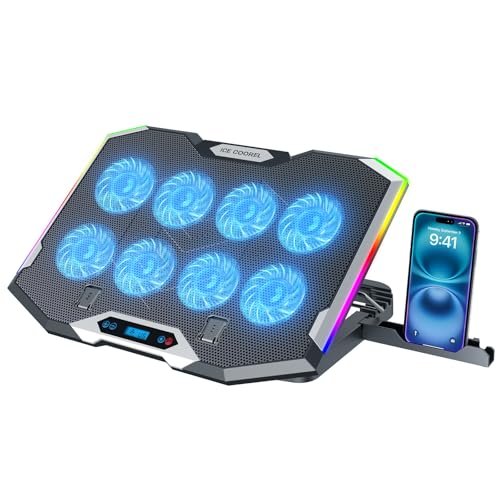
Gaming laptop cooling pads lift a laptop and move air near its intake vents. They suit players whose systems get hot during long sessions, as well as anyone who wants a more comfortable desk setup. The best cooling solutions for gaming laptops can help support airflow, improve posture, and add useful ports.
A weak pad can look impressive yet do little for heat, or make more noise than the laptop itself. Buyers also run into poor fit, awkward angles, flimsy hinges, and fans that do not line up with laptop vents. Those issues matter in real play: heat and noise can distract you, while a wobbly stand can spoil a long session. A cooling pad is not a fix for blocked vents or old thermal paste, so choosing one that fits your laptop and your needs is key.
I researched these models by comparing their listed fan layouts, size ranges, stands, ports, and controls, then considered the trade-offs for everyday gaming use. I have focused on what the specs can tell a buyer, while avoiding promises of exact temperature drops. This guide prioritizes fit, practical airflow, comfort, noise expectations, and value so you can find the best cooling solutions for gaming laptops for your setup.
What you’ll learn
- How to match a cooling pad to your laptop size and vent layout
- Which features matter most for airflow, comfort, and desk use
- How fan style, noise, and controls affect a gaming setup
- Which cooling pad best fits different budgets and gaming needs
In This Article
How To Choose The Best best cooling solutions for gaming laptops
The right cooling pad can help your gaming laptop breathe while raising its screen to a more comfortable height. A poor match may block vents, wobble under a heavy laptop, or add fan noise without useful airflow. Do not buy by fan count or RGB alone. First check your laptop size, underside intake position, desk space, and the stand angle you prefer. The best cooling solutions for gaming laptops suit both the machine and the way you play.
Match Laptop Size and Vent Layout
Check the pad’s stated laptop size range, then compare it with your laptop’s width and depth. A larger size rating does not guarantee a good fit if the laptop feet or intake vents sit in the wrong place. Look at the underside of your laptop and choose a pad that leaves its vents clear. Smaller multi-fan pads can work well for laptops with spread-out intakes, while a sealed turbo-fan style may suit models with a compatible underside layout. Do not assume every gaming laptop needs the same airflow design.
Balance Airflow, Noise, and Controls
More fans do not always mean better cooling. Fan size, placement, speed control, and how well air reaches your laptop vents all matter. A high-speed turbo fan can offer stronger directed airflow, but it may be louder than a broad, slower fan array. Look for adjustable speed if you game in different settings, such as a quiet room or a busy desk. Treat advertised fan counts as one detail, not a performance guarantee. The best cooling solutions for gaming laptops let you balance comfort and airflow.
Choose a Stable Stand and Useful Extras
A cooling pad should hold your laptop securely and keep it at a comfortable angle. Check the number of height settings, the size of the support lip, and whether your laptop sits steadily when you type. USB pass-through ports can help replace a port used to power the pad, but check the port type and count before buying. RGB lighting and phone holders are nice extras, not cooling features. For daily gaming, prioritize sturdy support and useful controls over looks alone.
Quick Comparison
| Model | Category | Best For | Key Spec | Amazon |
|---|---|---|---|---|
| ICE COOREL 8-Fan Cooling Pad | Best Overall | Adjustable desk setup | 8 fans, six height settings | Amazon |
| ChillCore A21 9-Fan Cooling Pad | Feature Rich | Large laptop owners | 9 fans, eight height settings | Amazon |
| llano V12 Turbo Cooling Pad | Turbo Fan | Focused airflow | 5.5-inch fan, speed control | Amazon |
| llano V12 Ultra Cooling Pad | Smart Control | Software-based adjustment | 5.5-inch fan, USB 3.0 hub | Amazon |
| IETS GT500 Turbo Cooling Pad | High Airflow | High-speed cooling control | 4200 RPM fan, foam seal | Amazon |
In-Depth Reviews for best cooling solutions for gaming laptops
1.ICE COOREL 8-Fan Gaming Laptop Cooling Pad
 ICE COOREL 8-Fan Gaming Laptop Cooling Pad
” />
The ICE COOREL cooling pad uses eight fans to move air beneath compatible laptops from 15 to 17.3 inches. Six height settings let you raise the screen, while RGB lighting adds color to a gaming desk. Two USB ports and a phone stand round out the feature set. It offers a flexible mix of airflow and comfort.
This stand suits players who want adjustable height, a fan array, and a place for a phone in one desk accessory. Its broad size range covers many common gaming laptops, but check the laptop’s feet and vent locations before buying. The control layout and USB ports make everyday setup more convenient. RGB can be turned into a style choice.
The open fan layout should be easy to inspect and dust with routine care. Its many hinges and add-ons mean users should set it on a firm, level desk. For buyers seeking several practical features in one pad, it offers solid value, provided the size and vent layout match.
Why It’s Great
- Eight fans spread airflow across the laptop base.
- Six height settings support a more comfortable screen angle.
- Two USB ports add useful desk connectivity.
- A phone stand keeps a second screen within reach.
- RGB lighting fits a colorful gaming setup.
Good to Know
- The pad is listed for laptops up to 17.3 inches, so larger models may not fit.
- Fan count alone does not ensure lower temperatures; vent alignment matters.
- RGB lighting and multiple moving parts may not suit a minimalist desk.
2.ChillCore A21 9-Fan Laptop Cooling Pad
 ChillCore A21 9-Fan Laptop Cooling Pad
” />
The ChillCore A21 combines nine fans with RGB lights and a size range listed for laptops from 15.6 to 19.3 inches. Its eight height stands give buyers several ways to angle the screen, and two USB ports add basic connectivity. This design stands out for its broad fit range and adjustable setup, not just its fan count.
This cooling pad is best suited to people with a large gaming laptop who want a raised, customizable desk position. The listed size range covers some wider models, but measure your laptop and confirm that its feet sit securely. Multiple height choices can help with posture. RGB lighting gives the stand a bold look for a gaming desk.
The open multi-fan layout allows access for routine dust removal. A large stand with many adjustment points should be placed on a stable surface before use. It may offer good feature value for large-laptop owners, though the best fit depends on the laptop’s shape and vents.
Why It’s Great
- Nine fans provide a broad airflow layout.
- The listed size range reaches up to 19.3 inches.
- Eight stand positions allow fine angle adjustment.
- Two USB ports offer extra connection options.
- RGB lighting adds visual appeal to a gaming station.
Good to Know
- The broad size rating does not guarantee a secure fit for every laptop shape.
- A nine-fan layout may be more complex to clean than a simple stand.
- The listing does not specify a measured temperature reduction.
3.llano V12 Turbo-Fan Laptop Cooling Pad
 llano V12 Turbo-Fan Laptop Cooling Pad
” />
The llano V12 uses a 5.5-inch turbo fan and an airtight pressure chamber to direct air toward a laptop base. It is listed for 15.6- to 19-inch laptops and includes adjustable fan speed, a dust filter, and a three-port USB hub. This focused design differs from cooling pads that rely on many small fans spread across the base.
This model is best suited to gaming laptop owners who want adjustable, directed airflow and whose laptop can sit well on the chamber seal. Its speed control offers a way to tune fan output for different tasks. Check the laptop’s size, underside vents, and fit with the foam chamber first. The USB hub can also help manage desk accessories.
The dust filter is a useful feature for routine upkeep, though it still needs regular attention. Its larger fan and chamber make it less like a simple, slim stand. It may be worthwhile for buyers who value focused airflow and speed control, if the fit and noise suit their room.
Why It’s Great
- A 5.5-inch turbo fan focuses airflow.
- Adjustable speed gives users control over fan output.
- The foam chamber is designed to help direct air.
- A dust filter supports easier routine maintenance.
- The three-port USB hub adds desk connectivity.
Good to Know
- The pressure chamber and seal may not suit every laptop base.
- High fan speeds can be more noticeable in a quiet room.
- A turbo-fan design may take up more desk space than a basic pad.
4.llano V12 Ultra Smart Cooling Pad
 llano V12 Ultra Smart Cooling Pad
” />
The llano V12 Ultra pairs a 5.5-inch turbo fan with smart software control, RGB lighting, and a three-port USB 3.0 hub. It is listed for 15.6- to 19-inch gaming laptops and has three height settings. Its appeal is the mix of directed airflow and software-based control, which gives it a more connected feel than a basic cooling stand.
This pad is best for players who want to adjust fan behavior through software and keep several desk devices connected. Three height settings provide some flexibility, though fewer choices may limit fine angle tuning. Check software compatibility and laptop fit before purchase. The turbo-fan design is aimed at users who prefer focused airflow over a wide array of small fans.
The fan and hub add more parts to keep clean and organized than a plain stand. Its height settings and stated USB 3.0 hub make it useful for a busy desk, but the value depends on whether you will use software control. Confirm the laptop’s dimensions and vent layout before deciding.
Why It’s Great
- Smart software control offers an added way to adjust the fan.
- The 5.5-inch turbo fan is designed for focused airflow.
- Three USB 3.0 hub ports support connected accessories.
- Three height settings help lift the laptop screen.
- RGB lighting suits a gaming-focused desk.
Good to Know
- Software control may be unnecessary for buyers who prefer simple buttons.
- Only three height settings are listed, fewer than some competing stands.
- Check laptop and software compatibility before purchase.
5.IETS GT500 4200 RPM Turbo Cooling Pad
 IETS GT500 4200 RPM Turbo Cooling Pad
” />
The IETS GT500 features a turbo fan rated up to 4200 RPM, with infinitely variable speed control for laptops from 13 to 17.3 inches. Its foam seal is designed to direct airflow, while a dust filter helps protect the laptop from dust drawn through the pad. This combination makes it a strong option for buyers seeking adjustable fan speed and focused air delivery.
This cooling pad suits gaming laptop owners who want more control over fan speed and whose laptop fits the sealed chamber. The speed dial lets users choose a setting rather than relying on a single fan level. Measure the laptop and inspect its underside before ordering. At its highest setting, fan noise may be more noticeable during play or voice chat.
The removable dust filter gives users a clear maintenance task, while the foam seal needs a good fit to work as intended. Its turbo fan and speed control add useful function, but buyers should weigh noise and desk space. It can be good value for those who need strong airflow adjustment.
Why It’s Great
- The fan is rated up to 4200 RPM.
- Infinitely variable speed control allows fine adjustment.
- The foam seal is designed to guide air toward the laptop.
- A dust filter helps limit dust entering the laptop area.
- The stated range includes laptops from 13 to 17.3 inches.
Good to Know
- High fan speeds may be loud for shared rooms or voice chat.
- The foam seal requires a suitable laptop fit.
- The listed size range does not cover laptops larger than 17.3 inches.
Final Thoughts: The Verdict
My personal top pick is the ICE COOREL 8-Fan Gaming Laptop Cooling Pad. Its eight fans, six height settings, USB ports, and phone stand make it a flexible desk upgrade for many 15- to 17.3-inch laptops. It is a balanced choice among the best cooling solutions for gaming laptops, as long as its size and fan layout suit your machine.
For focused airflow and speed control, consider the IETS GT500; its turbo fan and foam seal suit buyers who can accept more fan noise. The ChillCore is worth a look for larger laptops, while the llano V12 models suit shoppers who want turbo airflow and added controls. Check your laptop’s vents, size, and noise needs before choosing the best cooling solutions for gaming laptops for your budget.
1 thought on “Best Cooling Solutions For Gaming Laptops: Beat The Heat”
Comments are closed.