
A laptop cooling pad raises your computer and moves air beneath it to help manage heat. It can suit gamers, remote workers, and anyone using a large notebook for long sessions. The best cooling pad for 17.3 inch laptop use should fit securely, offer useful airflow, and feel comfortable on your desk.
A pad that is too small can leave a large laptop perched at the edge, while weak fans may add noise without moving much air. Some buyers focus only on fan count and miss fit, stand height, or USB needs. That can turn a hopeful upgrade into desk clutter. Heat can also come from blocked vents, dust, or demanding apps, so no pad can fix every cause. Choosing the right size and design helps you avoid wobble, awkward typing, and a purchase that does not suit your daily setup.
I compare cooling pads by stated laptop fit, fan layout, stand design, USB features, and practical trade-offs. I use product details to assess likely use cases rather than claim lab results or firsthand tests. This guide to the best cooling pad for 17.3 inch laptop use prioritizes a secure fit, sensible airflow, comfort, and clear buying advice.
What you’ll learn
- How to check whether a cooling pad can support a 17.3-inch laptop.
- Which fan layouts and stand features suit gaming, work, or travel.
- What trade-offs to expect from the five reviewed cooling pads.
- How to choose a pad without relying on fan count alone.
In This Article
How To Choose The Best best cooling pad for 17.3 inch laptop
The right cooling pad should support your laptop, leave its vents clear, and fit the way you work. A common mistake is to buy by fan count or bright lights alone. A low-quality pad may wobble, make distracting noise, or cover key vents. Check the stated size range against your laptop’s real width and depth, then review the stand, fan controls, and USB layout. The best cooling pad for 17.3 inch laptop use is the one that fits your machine and your routine, not simply the one with the most features.
Check Laptop Size and Support
A 17.3-inch screen does not tell you the full size of a laptop. Gaming models may have wide cases, deep bodies, or vents near the edge. Compare your laptop’s width and depth with the pad’s stated range, and check where its feet and vents sit. A pad rated up to 17 inches may be a tight fit for a 17.3-inch model. Look for a clear fit claim and a front stop that can hold the computer in place. The best cooling pad for 17.3 inch laptop setups should support the base without blocking airflow or leaving the laptop perched at the edge.
Balance Airflow, Noise, and Fan Control
More fans do not always mean better cooling. Fan size, placement, and how well the air meets your laptop vents matter too. A multi-fan pad can spread airflow, while a large turbine-style fan aims for more focused air movement. If you work in a quiet room, check whether speed can be adjusted and consider that higher fan speeds may be more audible. Match the pad’s layout to your laptop’s intake vents when possible. Avoid buying on fan count alone; the best cooling pad for 17.3 inch laptop use should offer useful airflow without making your desk unpleasant.
Look at Stand Comfort and Desk Features
An adjustable stand can raise the screen and make a long work session feel more natural. Check the number of height settings, the stability of the laptop stops, and whether the pad stays firm when you type. Also count the USB ports and see whether one port powers the fans, since that can affect what remains free for other gear. RGB lights and a phone holder are helpful extras only if you will use them. For gaming, prioritize stable support and airflow. For everyday work, comfort and a simple setup may matter more.
Quick Comparison
| Model | Category | Best For | Key Spec | Amazon |
|---|---|---|---|---|
| AICHESON S035 5-Fan Cooling Pad | Multi-Fan Value | Users who want broad airflow and blue lights | Five fans; supports up to 17.3 inches | Amazon |
| ChillCore A21 9-Fan Cooling Pad | Feature Rich | Large laptops and flexible desk setups | Nine fans; eight height settings | Amazon |
| havit HV-F2056 Cooling Pad | Simple Pick | Users with a laptop within its size range | Three USB-powered fans; two height settings | Amazon |
| ICE COOREL 8-Fan Cooling Pad | Adjustable Stand | A 17.3-inch laptop owner who wants RGB | Eight fans; six height settings | Amazon |
| llano V12 Turbofan Cooling Pad | Focused Airflow | Gaming laptops needing adjustable airflow | 5.5-inch turbofan; fits 15.6–19-inch laptops | Amazon |
In-Depth Reviews for best cooling pad for 17.3 inch laptop
1.AICHESON S035 5-Fan Cooling Pad
 AICHESON S035 5-Fan Cooling Pad
” />
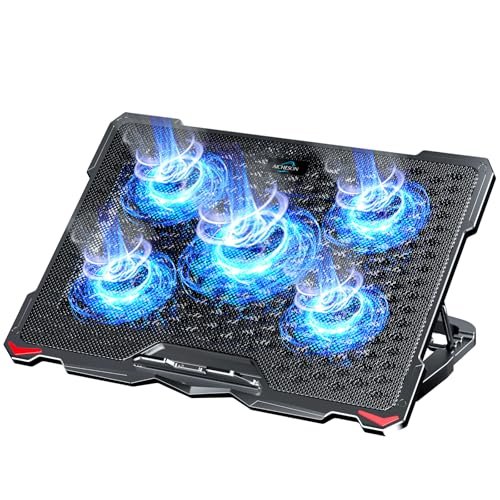
The AICHESON S035 uses five fans to move air beneath a laptop, with blue LED lights for a bright desk look. Its stated fit reaches 17.3 inches, making it a direct size match for many large notebooks. Two USB ports add useful connections. This best cooling pad for 17.3 inch laptop setups offers a simple, multi-fan approach.
The pad is designed for desk use and gives large laptops a raised base. The fan layout may suit users who prefer airflow across more of the underside, while the blue lights add a gaming-style touch. It is best for owners who want a broad fit claim and a simple stand. Check your laptop’s exact base size before ordering.
The mesh surface should be easy to wipe when dust gathers, though fan openings need regular care. The listed features make this a practical value choice for buyers seeking multiple fans and USB ports. Build feel and noise can vary by use, so keep expectations realistic.
Why It’s Great
- Five fans spread airflow across the laptop base.
- Stated support for laptops up to 17.3 inches.
- Two USB ports add connection options.
- Blue LED lighting suits a gaming desk.
- A straightforward layout is easy to set up.
Good to Know
- Blue lighting may not suit a quiet or minimal desk.
- The listing does not specify independent fan speed control.
- Measure your laptop base to confirm a secure fit.
2.ChillCore A21 9-Fan Cooling Pad
 ChillCore A21 9-Fan Cooling Pad
” />
The ChillCore A21 pairs nine fans with RGB lighting and eight height settings. Its stated size range covers laptops from 15.6 to 19.3 inches, so a 17.3-inch notebook falls within its listed fit. Two USB ports add everyday utility. For buyers comparing the best cooling pad for 17.3 inch laptop use, its broad fit and adjustable stand stand out.
The many height choices help users set a more comfortable viewing angle at a desk. RGB lights add a vivid look, while the nine-fan array gives the pad a feature-rich design. It may suit gamers and desk users who want an adjustable stand for a large laptop. Check the laptop’s base dimensions and vent locations before use.
The open fan area may collect dust, so wipe the surface and clear the vents as needed. Its broad fit range and stand options offer useful flexibility. This model has more features than a basic pad, though buyers should consider whether they need its lights and many adjustment steps.
Why It’s Great
- Wide stated range includes 17.3-inch laptops.
- Eight height settings offer many angle choices.
- Nine fans create a multi-point airflow layout.
- RGB lighting adds a customizable gaming look.
- Two USB ports support added desk gear.
Good to Know
- A nine-fan design may take up more desk space.
- RGB lighting may be distracting in dim rooms.
- More fans do not guarantee quieter or stronger cooling.
3.havit HV-F2056 Three-Fan Cooling Pad
 havit HV-F2056 Three-Fan Cooling Pad
” />
The havit HV-F2056 has three USB-powered fans and two height settings. Its stated laptop range is 15.6 to 17 inches, which is smaller than a 17.3-inch model. That fit limit matters for this guide: check your laptop’s dimensions carefully before buying. It may serve smaller notebooks well, but it is not the safest size match for every large laptop.
Its simple, slim design may appeal to people who want a basic cooling stand without many lights or controls. The two height settings can lift the screen for desk use, and the fans draw power through USB. It is best suited to laptops within the stated range and users who value a plain setup over a long list of features.
A simple surface is easy to wipe, and the compact feature set keeps setup clear. The main value depends on fit: its listed limit is 17 inches, not 17.3. Choose it only if your laptop’s actual base dimensions fit securely and leave the vents clear.
Why It’s Great
- Three fans offer a simple airflow setup.
- USB power keeps setup straightforward.
- Two height settings can improve desk posture.
- A plain design avoids bright RGB lighting.
- A useful basic choice for compatible laptop sizes.
Good to Know
- The stated fit range stops at 17 inches.
- It may not support a larger 17.3-inch laptop securely.
- Only two height settings are listed.
4.ICE COOREL 8-Fan RGB Cooling Pad
 ICE COOREL 8-Fan RGB Cooling Pad
” />
The ICE COOREL pad has eight cooling fans, RGB lighting, and six height settings. Its stated fit range reaches 17.3 inches, which makes it a direct option for many laptops in this guide. Two USB ports and a phone stand add desk features. It gives buyers a strong mix of airflow layout, adjustability, and extras.
Six height choices let desk users tune the angle to their screen and posture. The RGB lights and phone stand add a gaming or streaming feel, while the eight fans cover a wide area beneath the laptop. It may suit users who want a feature-rich stand. Confirm your laptop’s base size and vent position before placing it.
The fan openings and stand may need a quick dust check from time to time. Its extra features can be useful if you will use them, but may be more than a simple work setup needs. For a 17.3-inch laptop, verify stable support before settling on this pad.
Why It’s Great
- Stated fit range includes 17.3-inch laptops.
- Eight fans provide a broad multi-fan layout.
- Six height settings allow flexible desk positioning.
- Two USB ports add practical connectivity.
- Phone stand and RGB lights add gaming desk features.
Good to Know
- RGB effects may not suit every work space.
- The phone stand is useful only if you need one.
- Confirm the laptop sits securely at your chosen angle.
5.llano V12 5.5-Inch Turbofan Cooler
 llano V12 5.5-Inch Turbofan Cooler
” />
The llano V12 uses a 5.5-inch turbofan and an airtight pressure chamber to direct air beneath the laptop. Its stated fit range is 15.6 to 19 inches, which includes many 17.3-inch models. Adjustable speed and a three-port USB hub add control and connections. This focused design makes it a strong best cooling pad for 17.3 inch laptop pick.
The large fan differs from a pad with many small fans, so its airflow approach may appeal to gaming laptop owners who want adjustable speed. Its wide stated fit range gives it room for larger machines, while the USB hub can help organize a desk. Check fan noise at the speed you plan to use and keep laptop vents unobstructed.
The enclosed design needs regular dust care, especially around its intake and seal. Its specialized fan and USB hub offer more than a basic stand, making it a strong value for users who need those features. Check the unit’s size and noise needs before buying.
Why It’s Great
- 5.5-inch turbofan provides a focused airflow design.
- Stated fit range includes many 17.3-inch laptops.
- Adjustable speed gives users more airflow control.
- Three-port USB hub adds connection options.
- Airtight pressure chamber is designed to direct air.
Good to Know
- A large fan may be more audible at higher speeds.
- The specialized design can be bulkier than a basic pad.
- Keep the seal and intake area clear of dust.
Final Thoughts: The Verdict
My personal top pick is the llano V12 Turbofan Cooling Pad. Its wide stated fit range, adjustable speed, and three-port hub make it a versatile choice for many large laptops. For the best cooling pad for 17.3 inch laptop use, always check your machine’s base size and vent layout first.
If you want many height choices and a multi-fan layout, consider the ChillCore A21 9-Fan Cooling Pad. The AICHESON and ICE COOREL models offer other feature-rich options, while havit is best for smaller laptops within its stated size range. Pick the one that suits your laptop, desk, and budget.