
A gaming laptop cooling pad is a raised stand with fans that helps move air around your notebook. It can suit gamers, streamers, and anyone whose laptop runs hot during long sessions. People buy the best cooling pad for a gaming laptop to improve airflow, lift the screen, and make desk play more comfortable.
A cheap pad can look impressive but disappoint once the game starts. Fans may be loud, airflow may miss your laptop’s vents, or the stand may wobble under a large machine. Buying by fan count alone is a common mistake: fit, fan placement, noise, and height matter too. A poor match can clutter your desk without helping much. The right cooling pad should work with your laptop’s intake vents and your space, so you can focus on the game instead of heat, noise, or a sore neck.
I compare cooling pads by their listed fan design, laptop size range, stand adjustment, ports, and practical features. I also consider how each design may fit different gaming setups, without treating a product claim as a guaranteed temperature result. This guide to the best cooling pad for a gaming laptop puts fit, useful airflow, comfort, and clear trade-offs first.
What you’ll learn
- How to match a cooling pad to your laptop size and vent layout
- Which fan and stand features matter for gaming comfort
- How five popular cooling pads compare by design and use
- What trade-offs to consider before choosing a model
In This Article
How To Choose The Best best cooling pad for a gaming laptop
Choosing the best cooling pad for a gaming laptop starts with fit, not flashy lights or a big fan count. A low-quality stand may slip, block vents, or add more noise than comfort. Check your laptop’s size and where its air intakes sit before you buy. Then weigh airflow, fan noise, height settings, and desk space. A good match can support a more comfortable setup, though a cooling pad cannot fix blocked vents or poor room airflow.
Match the Pad to Your Laptop
Check your laptop’s size against the pad’s stated range, then compare that with the location of its intake vents. A pad that is too small can leave part of the laptop unsupported. One that is too large may take up desk space without helping airflow. Fan placement matters more than fan count alone. For a large gaming notebook, a broad stand or a sealed design may suit better. For a smaller laptop, a simpler multi-fan pad can be easier to position. Do not assume every 17-inch laptop has the same vent layout.
Balance Airflow and Noise
More airflow can help move warm air away from a laptop, but a fast fan may also make more noise. Look for adjustable speed so you can use a quieter setting for light work and raise it during demanding games. Large central fans and multiple smaller fans use different designs, so match the layout to your laptop’s vents. Avoid choosing by fan count or top speed alone. If you play with a headset, noise may matter less. For shared rooms or voice chat, quiet control can be a key feature.
Check Comfort, Ports, and Care
A cooling pad also acts as a laptop stand, so check its height settings, grip, and footprint. A stable base can make typing and gaming feel more natural, while a phone holder or USB hub may help keep your desk tidy. Confirm how many ports the pad uses and whether its hub fits your needs. Dust filters and easy access for cleaning are useful, especially in homes with pets. Do not pay extra for lights or software you will not use. Pick the best cooling pad for a gaming laptop that suits your daily setup.
Quick Comparison
| Model | Category | Best For | Key Spec | Amazon |
|---|---|---|---|---|
| ICE COOREL 8-Fan Cooling Pad | Multi-Fan | Adjustable desk setups | 8 fans; 6 height settings | Amazon |
| ChillCore A21 Blue | Large Laptop Fit | Laptops up to 19.3 inches | 9 fans; 8 height settings | Amazon |
| llano V12 RGB | Turbo Fan | Focused, adjustable airflow | 5.5-inch fan; 3-port hub | Amazon |
| llano V12 Ultra | Smart Control | Software-based fan control | 5.5-inch fan; USB 3.0 hub | Amazon |
| IETS GT500 | High-Speed Turbo | Users wanting adjustable fan speed | 4200 RPM; foam seal; dust filter | Amazon |
In-Depth Reviews for best cooling pad for a gaming laptop
1.ICE COOREL 8-Fan Gaming Laptop Cooling Pad
 ICE COOREL 8-Fan Gaming Laptop Cooling Pad
” />
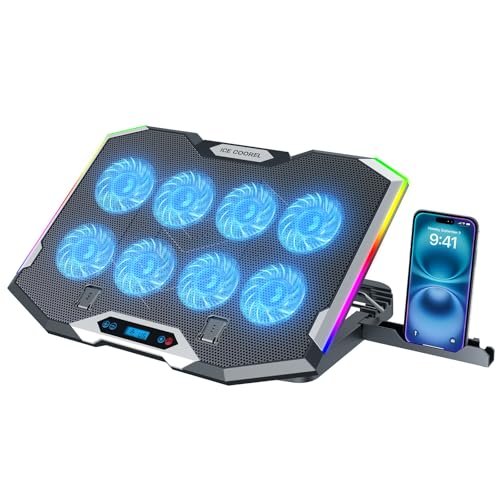
The ICE COOREL cooling pad uses eight fans and supports laptops from 15 to 17.3 inches. Its six height settings let you raise the screen and adjust your desk posture. RGB lighting adds color, while two USB ports and a phone stand bring handy extras. It is a flexible pick for gamers seeking the best cooling pad for a gaming laptop.
The broad fan layout offers a different approach from a single turbo fan. You can set the stand at one of six heights and keep a phone close by during play. This design may suit gamers who want airflow, a raised screen, and desk-friendly features in one unit. Check your laptop vents and size before buying to help align the fans.
The listed features include a stand and USB ports, but regular dust care still matters. Its adjustable frame gives users room to find a comfortable angle. RGB is a visual extra, not a cooling measure. For buyers who will use the height options and phone holder, this pad offers useful value.
Why It’s Great
- Eight fans spread airflow across the pad.
- Six height settings help tailor screen position.
- Two USB ports add connection options.
- A phone stand keeps a device within reach.
- RGB lighting adds a gaming-style look.
Good to Know
- Check that the fan layout lines up with your laptop’s air intakes.
- RGB lighting may not appeal to users who prefer a plain desk.
- The listed laptop range stops at 17.3 inches.
2.ChillCore 9-Fan Laptop Cooling Pad
 ChillCore 9-Fan Laptop Cooling Pad
” />
The ChillCore A21 Blue pairs nine fans with support for laptops from 15.6 to 19.3 inches. Eight height settings let you choose a raised angle for your desk. It also includes RGB lighting and two USB ports. Its wide size range and many fan positions make it a strong option for large gaming laptops and a contender for the best cooling pad for a gaming laptop.
This pad is aimed at users who want a wide stand with several angle choices. The two USB ports offer extra connection points, while the RGB lights add a bright gaming look. It may suit owners of larger notebooks who want one stand for gaming and general desk use. Compare its footprint with your desk before choosing.
The stand’s many height options help users find a comfortable position, though setup space is worth checking first. Keep the fans and laptop vents free of dust for better airflow. Its size range is a clear benefit for large notebooks. Buyers who value fit and adjustability may find good overall value.
Why It’s Great
- Nine fans provide a multi-fan airflow layout.
- Eight height settings offer many angle choices.
- Supports laptops up to 19.3 inches.
- Two USB ports add practical desk flexibility.
- RGB lighting suits a colorful gaming setup.
Good to Know
- Its larger laptop range may mean a bigger desk footprint.
- The blue RGB style may not fit every workspace.
- Check vent alignment rather than relying on fan count alone.
3.llano V12 RGB Turbo-Fan Cooling Pad
 llano V12 RGB Turbo-Fan Cooling Pad
” />
The llano V12 RGB uses a 5.5-inch turbo fan with an airtight pressure chamber, adjustable speed, and a dustproof design. It is made for laptops from 15.6 to 19 inches. A three-port USB hub adds useful connections, and RGB gives the stand a gaming look. This focused fan approach sets it apart from broad multi-fan pads.
The V12 may suit gamers who want adjustable fan speed and a design aimed at directing air beneath the laptop. Its three-port hub can help when a gaming setup needs extra connections. The stand has three height settings, fewer than some rivals, but that keeps the choices simple. Check your laptop size and vent position before use.
The dustproof design may help limit dust entering the fan, but routine cleaning is still sensible. Its sturdy-looking enclosed layout differs from open mesh pads, and the hub adds convenience. The larger fan and adjustable speed may appeal to users who value control, provided the design fits their laptop and budget.
Why It’s Great
- A 5.5-inch turbo fan focuses airflow.
- Adjustable speed lets users choose a fan level.
- The airtight pressure chamber is a distinct design feature.
- Three USB ports add connection options.
- Fits a broad range of larger gaming laptops.
Good to Know
- A turbo-fan design may be more noticeable than low-speed multi-fan pads.
- It has three height settings, fewer than some competing stands.
- Confirm that the chamber and fan design suit your laptop’s vents.
4.llano V12 Ultra Smart Cooling Pad
 llano V12 Ultra Smart Cooling Pad
” />
The llano V12 Ultra combines a 5.5-inch turbo fan with smart software control and an RGB laptop stand. It supports gaming laptops from 15.6 to 19 inches and has three height settings. Its three-port USB 3.0 hub offers useful connections. This model stands out for users who want software-based fan control in a focused cooling design.
The software control may suit gamers who like to manage settings from their computer instead of relying only on a physical dial. Three height settings provide a few clear angle options without a complex setup. Its size range covers many larger gaming laptops. Before buying, consider whether you will use the software and check your laptop’s vent layout.
The turbo-fan design calls for routine dust checks, even with regular care. Its stand, RGB lighting, and USB 3.0 hub bring several useful features together. The smart controls can add value for users who want them, while those who prefer simple manual use may be better served by another pad.
Why It’s Great
- Smart software control offers a computer-based way to manage the fan.
- The 5.5-inch turbo fan uses a focused airflow design.
- Three USB 3.0 ports provide added connections.
- Supports laptops up to 19 inches.
- Three height settings allow basic angle adjustment.
Good to Know
- Software control may be unnecessary for users who want simple manual settings.
- The three height settings offer fewer choices than some multi-fan pads.
- Confirm software compatibility and laptop fit before purchase.
5.IETS GT500 Turbo-Fan Cooling Pad
 IETS GT500 Turbo-Fan Cooling Pad
” />
The IETS GT500 uses a turbo fan rated up to 4200 RPM and offers infinitely variable speed control. A foam seal is designed to direct airflow around the laptop, while a dust filter helps protect the device. It is listed for laptops from 13 to 17.3 inches. This feature set makes it an option for users seeking adjustable, focused airflow.
The variable speed control lets users select a fan level rather than settle for fixed steps. Its foam seal gives the GT500 a more enclosed design than open stands, so check your laptop’s size and fit carefully. It may suit gaming laptop owners who want more direct airflow control and do not mind a larger, more specialized setup.
The included dust filter can be checked and cleaned as part of regular upkeep. The foam seal is a useful design feature, but it makes correct sizing important. Buyers who want variable fan control and a dust filter may value this pad, while those seeking a simple open stand may prefer another option.
Why It’s Great
- Variable speed control offers a wide range of fan settings.
- The fan is rated up to 4200 RPM.
- A foam seal is designed to direct airflow.
- A dust filter helps protect the laptop from dust.
- The listed size range includes smaller 13-inch laptops.
Good to Know
- A high-speed fan may be loud at stronger settings.
- The foam seal makes laptop size and fit especially important.
- Its enclosed design may not suit every laptop or desk setup.
Final Thoughts: The Verdict
My personal top pick is the ICE COOREL 8-Fan Gaming Laptop Cooling Pad. Its eight fans, six height settings, phone stand, and two USB ports make it a flexible choice for many gaming desks. It is my balanced pick for the best cooling pad for a gaming laptop, though you should confirm its size and fan placement fit your machine.
For larger notebooks, consider the ChillCore 9-Fan Laptop Cooling Pad, with its broad size range and eight height settings. The llano V12 models suit buyers drawn to turbo fans and speed control, while the IETS GT500 adds variable speed and a dust filter. Check your vents, noise needs, and desk space, then choose the best fit for your budget.