

A dual monitor stand holds two screens at a more useful height and frees space on your desk. It suits home offices, gaming setups, and busy workstations. People choose the best 2 monitor stand to improve screen alignment, make room for daily tasks, and create a tidier place to work.
A shaky pole, a base that takes up too much room, or arms that cannot support your screens can turn a simple upgrade into a daily annoyance. Some buyers also miss key details, such as VESA fit, screen weight, desk thickness, or whether a mount needs a clamp. The wrong choice may leave screens at awkward angles or crowd your keyboard and notes. Picking the right stand matters because it affects comfort and desk space every day, not just how your setup looks in a photo.
I focus on monitor mounts and practical desk setup choices, so I compared these models by screen fit, weight limits, mounting style, adjustability, and likely desk needs. I used the listed product details to sort out which stand fits different users, rather than treating one design as right for everyone. This guide puts fit, stability, and clear buying advice first.
What you’ll learn
- How to match a stand to your monitor size, weight, and VESA pattern
- When a desk clamp, grommet mount, or freestanding base makes sense
- Which models offer broad screen movement and which keep things simple
- What to check before buying the best 2 monitor stand for your desk
In This Article
How To Choose The Best best 2 monitor stand
A good dual monitor stand can make a desk feel calmer and give your screens a better viewing position. A poor fit can do the opposite: arms may sag, a base may steal useful space, or a clamp may not suit the desk edge. Before you buy the best 2 monitor stand, check screen size, weight, VESA pattern, desk type, and the range of movement you need. Do not rely on screen size alone; a monitor can be within the listed size range but still exceed an arm’s weight limit.
Check Screen Size, Weight, and VESA Fit
Start with the monitor maker’s specs. Check each screen’s weight without its original stand, then compare it with the mount’s limit per arm. Also check the VESA hole pattern on the back; 75 x 75 mm and 100 x 100 mm are common, but not universal. Screen size is only a guide, since thick bezels and wide cases can affect how two displays sit side by side. The best 2 monitor stand is one that fits both screens within every stated limit. If your monitor has no VESA holes, look for a compatible adapter before ordering.
Choose a Mount That Suits Your Desk
A clamp or grommet mount keeps the base off the desk and can offer a firm hold, but you need a suitable desk edge or hole. Check desk thickness and underside clearance before you buy. A freestanding stand avoids clamping and is easier to move, though its base uses more surface area. Glass bases can look neat, but still need a safe, flat spot. Avoid assuming every desk can take a clamp, especially desks with a thick lip or fragile surface. Pick the best 2 monitor stand style based on your furniture, not just its product photo.
Consider Movement, Desk Space, and Setup
Think about how often you change screen positions. Articulating arms can tilt, swivel, and rotate, which helps with shared desks or portrait viewing. A simpler stand may work well if you keep both screens in one position. Measure your desk width and note where the base, pole, or clamp will sit. Then check whether the arms can bring the monitors close enough without hitting a wall. Cable clips can help keep cords tidy, but they do not replace careful routing. For the best 2 monitor stand, choose useful movement and a manageable setup over features you will rarely use.
Quick Comparison
| Model | Category | Best For | Key Spec | Amazon |
|---|---|---|---|---|
| VIVO STAND-V002 | Best Overall | Clamp or grommet mounting | 13–30 in; 22 lb per screen | Amazon |
| ErGear Dual Monitor Stand | Best Value | Larger screens on a clamp mount | Up to 32 in; 17.6 lb per arm | Amazon |
| VIVO STAND-V002FG | Freestanding Glass Base | Users who cannot clamp a desk | 13–32 in; 22 lb per screen | Amazon |
| VIVO STAND-V002F | Freestanding | Screens up to 27 inches | Adjustable arms; free-standing base | Amazon |
| VIVO AeroPoise STAND-V002O | Articulating Arms | Frequent screen repositioning | 17–32 in; 19.8 lb per screen | Amazon |
In-Depth Reviews for best 2 monitor stand
1.VIVO Dual Monitor Desk Mount
 VIVO Dual Monitor Desk Mount
” />
The VIVO STAND-V002 is a flexible dual monitor desk mount for two screens from 13 to 30 inches. Each arm supports up to 22 pounds, and the mount accepts common 75 x 75 mm and 100 x 100 mm VESA patterns. Its tilt, swivel, and rotation adjustments help you line up both displays. This makes it a strong pick for a shared work area.
This best 2 monitor stand attaches with a C-clamp or a grommet mount, so it can suit desks with the right edge or mounting hole. The arms let you set screens at useful angles, while the center pole keeps the layout in one place. It is best for home offices and workstations where users want movement and a clear desk surface.
The metal frame is made for regular desk use, and built-in cable clips help guide cords along the arms. Wipe it with a soft cloth to remove dust. It offers useful adjustability and two mounting choices, making it a good value when your desk and screens meet its fit limits.
Why It’s Great
- Supports two screens up to 22 pounds each
- Works with clamp or grommet mounting
- Offers tilt, swivel, and screen rotation
- Fits common 75 x 75 mm and 100 x 100 mm VESA patterns
- Cable clips help keep cords close to the arms
Good to Know
- The desk must suit the clamp or have a usable grommet hole.
- Check the depth and width of your monitors to avoid screen overlap.
- The mount needs assembly and careful tightening before use.
2.ErGear Dual Monitor Stand
 ErGear Dual Monitor Stand
” />
The ErGear dual monitor stand is built for two screens up to 32 inches, with a stated limit of 17.6 pounds per arm. Its arms adjust in height and allow tilt, swivel, and rotation, so you can shape a side-by-side layout around your work. That mix of screen support and movement makes it a practical choice for many home desks.
This best 2 monitor stand is suited to users who want to reposition screens without lifting them off a fixed shelf. Its desk-mount design keeps a broad stand base off the main work area, which leaves more room for a keyboard or notes. It works best when your monitors fall within both the size and weight limits.
The design keeps the screens on separate adjustable arms, and its desk mount is a space-saving alternative to a wide base. Keep the arms and desk area clean with a soft cloth, and recheck the fasteners as part of setup. Its feature set makes it a useful value pick for a dual-screen workspace.
Why It’s Great
- Fits screens up to 32 inches
- Supports up to 17.6 pounds per arm
- Arms allow height, tilt, swivel, and rotation adjustment
- Mounting style keeps a large base off the desk
- Useful for users who change screen positions
Good to Know
- The per-arm weight limit is lower than some competing models.
- Confirm that your desk can safely accept the mount.
- A wide pair of screens may need more desk depth than expected.
3.VIVO Dual Monitor Stand with Glass Base
 VIVO Dual Monitor Stand with Glass Base
” />
The VIVO STAND-V002FG holds two monitors from 13 to 32 inches, with a listed weight limit of 22 pounds per screen. Its freestanding design uses a glass base instead of a desk clamp, and its arms allow useful screen adjustment. The broad size range makes it a versatile option when you need a stand that does not attach to the desk.
This best 2 monitor stand can suit renters, shared spaces, or desks where clamping is not a good option. The free-standing base is simple to place, and the arms help set both screens at a comfortable angle. Before buying, measure the base area and make sure your desk has room for it.
The glass base gives the stand a clean look, while the metal arms provide support for compatible screens. Dust and fingerprints may show on the base, so a soft cloth helps keep it neat. It can offer solid value if you want a freestanding design and have enough desk space.
Why It’s Great
- Supports screens up to 32 inches
- Holds up to 22 pounds per screen
- Freestanding design needs no desk clamp
- Fits common VESA mounting patterns
- Glass base gives the setup a polished look
Good to Know
- The base takes up desk space that a clamp mount would leave open.
- Check that the desk surface is flat and sturdy.
- The glass base may need frequent wiping to remove dust or fingerprints.
4.VIVO Freestanding Dual Monitor Stand
 VIVO Freestanding Dual Monitor Stand
” />
The VIVO STAND-V002F is a freestanding dual monitor stand designed for two screens up to 27 inches. Its heavy-duty adjustable arms let you set a useful position for each display, while its base avoids the need to attach anything to the desk. It stands out for shoppers who want a straightforward two-screen setup without a desk clamp.
This best 2 monitor stand is a practical fit for home offices and desks where drilling or clamping is not an option. The free-standing base is easy to place, and the adjustable arms help align both screens. Check the monitor weight and VESA pattern before buying, since the listed screen size alone does not confirm fit.
The metal stand is built to support a daily desk setup, and the simple base is easy to wipe clean. It trades some desk area for easy placement and no clamp installation. For compatible screens up to 27 inches, it is a useful option when a freestanding design matters most.
Why It’s Great
- Freestanding base avoids a desk clamp
- Designed for two screens up to 27 inches
- Adjustable arms help align the displays
- Can work on desks where mounting is not practical
- Simple base is easy to clean
Good to Know
- The product listing specifies support for screens up to 27 inches; check the full fit details before purchase.
- A freestanding base uses more desk area than a clamp mount.
- Confirm your monitors’ weight and VESA pattern before ordering.
5.VIVO AeroPoise Dual Monitor Stand
 VIVO AeroPoise Dual Monitor Stand
” />
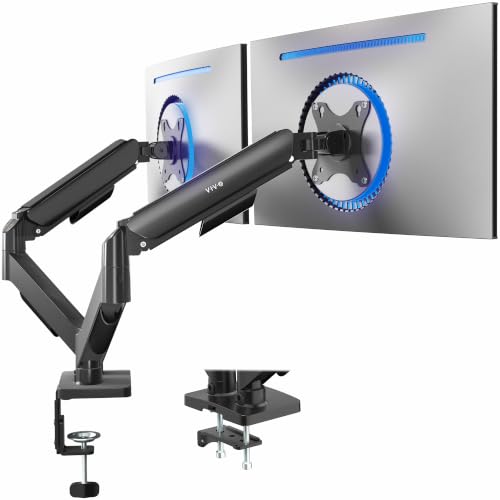
The VIVO AeroPoise STAND-V002O supports two screens from 17 to 32 inches, with a maximum weight of 19.8 pounds per screen. Its mechanical articulating arms give users room to move and angle each display. Support for 75 x 75 mm and 100 x 100 mm VESA patterns covers many common monitors, making it a flexible choice for a modern desk.
This best 2 monitor stand suits people who often shift their screens for focused work, calls, or shared viewing. The articulating arms can help you bring displays closer or change their angle without moving the whole stand. It works best for users whose monitors meet the stated size and weight limits and who value frequent adjustment.
The arm-based build keeps the design focused on movement and screen placement. Wipe the arms with a soft cloth and keep cables routed neatly as you adjust the displays. Its broad screen range and mechanical movement can make it good value for a flexible workstation.
Why It’s Great
- Fits screens from 17 to 32 inches
- Supports up to 19.8 pounds per screen
- Mechanical arms allow screen repositioning
- Supports common 75 x 75 mm and 100 x 100 mm VESA patterns
- Useful for shared desks and changing work tasks
Good to Know
- The 17-inch minimum may not suit smaller monitors.
- Check that each screen stays under the 19.8-pound arm limit.
- Articulating arms need room to move behind and beside the screens.
Final Thoughts: The Verdict
My personal top pick is the VIVO Dual Monitor Desk Mount. Its 22-pound-per-screen limit, broad adjustment, and choice of clamp or grommet mounting make it a flexible fit for many desks. It is my leading choice for the best 2 monitor stand if your monitors and desk match its requirements.
For a freestanding setup, consider the VIVO Dual Monitor Stand with Glass Base. The ErGear model is another useful value option for screens up to 32 inches, while the AeroPoise suits users who often move their displays. Check each screen’s weight, VESA pattern, and desk space before you choose. Pick the stand that fits your setup and budget.
1 thought on “Best 2 Monitor Stand: Smart Picks For A Better Desk”
Comments are closed.