
A 4K laptop docking station connects your laptop to monitors, wired internet, and desk accessories through one cable. It suits people who want a cleaner home office, more screen space, or fewer daily plug-ins. The best 4k laptop docking station makes a laptop feel like a full desktop setup.
A dock can look ideal on a product page and still disappoint at your desk. A monitor may not reach its listed resolution, a second screen may only mirror the first, or the laptop may charge too slowly. Some docks also need drivers, a separate power supply, or a specific USB-C video mode. Buying by port count alone is an easy mistake. The right match saves time and avoids the frustration of unpacking a dock, connecting everything, and finding that your laptop cannot use the features you paid for.
I focus on laptop docks and the small details that shape a real desk setup: display support, charging, operating system limits, and the gear included in the box. For this guide, I compared the listed features and practical compatibility notes for each model rather than assuming every laptop works the same way. This best 4k laptop docking station guide puts clear fit, useful ports, and fewer surprises first.
What you’ll learn
- How to match dock features to your laptop and monitors.
- Which model fits a triple-screen desk or a simpler setup.
- Why operating system and USB-C video support matter.
- What to check about charging, drivers, and included power supplies.
In This Article
How To Choose The Best best 4k laptop docking station
The best 4k laptop docking station is the one that works with your laptop, screens, and daily tasks—not simply the one with the most ports. Check your laptop’s USB-C or Thunderbolt features before you buy. Some ports carry video and power; others only move data. Also check whether the dock needs a driver or a separate power adapter. These details can decide whether your monitors extend, your laptop charges, and your desk stays tidy. A quick compatibility check can prevent an expensive and frustrating mismatch.
Check Display Support and Your Laptop
First, check the laptop’s manual for USB-C DisplayPort Alt Mode, Thunderbolt, or USB4 video support. A USB-C plug alone does not promise video output. Then compare the dock’s supported screen count and resolution with your monitors. Windows and macOS can handle multi-screen docks differently, and some models use DisplayLink software to add displays. Do not assume that three HDMI ports mean three independent 4K screens on every laptop. For basic work with one monitor, a simple dock may be enough. For several screens, confirm the exact setup and any driver needs before ordering.
Match Charging and Ports to Your Desk
Look at the dock’s power delivery rating and the charger included in the box. A dock’s stated charging capacity may depend on its power adapter, cable, and laptop, so check the details rather than judging by one headline number. If you run a power-hungry laptop, compare the dock’s output with the laptop’s own charger. Count the ports you will actually use, too: USB-A for older gear, USB-C for newer devices, Ethernet for a steady wired link, and card readers for camera work. A smaller dock suits travel; a full dock can clear more cables from a fixed desk.
Consider Drivers, Build, and Included Gear
Some docks work through standard USB-C video, while others need DisplayLink drivers for extra screens. A driver-based dock can be useful, but it adds a setup step and may not suit a locked-down work computer. Read the operating system notes and confirm that you can install the required software. Check whether the power adapter is included; a dock sold without one may need a separate purchase to charge devices or run at full capacity. Also consider where the dock will sit and how often you will move it. The best fit is the one that works with your setup without extra hassle.
Quick Comparison
| Model | Category | Best For | Key Spec | Amazon |
|---|---|---|---|---|
| Plugable 13-in-1 USB-C Dock UD-ULTC4K | Best Overall | Windows users who need several displays | Triple displays; HDMI and DisplayPort | Amazon |
| Anker 8-in-1 Dual Monitor Dock | Best for Two Screens | A compact desk with two displays | Dual HDMI; up to 85W PD | Amazon |
| TobenONE 18-in-1 Triple Monitor Dock | Port-Rich Pick | Users needing many connections | Three HDMI ports; 9 USB-A/C ports | Amazon |
In-Depth Reviews for best 4k laptop docking station
1. Plugable 13-in-1 Triple 4K Display Dock

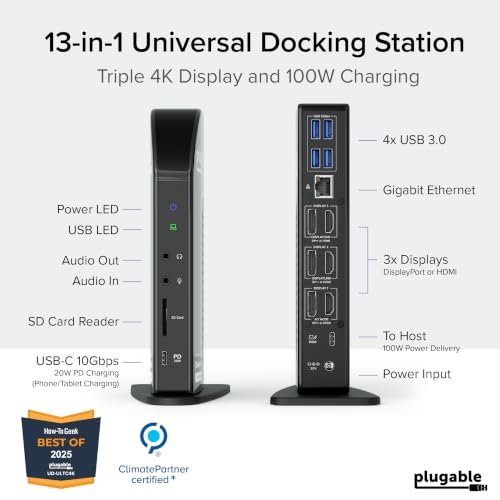
The Plugable UD-ULTC4K is a 13-in-1 USB-C dock built for a busy multi-screen desk. It offers three HDMI and three DisplayPort outputs, plus a broad mix of useful connections. Its DisplayLink technology helps add screens to compatible systems, while listed power delivery can reduce desk clutter. For shoppers seeking the best 4k laptop docking station for several displays, its flexible video options stand out.
This dock suits people who keep a laptop at a fixed desk and want several monitors, wired network access, and accessories connected in one place. Setup takes more care than a basic hub because DisplayLink software is required. Check your operating system and laptop support before you buy. Once configured, the dock can make a work area feel more like a full desktop, with fewer daily cable swaps.
The broad port selection can replace several small adapters and help keep a desk neat. The included power setup and driver requirement make it less plug-and-play than a simple hub, so check the package details. For compatible users who need many display and device connections, it offers strong value.
Why It’s Great
- Three HDMI and three DisplayPort outputs give users several ways to connect screens.
- A wide port selection can reduce the need for separate adapters.
- DisplayLink support can help add displays to compatible laptop setups.
- Useful for a permanent desk where several screens and accessories stay connected.
- USB-C connectivity works with a range of compatible Windows, Mac, and ChromeOS laptops.
Good to Know
- DisplayLink drivers are required, so setup is not fully plug-and-play.
- Supported display count and resolution depend on the laptop, operating system, and connection setup.
- Check the power delivery details and your laptop’s charging needs before relying on it as the main charger.
2. Anker 8-in-1 Dual HDMI Laptop Dock

The Anker 8-in-1 USB-C dock is a compact choice for a two-screen desk. It combines dual HDMI outputs with Ethernet, USB ports, and SD and TF card readers. Its listed power delivery reaches 85W when paired with a suitable charger. If the best 4k laptop docking station for you means fewer cables and practical desk ports, this model keeps the setup focused.
Its smaller hub-style design works well for home offices, students, and people who move between work areas. Connect the dock to a compatible USB-C laptop, then add screens and accessories as needed. The charger is not included, so plan for a separate power source if you want laptop charging. Check your system’s display support, especially if you need two independent screens rather than mirrored output.
Anker’s compact format is easy to place beside a laptop or tuck into a bag. It can tidy a modest desk without the bulk of a full docking station. Since the charger is sold separately, include that cost when judging overall value for your setup.
Why It’s Great
- Dual HDMI ports make it a practical option for a two-monitor desk.
- Ethernet supports a wired network connection where Wi-Fi is not ideal.
- SD and TF readers are handy for moving photos and files.
- Compact size suits small workspaces and users who travel with their dock.
- Up to 85W power delivery can charge many compatible laptops with a suitable charger.
Good to Know
- The charger is not included, so laptop charging may require an extra purchase.
- Two independent external displays depend on laptop and operating system support.
- The 4K resolution and refresh rate available can vary by host device and display setup.
3. TobenONE 18-in-1 Triple Monitor Dock
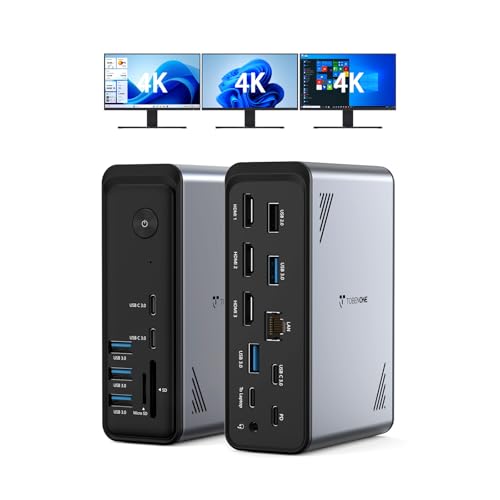
The TobenONE 18-in-1 dock is aimed at users who want many connections in one spot. Its listed features include three HDMI outputs, nine USB-A and USB-C ports, Ethernet, and PD 3.0. That port mix can suit a busy office with several screens and accessories. For a best 4k laptop docking station with an emphasis on connection options, it offers a broad feature set.
This model may fit a Windows laptop desk where monitors, storage, a network cable, and input devices all need a home. Its three HDMI ports make screen connections simple, but the laptop still needs to support the display setup you want. The listing says no power adapter is included, so check your charging plan and the dock’s power requirements before setting up your workspace.
A single dock can make a crowded desk easier to manage, especially when many devices stay plugged in. The large port count is useful, but the missing adapter can add cost and setup work. Check compatibility and included items to decide if its broad connection range is worth it.
Why It’s Great
- Three HDMI outputs provide multiple direct monitor connections.
- Nine USB-A and USB-C ports offer room for many accessories.
- Ethernet adds a wired network option for a stable desk connection.
- PD 3.0 support can serve compatible laptop charging needs when properly powered.
- Its broad connection range can reduce the need for several separate hubs.
Good to Know
- The power adapter is not included, so check what is needed to power the dock and charge a laptop.
- Three connected monitors do not guarantee three independent 4K displays on every laptop.
- Confirm operating system, USB-C video support, and display limits before buying.
Final Thoughts: The Verdict
My personal top pick is the Plugable 13-in-1 USB-C Dock for compatible users who need a flexible multi-monitor desk. Its HDMI and DisplayPort options, broad port mix, and DisplayLink support make it the most versatile choice here. It is my pick for the best 4k laptop docking station when several displays and desk devices matter more than simple plug-and-play setup.
For a smaller two-screen workspace, the Anker 8-in-1 Dual Monitor Dock is a tidy runner-up, though you need a separate charger. Choose the TobenONE 18-in-1 Dock if you value many ports and can supply the required power adapter. Before buying, match the dock to your laptop’s video support, screen needs, and budget.