
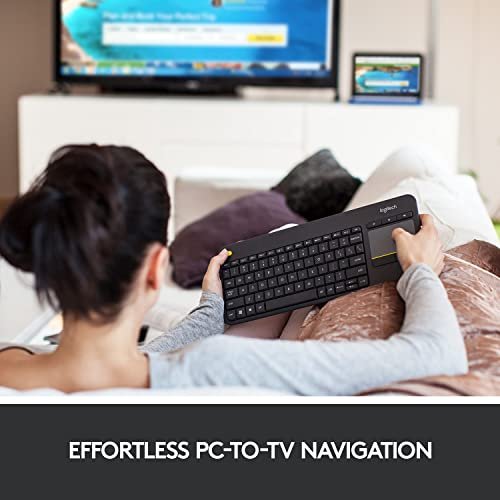
A Bluetooth wireless keyboard with a touchpad combines typing and pointer control in one handy tool. It suits people who use a smart TV, tablet, laptop, or home theater PC from across the room. Buyers value fewer desk items, easier navigation, and a simple way to control media.
A poor pick can turn a relaxed movie night into a hunt for a mouse, fresh batteries, or a working connection. Some small keyboards feel cramped, while trackpads may not support the gestures you expect. Another common mistake is assuming every wireless keyboard uses Bluetooth; some models need a USB receiver instead. That matters if your TV or tablet has no open USB port. Check the connection type, device support, key layout, power source, and touchpad size before you buy. A good match makes everyday control feel easy, not fussy.
I focus on practical computer and home media gear, and I compare the details that matter in daily use. For this guide, I reviewed the supplied product information, connection types, stated device support, and key features rather than treating every model as alike. My goal is to help you find the best bluetooth wireless keyboard with touchpad for your setup, habits, and budget.
What you’ll learn
- How Bluetooth and USB receiver connections differ
- Which keyboard fits a TV, tablet, or multi-device setup
- What to check in a touchpad, key layout, and power source
- Which listed models suit different needs and budgets
In This Article
How To Choose The Best best bluetooth wireless keyboard with touchpad
The right keyboard can make a TV, tablet, or small PC much easier to use from your seat. The wrong one may have keys that feel too tight, a touchpad that is hard to control, or a connection that your device cannot use. Do not assume that wireless means Bluetooth: the Logitech K400 Plus uses a USB receiver. Before you buy the best bluetooth wireless keyboard with touchpad for your needs, check your device ports, supported systems, power method, and where you plan to type.
Check the Connection and Device Support
First, match the keyboard connection to your device. Bluetooth models can pair with compatible tablets, phones, laptops, and TVs without using a USB port. A 2.4 GHz model may need its included receiver, so check that your TV or PC can accept it. Some products offer both connection types, which can add flexibility. Read the listed system support, too; support can vary by device and operating system. The Logitech K400 Plus is a useful TV keyboard, but it relies on a USB receiver, not Bluetooth. This detail can save you a return and help you choose the best bluetooth wireless keyboard with touchpad for your setup.
Pick a Touchpad and Size That Fit Your Use
A touchpad lets you move a pointer without keeping a mouse on your lap or sofa. For regular browsing, look for a pad large enough for steady cursor control and check whether the listing names multi-touch support. Small mini keyboards save space, but their keys and pad may feel cramped during long sessions. A fuller layout can be more comfortable for emails and work. For a TV remote-style task, compact size may matter more than typing comfort. Think about where you will hold the keyboard and how often you will type before choosing the best bluetooth wireless keyboard with touchpad.
Compare Power, Backlighting, and Device Switching
Power and extra features shape daily use. Rechargeable models avoid disposable batteries, while battery-powered keyboards may suit users who prefer quick battery swaps. Backlighting helps in a dim room, but it can affect battery life, so check the maker’s details. If you switch between a tablet, laptop, and phone, a multi-device model can reduce repeated pairing steps. Do not pay extra for lights or device switching if you will not use them. Choose features that solve a real problem, and confirm what is included before ordering the best bluetooth wireless keyboard with touchpad.
Quick Comparison
| Model | Category | Best For | Key Spec | Amazon |
|---|---|---|---|---|
| Logitech K400 Plus | TV Keyboard | PC-connected TV control | 2.4 GHz USB receiver; built-in touchpad | Amazon |
| Arteck 7-Color Backlit Keyboard | Backlit Bluetooth | Dim rooms and TV computers | Bluetooth; seven backlight colors | Amazon |
| Bnnwa Multi-Device Keyboard | Multi-Device | Switching among three devices | Bluetooth; supports three devices | Amazon |
| CZUR K5S Keyboard | Wired and Wireless | Users wanting connection options | Bluetooth and wired; rechargeable | Amazon |
| Fosmon Mini Keyboard | Compact Backlit | Travel and media devices | 2.4 GHz and Bluetooth; 500 mAh | Amazon |
In-Depth Reviews for best bluetooth wireless keyboard with touchpad
1. Logitech K400 Plus Wireless TV Keyboard

The Logitech K400 Plus pairs a compact keyboard with a built-in touchpad for controlling a PC-connected TV. Its 2.4 GHz wireless connection uses a USB receiver, not Bluetooth. Easy media controls put common TV tasks within reach. It stands out as a simple couch keyboard for compatible Windows, Android, and Chrome OS setups.
The layout suits quick searches, menu moves, and short messages from a sofa. The touchpad means you can leave a separate mouse on the desk. This keyboard is best for people who use a computer connected to a TV and have a free USB port. Check your device support before buying.
The black finish and integrated design keep the setup tidy, with no separate mouse to store. Follow the maker’s care guidance and wipe the surface gently. Its value is strongest for TV control, but buyers who need Bluetooth should choose another model.
Why It’s Great
- Combines typing and pointer control in one unit
- Includes easy media controls for TV use
- Uses a wireless USB receiver for compatible devices
- Works with listed Windows, Android, and Chrome OS devices
- Keeps a separate mouse off the sofa
Good to Know
- It uses a USB receiver rather than Bluetooth.
- It needs a compatible USB port on the host device.
- Check operating system and device support before purchase.
2. Arteck 7-Color Backlit Bluetooth Keyboard

The Arteck Universal keyboard combines Bluetooth typing, a built-in touchpad, media controls, and seven backlight colors. That mix helps users control a TV-connected computer or compatible smart device without a separate mouse. Its backlight is the key draw for evening use. Check the device’s Bluetooth and system support before pairing.
The built-in pad keeps pointer tasks close to the keys, which can make sofa browsing less awkward. Backlighting can also help when room lights are low. This model suits people who want a Bluetooth keyboard for a compatible TV computer, laptop, tablet, or other listed device. It is less useful if you prefer unlit keys.
The integrated design takes up less space than a keyboard and mouse set. Use a soft, dry cloth for routine care, and follow the product guide for cleaning. Its mix of Bluetooth and color lighting offers good convenience, though buyers should check power details and fit before ordering.
Why It’s Great
- Bluetooth avoids relying on a USB receiver
- Seven backlight colors aid use in dim rooms
- Built-in touchpad controls the pointer
- Media controls suit TV and computer use
- Listed support covers several device types
Good to Know
- Confirm Bluetooth compatibility with your exact TV or device.
- Backlighting may use more power than unlit typing.
- Check the product listing for current battery and charging details.
3. Bnnwa Three-Device Bluetooth Touchpad Keyboard

The Bnnwa keyboard is a Bluetooth model with a QWERTY layout and a large multi-touch trackpad. Its stated support for three devices makes it useful for people who move between a PC, tablet, and phone. The main draw is flexible control without a separate mouse. Confirm that each device supports its Bluetooth connection.
The full keyboard and trackpad suit users who want one control tool for several screens. It can help cut desk clutter and make tablet use feel more like laptop use. This model is best for people who often switch devices and value a larger touch area. Check the pairing steps and operating system support before use.
The combined design is easy to keep on a desk or carry between rooms. Wipe it gently with a soft cloth and avoid liquid near the keys. Its three-device support can add useful value, but check the stated layout and charging details to ensure they meet your needs.
Why It’s Great
- Can connect with up to three devices, as listed
- Large trackpad supports multi-touch input
- Bluetooth pairing avoids a USB receiver
- QWERTY layout feels familiar to many users
- Useful across compatible PCs, tablets, and phones
Good to Know
- Bluetooth support and gestures can vary by device.
- Three-device switching may take practice at first.
- Verify charging and battery details in the listing.
4. CZUR K5S Rechargeable Touchpad Keyboard

The CZUR K5S is listed as a wireless and wired keyboard with a built-in trackpad and rechargeable power. Its stated compatibility spans Windows, Mac, Android, and iOS devices. Those options make it worth a look if you want one keyboard for different kinds of hardware. Confirm the connection mode supported by each device.
The integrated touchpad lets you move a pointer without carrying a mouse, while wired and Bluetooth options offer setup choice. It may suit people who work across a laptop, tablet, or phone and want fewer desk items. Check the cable needs, pairing steps, and layout for your devices before relying on it.
A rechargeable design can reduce the need for disposable batteries. Keep the keys and pad clean with a dry, soft cloth, and follow the maker’s care notes. Its connection choices may offer solid value, but confirm the exact features and compatibility in the current product listing.
Why It’s Great
- Offers both wired and Bluetooth connection options
- Rechargeable design avoids routine disposable batteries
- Built-in touchpad reduces desk clutter
- Listed support includes Windows, Mac, Android, and iOS
- Portable format can suit a range of devices
Good to Know
- Check which wired connection and cable are included.
- Compatibility may differ across operating systems and devices.
- Review the listing for battery and charging specifics.
5. Fosmon Mini Backlit Wireless Keyboard

The Fosmon Mini keyboard brings a compact QWERTY layout, touchpad, backlighting, and both 2.4 GHz wireless and Bluetooth connections. Its listed 500 mAh rechargeable battery suits users who want a small control tool for travel or media devices. It is designed for uses such as compatible PCs, TV boxes, and home theater systems.
The mini size is handy when a full keyboard would feel bulky on a couch or in a bag. Its touchpad handles pointer tasks, while backlighting can help in a dark room. This model suits casual typing and media control more than long work sessions. Check the device connection and layout first.
The compact build is easy to store and carry, and its rechargeable battery avoids disposable cells. Use a soft cloth to clean the keys and touchpad. It offers useful features in a small package, though the reduced key size may not suit frequent or lengthy typing.
Why It’s Great
- Offers both Bluetooth and 2.4 GHz wireless modes
- Compact size suits travel and living room use
- Backlighting helps in low-light settings
- Rechargeable 500 mAh battery is listed
- Touchpad and keyboard work as one control unit
Good to Know
- Mini keys may feel cramped for long typing sessions.
- Check which connection mode your device supports.
- Battery life details can depend on backlight use.
Final Thoughts: The Verdict
My personal top pick is the Arteck 7-Color Backlit Bluetooth Keyboard for its Bluetooth link, built-in touchpad, and useful backlight. It is a strong fit for compatible TV computers and tablets. Note that the Logitech K400 Plus is made for PC-connected TVs but uses a USB receiver, not Bluetooth.
For multi-device use, consider the Bnnwa Three-Device Keyboard; the compact Fosmon may suit travel and media control. The best bluetooth wireless keyboard with touchpad depends on your devices, typing habits, and room. Check connection support and layout before you buy, then choose the model that fits your needs and budget.
1 thought on “Best Bluetooth Wireless Keyboard With Touchpad: Guide”
Comments are closed.