
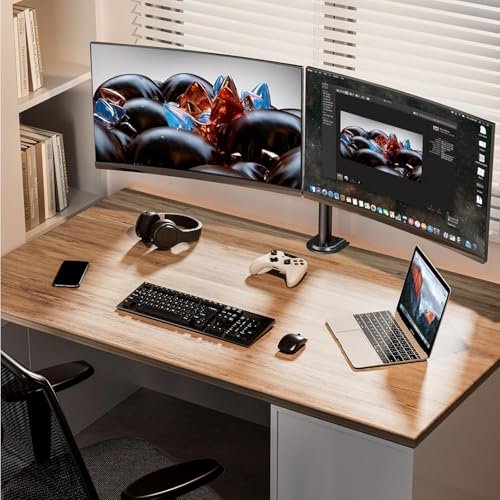
A dual monitor mount holds two screens on one desk attachment, freeing space and making screen placement easier. It suits home workers, students, and gamers who use two displays. People seek the best budget dual monitor mount to improve comfort and desk space without paying for a premium arm.
A low-cost mount can turn a tidy desk into a daily annoyance. Arms may sag, joints can feel stiff, or a clamp may not fit the desk edge. Buyers also risk choosing a mount that cannot support their screens or match their VESA holes. That mistake can mean a wobbly setup, a hard return, or monitors stuck in an awkward position. Checking screen size, weight, desk fit, and mount range first helps avoid those headaches and makes the upgrade feel worth it.
I compare dual monitor mounts by their listed screen range, per-arm weight limit, adjustment options, and desk attachment choices. I also look for clear setup details and practical limits, rather than treating a low price as proof of value. This guide to the best budget dual monitor mount prioritizes fit, steady support, useful movement, and a sensible cost.
What you’ll learn
- How screen weight and size affect mount fit
- Why VESA patterns and desk thickness matter
- Which mounts offer clamp or grommet attachment
- How to compare budget features with real needs
In This Article
How To Choose The Best best budget dual monitor mount
The right mount keeps both screens steady, easy to reach, and clear of desk clutter. A poor fit can lead to sagging arms, blocked ports, or a clamp that will not sit well on your desk. Before buying the best budget dual monitor mount, check screen size and weight, VESA support, and the desk attachment method. Do not rely on a big weight claim alone; each arm must support your own monitor, and the desk must suit the mount.
Check Screen Size, Weight, and VESA Fit
Start with the monitor’s weight without its stand, then compare it with the mount’s limit for each arm. A mount rated for two screens may still have a per-screen cap. Check the supported screen size too, since large panels can hit each other even when they are light. Most listed models here use VESA 75 x 75 or 100 x 100, but confirm your monitor has one of those patterns. The best budget dual monitor mount is only a good deal if both screens fit safely.
Match the Base to Your Desk
A C-clamp is useful when the desk edge is open and strong enough to hold it. A grommet base can work through a suitable desk hole and may suit some desk layouts better. Check the desk thickness range and look beneath the surface for drawers, rails, or braces that could block the clamp. Avoid tightening any mount onto fragile glass or a weak edge unless the maker approves it. A good base helps keep an affordable dual monitor mount steady during normal screen adjustments.
Choose the Movement You Will Use
Tilt, swivel, height changes, and portrait rotation can make a two-screen setup more comfortable, but each joint adds setup choices. Think about how you work: side-by-side screens need enough reach, while a portrait screen needs rotation and room to turn. Check that the arms can move without striking a wall or each other. If you rarely adjust your displays, a simpler mount may be easier to set up. The best budget dual monitor mount gives you useful movement without paying for features your desk cannot use.
Quick Comparison
| Model | Category | Best For | Key Spec | Amazon |
|---|---|---|---|---|
| HUANUO FlowLift Dual Monitor Stand | Best Overall | Broad fit and full motion | 13–32 in; 4.4–19.8 lb per arm | Amazon |
| ErGear Heavy Duty Dual Monitor Stand | Strong Value | Screens up to 32 inches | Up to 17.6 lb per arm | Amazon |
| VIVO STAND-V002 Dual Monitor Mount | Heavy-Duty Pick | Users needing more weight capacity | 13–30 in; up to 22 lb each | Amazon |
| ErGear Fast-Install Dual Monitor Arm | Easy Setup | Tool-free VESA attachment | 13–32 in; 4.84–19.8 lb per arm | Amazon |
| VIVO AeroPoise Dual Monitor Stand | Flexible Choice | 17–32-inch screens | Up to 19.8 lb per arm | Amazon |
In-Depth Reviews for best budget dual monitor mount
1.HUANUO FlowLift Dual Monitor Stand
 HUANUO FlowLift Dual Monitor Stand
” />
The HUANUO FlowLift supports two 13- to 32-inch screens, with each arm rated for 4.4 to 19.8 pounds. Its full-motion design allows users to tilt, swivel, and rotate compatible displays. VESA 75 x 75 and 100 x 100 patterns are supported. With both clamp and grommet base options, it offers a flexible feature set for a best budget dual monitor mount.
This mount suits people who want to adjust screen position during work, gaming, or shared desk use. The two base options can help match different desk layouts, while the wide listed screen range gives buyers room to pair common monitor sizes. Check each screen’s weight and VESA pattern before ordering. It is a practical choice for users who value movement and fit options.
The desk mount keeps screens off the work surface, which can make routine desk care easier. Its listed load range and VESA support offer solid value for many common displays. Build quality and desk fit still depend on correct installation, so check the included instructions and your desk before use.
Why It’s Great
- Supports a wide 13- to 32-inch screen range.
- Each arm has a stated capacity of 4.4 to 19.8 pounds.
- Offers C-clamp and grommet mounting options.
- Supports VESA 75 x 75 and 100 x 100 patterns.
- Full-motion adjustment helps users position screens to suit their work.
Good to Know
- Screens below the stated 4.4-pound minimum may not suit the arms.
- The desk must have a suitable edge or grommet hole for the chosen base.
- Large screens may need careful spacing to avoid contact when moved.
2.ErGear Heavy Duty Dual Monitor Stand
 ErGear Heavy Duty Dual Monitor Stand
” />
This ErGear dual monitor stand is built for two screens up to 32 inches, with a stated limit of 17.6 pounds per arm. Its adjustable arms support height changes, tilt, swivel, and screen rotation. That blend of core movement and useful capacity makes it a strong value candidate. For buyers comparing the best budget dual monitor mount options, the clear per-arm limit is helpful.
The stand suits home offices and study desks where two screens need to sit at different angles or heights. Its adjustment range can help users set up side-by-side displays without giving up as much desk space. Before purchase, check monitor weight and VESA fit, then confirm the desk can take the base. It is best for users who want flexible positioning without a premium-style shopping list.
Lifting the monitors can leave more room for a keyboard, notebook, or cleaning cloth. The stated capacity is useful for many common screens, though value depends on current price and desk fit. Tighten and check the mount as directed, and avoid forcing its joints beyond their intended range.
Why It’s Great
- Supports two screens up to 32 inches.
- Each arm is rated for up to 17.6 pounds.
- Provides height, tilt, swivel, and rotation adjustments.
- Frees desk space by holding screens above the work surface.
- Offers a useful balance of capacity and movement for a budget setup.
Good to Know
- The 17.6-pound limit applies to each arm, not an individual screen plus its stand.
- Check the included mounting method against your desk before buying.
- Large or wide monitors may limit how closely the screens can sit together.
3.VIVO STAND-V002 Dual Monitor Mount
 VIVO STAND-V002 Dual Monitor Mount
” />
The VIVO STAND-V002 holds two 13- to 30-inch screens and lists a capacity of up to 22 pounds per screen. Its articulating arms support adjustable placement, and the base can attach with a C-clamp or grommet mount. That higher stated load limit makes it worth considering for heavier compatible displays. It is a sturdy-looking option in a best budget dual monitor mount search.
This model is suited to users who want flexible screen placement and need more listed capacity than some entry-level arms provide. The two desk attachment choices can help it fit different setups, provided the desk supports the method selected. Check the monitor’s VESA pattern and dimensions first. It works best for people who prioritize capacity and arm movement over support for larger, 32-inch panels.
The stand raises screens off the desk, leaving the surface easier to organize and wipe. Its stated load limit and mounting options offer useful value when they match your setup. Confirm desk compatibility and follow the installation steps, since a strong mount still needs a secure, suitable surface.
Why It’s Great
- Lists support for screens up to 22 pounds each.
- Fits compatible monitors from 13 to 30 inches.
- Includes C-clamp and grommet mounting options.
- Articulating arms allow users to change screen position.
- A useful option for buyers whose screens exceed lighter arm limits.
Good to Know
- The stated screen size limit is 30 inches, below several newer options here.
- Confirm that your monitor’s VESA pattern matches the mount.
- The desk surface must safely support the clamp or grommet attachment.
4.ErGear Fast-Install Dual Monitor Arm
 ErGear Fast-Install Dual Monitor Arm
” />
This ErGear dual monitor arm is listed for 13- to 32-inch screens, with a load range of 4.84 to 19.8 pounds per arm. It supports VESA patterns up to 100 x 100 and uses a tool-free VESA mount to simplify attaching compatible screens. That feature may appeal to buyers who want a quicker display setup. It is a practical contender for the best budget dual monitor mount.
The stated range makes this arm suitable for many standard office and home monitors, as long as each display meets the weight and VESA requirements. Tool-free VESA attachment can make screen installation more convenient, but it does not remove the need to secure the desk base correctly. This option is best for users who value a simple monitor attachment and broad screen-size support.
The arm clears space beneath the screens and can help make desk care simpler. Its listed adjustment and load range offer practical value when both displays fit. Check the desk mount and hardware during setup, and follow the maker’s steps to keep the assembly secure.
Why It’s Great
- Supports screen sizes from 13 to 32 inches.
- Has a stated load range of 4.84 to 19.8 pounds per arm.
- Tool-free VESA mounting may speed up screen attachment.
- Supports VESA patterns up to 100 x 100.
- Offers a straightforward option for standard dual-screen desks.
Good to Know
- Screens under the listed minimum weight may not be supported.
- Tool-free VESA attachment does not mean the entire mount needs no tools.
- Verify desk fit and screen clearance before installation.
5.VIVO AeroPoise Dual Monitor Stand
 VIVO AeroPoise Dual Monitor Stand
” />
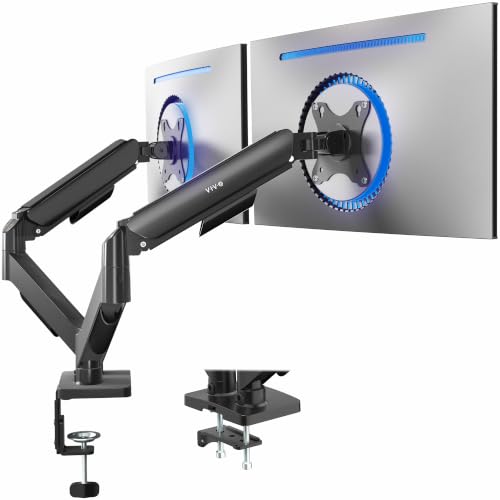
The VIVO AeroPoise is designed for two 17- to 32-inch screens, with each arm rated for up to 19.8 pounds. Its mechanical articulating arms support screen adjustment, and it fits VESA 75 x 75 and 100 x 100 patterns. Those details make it a flexible choice for larger displays. It belongs on a best budget dual monitor mount shortlist when your screens meet its size range.
This mount suits users who want to adjust compatible screens while keeping the desk surface more open. Its 17-inch minimum screen size is higher than some competing models, so it may not fit smaller displays. Check screen weight, VESA holes, and desk attachment needs before buying. It is a better match for medium or large monitors than compact screens.
Moving displays off the desk can make it easier to organize cables and clean around the work area. The listed size and load limits provide a clear starting point for judging fit. For good value, make sure both monitors and the desk suit the mount before installation.
Why It’s Great
- Supports screens up to 32 inches.
- Each arm has a listed capacity of up to 19.8 pounds.
- Fits VESA 75 x 75 and 100 x 100 patterns.
- Mechanical articulating arms allow screen repositioning.
- Offers a useful fit range for many medium and large monitors.
Good to Know
- The 17-inch minimum may rule out smaller monitors.
- The product data lists a maximum weight, but buyers should confirm their screen weight.
- Check that the desk mount and screen movement suit your workspace.
Final Thoughts: The Verdict
My personal top pick is the HUANUO FlowLift Dual Monitor Stand. Its 13- to 32-inch screen range, stated per-arm capacity, full motion, and choice of clamp or grommet base give it broad appeal. It is a strong best budget dual monitor mount for buyers who want flexibility, provided their desk and monitors fit its requirements.
The ErGear Heavy Duty Dual Monitor Stand is a good runner-up for users who want useful adjustments and support for screens up to 32 inches. Choose the VIVO STAND-V002 if its higher listed weight limit matters more. Check your monitor weight, VESA pattern, and desk before choosing the mount that fits your needs and budget.
1 thought on “Best Budget Dual Monitor Mount: Affordable Desk Picks”
Comments are closed.