
A business laptop docking station connects a laptop to screens, network access, power, and desk gear through one tidy setup. It can suit office teams, remote workers, and anyone who moves between desks. The best business laptop docking station makes daily setup faster and keeps a work area neat.
A dock that looks right on paper can still cause a long day of small annoyances. The laptop may not support the display setup you expect, the dock may not supply enough power, or a port may be missing when you need it. Cheap or poorly matched gear can mean flickering screens, slow transfers, and a desk full of adapters. Check your laptop’s ports and display limits before buying. Choosing the right dock helps avoid wasted money and makes the workday feel smooth instead of tangled.
I compare business docks by their listed ports, power needs, display support, and likely fit for common work setups. I also look closely at product details so a bundled laptop is not mistaken for a standalone dock. This guide to the best business laptop docking station prioritizes clear compatibility checks, practical use, and honest trade-offs over big claims.
What you’ll learn
- How to match a dock to your laptop’s ports and display needs
- Which models suit fixed office desks, shared workspaces, and travel
- Why charging power and screen support matter before you buy
- How to spot a laptop bundle that is not a standalone docking station
In This Article
How To Choose The Best best business laptop docking station
The right business dock can turn a desk into a simple one-cable setup, but a mismatch can cause missed screens, slow charging, or extra adapter costs. Do not shop by port count alone. Check your laptop’s USB-C or Thunderbolt support, the number and type of displays you need, and the power level it accepts. Some docks also need a separate charger or a specific cable. A little checking now helps you choose the best business laptop docking station for the way you actually work.
Check laptop and dock compatibility
Start with the ports and features on your laptop, not just the dock’s product title. USB-C can carry data, video, and power, but not every USB-C port supports all three. Thunderbolt docks may need a Thunderbolt host port to provide their full feature set. Check your laptop maker’s display and charging limits, too. A universal dock can suit mixed office fleets, while a model designed for a specific laptop family may offer a simpler fit. Avoid assuming that a connector’s shape guarantees compatibility; that mistake can leave you with a dock that charges but cannot drive your screens.
Match display support to your screens
Count your monitors and check each screen’s resolution and connection type before you buy. A dock may have two video ports but still rely on the laptop’s graphics support to run both screens at your preferred resolution and refresh rate. Read the dock and computer specifications together, and note whether you need HDMI, DisplayPort, or an adapter. For a basic office desk, a dual-display model may be enough. For a more complex setup, confirm exact screen limits rather than trusting a broad claim such as multi-display. That check can prevent a costly, frustrating surprise.
Compare power, ports, and desk use
A dock should have enough power for your laptop and enough useful ports for your daily tools. Compare the dock’s power delivery with your laptop’s charger needs, and check whether a power adapter is included. Look for Ethernet, USB-A, and card readers only if they solve a real need. A full-size dock can be a good choice for a fixed office, while a small USB-C hub may suit travel or a light setup. Do not mistake a high port count for better value. The best business laptop docking station is the one that fits your work without adding clutter or hidden costs.
Quick Comparison
| Model | Category | Best For | Key Spec | Amazon |
|---|---|---|---|---|
| Dell Pro WD25 USB-C Dock | Best Overall | Business desks needing broad connectivity | Up to 100W power; Ethernet and display ports | Amazon |
| Dell 16-Inch Ryzen 7 Business Laptop Bundle | Laptop Bundle | Buyers seeking a laptop and listed dock bundle | 16-inch touch display; 32GB DDR5 | Amazon |
| Lenovo 40B30090US USB-C Dock | Office Dock | Lenovo users and dual-screen desks | USB-C dock; dual-display listing | Amazon |
| Anker 8-in-1 Dual-Monitor USB-C Hub | Compact Value | Travel and lighter work setups | Ethernet, card reader, and up to 85W PD | Amazon |
| Microsoft Surface Thunderbolt 4 Dock | Premium Dock | Thunderbolt-ready desks and Surface users | Thunderbolt 4 docking station | Amazon |
In-Depth Reviews for best business laptop docking station
1.Dell WD25 USB-C Business Dock
 Dell WD25 USB-C Business Dock
” />
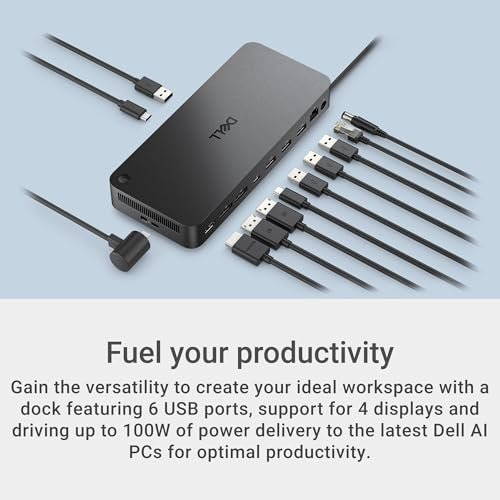
The Dell Pro WD25 is a USB-C business dock with up to 100W power delivery, Ethernet, USB-A, USB-C, HDMI, and DisplayPort connections. It aims to bring common desk gear together through one dock. Its broad port mix makes it a strong best business laptop docking station choice for compatible office laptops and monitor setups.
For a fixed desk, the WD25 can help cut down on cable swaps and keep key devices connected. Its mix of video and data ports suits many office routines, from screen sharing to wired networking. Check your laptop’s USB-C features and screen limits first. It is best for workers who want one central dock for a compatible business laptop.
The included ports can reduce adapter clutter, while the dock’s office-focused design suits a regular desk. Confirm what power adapter and cables come in the box before purchase. For a compatible laptop, it offers a useful all-in-one setup, though buyers should compare its price with the ports and power they will actually use.
Why It’s Great
- Up to 100W power delivery can suit many business laptop setups.
- Includes Ethernet for a wired office network connection.
- USB-A and USB-C ports support a mix of newer and older gear.
- HDMI and DisplayPort offer common monitor connection options.
- A central dock can help make desk setup quicker and neater.
Good to Know
- Laptop charging and display support depend on the laptop’s own specifications.
- Check the box contents to confirm which power adapter and cables are supplied.
- A full-size office dock may be more than a travel user needs.
2.Dell 16-Inch Ryzen 7 Business Laptop Bundle
 Dell 16-Inch Ryzen 7 Business Laptop Bundle
” />
This Dell listing describes a 16-inch FHD+ touchscreen business laptop with an AMD Ryzen 7 250, 32GB DDR5 memory, and Windows 11 Pro. The title also mentions a docking station set, but this is a laptop bundle, not a standalone dock. It may suit buyers replacing a computer and seeking a bundled desk setup.
The larger touch display, backlit keyboard, webcam, and Wi-Fi 6 features point to everyday office and remote work use. It is best suited to someone who needs a new laptop first and wants to assess the listed docking bundle as an extra. Before buying, verify the exact dock model and included accessories in the listing.
A laptop bundle can offer convenience if its parts match your needs, but it is not a direct substitute for the best business laptop docking station. Confirm storage details, included dock contents, and warranty terms. Buyers who only need a dock should choose a standalone model instead.
Why It’s Great
- Includes a business laptop rather than only a docking accessory.
- The listing specifies 32GB DDR5 memory for multitasking needs.
- A touchscreen may be useful for users who prefer direct input.
- Windows 11 Pro is listed for a business-focused setup.
- Could suit buyers who need to replace a laptop and build a desk setup together.
Good to Know
- This is not a standalone docking station.
- Verify the exact dock model and bundle contents before ordering.
- The listing’s storage wording should be checked carefully to confirm what is included.
3.Lenovo 40B30090US USB-C Dock
 Lenovo 40B30090US USB-C Dock
” />
The Lenovo 40B30090US is listed as a USB-C universal business dock with dual-display support. This listing also names a USB-C cable, power adapter, DisplayPort cable, HDMI cable, and cleaning cloth. The bundled cables may help reduce setup guesswork. It can be a practical best business laptop docking station candidate for a compatible office laptop.
A dual-screen desk can make it easier to keep documents, calls, and work tools in view. This dock may suit Lenovo users or mixed offices that need a USB-C connection and common video cables. Still, check your laptop’s USB-C display support and the dock’s compatibility details before you rely on two screens.
The listed power adapter and video cables make the package appealing for a desk setup. Keep the dock and cables organized to avoid wear and clutter. Its value depends on laptop compatibility and whether the included accessories are useful to you, so compare the bundle contents before purchase.
Why It’s Great
- The listing specifies a universal USB-C business dock.
- Dual-display support may suit a two-monitor office.
- A power adapter is listed among the included items.
- The package names both DisplayPort and HDMI cables.
- Useful for buyers who want several setup items in one purchase.
Good to Know
- Dual-screen capability depends on the connected laptop and its graphics support.
- Confirm the dock’s compatibility with your laptop before purchase.
- The listing’s extra cables may be unnecessary if you already own suitable ones.
4.Anker 8-in-1 Dual-Monitor USB-C Hub
 Anker 8-in-1 Dual-Monitor USB-C Hub
” />
The Anker 8-in-1 USB-C hub combines HDMI connections, Gigabit Ethernet, an SD/TF card reader, and up to 85W power delivery. Its compact hub format takes less desk space than many full-size docks. For compatible laptops, this best business laptop docking station option can add useful connections for work and travel.
Its smaller size can fit a shared desk or laptop bag more easily than a large dock. Ethernet and card readers may help users who move files or prefer a wired connection. The listing says the charger is not included, so plan to use a suitable power source. Check how your laptop handles multiple screens.
The compact design is easy to store and helps keep a light setup portable. As with any small hub, avoid pulling on its cable or leaving it under heavy items. It can offer good value for users who need its ports, but buyers needing a full desktop dock should compare larger models.
Why It’s Great
- Compact design suits travel and smaller work areas.
- Gigabit Ethernet provides a wired network option.
- SD and TF card readers support common memory cards.
- Up to 85W power delivery is listed for compatible setups.
- A range of ports can reduce the need for separate adapters.
Good to Know
- The charger is not included.
- The laptop must support the required USB-C video features.
- Check operating system and monitor limits before expecting two independent displays.
5.Microsoft Surface Thunderbolt 4 Dock
 Microsoft Surface Thunderbolt 4 Dock
” />
The Microsoft Surface Thunderbolt 4 Dock is a desk-focused dock for compatible Thunderbolt 4 and Surface work setups. Thunderbolt can support fast connections and a flexible desk layout when the host laptop also supports it. It is a premium best business laptop docking station option for buyers who want a matching Microsoft dock.
A dedicated dock can make it easier to connect a laptop to desk gear with fewer repeated plug changes. This model is best suited to Surface users or other compatible Thunderbolt laptops who have checked the port and display requirements. Confirm that your computer supports Thunderbolt features before paying extra for them.
Its purpose-built desk design can help keep a work area organized. As with any premium dock, check the package contents, connected-device needs, and laptop support before buying. The value is strongest when your laptop can use Thunderbolt 4 and your desk setup needs its capabilities.
Why It’s Great
- Thunderbolt 4 is listed for compatible high-speed setups.
- A Microsoft dock may be a natural fit for compatible Surface users.
- Designed for a permanent desk connection rather than constant adapter swaps.
- Can support a tidy central connection point for desk gear.
- Worth considering for users already invested in compatible Thunderbolt devices.
Good to Know
- Thunderbolt features require a compatible laptop port.
- It may cost more than a basic USB-C hub.
- Check display, charging, and accessory support for your exact computer.
Final Thoughts: The Verdict
My personal top pick is Dell Pro WD25 USB-C Dock for its office-ready mix of charging, Ethernet, and display connections. It is a strong best business laptop docking station choice when your laptop supports its features. The Lenovo 40B30090US is a useful runner-up for buyers who want listed dual-display support and cables in the box.
Choose the compact Anker hub for travel or a lighter desk, and consider Microsoft’s Thunderbolt dock if your laptop supports Thunderbolt 4. The Dell laptop bundle is for people shopping for a computer, not just a dock. Before you buy, match the dock’s power and display support to your laptop, then choose the option that fits your needs and budget.
2 thoughts on “Best Business Laptop Docking Station: Choose The Right Hub”
Comments are closed.