
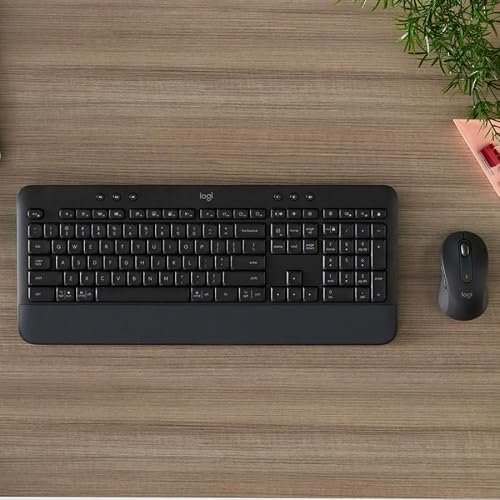
A business wireless keyboard lets you type and work without a cable crossing your desk. It suits office teams, remote workers, and anyone who wants a tidy setup. The best business wireless keyboard pairs reliable connection, useful comfort, and practical features for long workdays.
A keyboard can seem fine at first, then become a daily nuisance. Keys may feel stiff, the connection may drop, or a tiny mouse may strain your hand. Some buyers also choose a compact model without checking whether it has a number pad, then miss it during data entry. Others pay for features they never use. The right choice matters because this is a tool you touch all day. A dependable set can make work feel smoother, quieter, and less tiring.
I focus on office input gear and compare the details that matter at a real desk: connection options, layout, noise, and the included mouse. I reviewed the listed product features and weighed each set for work use, space, and ease of setup. This guide puts clear trade-offs first, so you can find the best business wireless keyboard for your routine and budget.
What you’ll learn
- Which connection type fits your office setup and security needs
- How full-size and compact layouts affect daily work
- What to expect from each included mouse and keyboard
- Which wireless combo offers the best fit for your budget
In This Article
How To Choose The Best best business wireless keyboard
The right wireless keyboard can make long work sessions feel easy, while a poor fit can turn every task into a small annoyance. Check the layout, connection, and mouse before you buy. A low-cost set may lack the features your work needs, and a compact board can leave you short of a number pad. Think about your desk, devices, and daily tasks first. These simple checks can help you pick the best business wireless keyboard without paying for extras you will not use.
Pick a Layout That Fits Your Work
A full-size keyboard gives you a number pad, which helps with budgets, spreadsheets, and frequent data entry. It also takes up more desk space. A compact keyboard can make a small desk feel less crowded, but you may miss the number pad or need time to adjust to its layout. Before you buy, check the key layout and compare it with the keyboard you use now. The MK650, MK540, MK370, and MK270 offer full-size layouts, while the MK470 is a compact choice. The best business wireless keyboard is the one that fits your tasks.
Check Wireless Options and Device Fit
Wireless sets may use a USB receiver, Bluetooth, or both. A receiver is simple to plug in and use, but it takes up a USB-A port. Bluetooth can be useful when you want to connect without a receiver, though device support can vary. The MK650 and MK370 offer Logi Bolt and Bluetooth options; the other listed combos use a USB-A nano receiver. Check the ports and operating systems on your work computer before ordering. For shared office use, a business-focused model with flexible connection options may be the best business wireless keyboard choice.
Balance Comfort, Noise, and Desk Space
A keyboard should feel comfortable through a full workday, not just during a quick test. Look at the key style, wrist support, and mouse shape, then consider how much desk room the set needs. The MK540 includes an integrated palm rest, while the MK470 is a slim, quiet option for a smaller space. Quiet keys can also help in shared rooms or video calls. Do not assume every compact mouse will suit your hand. If possible, check the dimensions and choose the best business wireless keyboard combo for your posture and work setting.
Quick Comparison
| Model | Category | Best For | Key Spec | Amazon |
|---|---|---|---|---|
| Logitech Signature MK650 Combo | Best Overall | Office users who want flexible connections | Logi Bolt, Bluetooth, SmartWheel | Amazon |
| Logitech MK270 Combo | Budget Pick | Simple everyday office tasks | Full-size board, USB-A receiver | Amazon |
| Logitech MK540 Combo | Comfort Pick | Users who want a palm rest | Full-size board, integrated palm rest | Amazon |
| Logitech MK470 Slim Combo | Compact Pick | Small desks and quiet work | Slim keyboard and quiet mouse | Amazon |
| Logitech MK370 for Business | Business Pick | Teams needing flexible connections | Logi Bolt receiver, Bluetooth | Amazon |
In-Depth Reviews for best business wireless keyboard
1.Logitech MK650 Business Wireless Combo
 Logitech MK650 Business Wireless Combo
” />
The Logitech Signature MK650 pairs a full-size keyboard with a mouse that has a SmartWheel. It supports Logi Bolt and Bluetooth, giving business users useful connection choices. Its broad device support suits mixed work setups. For buyers seeking the best business wireless keyboard, this combo stands out for its work-focused features and flexible pairing.
The full-size layout keeps a number pad close for spreadsheets and forms. Its included mouse is designed for everyday desk work, and the SmartWheel can move through long pages with less effort. I see it as a strong fit for office staff and remote workers who value ease of use. Check your desk space before choosing this full-size set.
The graphite finish gives the set a neat, office-ready look. A combo also means fewer separate items to shop for and match. Keep the keyboard and mouse clean with a soft, dry cloth, and avoid spills around the keys. Its flexible connections make it a useful long-term value for many business desks.
Why It’s Great
- Offers both Logi Bolt and Bluetooth connection options.
- Full-size layout includes a number pad for office tasks.
- SmartWheel mouse helps with long documents and web pages.
- Designed for use across several common operating systems.
- Keyboard and mouse come together as a coordinated set.
Good to Know
- The full-size keyboard needs more desk room than a compact model.
- Some users may prefer a keyboard with an included palm rest.
- Bluetooth and receiver support depend on the device and setup.
2.Logitech MK270 Full-Size Wireless Combo
 Logitech MK270 Full-Size Wireless Combo
” />
The Logitech MK270 combines a full-size wireless keyboard and a compact, ambidextrous mouse. One included USB-A nano receiver connects both devices, keeping setup simple. Its spill-resistant keyboard design can help guard against small accidents, though it is not meant for soaking. This no-fuss combo is a practical best business wireless keyboard option for basic office tasks.
The familiar full-size layout gives you a number pad for data entry and everyday work. Its compact mouse is made for either hand, which can help when a desk serves more than one user. The simple receiver setup suits people who want to plug in and start typing. It is best for routine office use, not advanced multi-device workflows.
The black finish fits most office spaces, and the matched set keeps shopping simple. Wipe the surface with a soft cloth and keep liquids away from the keys. Its practical design and straightforward setup offer good value for users who want basic wireless input without added connection features.
Why It’s Great
- One receiver connects both the keyboard and mouse.
- Full-size layout includes a useful number pad.
- Spill-resistant design helps with minor desk mishaps.
- Ambidextrous mouse works for left- and right-handed users.
- Simple setup suits users who want a basic wireless set.
Good to Know
- It connects through USB-A and does not list Bluetooth support.
- The mouse is compact and may feel small in larger hands.
- It lacks the multi-connection options found on business-focused models.
3.Logitech MK540 Advanced Wireless Combo
 Logitech MK540 Advanced Wireless Combo
” />
The Logitech MK540 pairs a full-size keyboard with an ambidextrous mouse and a USB-A nano receiver. Its quiet keyboard includes a number pad and integrated palm rest, making it a comfort-minded choice for daily work. This best business wireless keyboard contender suits buyers who want a familiar layout and a little extra wrist support at their desk.
The broad layout gives office users room for regular typing and number-heavy tasks. The integrated palm rest is handy for people who like support built into the keyboard, while the full-size mouse offers a familiar grip. It is best suited to a fixed desk with enough room for a larger set. Check your available space before buying.
The black set has a practical, work-ready look and covers both core input needs. Regular dusting with a soft cloth helps keep the keys clean. The included palm rest and full-size layout add useful value, though people seeking Bluetooth or a compact design may prefer another model.
Why It’s Great
- Integrated palm rest provides built-in wrist support.
- Full-size keyboard includes a number pad.
- Quiet key design can suit shared work areas.
- Ambidextrous mouse works for either hand.
- One included receiver keeps setup straightforward.
Good to Know
- The full-size layout takes up more desk space.
- The listed connection is a USB-A nano receiver.
- The palm rest is integrated, so its position cannot be adjusted separately.
4.Logitech MK470 Slim Wireless Combo
 Logitech MK470 Slim Wireless Combo
” />
The Logitech MK470 is a slim wireless keyboard and mouse combo made for smaller desks. Its low-profile keyboard and quiet mouse keep the setup neat and restrained. The compact design can free up room for notes or a laptop. For office users who value space and low noise, it may be the best business wireless keyboard fit.
The compact keyboard suits light typing, email, and everyday tasks, while the quiet mouse can be welcome in shared rooms. It is listed for Windows and ChromeOS, so check compatibility if you use another system. This combo is best for people with a small desk who do not rely on a full-size number pad.
The slim graphite design is easy to fit into a tidy workspace. Use a soft cloth for routine cleaning and keep liquids away from the keyboard. Its space-saving form offers strong value when desk room matters, but users who need a number pad may find a full-size model more practical.
Why It’s Great
- Compact design leaves more room on a small desk.
- Low-profile keyboard has a slim, tidy look.
- Quiet mouse is suited to shared work areas.
- Ambidextrous mouse design can suit either hand.
- A matched keyboard and mouse provide a simple setup.
Good to Know
- The compact layout does not provide a full-size number pad.
- Listed compatibility focuses on Windows and ChromeOS.
- Low-profile keys may not suit users who prefer taller key shapes.
5.Logitech MK370 Business Wireless Combo
 Logitech MK370 Business Wireless Combo
” />
The Logitech MK370 for Business combines a full-size keyboard and mouse with Logi Bolt and Bluetooth connection options. It is designed for business use and supports common systems, including Windows, Mac, Chrome, and Linux. Its flexible setup makes it a strong best business wireless keyboard candidate for offices with a mix of devices and work needs.
The full-size board offers a number pad for routine office work, while the wireless options let users choose a receiver or Bluetooth setup where supported. Its business focus makes it a fit for teams and people who switch between compatible devices. Before buying, check the connection needs and device support in your own workplace.
The graphite finish is understated and fits a work desk. A soft cloth is enough for day-to-day surface care; keep liquids away from the keyboard. The included keyboard and mouse make setup convenient, and the dual connection options add value for business users who need flexibility.
Why It’s Great
- Offers Logi Bolt USB receiver and Bluetooth options.
- Full-size keyboard includes a number pad.
- Designed for business use and common operating systems.
- Can suit offices with a mix of compatible devices.
- Combines keyboard and mouse in one wireless set.
Good to Know
- The full-size keyboard needs a fair amount of desk space.
- Bluetooth use depends on support from the connected device.
- Its business features may be more than a basic home setup needs.
Final Thoughts: The Verdict
My personal top pick is the Logitech Signature MK650 Combo. It brings a full-size layout, SmartWheel mouse, and both Logi Bolt and Bluetooth options, making it a balanced best business wireless keyboard for many desks. The added flexibility is useful at work, while the number pad supports everyday office tasks. Check that its size suits your desk before choosing it.
For a simpler setup, the Logitech MK270 is a practical pick for basic tasks and a USB-A receiver. Choose the MK470 if desk space and quiet use matter most, or the MK540 if you want an integrated palm rest. Compare your device ports, layout needs, and budget, then choose the set that fits your workday.