
A docking station connects a laptop to monitors, storage, a keyboard, and other desk gear through one link. The best cheap docking station can help home workers, students, and office users cut cable clutter without paying for features they will not use.
A low-cost dock can look like a bargain until a screen stays dark, a laptop charges slowly, or a promised port does not work as expected. Buyers often miss the difference between a USB-C data port and one that supports video, or assume every Mac can use two extended displays. Some docks also need a separate charger, which raises the real cost. Checking your laptop, screen setup, and power needs first can save time and frustration. The right best cheap docking station should make your desk simpler, not add another puzzle.
I compare docks by their listed ports, power limits, display claims, and likely fit for common laptop setups. I also look for details that shoppers can overlook, such as a charger sold separately or display support that depends on the computer. This guide focuses on practical value, clear trade-offs, and helping readers find the best cheap docking station for their own desk.
What you’ll learn
- How to match a dock to your laptop and monitor setup
- Which listed features can affect the real cost
- What each model offers and where it has limits
- How to choose a dock that fits your daily work
In This Article
How To Choose The Best best cheap docking station
Choosing a dock by port count alone can lead to a frustrating desk setup. A laptop may lack the video support needed for the screens you want, while a dock may need a separate charger to deliver its full power. Some low-cost models also list features that depend on your computer or operating system. Before buying the best cheap docking station, check your laptop model, screen resolution, charging needs, and return policy. A few minutes of checking can prevent a costly mismatch.
Check Laptop and Display Compatibility
Start with your laptop’s USB-C ports and confirm that they support video output, often listed as DisplayPort Alt Mode or Thunderbolt. A USB-C shape alone does not promise display support. Next, check the dock’s monitor limits, resolution, and refresh rate against your screens. Many Windows docks use MST for extended displays, but Mac support can differ by model and may mirror screens instead. The best cheap docking station is the one that works with your exact laptop, not just one with the most HDMI ports. Check the maker’s compatibility notes before you order.
Compare Charging Needs and Real Cost
Look at the dock’s power delivery rating and compare it with your laptop’s charger needs. A dock that offers 85W or 100W may still need a separate power adapter, and some listed output is shared among ports. For light laptops, a modest rating may be enough; powerful work laptops can need more. Include the cost of any missing charger when judging the best cheap docking station. Do not assume a high wattage printed on a box means every connected device receives that amount. Check whether the dock includes a power supply and the needed host cable.
Choose Ports You Will Actually Use
List the gear you plug in each day: monitor cables, USB drives, wired internet, headphones, or memory cards. A card reader is handy for photographers, while Ethernet can help in busy or weak Wi-Fi spaces. Check USB data speeds too, since a charging port may not transfer files quickly. Avoid paying extra for ports you will never use, but leave room for a new screen or accessory. The best cheap docking station balances useful connections with a price that fits your budget. Read the port layout carefully so plugs will not crowd your desk.
Quick Comparison
| Model | Category | Best For | Key Spec | Amazon |
|---|---|---|---|---|
| Dell Pro Dock WD25 | Office dock | Desk users who need broad connectivity | USB-C, 100W, Ethernet, HDMI and DisplayPort | Amazon |
| Anker 8-in-1 USB-C Dock | Compact value | Travel and simple dual-screen desks | Dual HDMI, up to 85W PD | Amazon |
| Anker Prime 14-in-1 Dock | Feature rich | Users needing many ports and fast data | Dual 4K HDMI, 10Gbps data, 160W max output | Amazon |
| UANTIN 10-in-1 USB-C Dock | Budget multiport | Users seeking a compact set of common ports | 4K HDMI, 100W PD, SD and microSD | Amazon |
In-Depth Reviews for best cheap docking station
1. Dell Pro WD25 USB-C Dock

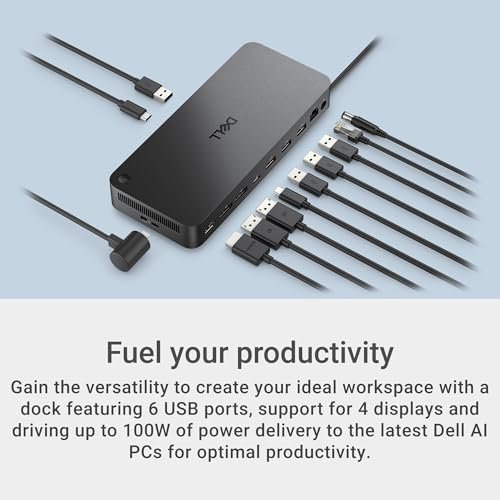
The Dell Pro WD25 is a USB-C dock built for a busy desk. Its listed features include up to 100W power delivery, Ethernet, USB-A and USB-C ports, HDMI, and DisplayPort. It is designed to connect common work gear through one dock. Its broad port mix makes it a strong choice for users seeking an office-ready best cheap docking station.
This dock suits people who leave a laptop at the same desk and want fewer daily plug-ins. Connect the host cable, then add compatible displays, wired network, and USB gear. Dell lists quad-display support, but the result depends on the laptop, its graphics, and screen setup. Check those details before buying. It is best for work users who value a tidy setup.
A dock can reduce cable mess, though you should check whether its package includes every power item you need. Its wide port selection adds useful value for a fixed desk. Confirm your laptop’s compatibility and display needs first, especially if you plan to run several screens.
Why It’s Great
- Up to 100W power delivery can suit many compatible work laptops.
- HDMI and DisplayPort offer useful monitor connection choices.
- Ethernet gives a wired network option for a stable desk setup.
- USB-A and USB-C ports support a mix of everyday accessories.
- Broad connectivity can help replace several separate adapters.
Good to Know
- Display count and resolution depend on the laptop and its graphics support.
- Check included power accessories and host compatibility before purchase.
- A full-size desk dock may be less convenient for frequent travel.
2. Anker 8-in-1 Dual HDMI USB-C Dock

This Anker 8-in-1 USB-C dock brings dual HDMI, Gigabit Ethernet, USB ports, SD and TF card readers, and up to 85W power delivery into a compact hub. It can simplify a small desk or travel kit without the bulk of a larger dock. For shoppers comparing the best cheap docking station options, its port mix stands out.
The compact form makes it easy to carry between home, school, and work. Connect a compatible USB-C laptop, then add displays and other gear as needed. A charger is not included, so plan for a compatible power adapter if you want laptop charging. Display behavior can vary by laptop and operating system. It is best for users who want many connections in a small hub.
Its small design takes little desk space and is simple to pack away. As with any compact hub, avoid strain on its cable and ports. Its useful mix can offer good value, but include the cost of a charger and confirm screen support before choosing it.
Why It’s Great
- Two HDMI ports provide options for a dual-screen setup.
- Gigabit Ethernet supports a wired network connection.
- SD and TF readers help transfer files from cards.
- Compact size works well for travel or a small desk.
- Up to 85W PD can charge compatible laptops with a suitable charger.
Good to Know
- The charger is not included, which can raise the total cost.
- Dual-display support and screen modes depend on the laptop and operating system.
- The listed 85W is a maximum; actual charging can vary by setup.
3. Anker Prime 14-in-1 Docking Station

The Anker Prime 14-in-1 dock is the most feature-rich pick here. Its listed features include dual 4K HDMI, 10Gbps data transfer, Ethernet, audio connections, and up to 160W total output. A smart interface adds a clear control point. This is not the lowest-cost choice, but it offers many connections for users who need more than a basic best cheap docking station.
It is designed for a more involved desk, with ports for displays, network access, audio, and data devices. The wide set of connections can help keep a laptop setup neat. Check your computer’s video support before relying on two extended screens, as display behavior varies by system. It suits users with several devices who want fewer adapters on the desk.
Its higher port count can make desk cleanup easier, though the dock itself takes more space than a small hub. Review power and display needs before paying for its extra features. For users who will use those ports, it may offer better long-term value than separate adapters.
Why It’s Great
- Fourteen listed functions support a broad range of desk gear.
- Dual 4K HDMI outputs offer high-resolution display options.
- 10Gbps data transfer is useful for compatible fast storage.
- Ethernet and audio ports add practical desktop connections.
- Up to 160W max output offers substantial shared power capacity.
Good to Know
- Its feature set may be more than a basic laptop setup needs.
- The 160W figure is maximum output, not a promise of that amount to each port.
- Confirm your laptop’s support for the display modes you plan to use.
4. UANTIN 10-in-1 USB-C Dock

The UANTIN 10-in-1 USB-C dock lists 4K HDMI, two USB-C ports, three USB-A ports, 100W power delivery, and SD and microSD readers. That gives it a useful range of connections for a compact hub. Its listed feature mix may appeal to buyers seeking a best cheap docking station with display, data, and card access in one device.
This multiport adapter can suit a student, home worker, or laptop user who needs common connections without a large desktop dock. Its card slots can help with photo transfers, while its USB ports make room for everyday accessories. Check whether your laptop supports video over USB-C and how its system handles external screens before you buy.
A small hub is easy to move and can keep a work surface less cluttered. Treat its cable and ports with care, as with any compact adapter. Its value depends on compatibility and the accessories included, so check the listing for power supply details before you compare prices.
Why It’s Great
- Three USB-A ports support common older accessories.
- Two USB-C ports add flexible connection options.
- SD and microSD slots can simplify card transfers.
- The 4K HDMI listing provides a high-resolution display option.
- Up to 100W PD can suit compatible laptop charging setups.
Good to Know
- The laptop must support video over USB-C for HDMI output to work.
- Confirm whether a power adapter is included before comparing total cost.
- Actual display support can vary with the host laptop and operating system.
Final Thoughts: The Verdict
My personal top pick is Dell Pro WD25 USB-C Dock for a work desk that needs Ethernet, monitor connections, and up to 100W power delivery. Its broad port mix makes it a practical best cheap docking station for compatible office laptops. Check display support before ordering, as screen limits depend on your computer.
For a smaller and more portable setup, consider the Anker 8-in-1 USB-C Dock; remember that its charger is sold separately. The Anker Prime suits users who need more ports and faster data, while UANTIN offers a compact mix of common connections. Choose based on your laptop, screens, and budget.