
A docking station turns one laptop port into a handy desk hub for screens, drives, network cables, and other gear. Students, remote workers, and office teams buy one to cut cable clutter and connect faster. This guide to the best cheap docking stations covers simple hubs and full desk docks.
A low-cost dock can save money, but the wrong one can waste your day. A screen may stay dark, a laptop may charge too slowly, or two HDMI ports may not work as two separate displays on your computer. Some docks also need a power adapter or software that buyers do not expect. Check your laptop’s ports and display support before you shop. A few minutes of care can prevent a desk full of tangled cords and a return trip to the store.
I focus on laptop docks and the small details that matter at a real desk: host connection, power needs, screen limits, and ports you will use. I compared the listed features and compatibility notes for these picks, while avoiding claims that depend on a specific laptop. This guide to the best cheap docking stations puts clear trade-offs and useful value first.
What you’ll learn
- How to match a dock to your laptop ports and operating system
- Which models offer charging, network, and screen connections
- Why some dual-screen docks need software or have display limits
- Which option best fits a simple desk, busy office, or tight budget
In This Article
How To Choose The Best best cheap docking stations
The right dock should make your desk easier, not add new tech trouble. First check the ports on your laptop, then confirm the dock works with its operating system and screens. A common mistake is to assume that every USB-C port can send video or that two HDMI ports always show separate screens. Cheap docks may also lack a charger or need driver software. Focus on the features you will use each day, and check the power and screen limits before you buy one of the best cheap docking stations.
Check Laptop Ports and Compatibility
Start by checking the laptop’s exact ports and its manual. USB-C is a connector shape, not a promise that video or charging will work. Look for support for video output and power delivery if you want a one-cable setup. Also check the dock’s supported operating systems. Some USB 3.0 docks use display drivers, while other docks rely on video features built into USB-C. This matters for work laptops with restricted software. The best cheap docking stations are only a good deal when they suit your computer, so confirm the model before you order.
Match Screen Support to Your Setup
Count the screens you plan to use, then check the dock’s stated resolution and refresh rate for each one. A dock that supports one 4K screen may not run two 4K screens at the same rate. Mac and Windows laptops can also handle multiple screens in different ways. Some docks mirror displays or need extra software to extend them. Do not rely on the number of HDMI ports alone. A basic USB 3.0 dock can suit light office work, while a USB-C dock with clear multi-screen support is better for a more demanding desk.
Compare Power, Ports, and Total Cost
Check whether the dock includes a charger, how much power it can pass to your laptop, and which ports you need. A dock’s maximum power figure does not mean every connected device receives that amount. If you use a high-power laptop, compare the dock’s charging rating with the laptop’s own adapter. Count useful ports such as Ethernet, USB-A, USB-C, and card readers. Include the cost of a separate charger or cables when comparing the best cheap docking stations. Paying a little more for the ports you need can be better value than buying a bare hub.
Quick Comparison
| Model | Category | Best For | Key Spec | Amazon |
|---|---|---|---|---|
| Dell Pro Dock WD25 | Office dock | A connected desk setup | USB-C, up to 100W, Ethernet | Amazon |
| Anker 8-in-1 USB-C Dock | Compact hub | Everyday use and travel | Dual HDMI, up to 85W PD | Amazon |
| Anker Prime 14-in-1 Dock | Feature-rich dock | A busy desk with many devices | Dual 4K HDMI, 10Gbps data | Amazon |
| Plugable Triple Display USB-C Dock | Multi-screen dock | Windows users with three screens | 100W PD, three HDMI outputs | Amazon |
| Plugable UD-3900 USB 3.0 Dock | Budget dock | Basic desk expansion | Dual HDMI, six USB ports | Amazon |
In-Depth Reviews for best cheap docking stations
1. Dell Pro WD25 USB-C Dock

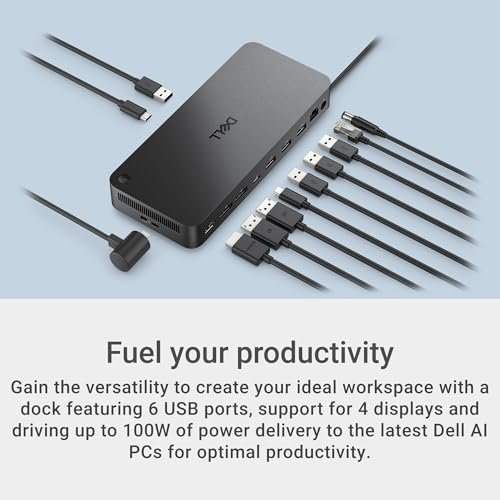
The Dell Pro WD25 is a USB-C desk dock with up to 100W power delivery, Ethernet, USB-A, USB-C, DisplayPort, and HDMI. Its listed support for multiple displays gives a work desk room to grow. This broad port mix stands out for people who want to connect a laptop, screens, and desk gear through one dock.
For day-to-day work, the WD25 can help keep a laptop, network cable, and accessories in one place. Its USB-C link makes it a fit for compatible laptops that support video and charging over that port. It is best suited to office users who need a fuller desk setup, not travelers seeking a tiny hub.
The dock’s desk-focused port range can reduce cable clutter and keep common connections close at hand. Check the box contents and laptop support before buying, since power and display needs vary. For users who will use its ports, it can offer better value than a simpler hub.
Why It’s Great
- Up to 100W power delivery can suit many compatible work laptops.
- Includes both DisplayPort and HDMI for screen connections.
- Ethernet gives a wired network option at the desk.
- USB-A and USB-C ports support a mix of newer and older gear.
- A broad port selection can reduce the need for extra adapters.
Good to Know
- Confirm your laptop supports video and charging over USB-C.
- The 100W figure is a maximum; actual charging depends on the laptop and setup.
- Check display limits and included power gear before purchase.
2. Anker 8-in-1 Dual HDMI USB-C Dock

This Anker 8-in-1 USB-C hub brings dual HDMI, Ethernet, USB connections, and SD and TF card readers into a compact dock. It supports up to 85W power delivery pass-through, but the charger is not included. For compatible laptops, its mix of display, network, and card slots makes it a flexible pick among the best cheap docking stations.
The small hub is easy to place beside a laptop or pack for a trip. It suits students and home workers who want screen and network connections without a large desk dock. Check your computer’s ability to run separate screens, as operating system and laptop limits can affect what the two HDMI ports do.
Its compact design keeps a few daily connections close by, while the card slots can help with photo transfers. Remember to budget for a compatible charger if you need pass-through power. It offers good utility when its display limits and port count fit your setup.
Why It’s Great
- Compact size works well for small desks and travel bags.
- Two HDMI ports provide flexible screen connections on supported systems.
- Ethernet offers a wired network option.
- SD and TF slots are useful for photo and file transfers.
- Up to 85W pass-through can reduce the need for a separate laptop cable.
Good to Know
- A charger is not included, so pass-through charging needs a suitable power adapter.
- Two HDMI ports do not guarantee two extended displays on every laptop.
- The 85W maximum may not meet the needs of every high-power laptop.
3. Anker Prime 14-in-1 Dock

The Anker Prime is a 14-in-1 laptop dock with dual 4K HDMI, Ethernet, audio, and fast data ports rated up to 10Gbps. Its stated 160W maximum output serves the dock’s connected devices; it should not be read as a promise of 160W laptop charging. This broad feature set suits users who want fewer adapters on a busy desk.
The dock is designed for a fixed work area with a laptop, screens, and several accessories. Its many connections can make daily desk changes easier, especially for users who move between laptop and desktop-style work. Check your laptop’s display support and the exact power details before choosing it over a smaller hub.
A single dock can help tidy a large group of cables, and the port range gives room for varied gear. Its extra features may be more than a basic setup needs. It is better value for buyers who will use its many connections than for those seeking the lowest-cost option.
Why It’s Great
- Many ports support a broad set of desk accessories.
- Dual 4K HDMI outputs add display flexibility on supported laptops.
- 10Gbps data ports can speed up transfers with compatible devices.
- Ethernet and audio connections help serve a full work setup.
- A smart interface adds useful access to dock information.
Good to Know
- A large feature set may not suit buyers who only need a basic hub.
- Display output depends on the laptop and operating system.
- The 160W maximum output is not the same as laptop charging wattage.
4. Plugable Triple Display USB-C Dock

This Plugable USB-C dock offers three HDMI outputs, up to 100W power delivery, and six USB ports rated at 5Gbps. Its listed screen setup supports one 4K display at 30Hz and two 1080p displays at 60Hz. That clear mix can help users plan a multi-screen desk, but check the computer and system requirements first.
The dock is aimed at people who want several screens and a set of wired accessories in one place. It can suit compatible Windows users who need a broad work view, such as spreadsheets beside calls and documents. Plugable lists Windows, macOS, and ChromeOS support, but display behavior and features can vary by system.
Its many USB ports and screen outputs can simplify a busy desk when the laptop meets the requirements. Check how power delivery works with your laptop and whether any driver setup is needed. It offers useful value for multi-screen work, but may be too much dock for a single-screen user.
Why It’s Great
- Three HDMI outputs can support a wide multi-screen workspace.
- The listed display rates make screen expectations clearer.
- Up to 100W power delivery supports a one-cable desk setup on compatible laptops.
- Six USB ports provide room for several wired devices.
- Designed for use with Windows, macOS, and ChromeOS, subject to system limits.
Good to Know
- The 4K HDMI output is listed at 30Hz, not 60Hz.
- Multi-display support depends on the laptop, operating system, and dock requirements.
- Confirm whether your setup needs software or drivers before buying.
5. Plugable UD-3900 USB 3.0 Dock

The Plugable UD-3900 is a USB 3.0 universal dock with two HDMI outputs, Gigabit Ethernet, audio, and six USB ports. It can connect through USB 3.0 or USB-C, and it uses a driver for display support. It is a practical way to add desk connections for users who do not need USB-C charging from the dock.
This dock is best suited to basic home or office work, such as browsing, documents, and video calls. Its USB connection can work with many computers, but the required driver and system support matter. It is not the best match for users who need a high-refresh gaming screen or a simple, driver-free setup.
The sturdy set of ports can keep a keyboard, mouse, network cable, and screens connected at the desk. Its older USB 3.0 design trades modern charging features for broad utility. For a basic setup, it can be a useful value if its driver and screen limits suit your needs.
Why It’s Great
- Two HDMI outputs add screen options to a compatible computer.
- Six USB ports can connect a range of desk accessories.
- Gigabit Ethernet supports a wired network link.
- USB 3.0 or USB-C connection options offer host flexibility.
- A useful choice for basic desk expansion without USB-C power delivery.
Good to Know
- Display support requires a driver, so it is not a plug-and-play choice for every user.
- It does not provide USB-C power delivery to charge the laptop.
- Check supported operating systems and screen limits before purchase.
Final Thoughts: The Verdict
My personal top pick is the Anker 8-in-1 USB-C Dock for its useful mix of HDMI, Ethernet, and card readers in a compact hub. It is a strong fit for everyday work when your laptop supports the screens you plan to use. The best cheap docking stations still need to match your computer, so check power and display support before ordering.
For a fuller office setup, consider the Dell Pro WD25, with broad desk ports and up to 100W power delivery. Choose the Plugable UD-3900 for basic expansion if its driver needs suit you, or the triple-display Plugable for a compatible multi-screen desk. Anker Prime suits users who need many ports. Pick based on your laptop, screens, and budget.