

A universal laptop docking station adds useful ports and can connect your laptop to monitors, a keyboard, and wired internet through one dock. It suits home workers, students, and office users who want a tidier desk. The best cheap universal laptop docking station balances reliable connections with a fair price.
A low-cost dock can look like a bargain until a screen stays dark, a monitor flickers, or the laptop will not charge. Buyers often assume every USB-C port supports video, or that any dock can run two screens at full resolution. Those small mistakes can turn a simple desk upgrade into a pile of adapters and returns. The right dock should match your laptop, monitor needs, and power limits. Checking those details first can save money and make daily work feel much smoother.
I focus on practical laptop and desk accessories, and I compare docks by their host connection, display support, power needs, and port mix. For this guide, I reviewed the listed product details and considered common Windows, macOS, and Chromebook compatibility limits. My goal is to help you find the best cheap universal laptop docking station for your setup, without paying for features you cannot use.
What you’ll learn
- How USB-C, USB-A, and DisplayLink docks differ
- What to check before connecting one or two monitors
- Which listed docks suit work, study, and shared desks
- How to avoid paying for features your laptop cannot use
In This Article
How To Choose The Best best cheap universal laptop docking station
A dock sits at the center of your desk, so a small mismatch can cause daily trouble. Some laptops charge over USB-C but do not send video through that port. Some USB 3.0 docks use DisplayLink software, which needs a driver and may not suit every task. Before buying the best cheap universal laptop docking station, check your laptop model, monitor inputs, charging needs, and operating system. Do not rely on the word universal alone; confirm the dock’s listed support for your exact setup.
Check the Laptop Connection
Start with the port on your laptop, not the dock’s product name. USB-C can carry data, power, and video, but not every laptop supports all three through each USB-C port. A USB-A dock can add ports and use DisplayLink for screens, but it may need a software driver. Check your laptop maker’s specs and the dock’s compatibility notes before you order. For a newer USB-C laptop, a USB-C dock is often the neatest fit. For an older computer, a USB 3.0 dock may be a more flexible choice.
Match the Dock to Your Displays
Count your screens and note their resolution and refresh rate before choosing a dock. A dual-monitor label does not mean every dock can run two 4K screens at 60Hz. USB 3.0 DisplayLink models often suit office work and web tasks, while demanding games and video editing may work better with a direct graphics connection. Check the dock’s display limits and your laptop’s video output limits together. If you only use one screen, a simpler dock can save money and reduce clutter.
Compare Power and Useful Ports
Look at the dock’s power adapter and the charging needs of your laptop. A dock may offer power delivery, but its output can be lower than your laptop’s original charger. Also count the ports you will use each day, such as USB-A for a mouse, Ethernet for steady internet, or audio for a headset. Avoid paying extra for unused video ports. The best cheap universal laptop docking station is not the one with the longest feature list; it is the one that fits your desk without a costly adapter chain.
Quick Comparison
| Model | Category | Best For | Key Spec | Amazon |
|---|---|---|---|---|
| Dell Pro Dock WD25 | Best Overall | USB-C office setups | Up to 100W; HDMI and DisplayPort | Amazon |
| USB 3.0 Dual Monitor Dock | Low-Cost Pick | Basic dual-screen desks | USB 3.0; dual-monitor support listed | Amazon |
| Plugable UD-3900 | Reliable Work Dock | Office tasks and older laptops | Dual HDMI up to 1080p | Amazon |
| Plugable UD-3900Z | Budget Desk Dock | Windows and ChromeOS desks | Dual 1080p HDMI; 10 ports | Amazon |
| Lenovo ThinkPad USB-C Dock | Higher-Spec Pick | Compatible ThinkPad and USB-C setups | Dual 4K at 60Hz, host dependent | Amazon |
In-Depth Reviews for best cheap universal laptop docking station
1.Dell Pro WD25 USB-C Dock
 Dell Pro WD25 USB-C Dock
” />
The Dell Pro WD25 is a USB-C laptop dock with a listed 100W power option, HDMI, DisplayPort, Ethernet, and USB ports. Its mix of video and data connections can clear away a crowded set of adapters. For a compatible laptop, it offers a useful one-cable desk setup. Check the host and display limits before planning a multi-screen layout.
This Dell dock is suited to office users who want to connect a laptop, monitors, wired network, and desk gear in one place. Its broad port mix makes it practical for a shared workstation or a home office. The best cheap universal laptop docking station still needs a compatible USB-C host, so confirm charging and display support for your laptop first.
A single dock can make daily setup and cable cleanup easier. The included port range gives it strong value for a compatible desk, though the exact display count depends on the laptop and dock configuration. Check the included power supply and warranty details before buying.
Why It’s Great
- Offers a broad set of USB, video, and network connections.
- Listed power delivery can reduce the need for a separate laptop charger.
- HDMI and DisplayPort support common office monitors.
- A single cable can simplify a regular desk setup.
- A good fit for users who want a mainstream brand and a full dock.
Good to Know
- Confirm your laptop supports video and charging through its USB-C port.
- The advertised display count may depend on the host laptop and setup.
- A full-featured dock may cost more than a basic USB 3.0 model.
2.USB 3.0 Dual-Monitor Dock
 USB 3.0 Dual-Monitor Dock
” />
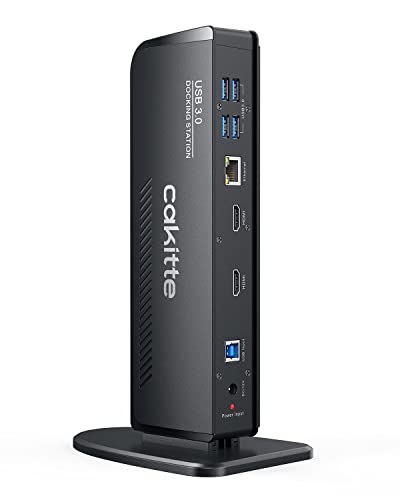
This USB 3.0 docking station is listed for dual-monitor use with MacBook and Windows laptops. USB 3.0 can make it useful for computers without a modern USB-C dock connection. The product details supplied do not name exact screen limits or all port types, so check the current listing before purchase. That careful check matters when choosing the best cheap universal laptop docking station.
The simple pitch is appealing: connect a laptop and add two screens for work or study. It may suit users who need more desk space for documents, email, and browser windows. Before relying on it, confirm whether it needs a driver, which operating system versions it supports, and whether your laptop can extend screens the way you expect.
Its value depends on the current price and the ports in the full listing. Keep the setup tidy by placing the dock near the laptop and routing monitor cables behind the desk. Since detailed build and power information is not provided here, verify those points before making it your daily-use dock.
Why It’s Great
- USB 3.0 may suit laptops without a suitable USB-C video port.
- The listing targets both MacBook and Windows users.
- Dual-monitor support can expand a basic work desk.
- Could be a lower-cost route to extra screen connections.
- A useful option for users who need a straightforward dock.
Good to Know
- The supplied product details do not state exact screen resolution limits.
- Check driver needs and current operating system support before buying.
- Do not assume it charges a laptop; confirm power features in the listing.
3.Plugable UD-3900 USB 3.0 Dock
 Plugable UD-3900 USB 3.0 Dock
” />
The Plugable UD-3900 is a USB 3.0 universal dock with two HDMI outputs, Gigabit Ethernet, audio, and six USB ports. It is designed for dual 1080p displays, which suits common office tasks such as email, spreadsheets, and web work. Its broad port selection makes it a practical choice when a laptop needs more connections at a set desk.
This model connects through USB 3.0 or USB-C and is made for Windows and Mac use with a driver. It is best for office users who value extra ports over high-resolution gaming or fast video work. The driver step is important: set it up before a deadline, then test both screens and any sleep or wake behavior.
Its upright, compact design helps keep cables in one spot, while the many ports can reduce desk clutter. The driver requirement adds a setup step, but the feature mix can offer good value for a basic office station. Confirm current OS support before buying.
Why It’s Great
- Two HDMI outputs support a dual-screen office setup.
- Six USB ports leave room for a keyboard, mouse, and other gear.
- Gigabit Ethernet adds a wired network option.
- Audio ports can keep a headset connection close at hand.
- Works with USB 3.0 or USB-C host connections.
Good to Know
- A DisplayLink driver is required for display use.
- The stated dual-display support is up to 1080p, not 4K.
- It is better for office work than gaming or graphics-heavy tasks.
4.Plugable UD-3900Z Dual HDMI Dock
 Plugable UD-3900Z Dual HDMI Dock
” />
The Plugable UD-3900Z is a dual 1080p HDMI universal dock for USB-C and USB 3.0 laptops. Its 10-port layout aims to serve a complete desk, with connections for screens and common accessories. Plugable lists plug-and-play support for Windows and ChromeOS, while macOS needs a driver. This makes it a flexible choice for mixed laptop setups.
For office work, two 1080p monitors can make it easier to keep a call, spreadsheet, and notes in view. The dock suits users who need several ports but do not need 4K screens. Mac users should plan for the driver step, and all buyers should check that the specific laptop and OS are supported.
The fixed desk design keeps cables gathered rather than spread around the laptop. Its port count and dual-screen support can make it good value for a work station. It is not the smallest travel dock, and its display limits matter if you plan to upgrade to higher-resolution screens.
Why It’s Great
- Offers two HDMI connections for dual 1080p displays.
- Ten ports can support a busy desk setup.
- Supports USB-C and USB 3.0 host connections.
- Plug-and-play support is listed for Windows and ChromeOS.
- A useful value choice for users who need several desk ports.
Good to Know
- macOS requires a driver for display support.
- Its display support is aimed at 1080p, not dual 4K.
- Check your operating system and laptop model for compatibility.
5.Lenovo ThinkPad Universal USB-C Dock
 Lenovo ThinkPad Universal USB-C Dock
” />
The Lenovo ThinkPad Universal USB-C Dock 40AY0090US comes with a 90W power adapter, USB-C cable, HDMI cable, and DisplayPort cable. It is listed for dual 4K at 60Hz, subject to the laptop and display setup. The cable bundle is handy, and the dock provides a strong choice for users who need more than basic 1080p screens.
This dock is best for compatible ThinkPad and other USB-C laptops that support the required video modes. It can suit a home office with two high-resolution screens and several desk accessories. Check the laptop maker’s port specs before buying, since USB-C shape alone does not ensure dual 4K output or full charging support.
The included cables and power adapter make setup more complete than buying each part separately. Its higher display capability may bring good long-term value for compatible systems, though it may not be the cheapest option. Confirm compatibility and the actual monitor configuration before placing an order.
Why It’s Great
- Listed dual 4K at 60Hz support suits high-resolution desk setups.
- Includes a 90W power adapter and key display cables.
- USB-C connection can make a single-cable desk routine possible.
- A useful option for compatible ThinkPad and business laptops.
- Has more room to support a future monitor upgrade than 1080p docks.
Good to Know
- Dual 4K output depends on the laptop’s video capabilities and setup.
- USB-C laptops are not all compatible with the same display modes.
- It may cost more than a basic budget dock.
Final Thoughts: The Verdict
My personal top pick is the Dell Pro WD25 USB-C Dock for compatible office laptops. Its useful mix of ports, listed 100W power, and video connections can make one cable handle much of a daily desk setup. The best cheap universal laptop docking station is the one that fits your laptop, not simply the one with the most ports.
For a lower-cost dual-screen work setup, consider the Plugable UD-3900Z; it suits users who need several ports and 1080p displays. The Lenovo ThinkPad dock is a better match for compatible systems and higher-resolution screens, while the UD-3900 works well for basic office tasks. Check your laptop’s video and charging support, then choose the dock that fits your needs and budget.