
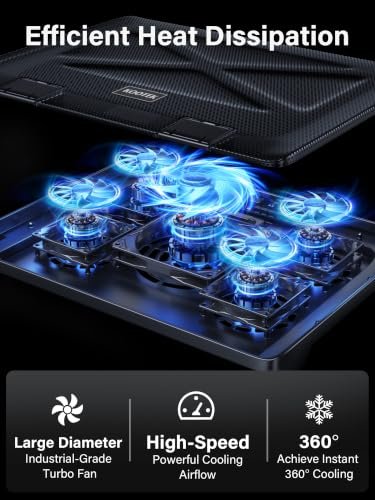
A computer cooler pad is a fan-equipped stand that helps move air beneath a laptop. It can also raise the screen and improve typing comfort. The best computer cooler pad is useful for gamers, remote workers, and anyone whose laptop gets warm during long sessions.
A weak cooler can be more noise than help. Some pads wobble, block laptop vents, or come with awkward USB cables and stands that feel flimsy. Others promise dramatic temperature drops that a simple fan pad cannot guarantee. It is easy to buy based on fan count alone, then find that the pad does not fit your laptop or your desk. The right choice should suit your laptop size, airflow needs, and daily routine. That way, you can avoid extra clutter and get a more comfortable setup.
I compare laptop cooler pads by their stated size range, fan layout, adjustability, USB setup, and everyday design. This guide uses product details and practical buying criteria to distinguish useful features from claims that need a closer look. My goal is to help you find the best computer cooler pad for your laptop, workspace, and budget without expecting a cooling stand to fix every heat issue.
What you’ll learn
- How to match a cooling pad to your laptop size and vents
- Which fan layouts and stand designs fit different work styles
- What to check about USB ports, power, and desk comfort
- How the five featured laptop cooling pads compare
In This Article
How To Choose The Best best computer cooler pad
The right laptop cooling pad should fit your laptop, support its vents, and feel stable on your desk. Buying by fan count alone is a common mistake: more fans do not always mean better airflow for your device. Low-quality pads may also wobble, add unwanted noise, or use a layout that does not line up with your laptop. Check the size range, fan placement, stand angle, and USB needs before you buy. A good match can make long work or play sessions more comfortable.
Match the Pad to Laptop Size and Vents
Start with your laptop’s screen size and the location of its air intakes. A pad that is too small may leave part of the base unsupported, while a poor fan match may push air where it is not useful. Check the maker’s stated size range, then compare the pad’s fan area with your laptop’s underside. The Kootek and TECKNET models list support for 12- to 17-inch laptops; the KeiBn is listed for 10- to 15.6-inch models. For a large gaming laptop, fit and stable support matter more than a high fan count.
Choose Useful Airflow, Not Just More Fans
Fan count is only one part of cooling. Fan size, placement, airflow path, and the laptop’s own vent design all affect how useful a pad may be. The Kootek offers five fans for broad coverage, while the havit and Targus use two or three fans. A multi-fan pad may appeal to a large laptop, but it can add controls and bulk. A quieter, simpler design may suit office work better. Remember that a cooling pad can help move air, but it cannot promise a specific temperature drop or replace cleaning blocked vents.
Check Comfort, Power, and Desk Stability
A cooler is also a stand, so look at its height settings, base, and USB layout. Adjustable height can improve screen position, but the pad should stay steady while you type. USB-powered fans may use a laptop port, so a built-in extra port can be helpful; check whether it passes data or only supplies power. Think about where you will use it, too. A slim mesh pad travels more easily, while a soft lap mat may feel better away from a desk. Choose the best computer cooler pad for your routine, not just its feature list.
Quick Comparison
| Model | Category | Best For | Key Spec | Amazon |
|---|---|---|---|---|
| Kootek Laptop Cooling Pad | Best Overall | Large laptops and adjustable desk setups | Five fans; six height settings | Amazon |
| havit HV-F2056 | Runner Up | Simple cooling for larger laptops | Three fans; two height settings | Amazon |
| TECKNET Laptop Cooling Pad | Slim Pick | Portable use and a tidy desk | Slim mesh design; dual USB ports | Amazon |
| KeiBn Laptop Cooling Pad | Compact Pick | Smaller laptops and adjustable angles | Two fans; five height settings | Amazon |
| Targus 17 Inch Lap Chill Mat | Lap Comfort | Using a laptop on your lap | Soft neoprene mat; dual USB fans | Amazon |
In-Depth Reviews for best computer cooler pad
1.Kootek Five-Fan Laptop Cooling Pad
 Kootek Five-Fan Laptop Cooling Pad
” />
The Kootek cooling pad uses five fans to move air beneath laptops from 12 to 17 inches. Its broad fan layout aims to cover more of the laptop base than a single-fan stand. Six height settings let you adjust the angle, while blue LED lights show when it is running. Two extra USB hubs add useful connection options for a desk setup.
This model suits people who want an adjustable stand and extra USB ports in one unit. Its fan layout may appeal to owners of larger laptops, though the best airflow depends on where the laptop takes in air. The stand can raise the screen for a more comfortable view. USB power keeps setup simple, but it does use a laptop port.
The stand has more moving parts than a basic cooling mat, so handle its height supports with care. The mesh surface should be easy to dust with a soft cloth. Its mix of fan coverage, adjustment, and USB hubs offers good value for users who will use those features.
Why It’s Great
- Five fans provide broad airflow coverage beneath a compatible laptop.
- Six height settings give more choice for screen and typing angles.
- Two extra USB hubs can add convenient desk connections.
- The listed 12- to 17-inch range fits many common laptop sizes.
- Blue LED indicators make fan activity easy to see.
Good to Know
- A five-fan layout may be larger and less portable than a slim pad.
- Cooling results depend on the laptop’s vent position and airflow needs.
- USB-powered operation uses a laptop port, and the extra hubs may not suit every setup.
2.havit HV-F2056 Laptop Cooling Pad
 havit HV-F2056 Laptop Cooling Pad
” />
The havit HV-F2056 uses three quiet, USB-powered fans to circulate air below laptops sized from 15.6 to 17 inches. Its fan layout offers a simple way to add airflow without a complex control setup. Two height settings can lift the screen and change the working angle. The straightforward design makes this a practical choice for larger laptops and everyday desk use.
This cooling pad is best suited to users who want a simple stand for a larger laptop. The two height options allow a modest change in viewing position, while the USB-powered fans keep setup easy. Its design works well on a desk for work, study, or play. Check your laptop’s underside first, since vent placement can affect how useful the airflow is.
The simple design should be easy to keep clean with a soft, dry cloth. Its lighter feature set means fewer adjustments than some stands, but that may suit users who value simplicity. For a compatible laptop, the havit offers a clear, practical blend of airflow and stand function.
Why It’s Great
- Three fans circulate air beneath compatible laptops.
- The listed 15.6- to 17-inch range targets larger devices.
- Two height settings offer a choice of working angle.
- USB power makes setup straightforward.
- A simple layout avoids extra controls that some users do not need.
Good to Know
- It has only two height settings, fewer than several adjustable rivals.
- The stated size range may not suit smaller laptops.
- USB-powered fans need an available port and cannot guarantee lower temperatures.
3.TECKNET Slim Laptop Cooling Pad
 TECKNET Slim Laptop Cooling Pad
” />
The TECKNET laptop cooling pad is a slim, USB-powered cooler for laptops from 12 to 17 inches. It features an alloy mesh surface, dual USB ports, and an LED working indicator. The maker lists 60 percent high-efficiency cooling, but real results can vary with laptop design and room conditions. Its low-profile build stands out for users who want airflow without a bulky gaming-style stand.
This model is best suited to people who carry a cooler between work spots or want a neat desk. The slim profile can fit into a simple laptop setup, while the mesh surface allows air to move under the device. Its LED indicator provides a quick status cue. Check your laptop’s feet and vent locations to ensure it sits well on the pad.
The mesh surface is easy to wipe with a soft cloth, and the alloy build gives it a more solid feel than a soft mat. Its slim form favors portability over many height options. It can be a useful value choice if you need simple airflow and extra USB ports.
Why It’s Great
- The listed 12- to 17-inch range covers many laptop sizes.
- A slim profile suits portable work setups.
- The alloy mesh surface supports airflow beneath the laptop.
- Dual USB ports add connection flexibility.
- An LED indicator shows when the cooler is working.
Good to Know
- The product details do not list height adjustment settings.
- The stated cooling-efficiency figure is a maker claim, not a guaranteed result.
- A slim pad may offer less support or lift than a full stand.
4.KeiBn Two-Fan Laptop Cooling Pad
 KeiBn Two-Fan Laptop Cooling Pad
” />
The KeiBn S039 cooling pad combines two fans with five height settings for laptops from 10 to 15.6 inches. Its compact size makes it a potential fit for smaller gaming and work laptops. Two USB ports add connection options, while the adjustable stand lets users choose a more useful screen angle. This mix of size support and tilt makes it a flexible pick for a modest desk setup.
This pad is best suited to people with a compact laptop who want more than a flat cooling surface. Five height settings offer flexibility for desk comfort, and the two-fan design keeps the feature list simple. It can support casual gaming or daily work, but check the laptop’s footprint and vents before buying. The stated size range is smaller than some competing models.
The stand has adjustable parts, so fold and move it with care. Dust can be cleared from the fans and surface with a soft cloth. Its combination of two fans, USB ports, and several height choices may offer good value to users who need a compact stand.
Why It’s Great
- Five height settings provide several viewing angles.
- Two fans offer active airflow in a compact design.
- The listed 10- to 15.6-inch range suits smaller laptops.
- Two USB ports can help with a limited-port setup.
- Its simple layout may suit both work and casual gaming.
Good to Know
- The listed size range does not cover many 17-inch laptops.
- Two fans may offer less coverage than five-fan models.
- USB power needs an available port and results vary by laptop.
5.Targus 17-Inch Lap Chill Mat
 Targus 17-Inch Lap Chill Mat
” />
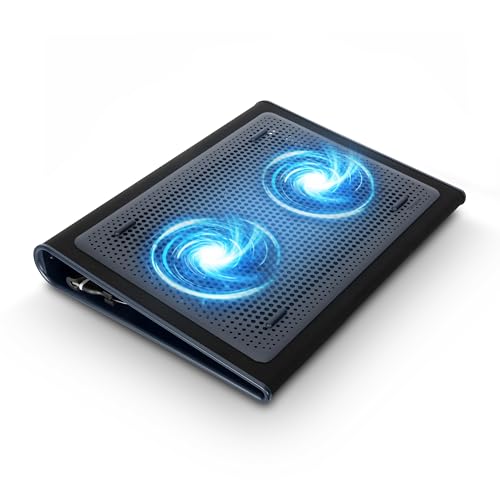
The Targus 17-inch Lap Chill Mat pairs a soft neoprene surface with two USB-A-connected fans. It is designed to fit most laptops up to 17 inches and help disperse heat during use. Unlike a raised metal stand, this mat focuses on a softer surface for lap or desk use. Its simple shape may appeal to people who want a cooling pad without a tall stand.
This model is best suited to laptop users who often work away from a desk and prefer a soft base. The dual fans connect by USB-A, so check that your laptop has a suitable port or adapter. Its mat-style design is easy to place on a lap or table, but it does not list adjustable height settings. It can add comfort, though it is not a replacement for a hard, stable desk.
The neoprene surface can be wiped with a damp cloth and allowed to dry fully. Its soft build differs from a rigid metal stand, so it may not feel as firm for typing. For users who value lap comfort and simple dual-fan airflow, it offers a useful alternative.
Why It’s Great
- Soft neoprene offers a different feel from a hard stand.
- Two USB-A fans help disperse heat beneath the laptop.
- The listed fit covers most laptops up to 17 inches.
- The mat-style design can work on a lap or desk.
- Its simple layout is easy to place and use.
Good to Know
- It does not list height adjustment settings.
- The soft mat may feel less stable than a rigid desk stand.
- USB-A fans require a compatible port or suitable adapter.
Final Thoughts: The Verdict
My personal top pick is the Kootek Laptop Cooling Pad for its five fans, six height settings, and extra USB hubs. It offers the broadest feature set here for people building an adjustable desk setup. As with any cooler, fit and vent placement matter, and no fan pad can promise a set temperature drop.
For a simpler option, the havit HV-F2056 suits larger laptops and users who want three fans without many extras. The TECKNET is a slim choice for portability, while the Targus suits lap use. To find the best computer cooler pad for you, check laptop size, vent layout, and USB needs, then choose what fits your routine and budget.