

A height-adjustable computer monitor lets you raise or lower the screen to suit your desk and posture. It is useful for office workers, students, and gamers who spend long hours at a display. People buy the best computer monitor with height adjustment to find a more comfortable viewing position without stacking books under the screen.
A monitor can look great online and still leave you craning your neck at your desk. Some stands only tilt, even when buyers expect full height adjustment. Others have weak bases, limited ports, or a screen size that feels cramped once work begins. These small misses can turn a long workday into a sore-neck slog. Check the stand features, resolution, refresh rate, and ports before you buy. The right choice should fit your body and your setup, not just your budget or a flashy spec.
I compare monitor specs, stand features, screen size, and everyday connection needs to help narrow the field. For this guide, I reviewed the supplied product details and weighed each model against common desk, gaming, and study needs. I give extra weight to clear ergonomic benefits and practical value, so you can choose the best computer monitor with height adjustment for your own workspace.
What you’ll learn
- How to tell real height adjustment from a tilt-only stand.
- Which screen size and refresh rate fit your daily tasks.
- What each monitor offers for work, gaming, and study.
- How to spot trade-offs before you order.
In This Article
How To Choose The Best best computer monitor with height adjustment
The best computer monitor with height adjustment should make your desk more comfortable, not add a new hassle. A common mistake is to assume that tilt means height adjustment; it does not. Buyers may also overlook a missing port or choose a screen that is too small for split-screen work. Check the stand details, screen size, resolution, and connections before buying. If the monitor lacks a height-adjustable stand, confirm VESA support and factor in the cost of a suitable monitor arm.
Check the Stand’s Range of Motion
A height-adjustable stand lets you move the screen up or down so its top edge can sit near eye level. Swivel and tilt can help you fine-tune the view, but they do not replace height adjustment. Read the stand details closely, since product listings often group these features together. The Acer SH243Y and SH273 P1si listings specify height adjustment and swivel. The HP 24mh listing specifies height and tilt. For the Sceptre, check whether the stand adjusts before buying; a compatible VESA arm may be needed. This detail matters most if you sit at your desk for hours.
Match Screen Size and Refresh Rate to Your Work
A 23.8-inch Full HD screen suits many small desks, school tasks, and everyday office apps. A 27-inch Full HD screen gives you a larger view, though text may look less sharp up close than on a higher-resolution display. Refresh rate matters too. A higher rate can make motion look smoother in games and scrolling, while basic office tasks may not need it. Acer’s listed 144Hz models suit users who want both work and gaming features. Choose based on your desk distance and daily use, not the biggest number on the box.
Review Ports, Mounting, and Daily Comfort
Check that the monitor has the right ports for your computer. HDMI and DisplayPort are common, while VGA may help with older devices. Built-in speakers can save desk space, but they may not replace a headset or dedicated speakers. VESA mounting is useful if you want to add an adjustable arm, but check the mount size and weight limit first. Also look for a screen finish and eye comfort settings that suit your room. A good setup combines the right connections with a screen position you can keep comfortable through a long workday.
Quick Comparison
| Model | Category | Best For | Key Spec | Amazon |
|---|---|---|---|---|
| Acer SH243Y P1si 23.8-Inch | Best Overall | Work and gaming on a smaller desk | 1080p, up to 144Hz, height adjustment | Amazon |
| HP 24mh 23.8-Inch | Office Pick | Everyday work and study | 1080p IPS, speakers, height and tilt | Amazon |
| Acer SH273 P1si 27-Inch | Large Screen | Gaming and roomy desk setups | 1080p, up to 144Hz, height adjustment | Amazon |
| Sceptre E225W-FW144 22-Inch | Compact Gaming | Small desks and fast-paced games | 1080p, up to 144Hz | Amazon |
| Samsung S40GD 27-Inch | Office Display | Business work and daily use | IPS, 100Hz, eye care features | Amazon |
In-Depth Reviews for best computer monitor with height adjustment
1.Acer SH243Y P1si 23.8-Inch 144Hz Monitor
 Acer SH243Y P1si 23.8-Inch 144Hz Monitor
” />
The Acer SH243Y P1si pairs a 23.8-inch IPS screen with Full HD resolution and a listed refresh rate of up to 144Hz. AMD FreeSync and a 1ms VRB response time target smooth motion in compatible games. Its stand offers tilt, height adjustment, and swivel. This blend makes it a strong best computer monitor with height adjustment for mixed work and play.
The compact screen fits many desks without taking over the work area. The listed stand movements make it easier to set a more natural viewing position, then turn the screen toward a colleague or a second seat. HDMI and VGA give you useful connection choices. This Acer is best suited to people who want a practical office screen with gaming features for evenings.
A zero-frame design gives the display a neat look, while the adjustable stand helps reduce the need for desk risers. Keep the screen clean with a soft, dry cloth and avoid harsh cleaners. Its feature mix offers good value for users who want height adjustment and fast refresh in one monitor.
Why It’s Great
- Height adjustment, tilt, and swivel offer useful ergonomic control.
- Up to 144Hz can make compatible games and motion look smoother.
- IPS Full HD suits everyday work, study, and entertainment.
- HDMI and VGA support a mix of newer and older devices.
- Compact 23.8-inch size works well on many desks.
Good to Know
- Full HD on a 23.8-inch screen is not as detailed as a higher-resolution monitor.
- The listed 144Hz maximum may depend on the connected device and setup.
- VGA is an older connection and will not suit every modern computer.
2.HP 24mh 23.8-Inch Height-Adjustable Monitor
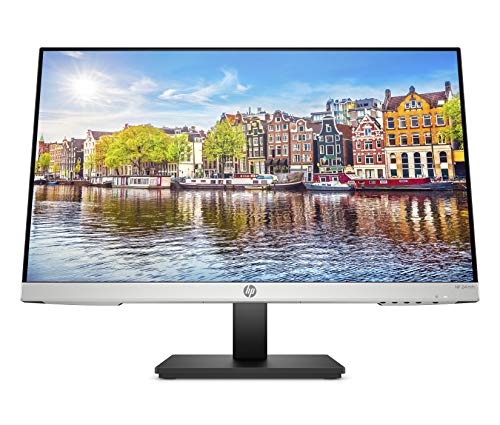 HP 24mh 23.8-Inch Height-Adjustable Monitor
” />
The HP 24mh has a 23.8-inch IPS display with Full HD resolution, built-in speakers, and a stand listed with height and tilt adjustment. HDMI and DisplayPort help it connect to many computers. Its feature set puts practical comfort ahead of gaming extras. For home office tasks and study, it is a sensible best computer monitor with height adjustment to consider.
The moderate screen size suits common desks and gives enough room for documents, web pages, and video calls. Height and tilt controls help you place the display at a more comfortable angle. Built-in speakers offer a handy option for simple audio, though they are best viewed as a convenience. This model fits students and office users who want a straightforward setup.
The VESA mounting option gives you another way to position the screen if the included stand does not fit your desk. Use a soft cloth for routine care. This HP is a useful value choice when comfort, basic audio, and common ports matter more than a high refresh rate.
Why It’s Great
- Listed height adjustment helps align the screen with your seated position.
- IPS Full HD display suits daily work, browsing, and video.
- Built-in speakers can handle basic audio without extra desk gear.
- HDMI and DisplayPort offer useful connection options.
- VESA mounting gives buyers an alternative monitor-arm setup.
Good to Know
- The listing does not position this model as a high-refresh gaming display.
- Built-in speakers may not provide the depth or volume of separate speakers.
- Check the exact stand range and VESA requirements before purchase.
3.Acer SH273 P1si 27-Inch 144Hz Monitor
 Acer SH273 P1si 27-Inch 144Hz Monitor
” />
The Acer SH273 P1si brings a 27-inch IPS Full HD screen, AMD FreeSync, and a listed refresh rate of up to 144Hz. Its 1ms VRB response time is aimed at smoother-looking motion in compatible games. The stand lists tilt, height adjustment, and swivel. This larger best computer monitor with height adjustment suits users who want gaming features and more screen area.
The 27-inch panel gives you more room for windows, timelines, and games than a compact display. Its adjustable stand lets you set the screen height and angle to better suit your chair and desk. HDMI and VGA support different devices. It is best suited to users with enough desk depth who want one screen for work, media, and play.
The zero-frame look can help a multi-screen setup feel less cluttered. Clean the panel gently with a soft cloth and keep liquids away from the screen. The added size and stand movement are useful, but Full HD is less sharp at 27 inches than at a smaller screen size.
Why It’s Great
- The 27-inch panel gives more room for work and entertainment.
- Height adjustment, swivel, and tilt help tailor the screen position.
- Up to 144Hz and FreeSync target smoother compatible gaming.
- IPS technology supports broad viewing angles.
- HDMI and VGA make it easier to connect different devices.
Good to Know
- Full HD can look less crisp on a 27-inch display than on a smaller screen.
- The larger panel needs more desk space and viewing distance.
- A high refresh rate requires a compatible computer and connection.
4.Sceptre E225W-FW144 22-Inch Gaming Monitor
 Sceptre E225W-FW144 22-Inch Gaming Monitor
” />
The Sceptre E225W-FW144 is a 22-inch Full HD gaming monitor listed with a refresh rate of up to 144Hz. HDMI and DisplayPort give you common ways to connect a computer, and built-in speakers add basic audio. Its compact size may appeal to gamers with limited desk space. It is not a confirmed stand-alone best computer monitor with height adjustment based on the supplied listing.
A 22-inch screen is easy to fit on a small desk and keeps the display close for focused play. The listing highlights gaming speed and built-in speakers, rather than a height-adjustable stand. Check the current stand details before ordering. If you need a higher screen position, confirm VESA support and consider a compatible adjustable arm. It suits users who value compact size and refresh rate.
The machine-black finish and small footprint make this display simple to place in a modest setup. Wipe the screen with a soft, dry cloth and avoid sprays. Its gaming features may offer good value, but buyers who need ergonomic height control should include a suitable monitor arm in their budget.
Why It’s Great
- Compact size is useful for small desks and close viewing.
- Up to 144Hz is a notable gaming feature in this screen size.
- HDMI and DisplayPort support common computer connections.
- Built-in speakers provide basic audio without separate speakers.
- Full HD resolution suits general gaming and daily tasks.
Good to Know
- The supplied listing does not confirm height adjustment on the included stand.
- A compatible VESA arm may add cost if you need to raise the screen.
- The 22-inch screen offers less workspace than larger options.
5.Samsung S40GD 27-Inch 100Hz Business Monitor
 Samsung S40GD 27-Inch 100Hz Business Monitor
” />
The Samsung S40GD is a 27-inch business monitor with an IPS panel, a 100Hz refresh rate, Eye Saver Mode, and Game Picture Mode. Its borderless design aims for a clean desk look. The listing calls the design ergonomic, but does not spell out the stand’s full height range. Confirm that detail if a best computer monitor with height adjustment is your main goal.
A 27-inch screen gives office users room for documents, spreadsheets, and video calls. The 100Hz rate may make everyday motion look smoother than a basic 60Hz display, while Eye Saver Mode offers a setting for long sessions. It is best suited to business and home office users who want a larger IPS screen and should verify the stand features for their setup.
Samsung lists a three-year warranty, which adds reassurance for a work display. Use a soft cloth for simple care and avoid pressing on the panel. The borderless design and business features offer a useful package, but check the exact stand movement and ports before choosing it for ergonomic needs.
Why It’s Great
- The 27-inch IPS panel gives a wide view for office tasks.
- A 100Hz refresh rate can make scrolling and motion look smoother.
- Eye Saver Mode provides an extra display setting for long sessions.
- Borderless styling looks neat in a home or business setup.
- The listed three-year warranty offers added purchase reassurance.
Good to Know
- The supplied listing does not specify the stand’s height-adjustment range.
- Confirm the connections you need before ordering.
- A 27-inch Full HD screen may look less sharp than a higher-resolution option.
Final Thoughts: The Verdict
My personal top pick is the Acer SH243Y P1si 23.8-Inch Monitor. It combines a listed height-adjustable stand, IPS Full HD, and up to 144Hz in a desk-friendly size. That makes it a balanced best computer monitor with height adjustment for work and gaming. The HP 24mh is a strong office runner-up, with built-in speakers and height and tilt adjustment.
Choose the Acer SH273 P1si if you want a larger 27-inch gaming screen and have room for it. The HP 24mh better suits study and daily office work. The Sceptre is compact, but check its stand or budget for an arm; Samsung buyers should confirm stand movement. Pick the screen size and stand that fit your desk, needs, and budget.