
A desk fan moves air across your workspace to help you feel cooler without taking up much room. It suits home office workers, students, and anyone who wants a personal breeze. The best cooling desk fan balances useful airflow, noise, size, and easy controls.
A weak fan can leave you warm while adding one more noisy device to your desk. Some models have awkward controls, a narrow breeze, or a battery that does not suit long work sessions. Others look powerful on paper but may not cool a whole room. It is easy to buy by speed count alone and miss the details that matter each day. Choosing the right fan can make a hot desk feel far more comfortable, while a poor fit can become clutter you stop using.
I focus on practical details that shape daily use: airflow settings, noise claims, oscillation, power, and placement. I compared the supplied product specifications and features, then considered who each design may suit best. This guide prioritizes clear trade-offs, useful comfort, and honest limits, so you can choose the best cooling desk fan for your space and routine.
What you’ll learn
- How fan size and airflow affect personal cooling at a desk
- Which features matter for quiet work, sleep, and shared rooms
- How corded, rechargeable, and oscillating models differ
- What each featured fan offers and where it may fall short
In This Article
How To Choose The Best best cooling desk fan
The right fan should fit your desk, daily routine, and comfort needs. A common mistake is to buy by speed count or a bold airflow claim alone. Small fans also vary in noise, reach, controls, and power, and a low-quality unit may wobble or feel hard to adjust. Before you choose the best cooling desk fan, think about where it will sit, how close you will be, and whether you need a cord, battery, timer, or moving airflow. A fan moves air; it does not replace room air conditioning.
Match Airflow to Your Desk
A personal desk fan works best when its breeze reaches you without pushing papers or bothering others. Check the fan’s size, angle, and whether it can oscillate. A compact fixed fan suits one person sitting close by. A tower or oscillating model can spread air across a wider area, though it still may not cool a whole room. Avoid choosing the highest speed alone; useful control at low and medium settings often matters more. The best cooling desk fan is the one that directs air where you need it.
Check Noise, Controls, and Sleep Use
Noise matters during calls, study, and sleep. Look for clear sound or quiet-mode claims, but remember that perceived noise depends on speed and room conditions. Multiple settings help you find a balance between airflow and sound. Simple buttons can be easier to use than a display with many steps, while a timer may be handy at night. Do not assume a low decibel figure means every setting is silent. For a bedroom or quiet office, prioritize adjustable low-speed airflow and convenient controls.
Choose the Right Power and Placement
A plug-in fan is ready for long work sessions near an outlet. A rechargeable fan offers more freedom, but battery life and charging needs can limit use; check the product details before relying on it away from a socket. Consider desk space, stability, and whether a wall-mount design fits your room. A fan with a remote or timer can be useful when placed farther away. Avoid paying for features you will not use. The best cooling desk fan matches your power access and where you plan to put it.
Quick Comparison
| Model | Category | Best For | Key Spec | Amazon |
|---|---|---|---|---|
| Personal Tower Cooling Fan | Best Overall | Desk or bedside airflow | 3 speeds; 60° and 110° oscillation | Amazon |
| DIGIX Portable Desk Fan | Best Adjustable | Personal use and travel | 100 speeds; 360° rotation | Amazon |
| Honeywell QuietSet HTF210B | Quiet Pick | Bedroom or quiet office | 4 power and sound levels | Amazon |
| Coolhill USB Desk Fan | Feature-Rich | Flexible desk or wall placement | 100 speeds; 120° rotation | Amazon |
| Levoit Tower Fan | Best Controls | Quiet, adjustable desk airflow | 5 speeds; 12-hour timer | Amazon |
In-Depth Reviews for best cooling desk fan
1.Personal Tower Cooling Fan
 Personal Tower Cooling Fan
” />
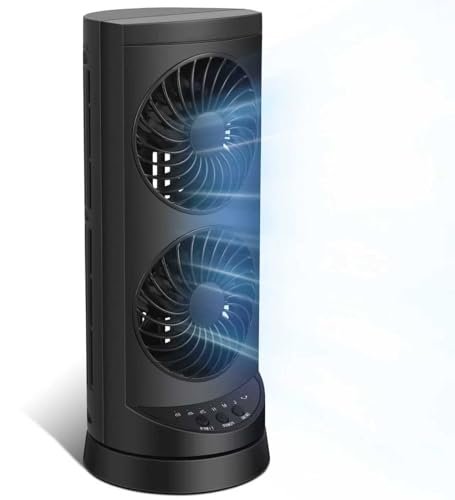
This personal tower fan offers three speeds and two listed oscillation ranges, 60° and 110°. Its product listing also states 25 dB noise and airflow up to 24 ft/s. Those figures are manufacturer claims, not a promise of silent use or room cooling. The tall, narrow design aims to deliver a focused breeze from a small footprint.
The tower form can sit beside a desk or bed, where its moving airflow may feel more even than a fixed breeze. A timer adds a useful option for evening use. It suits people who want a plug-in personal fan with simple speed choices and broad movement, rather than a rechargeable travel fan.
The narrow shape may be easier to place than a wide table fan. Keep the intake clear of dust and wipe the outer surface as needed. Its listed features offer good flexibility, though the value depends on whether oscillation and a timer matter to you.
Why It’s Great
- Two oscillation ranges help spread airflow across a desk or bedside area.
- Three speeds make it easy to choose a basic airflow level.
- A timer can reduce the need to switch the fan off by hand.
- Tall, narrow styling can save space on a crowded desk.
- The listing provides stated noise and airflow figures for comparison.
Good to Know
- The listed 25 dB and 24 ft/s figures are claims, not independent test results.
- It is a plug-in fan, so placement depends on access to power.
- Three speed choices offer less fine control than models with many settings.
2.DIGIX 100-Speed Portable Desk Fan
 DIGIX 100-Speed Portable Desk Fan
” />
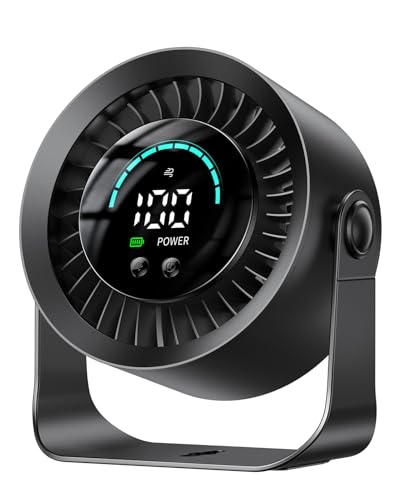
The DIGIX portable fan lists 100 speed settings, 360° rotation, USB charging, and an LED display. That range gives you more room to fine-tune a personal breeze than a fan with only a few modes. Its wall-mount design adds another placement option. It is a flexible pick for a desk, bedroom, or trip.
A rotating head can help direct airflow without moving the whole fan. The display makes settings visible, while rechargeable power can help when an outlet is not close by. This model best suits people who value detailed control and portability. Check the product listing for battery and charging details before planning long sessions away from power.
The compact design should be simple to dust with a soft cloth, though care is needed around the intake. Its many settings add versatility, but may be more choice than some users need. Consider its value against your need for battery use and adjustable airflow.
Why It’s Great
- One hundred listed speed levels allow fine airflow adjustment.
- 360° rotation supports flexible breeze direction.
- USB rechargeable power can make placement less dependent on an outlet.
- An LED display makes selected settings easier to check.
- A wall-mount design offers another way to save desk space.
Good to Know
- Battery runtime and charging time are not stated in the supplied product details.
- Many speed levels may feel less direct to use than a few clear buttons.
- Wall mounting may require a suitable spot and setup.
3.Honeywell QuietSet Personal Table Fan
 Honeywell QuietSet Personal Table Fan
” />
The Honeywell QuietSet is a personal table fan with oscillation and four levels of power and sound. Its straightforward range may appeal to people who want a few clear choices instead of a long list of speeds. The design focuses on personal airflow for a bedroom, desk, or other small space.
This fan is suited to quiet work areas and bedside use, where a softer setting can matter as much as airflow. Oscillation can move the breeze across a wider spot than a fixed fan. It is a practical option for anyone who wants a familiar tabletop format and simple controls, though it is not a room air conditioner.
Its table format is easy to place on a level surface and wipe clean around the outside. Keep dust from building up near the air path. The four-level setup keeps operation simple, and its value is strongest for buyers who want basic personal cooling from an established fan brand.
Why It’s Great
- Four power and sound levels provide a clear range of choices.
- Oscillation helps move air beyond one fixed point.
- Personal table form fits desks and bedside tables.
- Simple settings can be easier to manage than a digital menu.
- The QuietSet design is aimed at users who care about sound.
Good to Know
- The supplied details do not give a specific noise rating.
- Four levels provide less precise airflow control than a 100-speed fan.
- Its personal format is best for nearby airflow, not whole-room cooling.
4.Coolhill USB Desk Fan with 100 Speeds
 Coolhill USB Desk Fan with 100 Speeds
” />
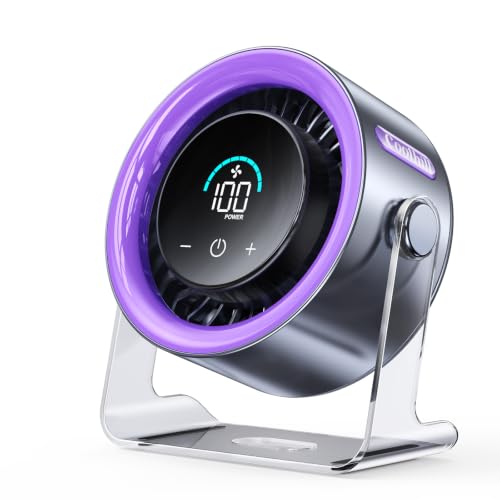
The Coolhill USB desk fan lists 100 speed settings, a digital display, rechargeable battery power, and 120° rotation. Its listing also describes turbo airflow and a wall-mount option. Together, those features aim to give you fine control and flexible placement in a home office, bedroom, or small work area.
The rotating head may help send air toward your face or across a nearby space. Battery power can suit a desk without a handy outlet, while wall mounting can free up the work surface. This model fits people who want many settings and more than one placement choice. Check battery details before extended use.
A small desktop fan is generally easy to wipe, but keep the air openings free of dust. The display makes its many settings easier to read. It may offer useful value for buyers who will use the rotation or battery, while simpler needs may not call for its extra features.
Why It’s Great
- One hundred speed levels allow detailed airflow adjustment.
- 120° rotation helps direct air across a wider nearby area.
- Rechargeable design can reduce reliance on a nearby outlet.
- Digital display shows selected settings.
- Wall-mount placement may free up desk space.
Good to Know
- The supplied details do not state battery runtime or charging time.
- Turbo airflow is a listing claim and does not describe measured room cooling.
- A large number of settings may take more time to adjust.
5.Levoit Quiet Tower Desk Fan
 Levoit Quiet Tower Desk Fan
” />
This Levoit tabletop tower fan lists five speeds, a 12-hour timer, remote control, and three airflow angles. Its product details state a 20 dB noise level and airflow up to 23 ft/s; treat these as manufacturer claims. The DC motor and bladeless tower form add features for buyers seeking a compact fan with flexible controls.
The remote can be handy when the fan sits across a desk or beside a bed. Five speeds offer a useful range without dozens of steps, and the timer suits planned use. It is best for people who want a plug-in tower fan with several controls. Its listed angles can help aim airflow where needed.
The narrow body can fit beside a workstation, and the outer surface should be easy to wipe. Keep the intake clear to support airflow. The timer and remote add convenience, though the value depends on whether you will use those features and the available fan speeds.
Why It’s Great
- Five speeds offer more choice than a basic three-speed fan.
- A 12-hour timer supports scheduled use.
- Remote control can make adjustments easier from a bed or chair.
- Three listed airflow angles provide placement flexibility.
- The tower design can take up less surface width than a broad fan.
Good to Know
- The listed 20 dB and 23 ft/s figures are manufacturer claims, not independent test results.
- It needs a power outlet, so it is less suited to travel away from power.
- A remote adds convenience but is another small item to keep track of.
Final Thoughts: The Verdict
My personal top pick is the Personal Tower Cooling Fan. Its three speeds, timer, and two listed oscillation ranges make it a flexible choice for a desk or bedside spot. It offers a strong mix of useful features without an overly complex control list, making it my best cooling desk fan pick for many personal spaces.
For more precise settings and portable use, consider the DIGIX Portable Desk Fan. The Honeywell QuietSet is a simpler option for buyers who value clear controls. Each model has different power and placement needs, so check those details before you buy. Choose the best cooling desk fan for your space, routine, and budget.