
A cooling desktop stand lifts your MacBook Pro and helps move air around its base. It can also improve screen height and desk comfort. The best cooling desktop stand for macbook pro suits people who work, study, create, or play for long stretches and want a cooler, tidier setup.
A stand that looks sturdy online may wobble, block vents, or sit at the wrong height once it reaches your desk. Some fans add more noise than relief, while a weak frame can make typing feel shaky. It is easy to focus on fan count and miss fit, airflow direction, and port needs. That mistake can leave your MacBook awkwardly placed and your desk cluttered. Choosing carefully matters: the right stand should support your laptop, suit your daily work, and offer useful airflow without making your workspace harder to enjoy.
I write about practical laptop gear and compare stands by their listed size range, fan layout, adjustment options, materials, and desk features. For this guide, I reviewed the product details provided and considered how each design may fit common MacBook Pro setups. I prioritize clear trade-offs, sensible fit, and useful value so you can choose the best cooling desktop stand for macbook pro for your own desk.
What you’ll learn
- How fan layout and laptop fit can affect everyday cooling.
- Which stands offer useful height and angle adjustments.
- What to check before choosing a stand for your MacBook Pro.
- How the five listed options differ in size, build, and desk features.
In This Article
How To Choose The Best best cooling desktop stand for macbook pro
The right stand should fit your MacBook Pro, sit securely, and work well with your desk habits. A common mistake is to pick the model with the most fans without checking laptop size, fan placement, or noise. Low-quality hinges and narrow supports can also wobble during typing. Before you buy, check the stand’s stated size range, adjustment points, power needs, and port layout. A well-matched best cooling desktop stand for macbook pro can make a long workday more comfortable, but it should not block your laptop’s vents or promise cooling results that the product details cannot verify.
Check MacBook Pro Fit and Airflow
Start with your MacBook Pro’s screen size and the stand’s stated size range. A stand that is too small may leave the laptop poorly supported, while a very large pad can take up desk space without adding much value. Check where the fans sit and whether they line up with the laptop’s underside. Do not assume that more fans always mean better cooling. The Kootek and ChillCore list broad size ranges, while the YICOSUN and Metfut list support for laptops up to 16 inches. Match the best cooling desktop stand for macbook pro to your exact model and desk space.
Choose Stable Height and Angle Settings
A good stand should hold your laptop at a useful viewing angle without rocking when you type. Look for clear adjustment settings, secure stops, and support points that keep the laptop in place. Extra height can help bring the screen closer to eye level, but a steep angle may feel less natural if you type on the built-in keyboard. The Kootek lists six height settings, the ChillCore lists eight, and the ICE COOREL lists seven. If you use an external keyboard, more lift may suit you. For direct laptop typing, favor a stable, moderate angle.
Balance Fan Noise, Power, and Desk Features
Fan noise matters in a quiet office, shared room, or video call. Product titles describe several options as quiet, but noise can vary by setting and room, so check current customer feedback before buying. Also note how each stand gets power and whether its ports fit your setup. The Kootek and ChillCore list two extra USB ports, and ICE COOREL lists two USB ports. RGB lights may appeal to gaming desks but are not needed for cooling. The best cooling desktop stand for macbook pro is the one whose fan and port features you will actually use.
Quick Comparison
| Model | Category | Best For | Key Spec | Amazon |
|---|---|---|---|---|
| Kootek Laptop Cooling Pad | Best Overall | Broad laptop fit and fan coverage | Five fans; six height settings; two USB hubs | Amazon |
| YICOSUN Adjustable Cooling Stand | Ergonomic Pick | Compact aluminum design with lighting | Two fans; foldable; 10–16-inch laptops | Amazon |
| Metfut Laptop Cooling Pad | Flexible Setup | Users who want a rotating base | Adjustable height and angle; 360-degree base | Amazon |
| ChillCore A21 Cooling Pad | Large Laptop Pick | Large laptops and gaming desks | Nine fans; eight height settings; two USB ports | Amazon |
| ICE COOREL Aluminum Cooling Pad | Simple Aluminum Pick | A metal stand with adjustable height | Seven height settings; two USB ports | Amazon |
In-Depth Reviews for best cooling desktop stand for macbook pro
1.Kootek Five-Fan Laptop Cooling Pad
 Kootek Five-Fan Laptop Cooling Pad
” />
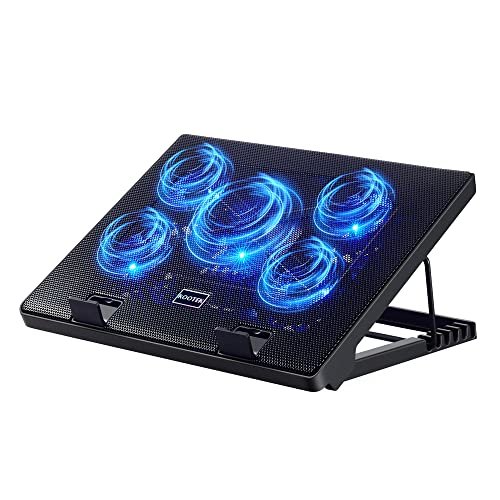
The Kootek cooling pad uses five fans to spread airflow across a broad laptop area. It is listed for 12- to 17-inch laptops, which covers many MacBook Pro sizes. Six height settings let you raise the screen, while two extra USB hubs add desk convenience. Its mix of fan coverage and adjustment makes it a strong all-round pick.
This USB-powered stand suits people who want a raised laptop and cooling in one desk accessory. Its blue LED adds a visible accent, and the adjustable frame lets you choose a working angle. The broad stated size range may help households with more than one laptop. It is best for users who value fan coverage and flexible positioning.
The design keeps setup simple, though the mesh and fan area may need a quick dust wipe over time. Check the frame and laptop stops when adjusting height. For its five fans, USB hubs, and broad fit, it offers useful value if those features match your desk.
Why It’s Great
- Five fans provide broad listed airflow coverage.
- Six height settings offer several viewing positions.
- Two extra USB hubs can help connect desk accessories.
- The 12- to 17-inch range suits many laptop sizes.
- USB power keeps the setup straightforward.
Good to Know
- Fan count alone does not confirm how much cooling a MacBook Pro will gain.
- The blue LED may not suit users who prefer a plain desk.
- The wide pad may use more desk space than a compact stand.
2.YICOSUN Aluminum Cooling Stand
 YICOSUN Aluminum Cooling Stand
” />
The YICOSUN pairs two fans with an aluminum alloy frame and foldable design. Its stated 10- to 16-inch range includes many MacBook Pro models. RGB lighting adds color for users who like a more vivid desk, while the stand’s raised shape supports a more lifted screen position. It is a compact alternative to a wide multi-fan cooling pad.
This stand is aimed at people who want cooling and a more ergonomic laptop position without a large desktop pad. Its foldable build can be useful when you need to move or store it. The simple gray finish suits many work areas, while the lights bring a gaming touch. It may fit students, office users, and casual gamers.
The aluminum design gives the stand a clean look, but its moving parts should be folded with care. Dust around the fans can be wiped away with a soft cloth. It offers a useful blend of portability and function for buyers who want a compact cooling stand.
Why It’s Great
- Two fans add active airflow in a compact form.
- The foldable design is easier to store or move.
- Aluminum alloy gives the stand a clean metal look.
- The stated 10- to 16-inch range suits many laptops.
- RGB lighting adds a colorful desk accent.
Good to Know
- Two fans may offer less coverage than larger multi-fan pads.
- RGB lighting may distract in a calm work space.
- Check the size range against your exact MacBook Pro model.
3.Metfut Rotating Laptop Cooling Stand
 Metfut Rotating Laptop Cooling Stand
” />
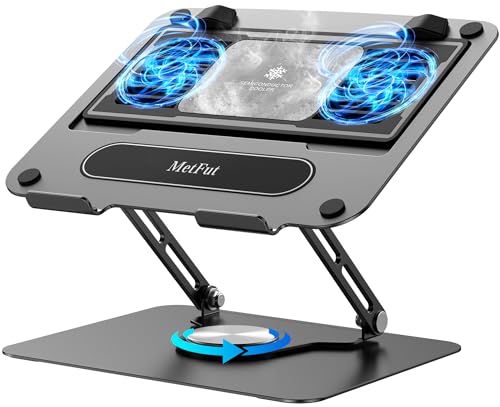
The Metfut stand combines a cooling fan with adjustable height and angle settings. Its 360-degree rotating base can make it easier to turn a laptop toward a colleague or change its position on a desk. The product lists a carbon steel framework and support for 10- to 16-inch laptops. It stands out for flexible placement rather than a high fan count.
This model may suit people who share screens, DJ, or often shift their laptop position. The rotating base can help with desk tasks, while the adjustable angle lets you set a more comfortable view. Its stated size range includes many MacBook Pro models. Check that the base has room to turn freely on your desk.
The carbon steel frame is designed for a sturdy feel, and the black finish is easy to pair with other gear. Wipe the stand and fan area with a soft cloth as needed. Its rotating base adds value for users who will use that extra movement.
Why It’s Great
- The 360-degree base makes it easy to turn the laptop.
- Height and angle adjustments support flexible positioning.
- The carbon steel framework is a useful build feature.
- The listed size range includes many 10- to 16-inch laptops.
- The black finish keeps the design low-key.
Good to Know
- The rotating base needs clear space around it.
- The product title does not state a fan count.
- A rotating base may add bulk compared with a simple stand.
4.ChillCore Nine-Fan Cooling Pad
 ChillCore Nine-Fan Cooling Pad
” />
The ChillCore A21 cooling pad lists nine fans and support for 15.6- to 19.3-inch laptops. That large size range may suit users with a large laptop or a broad desktop setup. Eight height settings let you change the viewing angle, while two USB ports add connection options. RGB lights give this cooling pad a gaming-focused look.
This stand is best suited to users who need a large platform and enjoy a bright gaming setup. Its many height settings give more choice when positioning the screen, though the wide frame may be less handy on a small desk. Check your MacBook Pro size and the pad’s footprint before choosing it for everyday work.
The broad pad and fan openings may need regular dusting to keep the surface tidy. Its listed adjustment range and USB ports add practical value, while the lighting is a style choice. Consider it if you need a large cooling stand and have room for it.
Why It’s Great
- Nine fans offer a broad listed fan layout.
- Eight height settings provide several screen positions.
- Two USB ports can support desk accessories.
- The stated range includes large laptops.
- RGB lighting suits gaming setups.
Good to Know
- The listed minimum size is larger than many MacBook Pro models.
- Its wide footprint may crowd a small desk.
- RGB lighting may not suit a work-first setup.
5.ICE COOREL Aluminum Cooling Pad
 ICE COOREL Aluminum Cooling Pad
” />
The ICE COOREL cooling pad has an aluminum design and support for 12- to 15.6-inch laptops. Seven height settings let you choose a screen position, and two USB ports add useful desk connections. Its listed size range makes it worth considering for compatible MacBook Pro models. The silver finish offers a simple look without a stated RGB feature.
This stand may work well for people who want adjustable height and a metal finish without a large gaming-style pad. Its compact stated range can suit smaller laptops, but buyers should compare it with their MacBook Pro’s exact size. The two USB ports may help keep common accessories close at hand on a desk.
The aluminum surface should be easy to wipe with a soft cloth, and the adjustable design adds everyday flexibility. Keep the stand clear of dust and check that its supports sit securely before use. It offers practical features for buyers who want a simple laptop cooling pad.
Why It’s Great
- Seven height settings help tailor screen position.
- The aluminum design has a clean silver finish.
- Two USB ports add useful connection options.
- The 12- to 15.6-inch range suits many smaller laptops.
- The design avoids a prominent RGB feature.
Good to Know
- The size range may not suit larger MacBook Pro models.
- The product title does not state the number of fans.
- Check port placement and fit against your desk setup.
Final Thoughts: The Verdict
My personal top pick is the Kootek Laptop Cooling Pad. Its five fans, six height settings, broad listed size range, and two USB hubs make it a balanced choice for many desks. It is a strong contender for the best cooling desktop stand for macbook pro, though fit and airflow depend on your exact laptop and setup. For a more compact, foldable option, the YICOSUN Adjustable Cooling Stand offers two fans, an aluminum frame, and RGB lighting. Pick the stand that fits your MacBook, desk space, and budget.