
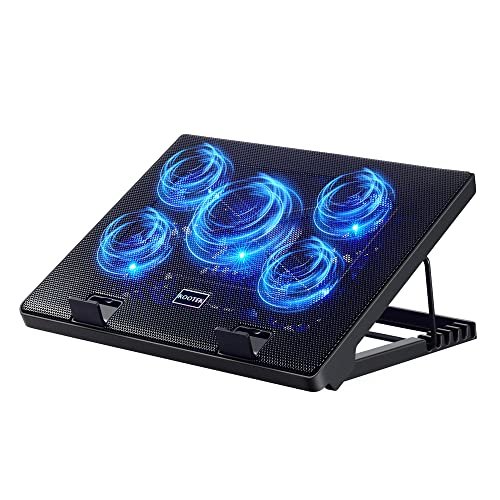
A laptop cooling pad is a raised stand with fans that move air beneath your computer. It can help gamers, remote workers, and students keep a laptop’s vents clear during long sessions. People buy one for added airflow, a more comfortable screen angle, and a steadier desk setup.
A weak cooling pad can be more hassle than help. Its fans may whine, its stand may wobble, or its airflow may miss the laptop’s intake vents. A pad that is too small can leave a heavy gaming laptop feeling poorly supported. Some buyers also expect a fan stand to fix every heat issue, even when dust, blocked vents, or demanding software are the real cause. Choosing carefully matters: the right size, useful airflow, and a stable stand can make daily work feel more comfortable without adding needless noise or clutter.
I focus on practical laptop gear and compare the features that matter at a desk: fit, fan layout, height settings, ports, and ease of use. For this guide, I reviewed the supplied product specifications and weighed each model against common laptop sizes and needs. This best cooling mat for laptop guide prioritizes clear trade-offs, honest limits, and a good match for your setup.
What you’ll learn
- How laptop size and vent placement affect cooling pad fit.
- Which fan layouts suit light work or demanding gaming.
- What to check for in stand stability, noise, and USB ports.
- How to choose a model that matches your budget and desk.
In This Article
How To Choose The Best best cooling mat for laptop
The best cooling mat for laptop use is one that fits your machine and supports its airflow, not simply the one with the most fans. A small pad can leave vents uncovered, while a flimsy stand may shift under a large gaming laptop. Fan noise and awkward height settings can also turn a useful accessory into desk clutter. Before buying, check your laptop’s size, vent location, the stand’s adjustment range, and how it receives power. A cooling pad can aid airflow, but it cannot replace clean vents or sound laptop maintenance.
Match the Pad to Your Laptop
Check your laptop’s width and the cooling pad’s stated size range before you buy. Also look underneath your laptop to find its air intake vents. A fan layout that lines up with those vents may be more useful than a higher fan count that blows in the wrong places. Larger gaming laptops need a broad, stable platform and solid stops to help keep them in place. For a small work laptop, a lighter stand may be easier to move. Avoid assuming that a pad made for a 17-inch laptop will suit every model of that size; body shape and vent location differ.
Choose Airflow and Noise for Your Work
Fan count alone does not tell you how well a cooling pad will work. Look for fan size, placement, and speed control, then consider how much noise you can accept. A cluster of small fans can spread airflow, while a large turbine-style fan aims for a more focused stream. Either design depends on your laptop’s vent layout. If you work in a quiet room, a lower fan setting may matter more than peak airflow. Gamers and people running heavy tasks may prefer adjustable speed. Treat product claims as specifications, not proof of a set drop in temperature.
Check the Stand, Power, and Extras
A cooling pad also serves as a stand, so check its height settings, grip points, and support before you choose. A stable angle can help you view the screen and reach the keyboard, but a steep tilt may feel awkward for long typing sessions. USB-powered fans are simple to use, yet they occupy a laptop port. Extra USB ports can help, but check whether they pass data or only provide power. Consider the pad’s weight and cable setup if you move between rooms. For the best cooling mat for laptop comfort, choose useful features over lights you may rarely use.
Quick Comparison
| Model | Category | Best For | Key Spec | Amazon |
|---|---|---|---|---|
| Kootek 5-Fan Cooling Pad | Best Overall | Everyday use and mixed laptop sizes | Five fans; 12–17-inch laptops | Amazon |
| ICE COOREL 8-Fan RGB Pad | RGB Pick | Gaming setups and larger laptops | Eight fans; 15–17.3-inch laptops | Amazon |
| ChillCore 9-Fan Cooling Pad | Large Laptop | Large laptops and adjustable setups | Nine fans; up to 19.3-inch laptops | Amazon |
| llano V12 Turbofan Cooler | High Airflow | Gaming laptops with compatible vents | 5.5-inch turbofan; 15.6–19-inch laptops | Amazon |
| AICHESON S035 5-Fan Pad | Value Pick | Users seeking basic fan cooling | Five fans; up to 17.3 inches | Amazon |
In-Depth Reviews for best cooling mat for laptop
1.Kootek 5-Fan Laptop Cooling Pad
 Kootek 5-Fan Laptop Cooling Pad
” />
The Kootek cooling pad uses five fans to move air across a broad area beneath laptops from 12 to 17 inches. Its USB-powered design keeps setup simple, and two extra USB hubs add handy connections. Six height settings help tailor the viewing angle. For shoppers seeking the best cooling mat for laptop airflow and desk comfort, it offers a useful mix.
The stand can suit work, study, and gaming setups, especially when one laptop moves between tasks. Its blue LED lights show when the fans are on, while adjustable height helps lift the screen. The broad format supports a range of common laptop sizes. It is best for users who want several fans and a stand without choosing a more specialized turbine cooler.
The mesh surface should be easy to wipe with a soft, dry cloth. Keep the fans clear of dust and avoid pulling on the USB cable. Its practical layout and extra ports give it solid everyday value, though the plastic build should be handled with care.
Why It’s Great
- Five fans spread airflow across the laptop’s underside.
- Six height settings allow a more comfortable screen angle.
- Two extra USB hubs add useful desk connections.
- Fits listed laptop sizes from 12 to 17 inches.
- USB power makes setup straightforward.
Good to Know
- The cooling result depends on how well the fan layout matches your laptop vents.
- Blue lights may not suit users who prefer a plain desk setup.
- The USB-powered fans use a laptop port while running.
2.ICE COOREL 8-Fan RGB Cooling Pad
 ICE COOREL 8-Fan RGB Cooling Pad
” />
The ICE COOREL cooling pad has eight fans and RGB lighting for a gaming-focused desk. It is listed for laptops from 15 to 17.3 inches and includes six height settings. Two USB ports add connection options, while the phone stand gives a small device a place nearby. This best cooling mat for laptop setups stands out for its fan count and gaming style.
Its larger footprint suits many gaming notebooks better than a compact travel stand. The adjustable tilt can raise the display, and the phone holder keeps a second screen within reach. RGB lighting adds color to a gaming desk, though it may be less welcome in a simple work area. It is best for users who value features and looks in one stand.
The pad can be cleaned with a dry cloth, and dust should be cleared from the fan openings. Its plastic frame includes useful extras, but take care when moving it with a laptop in place. It offers good feature value for users who want lighting, multiple fans, and a phone stand.
Why It’s Great
- Eight fans provide multiple airflow points.
- Six height settings support a range of desk angles.
- RGB lighting suits colorful gaming setups.
- Two USB ports add convenience.
- A built-in phone stand keeps a device close by.
Good to Know
- The listed size range starts at 15 inches, so it may be too large for smaller laptops.
- RGB lighting may be distracting in quiet or shared spaces.
- More fans do not guarantee better cooling if vents do not line up.
3.ChillCore 9-Fan Cooling Pad
 ChillCore 9-Fan Cooling Pad
” />
The ChillCore cooling pad combines nine fans with RGB lights and is listed for laptops from 15.6 to 19.3 inches. Eight height settings offer more tilt choices than many basic stands, and two USB ports add practical utility. Its broad size range makes it a candidate for large notebooks. For the best cooling mat for laptop users with oversized machines, fit is a key draw.
The stand is aimed at gaming laptops and other large systems that need a wide base. Its eight adjustment levels help users set a screen height that feels right at the desk. RGB lighting gives the setup a bold look. It is best suited to people who want many fans and flexible angles, and who have enough desk space for a larger pad.
Use a soft cloth to wipe the frame and remove dust around fan openings with care. The size and feature set offer useful value for large-laptop owners. Check your laptop’s footprint and vent positions first, since a large stand may not suit a small desk or every chassis.
Why It’s Great
- Nine fans cover a broad area beneath compatible laptops.
- Eight height settings offer flexible screen positioning.
- Listed support extends to laptops up to 19.3 inches.
- Two USB ports provide extra connection options.
- RGB lights match a gaming-focused desk.
Good to Know
- Its large footprint may take up considerable desk space.
- The listing does not establish a specific temperature drop.
- RGB lighting may not suit every work environment.
4.llano V12 Turbofan Laptop Cooler
 llano V12 Turbofan Laptop Cooler
” />
The llano V12 takes a different route from multi-fan pads. It uses a 5.5-inch turbofan, an airtight pressure chamber, and adjustable speed, with support listed for 15.6- to 19-inch laptops. The design aims to direct airflow through a closer fit. A three-port USB hub adds connections. This best cooling mat for laptop gaming use may appeal when vent placement matches the chamber.
This model suits larger gaming laptops and users willing to check the fit before buying. Speed adjustment offers control over airflow, and the RGB version adds a vivid look. Its dustproof design is intended to help keep debris out of the fan area. It is best for a compatible laptop with suitable vents, rather than someone seeking a simple universal stand.
The enclosed fan design calls for regular dust checks and careful cleaning around the intake. Its specialized build and USB hub offer a distinct package, but fit matters more here than with an open mesh pad. Confirm your laptop’s size and vent layout to judge its value.
Why It’s Great
- Large 5.5-inch turbofan focuses airflow through its chamber.
- Adjustable speed gives users control over fan output.
- Three-port USB hub adds several connections.
- Listed for laptops from 15.6 to 19 inches.
- Dustproof design helps protect the fan area.
Good to Know
- The pressure chamber needs a compatible laptop shape and vent layout.
- Its focused design is less universal than an open multi-fan pad.
- Check whether the fan noise suits your room and work habits.
5.AICHESON S035 5-Fan Cooling Pad
 AICHESON S035 5-Fan Cooling Pad
” />
The AICHESON S035 has five fans and is listed for laptops up to 17.3 inches. Blue LED lights mark the fan area, and two USB ports add basic connectivity. Its straightforward design focuses on airflow and laptop support rather than many extras. For buyers seeking the best cooling mat for laptop use at a simple feature level, this model covers core needs.
This cooling pad can suit everyday laptop users who want to raise a notebook and add fan airflow without a specialized design. The blue lights give it a familiar gaming accessory look. Its size range covers many common laptops, but check your machine’s underside and dimensions before ordering. It is best for people who want a basic fan stand with USB ports.
Wipe the surface with a soft cloth and keep dust from building around the fans. The simple layout can be easy to maintain, and the two ports add practical value. Confirm the exact height and support needs for your setup, as the listing gives fewer standout design details than some rivals.
Why It’s Great
- Five fans provide airflow beneath the laptop.
- Listed support reaches laptops up to 17.3 inches.
- Two USB ports add handy connections.
- Blue LED lights show the fan area.
- A straightforward design avoids extra setup features.
Good to Know
- The listing does not specify detailed fan speed controls.
- Blue LEDs may not fit a low-light work space.
- Check laptop vent placement to make sure the airflow can help.
Final Thoughts: The Verdict
My personal top pick is the Kootek 5-Fan Laptop Cooling Pad. Its broad size range, five fans, six height settings, and extra USB hubs make it a balanced choice for work and play. It is my best cooling mat for laptop pick for shoppers who want practical features without a specialized fit. Remember, real cooling depends on your laptop’s vent layout and clean airflow.
For a larger gaming setup, consider the ICE COOREL 8-Fan RGB Cooling Pad, which adds RGB lights and a phone stand. The llano V12 may suit users whose laptop vents match its focused fan chamber, while AICHESON offers a simpler five-fan option. Check dimensions, noise needs, and desk space before you buy. Choose the model that fits your laptop and budget.