
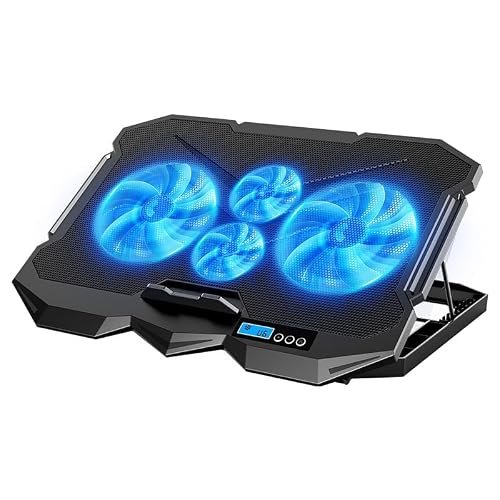
A laptop cooling pad lifts your Acer Aspire and moves air beneath it to support airflow during long work or play sessions. It can also improve typing comfort and raise the screen. Students, remote workers, and gamers look for the best cooling pad acer aspire to help make desk use more comfortable.
A poor fit can leave fan vents covered, while a weak stand may wobble as you type. Some pads add bright lights but offer little control over fan speed or height. Others take up more desk space than expected, or use a USB port you need for a mouse. These small frustrations add up when the laptop runs for hours. Choosing by fan count alone can also mislead you: size, airflow layout, stability, and noise matter in daily use. A good match helps your setup feel more useful, not more cluttered.
I compared the listed cooling pads by laptop size range, fan layout, height settings, ports, and practical desk features. I also separated confirmed product specs from claims that would need hands-on testing, such as noise or temperature change. This guide to the best cooling pad acer aspire prioritizes fit, useful controls, and clear trade-offs so you can choose with confidence.
What you’ll learn
- How to match a cooling pad size to your Acer Aspire screen and base.
- Which fan layouts and height settings suit work, study, or gaming.
- What USB ports, displays, and lights add to everyday use.
- How the five listed pads compare, including their main limits.
In This Article
How To Choose The Best best cooling pad acer aspire
The right cooling pad should fit your Acer Aspire, sit steady, and suit the way you work. A pad that is too small may not support the laptop well, while an oversized model can crowd a compact desk. Low-cost designs may also have limited height choices or use a USB port you need. Do not judge the best cooling pad acer aspire by fan count alone. Check the size range, fan placement, stand design, and port needs before you buy.
Match the Pad to Your Acer Aspire Size
Check your laptop’s screen size and base width before choosing a cooling pad. The listed models cover ranges from 12 to 17 inches, with some designed for larger gaming laptops. A pad that is too small can leave the laptop poorly supported, while a much larger stand may take over your desk. Also check where the Aspire draws air from; fan placement matters more than a high fan count if the airflow misses the vents. For many everyday Aspire models, a 12-to-17-inch stand is a flexible place to start. The best cooling pad acer aspire should support the laptop without blocking its vents.
Choose Useful Fans and Height Settings
More fans do not always mean better results. Look at their layout and whether the pad lets you control the fan speed; the supplied product details do not confirm speed controls for every model. A multi-fan pad can spread airflow across a broad base, while a simple setup may suit light office work. Height settings matter too. They can raise the screen and ease wrist or neck strain, but the stand should feel stable at the angle you use. Avoid assuming that a fan count guarantees lower temperatures or quiet operation. For the best cooling pad acer aspire, balance airflow coverage with comfortable, steady positioning.
Check Ports, Power, and Desk Features
Most USB-powered pads draw power from the laptop, so consider which ports you need for your other gear. Several options here list two USB ports or hubs, which may help with a mouse or other small accessory. Check whether a model’s extra ports replace the USB connection used to power the pad. Displays and RGB lights can look appealing, but they are not essential to airflow. If you move between rooms, also consider the stand’s size and weight before buying. The best cooling pad acer aspire is the one whose extras fit your routine, rather than features you will rarely use.
Quick Comparison
| Model | Category | Best For | Key Spec | Amazon |
|---|---|---|---|---|
| Acer Aspire 4-Fan Cooling Pad | Feature-rich | Display and broad Aspire fit | 4 fans, LCD, 4 heights | Amazon |
| Kootek 5-Fan Cooling Pad | Best overall | Flexible desk setup | 5 fans, 6 heights, 2 hubs | Amazon |
| AICHESON S035 5-Fan Pad | Practical pick | Laptops up to 17.3 inches | 5 fans, 2 USB ports | Amazon |
| ChillCore 9-Fan RGB Pad | Large laptop | Large gaming laptops | 9 fans, 8 height settings | Amazon |
| ICE COOREL 8-Fan RGB Pad | Gaming setup | RGB and phone stand users | 8 fans, 6 heights | Amazon |
In-Depth Reviews for best cooling pad acer aspire
1.Acer Aspire 4-Fan Cooling Pad with LCD
 Acer Aspire 4-Fan Cooling Pad with LCD
” />
This cooling pad lists support for Acer Aspire, Nitro, Swift, Extensa, and TravelMate laptops from 13 to 17 inches. Four fans move air beneath the laptop, while the LCD display adds at-a-glance information. Four height settings help tailor the stand to your desk. Its broad series compatibility makes it a flexible option for mixed Acer households.
The stand includes two USB-A ports, giving you a way to connect small accessories while using the pad. Its stated fit covers many common Aspire sizes, though checking your exact model and vent layout is still wise. The raised angle may suit students and home workers who spend long hours at a desk. The display and fan layout make it a feature-focused pick.
The plastic build and hinge feel should be checked on arrival, as listed specifications cannot confirm long-term durability. Keep the mesh clear of dust with a soft brush or cloth. For buyers who want an LCD, multiple height choices, and Acer-series compatibility in one stand, the feature mix may offer useful value.
Why It’s Great
- Lists compatibility with several Acer laptop series, not Aspire alone.
- Four fans provide airflow across more than one point beneath the laptop.
- LCD display offers a visible status feature.
- Four height settings allow a choice of working angle.
- Two USB-A ports can help accommodate desk accessories.
Good to Know
- The listed details do not specify fan speed control or measured cooling results.
- Confirm the exact laptop dimensions and underside vent locations before ordering.
- The LCD and extra features may be unnecessary if you want a simple stand.
2.Kootek 5-Fan Laptop Cooling Pad
 Kootek 5-Fan Laptop Cooling Pad
” />
The Kootek cooling pad is listed for 12-to-17-inch laptops and uses five fans for broad airflow coverage. It offers six height settings, two extra USB hubs, and blue LED lighting. This blend of size range and stand adjustment makes it a versatile choice for Acer Aspire owners who want cooling support and a raised screen in one desk accessory.
The six position choices help users set a comfortable angle for typing or viewing. Its 12-to-17-inch range covers many Aspire models, but compare the laptop’s base size before buying. The USB hubs may suit a mouse or small accessory, while the blue lights add a visible gaming-style touch. It is best for users who value adjustability and desk flexibility.
The mesh surface can be wiped with a soft, dry cloth, and the fan area should be kept free of dust. The listing does not establish noise levels or long-term build life, so check the stand on arrival. Its mix of adjustment, hubs, and five fans gives it a strong feature-to-price case.
Why It’s Great
- Five fans are designed to spread airflow across the laptop base.
- Six height settings offer more angle choices than many basic stands.
- Two extra USB hubs provide added connection options.
- The stated 12-to-17-inch range suits many Acer Aspire sizes.
- Blue LED lighting adds a clear visual accent for desk setups.
Good to Know
- The listing calls the fans quiet, but personal noise levels can vary.
- Blue LED lighting may not suit users who prefer a plain work setup.
- Check the pad dimensions against your exact Aspire model before purchase.
3.AICHESON S035 5-Fan Cooling Pad
 AICHESON S035 5-Fan Cooling Pad
” />
The AICHESON S035 is a five-fan cooling pad listed for notebooks up to 17.3 inches. Blue LED lights and two USB ports add practical and visual features without a built-in display. The larger stated size range can suit bigger Acer Aspire laptops, while its multi-fan layout offers a straightforward approach to airflow beneath the device.
This stand is aimed at users who want a broad laptop fit and simple desk features. The two USB ports can help connect accessories, but check how the pad draws power and whether its ports meet your needs. Its blue lights suit users who like a gaming look. It may work well for a larger Aspire used for study, work, or play.
Wipe the surface gently and remove dust from the fan openings as needed. The available details do not confirm noise, fan controls, or long-term hinge strength, so treat those as points to check. It offers a practical feature set for buyers who do not need many height settings or a screen.
Why It’s Great
- Five fans provide multiple airflow points beneath the laptop.
- The stated fit extends to laptops up to 17.3 inches.
- Two USB ports add connection options for desk use.
- Blue lighting gives the stand a gaming-oriented appearance.
- Its feature set stays focused on fans, ports, and laptop support.
Good to Know
- The provided product details do not state how many height settings it has.
- No measured temperature or noise results are supplied in the listing data.
- The blue lighting may be distracting in a dark or quiet workspace.
4.ChillCore 9-Fan RGB Cooling Pad
 ChillCore 9-Fan RGB Cooling Pad
” />
The ChillCore stand lists nine fans, RGB lighting, and eight height settings for laptops from 15.6 to 19.3 inches. It also has two USB ports. Its large size range and many adjustment positions make it a feature-heavy choice for bigger Acer Aspire gaming laptops. Check your laptop dimensions carefully, since smaller models may not sit as neatly on its surface.
Eight height options give users room to change the screen angle for gaming or desk work. The RGB lights may suit a colorful setup, and the two ports add some accessory flexibility. This model is best suited to owners of larger laptops who have desk space to spare. Its wide fit range may be more than a compact Aspire needs.
Keep dust out of the fan openings and wipe the surface with a soft cloth. The listed details do not confirm fan speed control, noise, or real temperature changes. Its many fans and height positions offer a wide feature set, but the larger footprint may affect value for owners of smaller laptops.
Why It’s Great
- Nine fans provide an extensive multi-fan layout.
- Eight height settings offer many ways to position the laptop.
- The stated size range includes larger gaming notebooks.
- RGB lighting can match a colorful gaming desk.
- Two USB ports support added accessory connections.
Good to Know
- The 15.6-inch minimum may make it a poor fit for smaller Aspire models.
- Its larger size may take up more desk space than a basic stand.
- The product details do not confirm noise levels or cooling results.
5.ICE COOREL 8-Fan RGB Cooling Pad
 ICE COOREL 8-Fan RGB Cooling Pad
” />
The ICE COOREL cooling pad pairs eight fans with RGB lighting and six height settings. It is listed for 15-to-17.3-inch laptops and includes two USB ports plus a phone stand. These extras suit a gaming or media desk where the laptop, phone, and lighting share one space. Check your Aspire’s size, as compact models may not fit its range.
The six height choices let users adjust the viewing angle, while the phone stand keeps a second device close by. RGB lights add a bold look for gaming setups. It is best suited to owners of 15-inch or larger Aspire laptops who want desk extras as well as a cooling stand. The listed two USB ports add useful connectivity.
Clean the pad with a soft cloth and clear dust from its fan openings. The available details do not confirm noise, lighting controls, or measured cooling performance. Its phone stand and lighting add value for some users, but may be needless extras for anyone seeking a plain, compact laptop riser.
Why It’s Great
- Eight fans create a broad multi-fan arrangement.
- Six height settings make it easier to choose a viewing angle.
- The phone stand keeps a mobile device within reach.
- Two USB ports offer extra connection options.
- RGB lighting suits users building a gaming desk.
Good to Know
- The listed 15-inch minimum may exclude smaller Acer Aspire laptops.
- RGB lighting and a phone stand add bulk and may not suit simple setups.
- The product details do not state noise levels or measured cooling gains.
Final Thoughts: The Verdict
My personal top pick is the Kootek 5-Fan Laptop Cooling Pad. Its stated 12-to-17-inch fit, five fans, six height settings, and two USB hubs make it a balanced choice for many Acer Aspire desk setups. It stands out as a strong best cooling pad acer aspire option if you want useful adjustments as well as airflow.
For a larger laptop and a colorful setup, consider the ChillCore 9-Fan RGB Cooling Pad, with its eight height settings and wide size range. The Acer Aspire 4-Fan pad is another fit for buyers who want an LCD and broad Acer-series compatibility. Check your laptop size, vent layout, desk space, and budget before choosing.
1 thought on “Best Cooling Pad Acer Aspire: Stay Cool And Boost Performance”
Comments are closed.