
A cooling pad raises your laptop and moves air beneath its base to help manage heat. It can make long work sessions or gaming feel more comfortable, especially with a large notebook. This guide to the best cooling pad for 17 inch laptop compares practical stands for home, school, and travel.
A pad that looks powerful can still disappoint. Small fans may not line up with your laptop vents, a weak stand can wobble, and loud motors can spoil a quiet room. Some buyers also overlook the pad’s size, USB needs, or typing angle, then find their 17-inch laptop hangs over the edge or blocks a port. Those little hassles add up during a long day. The right fit matters: it should support the laptop safely, suit your desk, and offer useful airflow without turning your setup into a noisy, cluttered mess.
I focus on laptop accessories and compare the details that matter at a real desk: size range, fan layout, height choices, USB features, and everyday ease of use. I selected these five cooling pads from their listed features and intended use, not from unverified temperature claims. This guide prioritizes fit, comfort, noise expectations, and value to help you find the best cooling pad for 17 inch laptop.
What you’ll learn
- How to check whether a cooling pad can support a 17-inch laptop.
- Which fan layouts and stand features suit work, gaming, or travel.
- How the five listed cooling pads differ in design and useful extras.
- What to consider before choosing a cooling pad for your desk.
In This Article
How To Choose The Best best cooling pad for 17 inch laptop
A good cooling pad should fit your laptop and your habits, not just look impressive in a product photo. Buyers often choose by fan count alone, but more fans do not guarantee better airflow or a quieter desk. A narrow pad may leave a large laptop poorly supported, while a flimsy stand can shift as you type. Before buying the best cooling pad for 17 inch laptop, check the supported size, stand design, fan controls, and how the USB connection will fit your setup.
Check Laptop Fit and Support
Start with your laptop’s actual width and the pad’s supported size range. A listing for 17-inch laptops is a useful guide, but a wide gaming model may need more room than a slim notebook. Look for a stable surface and a front stop or other feature that helps keep the computer in place when tilted. Avoid choosing a compact pad just because it has many fans if the laptop would overhang it. A wide stand with adjustable height, such as the Kootek or AICHESON, may suit larger laptops; the Targus is designed for most models up to 17 inches.
Match Fans to Your Airflow Needs
Fan count is only one part of cooling. The fan position should work with the vents under your laptop, and a mesh or open surface can help air reach the base. A three-fan pad may be enough for everyday work, while a five- or eight-fan design offers more fan coverage options. Do not assume that more fans mean lower temperatures; results depend on laptop vents, room conditions, and workload. If sound matters, look for quiet fan claims and remember that USB-powered fans still make some noise. The havit is a simple choice, while the ICE COOREL offers eight fans for users who want broad coverage.
Consider Height, Ports, and Daily Use
A useful stand should make the screen easier to view without making typing awkward. Check how many height settings it offers and whether you can still reach your laptop ports. USB-powered pads draw power from a USB connection, so consider whether you have a port to spare. Some models add USB ports, but they may not replace a full-powered hub. For a flexible desk setup, Kootek has six height positions and two extra USB hubs; the ICE COOREL adds a phone stand. For travel or a simple lap setup, the soft neoprene Targus mat may be more appealing.
Quick Comparison
| Model | Category | Best For | Key Spec | Amazon |
|---|---|---|---|---|
| Kootek 5-Fan Cooling Pad | Best Overall | Adjustable desk setups | 5 fans, 6 height settings, 2 USB hubs | Amazon |
| havit HV-F2056 | Simple Pick | Everyday work and study | 3 USB-powered fans, 2 height settings | Amazon |
| ICE COOREL 8-Fan Pad | Feature Rich | Gaming-style desk setups | 8 fans, RGB, 6 height settings | Amazon |
| Targus Lap Chill Mat | Lap Friendly | Soft support on a lap or desk | Neoprene mat, dual USB-A fans | Amazon |
| AICHESON S035 5-Fan Pad | Adjustable Value | Large notebooks up to 17.3 inches | 5 fans, blue LEDs, 2 USB ports | Amazon |
In-Depth Reviews for best cooling pad for 17 inch laptop
1.Kootek 5-Fan Laptop Cooling Pad
 Kootek 5-Fan Laptop Cooling Pad
” />
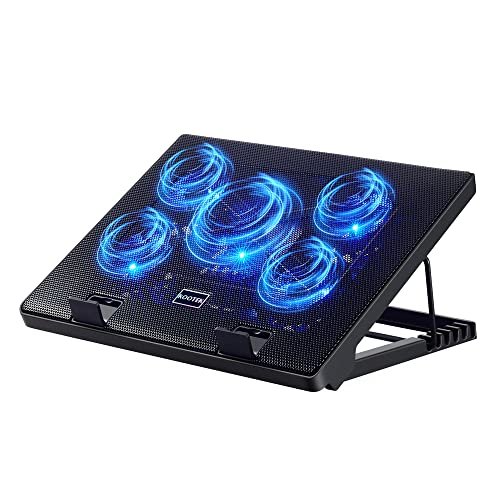
The Kootek cooling pad pairs five quiet fans with a stand made for laptops from 12 to 17 inches. Its fan layout aims to spread airflow beneath a large notebook, while blue lights add a clear gaming-style look. Six height settings let you adjust the viewing angle. Two extra USB hubs add handy connection options at a desk.
For a 17-inch laptop, the broad stand and adjustable height make this a flexible choice for work, study, or gaming. The front stops help hold a laptop in place as you tilt the pad. It is USB-powered, so plan for a laptop port or another suitable USB power source. This model suits users who want airflow and a more ergonomic setup.
The open design is easy to wipe clean, and the stand offers useful adjustability for its price range. Keep the laptop vents clear and check the pad’s fit before use. Its fan and port mix makes it a strong all-round choice, though the added features take more desk space than a simple mat.
Why It’s Great
- Five fans provide broad airflow coverage beneath the laptop.
- Six height settings support a more comfortable viewing angle.
- Two extra USB hubs add convenient connection options.
- Made for laptops up to 17 inches.
- Quiet fan design is suited to shared work areas.
Good to Know
- The larger stand can take up noticeable desk space.
- Blue LEDs may not suit users who prefer a plain look.
- Fan results depend on laptop vent placement and workload.
2.havit HV-F2056 Cooling Pad
 havit HV-F2056 Cooling Pad
” />
The havit HV-F2056 keeps the design simple with three quiet, USB-powered fans for laptops from 15.6 to 17 inches. Its airflow comes from below the notebook, and two height settings raise the screen for a more comfortable view. For shoppers comparing the best cooling pad for 17 inch laptop, it offers core cooling stand features without extra controls.
This pad suits students, home workers, and anyone who wants a straightforward laptop stand with built-in fans. The two height options provide a small range of angle adjustment for viewing and typing. Connect it through USB and keep the laptop vents aligned with the fan area. Its uncluttered layout works well for users who do not need many add-ons.
The basic surface is easy to keep tidy, and the compact feature set avoids needless complexity. Check the fit of your laptop and the location of its vents before choosing it. It can be a practical value pick when a simple stand and three fans matter more than extra ports or many height settings.
Why It’s Great
- Three fans offer simple airflow for everyday laptop use.
- Listed for laptops from 15.6 to 17 inches.
- Two height settings can improve screen viewing and typing comfort.
- USB power keeps setup straightforward.
- A simple design suits users who want fewer extras.
Good to Know
- It has fewer fans than several other options here.
- Only two height settings are listed.
- It does not list extra USB hubs or a phone stand.
3.ICE COOREL 8-Fan Gaming Cooling Pad
 ICE COOREL 8-Fan Gaming Cooling Pad
” />
The ICE COOREL cooling pad stands out with eight fans, RGB lighting, and support for laptops from 15 to 17.3 inches. Six height settings let you change the stand angle, while two USB ports and a phone stand add useful desk features. It offers a feature-packed option for shoppers seeking the best cooling pad for 17 inch laptop setups.
This model is best suited to users who want a gaming-style look and many fan positions beneath their laptop. The adjustable stand can help raise the screen, and the phone holder keeps a second device close by. Check your laptop’s base and vents against the fan layout before use. Its lights and extras make it more suited to a feature-rich desk than a plain office setup.
The pad’s flat surface should be simple to wipe, though its multiple features mean more parts to keep dust-free. Its listed size range includes many 17-inch notebooks. For buyers who value RGB, a phone stand, and six height choices, it offers a broad set of features in one accessory.
Why It’s Great
- Eight fans provide extensive fan coverage beneath a laptop.
- Six height settings offer several viewing angles.
- RGB lighting adds a colorful gaming-style appearance.
- Two USB ports and a phone stand add desk utility.
- Supports laptops up to 17.3 inches, according to the listing.
Good to Know
- The RGB look may be too bright or busy for some desks.
- Eight fans may create more sound than a simpler pad.
- A high fan count does not guarantee a specific temperature drop.
4.Targus 17-Inch Lap Chill Mat
 Targus 17-Inch Lap Chill Mat
” />
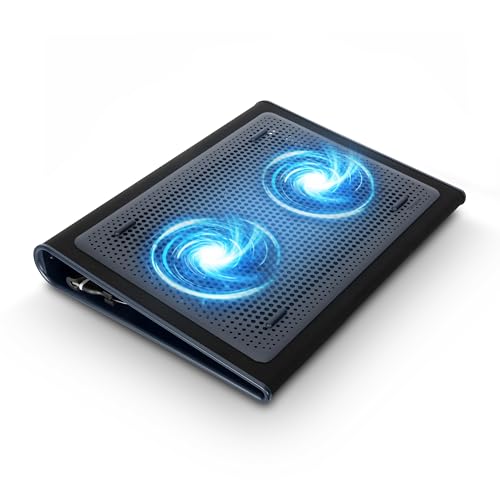
The Targus Lap Chill Mat takes a different approach from rigid cooling stands. Its soft neoprene body is designed to fit most laptops up to 17 inches, and two USB-A connected fans help disperse heat below the computer. This low-profile format makes it a useful alternative for shoppers who want a cooling pad without a tall, adjustable stand.
Its soft mat design suits people who use a laptop on a couch, lap, or flat desk and prefer a gentler base. The dual fans draw power through USB-A, so make sure your laptop or setup has a compatible port. It does not offer the height choices of a stand, but its simple shape may feel more natural for casual use.
Neoprene can be wiped clean with care, and the soft form is easy to move between rooms. It is not a rigid riser, so it will not provide the same screen lift or typing angle as adjustable pads. Choose it for lap-friendly use and simple heat dispersion rather than extensive stand features.
Why It’s Great
- Soft neoprene offers a different feel from a hard stand.
- Designed to fit most laptops up to 17 inches.
- Dual fans help disperse heat beneath the laptop.
- Low-profile shape suits casual use on a lap or desk.
- USB-A power keeps the fan connection familiar.
Good to Know
- It does not provide adjustable height settings.
- The soft mat may not feel as stable as a rigid stand.
- Check that your setup has a compatible USB-A port.
5.AICHESON S035 5-Fan Cooling Pad
 AICHESON S035 5-Fan Cooling Pad
” />
The AICHESON S035 combines five fans with support for notebooks up to 17.3 inches. Blue LED lights give it a familiar gaming look, while two USB ports add connection options. For people comparing the best cooling pad for 17 inch laptop use, this model offers a large stated size range and a practical mix of fan and port features.
This cooling pad is suited to owners of large notebooks who want fan airflow and a raised stand in one desk accessory. The two USB ports can help with nearby devices, though they may not replace a separate powered hub. Its blue lighting is visible during use, so consider whether that suits your room. Check the laptop’s footprint and vent positions before setup.
The flat cooling surface is simple to wipe, and the listed 17.3-inch capacity gives large-laptop buyers room to compare. The blue lights and USB ports add value for users who want more than a basic pad. It is a sensible feature mix, as long as the fan layout suits your laptop.
Why It’s Great
- Five fans provide multiple points of airflow beneath the notebook.
- Listed to support laptops up to 17.3 inches.
- Two USB ports offer added connection options.
- Blue LEDs give the stand a clear visual style.
- Combines cooling fans and stand features in one accessory.
Good to Know
- Blue lighting may not appeal to users who want a minimal setup.
- Confirm laptop size and vent alignment before buying.
- Fan performance and noise can vary with the laptop and room.
Final Thoughts: The Verdict
My personal top pick is the Kootek 5-Fan Laptop Cooling Pad. Its five fans, six height settings, and two extra USB hubs make it a balanced choice for many 17-inch laptop desks. It offers useful flexibility without relying on fan count alone. For a simpler setup, the havit HV-F2056 Cooling Pad is a practical runner-up with three fans and two height settings.
Choose the ICE COOREL if you want RGB and a phone stand, or the Targus if soft lap use matters more than screen height. The AICHESON is worth a look for its five fans and two USB ports. The best cooling pad for 17 inch laptop use depends on fit, vent position, noise needs, and desk space. Check those details and your budget before you buy.
1 thought on “Best Cooling Pad For 17 Inch Laptop: Smart Buying Guide”
Comments are closed.