
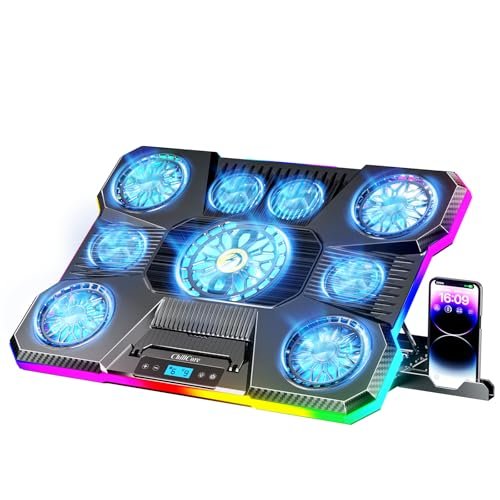
A laptop cooling pad lifts your computer and moves air beneath it to help manage heat during gaming, work, or long study sessions. The best cooling pad for 18 inch laptop shoppers need a wide, stable surface that fits a large chassis without blocking its vents.
A pad that looks powerful can still disappoint. Small fans may miss your laptop’s intake vents, a narrow frame can leave a large computer wobbling, and bright lights cannot make up for poor airflow. Some buyers also overlook fan noise, stand height, or the number of USB ports they need. That can turn a useful desk upgrade into clutter that gets in the way. Choosing the right size and fan design matters in real use, especially when a heavy gaming laptop runs hot for hours.
I focus on laptop accessories and compare the details that matter at a desk: supported size, fan layout, stand adjustment, and ports. For this guide, I reviewed the supplied product specifications and weighed how each design may suit an 18-inch laptop. My goal is to help you find the best cooling pad for 18 inch laptop use without paying for features you do not need.
What you’ll learn
- How to check whether a cooling pad can support an 18-inch laptop.
- Why fan style and placement matter more than fan count alone.
- Which pads offer useful height settings, lighting, or extra ports.
- How to match a cooling pad to your budget and daily routine.
In This Article
How To Choose The Best best cooling pad for 18 inch laptop
An 18-inch laptop needs more than a pad with a high fan count. A small platform may not support its full base, and fans that sit away from the laptop’s air intakes may do little to help. Cheap stands can also wobble, sound harsh, or block ports. Before you buy, check the listed size range, fan design, stand support, and power connection. The best cooling pad for 18 inch laptop use should fit your computer and your desk habits, not just look good in a product photo.
Check Laptop Fit and Platform Support
Start with the cooling pad’s stated laptop size range, then compare it with your laptop’s width and depth. A listing that supports an 18-inch model is a useful starting point, but the shape of your laptop still matters. Look for a broad platform, secure front stops, and a stable base. Avoid assuming that a larger screen size always means a matching chassis size. If you use a thick gaming laptop, check that its feet rest firmly and its vents are not covered. This fit check helps you choose the best cooling pad for 18 inch laptop use without an awkward overhang.
Match the Fan Design to Your Laptop
Fan count is easy to compare, but it does not tell the whole story. Several small fans spread across a pad may suit a laptop with vents across its base. A large turbofan design may appeal to users who want concentrated airflow and a pressure chamber. Check where your laptop takes in air before choosing. Also consider noise, speed controls, and whether the pad’s design lets air reach the vents. Do not pay extra for a fan layout that misses your laptop’s intake area. The best cooling pad for 18 inch laptop performance starts with a sensible match, not a big number.
Consider Comfort, Ports, and Noise
A cooling pad can also improve your desk setup. Adjustable height may help you find a more comfortable typing angle, while USB ports can make it easier to connect small accessories. Check how the pad gets power and whether using its hub affects the port you need. RGB lights are a style choice, not a cooling feature. If you work or play in a quiet room, fan noise may matter more than lighting. Pick useful controls and a steady stand first. These details help make the best cooling pad for 18 inch laptop practical for everyday use.
Quick Comparison
| Model | Category | Best For | Key Spec | Amazon |
|---|---|---|---|---|
| ChillCore A21 | Best Overall | Large laptops and flexible desk setups | 9 fans; fits 15.6–19.3 inches | Amazon |
| Razer Laptop Cooling Pad | Smart Control | Users who want adaptive fan control | Pressure chamber; fits up to 18 inches | Amazon |
| llano V12 | Turbofan Pick | Gaming laptop owners | 5.5-inch turbofan; fits 15.6–19 inches | Amazon |
| 10-Fan Cooling Pad | Adjustable Stand | Users who want several height choices | 10 fans; 7 height settings | Amazon |
| AICHESON 15-Fan Pad | Many-Fan Option | Up to 18-inch laptops | 15 fans; two USB ports | Amazon |
In-Depth Reviews for best cooling pad for 18 inch laptop
1.ChillCore A21 9-Fan Laptop Cooling Pad
 ChillCore A21 9-Fan Laptop Cooling Pad
” />
The ChillCore A21 is a strong fit for shoppers seeking the best cooling pad for 18 inch laptop setups. It supports laptops from 15.6 to 19.3 inches and uses nine fans to move air beneath the base. Eight height settings let you tune the angle, while RGB lights add a gaming look. Two USB ports round out its practical feature set.
Its wide size range gives owners of large gaming laptops room to check fit before buying. The adjustable stand can help you find a more comfortable screen and keyboard angle at a desk. Two USB ports may also help with small accessories. This model suits users who want a broad feature mix, fan coverage, and a striking look in one stand.
The mesh top should be easy to dust with a soft cloth, and the stand’s adjustable design adds everyday flexibility. Check that your laptop’s feet sit securely before use. With nine fans, lighting, and two USB ports, it offers a feature-rich option for buyers who value versatility.
Why It’s Great
- Supports laptops up to 19.3 inches, giving many 18-inch models room to fit.
- Nine fans provide airflow across the cooling surface.
- Eight height settings let users adjust the stand angle.
- Two USB ports add handy connection options.
- RGB lighting suits a gaming desk setup.
Good to Know
- Confirm your laptop’s exact width and depth, as screen size alone does not ensure a perfect fit.
- RGB lighting may not suit a plain or low-light work setup.
- Nine fans may create more sound than a passive stand; check the noise level that suits your space.
2.Razer Smart Laptop Cooling Pad
 Razer Smart Laptop Cooling Pad
” />
The Razer Laptop Cooling Pad is a premium-minded choice for the best cooling pad for 18 inch laptop shoppers who want control features. Its airtight pressure chamber pairs with intelligent fan control, preset curves, and custom fan curves. Razer lists fit for most laptops and MacBooks from 14 to 18 inches. Three USB Type-A ports and Chroma RGB complete the setup.
The smart controls may appeal to people who want to tune fan behavior instead of relying on one fixed setting. Preset curves offer a simpler starting point, while custom curves give more control. Its stated size range includes 18-inch laptops, but users should still compare their computer’s dimensions. This option suits Razer fans and desk users who value adjustable settings.
The port selection and lighting add convenience and style, while fan curves give users ways to tailor operation. Check the fit and port needs before purchase. Its feature-rich design may offer good value to buyers who will use its controls, but it may be more than a basic setup needs.
Why It’s Great
- Listed to fit laptops and MacBooks up to 18 inches.
- Intelligent fan control offers preset and custom curves.
- A pressure chamber is designed to direct airflow.
- Three USB Type-A ports support extra accessories.
- Chroma RGB provides customizable lighting.
Good to Know
- An 18-inch laptop is at the upper end of the stated size range, so check its dimensions carefully.
- Advanced fan controls may be unnecessary for buyers who want a simple stand.
- The product description does not list height adjustment.
3.llano V12 Gaming Laptop Cooling Pad
 llano V12 Gaming Laptop Cooling Pad
” />
The llano V12 takes a different approach from pads built around many small fans. It uses a 5.5-inch turbofan and an airtight pressure chamber, with adjustable speed for user control. Its listed fit range covers 15.6- to 19-inch laptops, which includes many 18-inch models. A dustproof design, three-port USB hub, and RGB lighting round out the feature list.
This cooling pad may suit gaming laptop owners who prefer a large fan design and speed adjustment. Its broad size range is helpful, though checking the laptop’s base dimensions remains important. The three-port hub can support desk accessories, and RGB lighting adds visual flair. Buyers should also consider whether a turbofan’s sound and style suit their room and routine.
The dustproof design may help limit dust entry, but the pad still needs routine cleaning. Its large fan and pressure chamber make it distinct from basic multi-fan stands. With adjustable speed and a USB hub, it is a feature-packed choice for shoppers who want a dedicated gaming setup.
Why It’s Great
- Large 5.5-inch turbofan offers an alternative to small fan arrays.
- Listed size range includes laptops up to 19 inches.
- Adjustable speed lets users change fan output.
- Three-port USB hub can serve desk accessories.
- Dustproof design and RGB lighting add useful and style-focused features.
Good to Know
- Check fan noise expectations, especially for quiet rooms or shared spaces.
- A turbofan design may be less appealing to buyers seeking a slim, simple stand.
- The listed fit range does not replace checking your laptop’s base dimensions.
4.10-Fan Cooling Pad with 7 Height Settings
 10-Fan Cooling Pad with 7 Height Settings
” />
This cooling pad combines ten fans with seven adjustable height settings and a stated fit range of 12 to 18.1 inches. That upper limit makes it a candidate for many 18-inch laptops. RGB lighting and a USB Type-C connection add modern touches. For shoppers comparing the best cooling pad for 18 inch laptop use, its appeal is the mix of size support and stand adjustment.
Seven height choices give users room to find a comfortable viewing angle for work or play. The broad supported range may also suit households with more than one laptop size. Check the laptop’s base dimensions and port layout before you buy. It is best suited to users who want an adjustable stand and a multi-fan design without needing a specialized control system.
The open cooling-pad surface should be simple to wipe with a soft cloth. The listing highlights fan count and adjustment, but does not provide detailed build material information. Its value will depend on whether you will use the height settings, RGB lights, and Type-C connection.
Why It’s Great
- Listed to support laptops up to 18.1 inches.
- Seven height settings offer several viewing angles.
- Ten fans spread across the cooling pad.
- USB Type-C connection adds a modern connection option.
- RGB lighting gives the stand a gaming style.
Good to Know
- The 18.1-inch upper limit leaves little size margin for some large laptop bases.
- The product details do not specify fan speed controls.
- Check whether the Type-C connection meets your power and accessory needs.
5.AICHESON 15-Fan Cooling Pad for 18-Inch Laptops
 AICHESON 15-Fan Cooling Pad for 18-Inch Laptops
” />
The AICHESON cooling pad uses 15 fans and is listed for laptops up to 18 inches. It adds RGB lighting, a stand base, and two USB ports. Its broad fan array may interest users who want airflow across a large laptop base. It is one option to consider when comparing the best cooling pad for 18 inch laptop setups with a focus on fan count.
This pad may suit gaming laptop owners who want a stand with many fans and a colorful desk look. The two USB ports can help connect small accessories, subject to the pad’s power and port setup. As with any 18-inch model, compare your laptop’s full base dimensions with the stand before use. It may be less appealing to users who prefer a quiet, plain design.
The surface can be kept tidy with regular dusting, and its stand form combines cooling with laptop support. The provided details do not state specific height settings or fan controls, so check the listing for those needs. Its value rests on whether you want its many fans, lighting, and USB ports.
Why It’s Great
- Fifteen fans create a broad multi-fan layout.
- Listed to support laptops up to 18 inches.
- Two USB ports can help connect small accessories.
- RGB lighting adds color to a gaming desk.
- Combines a laptop stand base with active cooling.
Good to Know
- The stated maximum size is 18 inches, so check the exact laptop base measurements.
- Fan speed controls are not specified in the supplied product details.
- RGB lighting and a high fan count may not suit buyers seeking a quiet, simple stand.
Final Thoughts: The Verdict
My personal top pick is ChillCore A21 9-Fan Laptop Cooling Pad. Its stated 15.6- to 19.3-inch fit range, nine fans, eight height settings, and two USB ports make it a flexible choice for many large laptops. It earns my nod as the best cooling pad for 18 inch laptop shoppers who want useful features in one stand.
For adaptive fan controls, consider the Razer Smart Laptop Cooling Pad. The llano V12 suits buyers drawn to a turbofan design, while the 10-fan model offers seven height settings. Compare your laptop’s base size, port needs, and noise tolerance, then choose the option that fits your budget and desk.