
A laptop cooling pad lifts your computer and moves air beneath it to help manage heat during long gaming sessions. It can suit gamers whose laptops run hot, feel cramped on a desk, or need a more comfortable screen angle. The best cooling pad for laptop for gaming balances fit, airflow, noise, and useful features.
A weak cooler can look impressive yet do little for heat, while a loud fan may distract you from the game. Some buyers also overlook laptop size, USB ports, or stand height and end up with a poor fit. That can mean blocked vents, a wobbly setup, or one more device cluttering the desk. Cooling pads are not a cure for dust or worn fans, so choosing carefully matters. A good match can improve airflow and comfort without promising a specific temperature drop.
I compared the listed models by their stated size range, fan setup, stand adjustments, ports, and design. I also considered the trade-offs that matter at a real gaming desk, such as noise, fit, and extra space. This guide does not claim lab-tested temperature results. It prioritizes clear specs and helps you find the best cooling pad for laptop for gaming for your setup.
What you’ll learn
- How laptop size and vent placement affect cooling pad fit
- Which fan styles and controls suit different gaming setups
- What to expect from USB ports, RGB lights, and adjustable stands
- How to choose a cooler without expecting guaranteed temperature drops
In This Article
How To Choose The Best best cooling pad for laptop for gaming
The right cooling pad should fit your laptop, line up with its vents, and feel steady during play. A common mistake is buying by fan count alone; more fans do not prove better cooling. Low-quality stands can also wobble, add distracting noise, or use ports you need for other gear. Before buying the best cooling pad for laptop for gaming, check the size range, airflow layout, height settings, USB needs, and return terms. These details matter more than flashy lights when you game for hours.
Match the Pad to Your Laptop Size
Start with your laptop’s screen size and the pad’s stated fit range. A small pad may leave a large gaming laptop unstable, while an oversized model can take up too much desk space. Also check where your laptop draws air; a fan under a solid panel may not help much. The best cooling pad for laptop for gaming should support the computer without covering its vents. Models here list ranges from 12 to 19.3 inches, but measure your laptop and check its base shape before you order.
Choose Airflow and Noise for Your Needs
A cooler with several fans spreads airflow across a wider area, while a large turbo fan uses a different, more focused design. Fan count alone does not show cooling strength, so look for speed control and a layout that suits your laptop vents. If you play in a quiet room, noise matters as much as airflow. The llano V12 models list adjustable fan speed, while the multi-fan pads offer several smaller fans. Read current buyer feedback for sound reports, since noise can vary by speed and setup.
Check Stand Comfort, Ports, and Power
A height-adjustable stand can lift the screen and improve your posture, but it should lock in place and keep the laptop stable. Count the USB ports and check whether the cooler uses one for power; a port may not work like a full-speed hub. RGB lights look fun but do not improve cooling. For the best cooling pad for laptop for gaming, choose features you will use every day. A desk gamer may value a USB hub, while a frequent mover may prefer a simpler, lighter stand.
Quick Comparison
| Model | Category | Best For | Key Spec | Amazon |
|---|---|---|---|---|
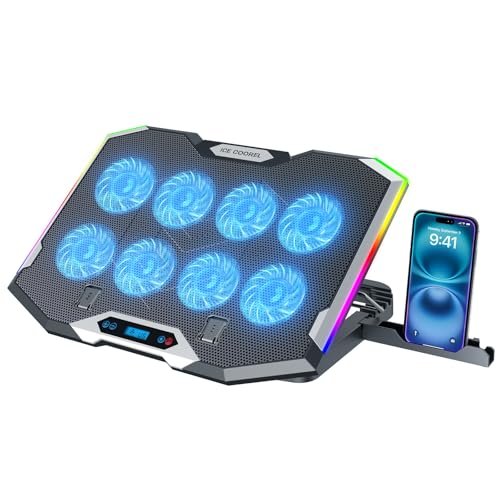
| ICE COOREL 8-Fan Cooling Pad | Versatile | 15–17.3-inch laptops | 8 fans, 6 height settings | Amazon |
| ChillCore 9-Fan Laptop Cooler | Large-Laptop Pick | 15.6–19.3-inch laptops | 9 fans, 8 stand settings | Amazon |
| llano V12 Gaming Cooling Pad | Turbo Fan | Focused airflow and speed control | 5.5-inch turbo fan, 3-port hub | Amazon |
| llano V12 Ultra Cooling Pad | Smart Control | Gamers who want software control | 5.5-inch turbo fan, USB 3.0 hub | Amazon |
| DeskLogics Laptop Cooling Pad | Wide Fit | 12–19-inch laptops | Quiet turbo fan, sealed airflow design | Amazon |
In-Depth Reviews for best cooling pad for laptop for gaming
1. ICE COOREL 8-Fan Gaming Cooling Pad

The ICE COOREL pad pairs eight cooling fans with a stand made for 15- to 17.3-inch laptops. Six height settings let you raise the screen and adjust your viewing angle. RGB lighting adds color, while two USB ports and a phone stand bring handy extras. This mix makes it a flexible choice for gaming desks.
Its broad fan layout is designed to move air beneath the laptop, while the adjustable stand helps tailor the setup to your desk. The phone holder can keep a second screen close at hand. This model may suit gamers who want several fans, flexible height, and added desk features in one cooling pad.
The listed features make this a practical all-in-one option, though actual cooling and noise depend on your laptop and fan use. Keep the vents clear and wipe dust from the pad as needed. Check current fit and return details before buying for lasting value.
Why It’s Great
- Eight fans cover a broad area beneath the laptop.
- Six height settings offer flexible screen positioning.
- Two USB ports add useful desk connectivity.
- A built-in phone stand keeps a device nearby.
- RGB lighting adds a gaming-style look.
Good to Know
- The stated size range tops out at 17.3 inches.
- The product details do not state fan noise or measured cooling results.
- RGB lighting may not suit a simple or low-distraction desk.
2. ChillCore 9-Fan Laptop Cooler

ChillCore lists nine fans for laptops from 15.6 to 19.3 inches, giving this pad a wide fit range for larger gaming machines. Eight height settings help you set a more comfortable screen angle. RGB lights and two USB ports add features for a full desk setup. Its stated size range is a key draw.
The stand gives users many height positions, while the larger stated laptop range may suit owners of broad gaming notebooks. Two USB ports can help with basic desk connections, though check how the ports work for your devices. This cooling pad fits gamers who want lots of fans and stand options.
Its feature set is appealing for large laptops, but product details do not give noise or measured cooling data. Keep the fan area free of dust and check the pad’s footprint against your desk. Compare current price and return terms before you choose.
Why It’s Great
- Nine fans offer a multi-fan cooling layout.
- Fits laptops listed up to 19.3 inches.
- Eight height settings allow fine stand adjustment.
- Two USB ports add convenient connections.
- RGB lighting complements a gaming setup.
Good to Know
- The wide stand may take up more desk space.
- No measured temperature results are provided in the product details.
- Fan noise levels are not specified.
3. llano V12 Turbo Fan Cooling Pad

The llano V12 uses a 5.5-inch turbo fan and an airtight pressure chamber, rather than a bed of small fans. It is listed for 15.6- to 19-inch laptops and offers adjustable speed. A three-port USB hub adds connections, and the design includes dust protection. These features set it apart from basic multi-fan pads.
Speed control lets you adjust the fan to your needs, while the broad size range can work for many gaming laptops. The turbo-fan design may appeal to users seeking a more focused airflow approach. Its RGB lighting and stand format suit gamers who want a feature-rich cooler for a fixed desk setup.
The listed dustproof design may help limit buildup, though regular care is still wise. Check laptop fit and fan noise at your preferred speed before settling in. Its adjustable fan and USB hub offer useful value for gamers who want more control.
Why It’s Great
- Large 5.5-inch turbo fan uses a distinct airflow design.
- Adjustable speed gives users control over fan output.
- Listed fit range covers laptops from 15.6 to 19 inches.
- Three-port USB hub adds connectivity.
- Dustproof design is a useful stated feature.
Good to Know
- A large fan may sound different from smaller fan arrays.
- Its size range does not include smaller laptops under 15.6 inches.
- The product details do not provide measured cooling or noise figures.
4. llano V12 Ultra RGB Cooling Pad

The llano V12 Ultra pairs a 5.5-inch turbo fan with smart software control, so it stands out from simpler fan pads. Its listed fit range is 15.6 to 19 inches, and adjustable speed helps tailor airflow. A three-port USB 3.0 hub and RGB lighting round out this gaming-focused design.
Software control may appeal to gamers who prefer to manage fan settings from their computer. The stand has three height positions, and the broad laptop range suits many larger gaming models. This cooler is best for users who value control and a USB 3.0 hub over a basic plug-in pad.
The stand offers fewer height positions than some rivals, so check whether its angles suit your desk. Keep the fan and laptop vents clear of dust. Its software features and USB hub may add value for users who will make regular use of them.
Why It’s Great
- Smart software control adds a way to manage fan settings.
- The 5.5-inch turbo fan offers a different cooling layout.
- Three USB 3.0 ports provide useful hub connections.
- Adjustable fan speed supports personal tuning.
- RGB lighting suits gaming desk setups.
Good to Know
- The stand has three height positions, fewer than some listed rivals.
- Software control may be unnecessary for users who prefer simple operation.
- The stated size range starts at 15.6 inches.
5. DeskLogics Sealed-Airflow Laptop Cooler

DeskLogics lists a quiet turbo fan and sealed airflow design for laptops from 12 to 19 inches. This wide fit range can suit users with smaller notebooks as well as large gaming models. The stand is height adjustable and includes RGB lighting. USB power keeps the setup simple for a desk or gaming station.
The broad size range makes this cooler worth a look if your laptop falls outside the fit of other models here. Its stand may also help lift the screen for a better desk view. This pad is aimed at users who want a turbo-fan design and a wide fit range.
The sealed airflow layout is a stated design feature, not a guarantee of lower temperatures. Clear dust from the pad and check that your vents line up. Compare the stand’s height options and current price to judge its value for your setup.
Why It’s Great
- Listed fit range spans laptops from 12 to 19 inches.
- Turbo-fan design differs from multi-fan pads.
- Height adjustment can improve desk positioning.
- RGB lighting adds a gaming look.
- USB power supports a simple desk setup.
Good to Know
- The product details do not state the number of height settings.
- The claimed quiet design has no listed noise measurement.
- USB powered means the cooler needs a suitable USB connection.
Final Thoughts: The Verdict
My personal top pick is the ICE COOREL 8-Fan Gaming Cooling Pad. Its eight fans, six height settings, two USB ports, and phone stand make it a balanced choice for laptops up to 17.3 inches. It offers a useful mix of cooling features and desk comfort without relying on a single standout spec. For many gamers, it is the best cooling pad for laptop for gaming to start with.
For a larger laptop, consider the ChillCore 9-Fan Laptop Cooler with its wide fit range and eight stand settings. The llano V12 suits users who want turbo-fan speed control, while the V12 Ultra adds software control and USB 3.0. Check your laptop size, vent layout, and budget before choosing.
1 thought on “Best Cooling Pad For Laptop For Gaming: Play Cooler”
Comments are closed.