
A laptop cooling pad lifts your computer and moves air beneath it. It can help make a 15.6-inch laptop more comfortable to use during long work sessions or gaming. If you are looking for the best cooling pad for my 15.6 notepad, consider fan layout, stand height, and desk space.
A pad that looks impressive can still disappoint if it wobbles, blocks your laptop’s vents, or places its fans far from the warm areas. Some buyers also overlook fan noise, USB ports, or the amount of desk space a larger stand needs. The result can be a cluttered setup that does little to ease a hot laptop. Picking carefully matters: the right fit can improve airflow and posture, while a poor fit may add hassle without a clear benefit.
I focus on practical laptop accessories and compare the features that matter at a real desk. For this guide, I reviewed the supplied product details, including laptop size ranges, fan counts, height settings, and USB features. I did not treat listed specs as proof of measured cooling results. This guide prioritizes fit, useful design, and clear trade-offs to help you choose the best cooling pad for my 15.6 notepad.
What you’ll learn
- How to match a cooling pad to a 15.6-inch laptop.
- Which fan and stand features suit work, study, or gaming.
- What to check before buying a USB-powered cooling pad.
- How the five listed models differ in design and use.
In This Article
How To Choose The Best best cooling pad for my 15.6 notepad
The best cooling pad for my 15.6 notepad should fit your laptop and your daily setup, not just look powerful in a product photo. A pad that is too small may offer poor support, while a large model can crowd a small desk. Low-quality stands may wobble, and extra fans do not guarantee better cooling. Check the stated size range, stand design, USB needs, and fan layout before you buy. Think about how you work, too: a comfortable tilt may matter more than lights or a high fan count.
Check the Laptop Size and Fan Layout
Start with your laptop’s width and the maker’s stated size range. A 15.6-inch model is covered by all five options here, but some pads also support smaller or larger laptops. Check that the laptop sits securely and that the pad does not block its air vents. Fan count alone is not a reliable measure of cooling; placement and airflow paths matter, too. The havit has three fans, while AIMIUZI lists five and ChillCore lists nine. Choose the layout that suits your laptop, and avoid assuming more fans always mean lower temperatures.
Choose a Stand Height You Will Actually Use
A raised laptop can make typing and viewing feel more comfortable, but the right angle depends on your desk and habits. The KeiBn offers five height settings, AIMIUZI offers five angle settings, and ChillCore lists eight height settings. The havit has two settings. More positions can help you fine-tune your setup, but a stable stand matters more than a long list of angles. If you type for hours, consider using a separate keyboard and mouse when the laptop is raised. Pick a simple, steady option if you want a basic desk upgrade.
Consider USB, Noise, and Desk Space
Most pads in this guide draw power through USB, so plan for a free port and tidy cable placement. KeiBn and ChillCore list two USB ports, while llano lists a three-port USB hub. Check whether the pad’s connections suit your accessories and laptop. Fan noise can also affect calls, study, or quiet rooms; product details may call some fans quiet, but actual sound can vary by setting and room. Larger models and RGB lights may add visual impact but take more space. Choose features you will use rather than paying for extras you do not need.
Quick Comparison
| Model | Category | Best For | Key Spec | Amazon |
|---|---|---|---|---|
| havit HV-F2056 | Best Overall | Simple everyday use | Three fans; two height settings | Amazon |
| KeiBn S039 | Adjustable Stand | Users who want more tilt options | Two fans; five height settings | Amazon |
| AIMIUZI Laptop Cooling Pad | Multi-Fan Pick | Users seeking five fans and angles | Five fans; five angle settings | Amazon |
| ChillCore A21 Blue | Gaming Style | Large laptops and RGB setups | Nine fans; eight height settings | Amazon |
| llano V12 | Turbofan Design | Gaming and added USB ports | 5.5-inch turbofan; three-port USB hub | Amazon |
In-Depth Reviews for best cooling pad for my 15.6 notepad
1.havit HV-F2056 Cooling Pad
 havit HV-F2056 Cooling Pad
” />
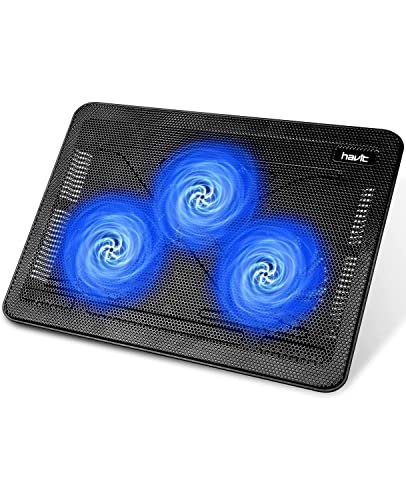
The havit HV-F2056 is a straightforward laptop cooling pad for 15.6- to 17-inch laptops. It uses three quiet, USB-powered fans to circulate air beneath your computer. Two height settings let you raise the screen or change your typing angle. Its simple feature set makes it a practical choice for people who want airflow and a basic stand in one accessory.
The black design keeps the look plain and easy to pair with a work or study desk. Connect it through USB, place your laptop on the pad, and choose one of its two height settings. This model suits people who prefer a simple setup over extra lights or a large number of adjustment choices. Its listed size range also leaves room for some larger laptops.
The flat design should be easy to wipe with a soft cloth as part of routine care. Check the fan area for dust from time to time. Its three fans and two height settings offer useful basics without a complex feature list, making it a solid value choice for everyday laptop use.
Why It’s Great
- Three fans circulate air beneath the laptop.
- USB power keeps setup simple.
- Two height settings add a choice of viewing angle.
- The stated 15.6- to 17-inch range suits many common laptops.
- A plain black design fits many desk setups.
Good to Know
- It offers only two height settings.
- The product details do not state a fan speed control.
- It uses a USB port for power, so plan for that connection.
2.KeiBn S039 Adjustable Cooling Pad
 KeiBn S039 Adjustable Cooling Pad
” />
The KeiBn S039 cooling pad is made for laptops from 10 to 15.6 inches. It uses two fans to move air beneath the computer and offers five height settings for a more tailored desk angle. Two USB ports add connection options. This mix of airflow, adjustability, and ports makes it a flexible pick for a 15.6-inch laptop.
The stand format can help lift a laptop screen to a more comfortable position, though your ideal height depends on your desk and chair. Its five settings give more choice than a basic two-position pad. This model suits students, remote workers, and casual gamers who value adjustability and want a cooling stand that can also support smaller laptops.
For routine care, wipe the stand with a soft cloth and keep dust clear of its fans. The listed USB ports and height options add everyday utility. Check that the laptop rests securely at your chosen angle, and consider its two-fan design when comparing it with pads that list more fans.
Why It’s Great
- Five height settings allow more angle choices.
- Two fans provide under-laptop airflow.
- Two USB ports offer added connection options.
- The stated size range includes laptops up to 15.6 inches.
- It can suit users who want a flexible stand as well as a cooler.
Good to Know
- It lists two fans, fewer than several options in this guide.
- Its maximum stated laptop size is 15.6 inches.
- The product details do not specify fan noise levels.
3.AIMIUZI Five-Fan Cooling Pad
 AIMIUZI Five-Fan Cooling Pad
” />
The AIMIUZI cooling pad is designed for 12- to 15.6-inch laptop notebooks. It lists five quiet fans and five adjustable angles, bringing airflow and desk positioning together. Its black stand has a broad feature mix for a compact laptop setup. For shoppers looking for the best cooling pad for my 15.6 notepad, this model offers a clear alternative to simpler fan stands.
Five angle settings let you adjust the laptop position to suit a desk, chair, or task. The pad is intended for laptops up to 15.6 inches, so it may suit students and office users with a standard-size notebook. Its listed quiet fans may appeal to people who prefer a calmer workspace, though perceived sound can vary by setting and room.
Keep the fan openings clear and wipe the stand with a soft cloth to manage dust. The listed five fans and adjustable angles make this a feature-rich option. Confirm the pad fits your laptop and desk before buying, since its added features may matter less to users who only need a simple riser.
Why It’s Great
- Five fans are listed for under-laptop airflow.
- Five angle settings support different desk positions.
- The stated size range includes 15.6-inch laptops.
- The product description identifies its fans as quiet.
- The black design has a simple, neutral look.
Good to Know
- Its stated maximum laptop size is 15.6 inches.
- The product details do not list USB port count.
- The five-fan layout may be more than a basic setup needs.
4.ChillCore A21 Blue RGB Cooling Pad
 ChillCore A21 Blue RGB Cooling Pad
” />
The ChillCore A21 Blue is a gaming-style cooling pad for laptops from 15.6 to 19.3 inches. It lists nine fans, RGB lights, and eight height settings, plus two USB ports. That broad feature set may suit users who want a large stand with many adjustment choices. It also gives 15.6-inch laptop owners room to compare size and features.
The RGB lighting adds a gaming look, while the eight height settings give you several ways to position a laptop. Its stated range covers some larger models as well as 15.6-inch laptops. This pad may suit gamers or desk users who want adjustable height and a bold style. Check the available desk space before choosing a larger stand.
Wipe the surface with a soft cloth and keep dust away from the fan openings. The many fans, height options, lights, and ports create a feature-rich design. Consider whether you need these extras and have space for the stand, as a simpler pad may be better value for a basic work setup.
Why It’s Great
- Nine fans are listed for airflow beneath the laptop.
- Eight height settings offer many position choices.
- RGB lights add a gaming-focused look.
- Two USB ports provide extra connection options.
- Its stated size range includes laptops larger than 15.6 inches.
Good to Know
- The larger stated size range may mean it takes up more desk space.
- RGB lighting may not suit a plain or quiet-looking workspace.
- The product details do not state fan noise levels.
5.llano V12 Turbofan Cooling Stand
 llano V12 Turbofan Cooling Stand
” />
The llano V12 uses a 5.5-inch turbofan and an airtight pressure chamber in a stand made for 15.6- to 19-inch laptops. Its speed is adjustable, and the product lists a dustproof design and a three-port USB hub. This approach differs from multi-small-fan pads. It may appeal to gamers or other users who want more control over fan speed and extra ports.
The V12 is a larger cooling stand, so check its footprint before setting it on a compact desk. Adjustable fan speed gives users a way to change operation to suit their setup, while the three-port hub can help with accessories. It is best suited to people who want a turbofan-style design and use laptops within the stated size range.
Keep the stand and its air openings clear of dust, and follow the maker’s care guidance. Its hub and adjustable-speed fan add useful features for some setups. Since the product details do not provide measured cooling or noise results, weigh its design against your space, needs, and budget.
Why It’s Great
- The 5.5-inch turbofan has adjustable speed.
- The airtight pressure chamber sets it apart from multi-fan pads.
- A three-port USB hub adds connection options.
- The stated laptop range includes 15.6-inch models.
- The product lists a dustproof design.
Good to Know
- Its turbofan design may not suit buyers seeking a simple, compact pad.
- The product details do not provide measured cooling or noise results.
- Check the stand’s footprint and hub needs before buying.
Final Thoughts: The Verdict
My personal top pick is the havit HV-F2056. Its three USB-powered fans, two height settings, and support for laptops up to 17 inches make it a practical fit for many 15.6-inch laptops. It keeps the feature list simple while adding airflow and a choice of stand height. For many people, that balance makes it the best cooling pad for my 15.6 notepad.
For more tilt options and two USB ports, consider the KeiBn S039. The AIMIUZI suits buyers who want five fans and five angles; ChillCore adds RGB and many height settings, while llano offers a turbofan and USB hub. Check fit, space, and the features you will use before choosing.