
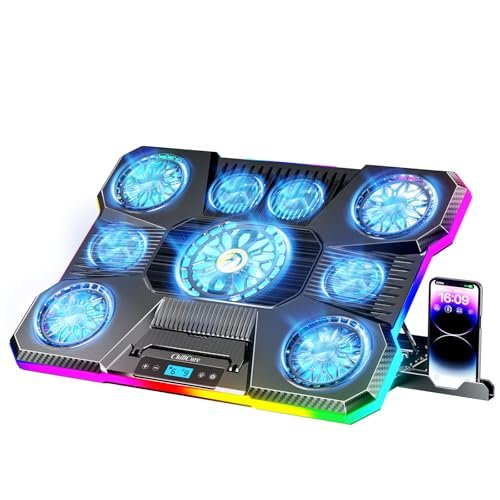
A laptop cooling pad lifts your computer and moves air beneath it to help manage heat during long gaming sessions. It can also improve desk comfort and airflow around the laptop. This guide to the best cooling pad for 15.6 gaming laptop is for players who want practical cooling, useful features, and a steady setup.
A pad that looks impressive can still disappoint. Small fans may not line up with your laptop vents, loud motors can spoil a quiet room, and a flimsy stand can wobble during play. Some buyers also expect a cooler to fix every heat issue, even when dust, blocked vents, or demanding game settings are the real cause. That mismatch can leave you with more noise, less desk space, and little change in comfort. Choosing carefully helps you match fan layout, size, tilt, and ports to the way you actually use your machine.
I focus on laptop accessories and practical desk setups, where fit and daily comfort matter as much as feature lists. For this guide, I compared the supplied product details, sizes, fan counts, stand adjustments, and connection features. I also considered who each design may suit. My goal is to help you find the best cooling pad for 15.6 gaming laptop without paying for features you will not use.
What you’ll learn
- How to match a cooling pad to a 15.6-inch gaming laptop.
- Which fan and stand features matter for everyday use.
- How five cooling pads differ in size, design, and extras.
- How to set realistic expectations for laptop cooling.
In This Article
How To Choose the Best Cooling Pad for 15.6 Gaming Laptop
The right cooling pad should fit your laptop, sit firmly on your desk, and send air where your machine needs it. A high fan count alone does not promise better cooling, and a cheap stand may slip or feel awkward at a steep angle. Check the laptop’s size and vent layout before you buy. Also think about noise, USB ports, and how often you move your setup. These details help you pick the best cooling pad for 15.6 gaming laptop for real daily use, not just a long feature list.
Check Laptop Fit and Airflow
Start with the laptop’s width and the cooling pad’s stated size range. A 15.6-inch screen is a useful guide, but laptop bodies and vent positions can vary. Look for a top surface that supports the base without covering its intake vents. Fan placement matters too: several small fans may spread airflow, while a large fan may suit a broad vent area. Do not assume that more fans always mean stronger cooling. For a 15.6-inch gaming laptop, choose a pad that fits securely and keeps the laptop’s own vents clear.
Balance Fan Noise and Controls
Gaming laptops can already make plenty of noise under load, so a loud cooling pad may become annoying fast. Check whether the product lists speed control, and consider whether you need bright RGB lights or prefer a quieter, simpler setup. Fan count alone does not tell you how loud a pad will be. If you play with a headset, sound may matter less; for study, voice chat, or shared rooms, quieter use can be a bigger priority. The best cooling pad for 15.6 gaming laptop should suit your room and habits, not just your game.
Choose a Stable Stand and Useful Ports
A cooling pad also works as a laptop stand, so look for height settings that feel comfortable and a support lip that helps keep the laptop in place. More angle options can help you find a better screen and keyboard position, but stability matters more than the number of settings. Check the USB layout, too. Some pads use a laptop USB port for power and add ports for other devices; port count and function can vary. If you move your setup often, favor a simple, sturdy model that is easy to carry and set up.
Quick Comparison
| Model | Category | Best For | Key Spec | Amazon |
|---|---|---|---|---|
| ChillCore A21 | Best Overall | Large laptops and feature seekers | 9 fans; 8 height settings | Amazon |
| ICE COOREL 8-Fan Pad | Runner Up | RGB fans who want a phone stand | 8 fans; 6 height settings | Amazon |
| KeiBn S039 | Compact Pick | Small desks and simple setups | 2 fans; 5 height settings | Amazon |
| llano V12 | High-Airflow Design | Users seeking a focused fan design | 5.5-inch turbofan; speed control | Amazon |
| KYOLLY Slim Cooling Pad | Slim Budget Pick | Portable, low-profile setups | 2 large fans; 5 height settings | Amazon |
In-Depth Reviews for the Best Cooling Pad for 15.6 Gaming Laptop
1.ChillCore A21 9-Fan Cooling Pad
 ChillCore A21 9-Fan Cooling Pad
” />
The ChillCore A21 uses nine fans and supports laptops listed from 15.6 to 19.3 inches. Its broad size range makes it a flexible choice for many gaming laptops. Eight height settings let you adjust the screen angle. RGB lighting adds a gaming look, while two USB ports provide handy connection options. It is a feature-rich contender for the best cooling pad for 15.6 gaming laptop.
The stand offers plenty of height choices for desk play, work, or video calls. Its larger size may suit a full gaming setup better than a tiny travel desk. The two USB ports can help when you need extra connections, though check their layout against your devices. This pad is best for players who want adjustable height, lighting, and broad laptop support.
The open fan surface should be easy to wipe with a dry, soft cloth. The product lists several useful features, but its larger frame may take up more desk space. It offers good feature value for users who will use the fan array, stand range, and RGB lighting.
Why It’s Great
- Nine fans provide a wide airflow layout beneath the laptop.
- Eight height settings give users more options for screen tilt.
- Listed support up to 19.3 inches suits larger machines too.
- RGB lighting adds a gaming-style look to a desk.
- Two USB ports offer extra connection options.
Good to Know
- The larger size may crowd a compact desk.
- RGB lighting may not suit a low-key work setup.
- Fan count alone cannot promise a specific temperature drop.
2.ICE COOREL 8-Fan RGB Cooling Pad
 ICE COOREL 8-Fan RGB Cooling Pad
” />
The ICE COOREL pad has eight cooling fans and is listed for laptops from 15 to 17.3 inches. That range includes many 15.6-inch gaming laptops. Six height settings help raise the screen, and RGB lighting gives the stand a bright gaming feel. Two USB ports and a phone stand add useful extras. It is a strong option when the best cooling pad for 15.6 gaming laptop should also organize a desk.
The angled stand can help create a more comfortable viewing position during long sessions. Its phone stand is handy for a second screen, chat, or a guide beside the game. The RGB design suits players who enjoy a coordinated setup. This model is best for users who want multiple fans, adjustable height, and a place to keep a phone nearby.
The top surface can be wiped clean with a soft cloth, and the listed features offer solid everyday value. Check that the laptop fits within its size range. The phone stand and lighting are useful extras, but they add features some buyers may not need.
Why It’s Great
- Eight fans cover a broad area beneath the laptop.
- Six height settings allow a choice of viewing angle.
- The listed size range includes common 15.6-inch gaming laptops.
- A built-in phone stand keeps a device close at hand.
- Two USB ports and RGB lighting add useful setup extras.
Good to Know
- The 17.3-inch upper size limit may not fit larger laptops.
- RGB lighting may be distracting in a dark room.
- The phone stand may go unused if you do not keep a phone at your desk.
3.KeiBn S039 Two-Fan Cooling Pad
 KeiBn S039 Two-Fan Cooling Pad
” />
The KeiBn S039 keeps its design simple with two fans and support for laptops from 10 to 15.6 inches. Its five height settings make it more than a flat cooling surface, while two USB ports add basic convenience. It is a compact choice for smaller gaming laptops. Buyers seeking the best cooling pad for 15.6 gaming laptop with a simple layout may appreciate its focus.
This model is suited to a small desk or a user who prefers fewer extras. The raised angle can make the screen easier to view, and the smaller size may be easier to place than a wide multi-fan pad. It is best for owners of laptops at or below 15.6 inches who want a straightforward stand and cooling fans.
The simpler layout should be easy to dust with a soft cloth. Its compact design can be useful when desk space is limited, though the listed size ceiling matters. It may offer good value to buyers who prefer a basic stand over lighting or extra accessories.
Why It’s Great
- The compact size can suit smaller desks.
- Five height settings allow an adjustable viewing angle.
- Two USB ports add basic connection flexibility.
- The listed range includes laptops up to 15.6 inches.
- The simple design avoids extra lights and accessories.
Good to Know
- The 15.6-inch maximum leaves little room for larger laptops.
- Two fans provide fewer airflow points than multi-fan models.
- The product listing does not specify a fan speed control.
4.llano V12 Turbofan Cooling Stand
 llano V12 Turbofan Cooling Stand
” />
The llano V12 uses a 5.5-inch turbofan with an airtight pressure chamber design. It is listed for laptops from 15.6 to 19 inches and includes adjustable speed, dust protection, and a three-port USB hub. These features set it apart from pads built around several smaller fans. For shoppers comparing the best cooling pad for 15.6 gaming laptop, its focused fan design is a distinct option.
The larger stand is designed for gaming laptops and may suit a fixed desk setup more than a small travel space. Adjustable speed lets users change fan output to match their needs. The USB hub offers extra ports for desk accessories. This pad is best for people who want a focused airflow design and a stand made for larger laptops.
The dustproof design may help limit dust entering the fan area, though regular surface cleaning is still sensible. Its larger frame and focused fan setup are more specialized than a basic pad. It can be good value for users who want speed control and a multi-port hub.
Why It’s Great
- A 5.5-inch turbofan gives the design a focused airflow approach.
- Adjustable speed allows users to change fan output.
- The listed range starts at 15.6 inches and reaches 19 inches.
- A three-port USB hub adds connection options.
- The dustproof feature may help reduce dust entry.
Good to Know
- The larger design may not suit small desks or frequent travel.
- Its focused fan setup may not align with every laptop vent layout.
- Confirm that your laptop’s base fits the listed size range.
5.KYOLLY Slim Two-Fan Cooling Pad
 KYOLLY Slim Two-Fan Cooling Pad
” />
The KYOLLY cooling pad pairs two large fans with a slim stand for laptops from 10 to 15.6 inches. It includes five height settings, speed control, and two USB ports. The listing describes the fans as quiet, though noise can vary by setting and use. Its pared-back design makes it a practical choice for shoppers seeking the best cooling pad for 15.6 gaming laptop in a low-profile form.
The slim shape may be easier to fit on a crowded desk or carry between rooms than a broad RGB stand. Five height settings help users adjust the screen position, while speed control gives some choice over fan output. It is best for owners of laptops up to 15.6 inches who value a simple, portable setup over a large fan array.
A soft cloth should be enough for routine surface cleaning. The slim design and basic ports make it an easy fit for many desks, but check the laptop size before ordering. It offers useful everyday features without the bulk of larger cooling stands.
Why It’s Great
- The slim profile can suit a smaller desk or mobile setup.
- Two large fans keep the design simple.
- Five height settings support an adjustable screen position.
- Speed control gives users a choice of fan output.
- Two USB ports add practical connection options.
Good to Know
- The listed laptop size range tops out at 15.6 inches.
- Two fans cover less of the base than multi-fan pads.
- The quiet description is not a measured noise rating.
Final Thoughts: The Verdict
My personal top pick is the ChillCore A21 9-Fan Cooling Pad. Its broad laptop range, nine fans, eight height settings, and two USB ports make it the most versatile choice in this group. It is a strong place to start if you want the best cooling pad for 15.6 gaming laptop and value an adjustable, feature-rich setup.
For a focused fan design and extra ports, consider the llano V12 Turbofan Cooling Stand. The ICE COOREL suits buyers who want RGB and a phone stand, while KeiBn and KYOLLY offer simpler, compact designs. Check your laptop size, vent layout, desk space, and noise needs before choosing. Pick the features that fit your budget and daily setup.