
A laptop cooling pad is a raised stand with powered fans that can help move air around a computer. Surface Pro 4 owners often buy one for a cooler-feeling desk setup and a better viewing angle. The best cooling pad for surface pro 4 should also hold this smaller device securely.
Buying the wrong cooler can mean loud fan noise, a wobbly stand, or a pad that is far too large for your Surface. A fan count alone does not prove that a cooler will lower device temperatures. Surface Pro 4 models also differ: some use a fan, while the Core m3 model is fanless. Since the tablet sheds heat through its body and edges, a laptop pad may offer limited help. Check fit, stability, noise, and your actual use before spending money.
I compare these options by their listed size range, fan setup, height settings, ports, and likely desk fit, while keeping the Surface Pro 4’s compact shape in mind. I do not treat advertised fan counts as proof of tested cooling results. This guide prioritizes steady support, useful airflow, simple setup, and honest expectations when choosing the best cooling pad for surface pro 4.
What you’ll learn
- Why a laptop cooler may not directly cool every Surface Pro 4 model
- How to check stand fit and stability before buying
- Which fan and height features suit different desk setups
- What to expect from the five listed cooling pads
In This Article
How To Choose The Best best cooling pad for surface pro 4
The right pad should support your Surface Pro 4 without rocking, slipping, or blocking the way you use its kickstand. Many laptop coolers are built for larger machines, so a small tablet can sit poorly on their mesh. More fans do not always mean lower device temperatures, either. Before you buy the best cooling pad for surface pro 4, check its size, fan placement, noise, and height range. Also keep in mind that a pad cannot replace clear vents or fix a software or battery issue.
Check Fit and Stable Support
A Surface Pro 4 is smaller than many laptops that these cooling pads are made to hold. Look at the pad’s surface, stop ledges, and size range, then think about whether you will use the tablet with its own kickstand or keyboard. A broad mesh deck may leave the tablet less secure if it has no firm contact points. Avoid placing it where it can slide or tip, and do not block its edge vents. A wide pad can work well as a desk base, but a simple stand may suit a bare tablet better.
Choose Airflow With Realistic Expectations
Fan count and size tell you how a pad is built, not how much it will lower Surface temperatures. The Surface Pro 4 moves heat through its body and edges, so air blown at its back may have only a modest effect. Check whether the fan position lines up with the device and whether speed control is offered. A two-fan model may be enough for quiet desk use; a multi-fan pad gives broader airflow for a laptop used beside the tablet. Do not buy on fan count alone or expect a pad to cure overheating.
Consider Noise, Height, and Power
A pad that is pleasant to use should fit your desk and connect without fuss. Check its height settings, USB connection, and whether it uses a USB port that you need for other gear. Extra ports can help, but they are not a substitute for a powered hub when you need more connections. Fan noise matters during calls or quiet work, and advertised quietness is not the same as a measured sound test. Choose a low, stable setting for typing, or a taller angle when screen height matters more than portability.
Quick Comparison
| Model | Category | Best For | Key Spec | Amazon |
|---|---|---|---|---|
| Kootek 5-Fan Cooling Pad | Best Overall | Broad airflow and adjustable desk use | 5 fans, 6 height settings | Amazon |
| KYOLLY Ultra Slim Cooling Pad | Slim Pick | A light, simple desk setup | 2 fans, 5 height settings | Amazon |
| KeiBn 15-Fan RGB Cooling Pad | Feature Rich | Users who want many fans and RGB | 15 fans, 4 height settings | Amazon |
| Targus Dual-Fan Lap Chill Mat | Lap Use | Cushioned use on a lap or desk | Soft neoprene, 2 USB-A fans | Amazon |
| ICE COOREL Aluminum Cooling Pad | Adjustable Stand | A metal stand with many height choices | Aluminum, 7 height settings | Amazon |
In-Depth Reviews for best cooling pad for surface pro 4
1.Kootek 5-Fan Laptop Cooling Pad
 Kootek 5-Fan Laptop Cooling Pad
” />
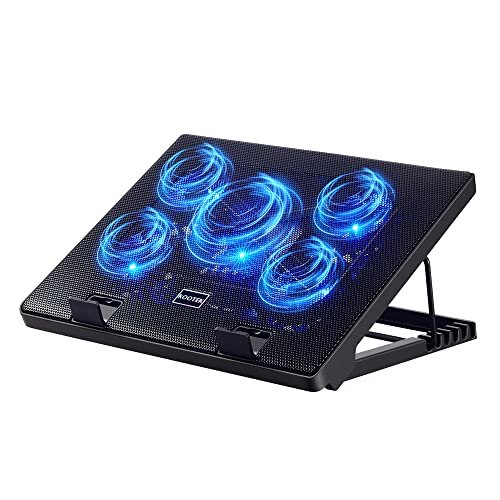
The Kootek cooling pad has five fans, six height settings, and two extra USB hubs. Its broad fan layout is designed to move air across laptops from 12 to 17 inches. For the best cooling pad for surface pro 4 seekers, its adjustable deck offers a flexible desk base, though tablet temperatures may not change much.
The stand lets you choose an angle for viewing or typing, while its USB-powered fans keep setup simple. Its large surface is better suited to a Surface Pro 4 used with a keyboard or placed securely on a desk than to a bare tablet held by hand. Blue LEDs show when the fans are running.
The mesh surface is easy to wipe with a soft, dry cloth. Its plastic frame and adjustable supports add useful options, but the wide footprint takes desk space. It offers good flexibility if you also use a larger laptop.
Why It’s Great
- Five fans spread airflow across a broad surface.
- Six height settings allow several desk angles.
- Two extra USB hubs add connection options.
- USB power makes setup straightforward.
- Works with a range of larger laptops too.
Good to Know
- Its large deck may feel oversized for a Surface Pro 4.
- Fan count does not guarantee a temperature drop on the tablet.
- The extra height settings may make the stand less compact to store.
2.KYOLLY Slim Two-Fan Cooling Pad
 KYOLLY Slim Two-Fan Cooling Pad
” />
The KYOLLY is a slim laptop cooling pad with two large fans, five height settings, speed control, and two USB ports. It is listed for laptops from 10 to 15.6 inches. That compact range makes it a practical candidate for a small desk, though buyers should check how the Surface Pro 4 sits on its deck.
Its adjustable angle can help bring a screen closer to eye level, and speed control gives users a way to set the fan pace. It suits a Surface Pro 4 owner who wants a simple, portable desk stand and may also use a small laptop. Check the tablet’s stability before leaving it unattended.
The slim profile is easy to wipe down and store between uses. Its plastic build keeps the design light, though it may not feel as substantial as a metal stand. It is a sensible choice when compact size matters most.
Why It’s Great
- Slim design is easier to store than a large pad.
- Five height settings support varied desk positions.
- Speed control lets you adjust fan output.
- Two USB ports offer added connection flexibility.
- Its listed size range includes smaller laptops.
Good to Know
- Only two fans provide less total coverage than multi-fan models.
- A Surface Pro 4 may not sit securely without careful placement.
- No verified noise or cooling test results are provided here.
3.KeiBn 15-Fan RGB Cooling Pad
 KeiBn 15-Fan RGB Cooling Pad
” />
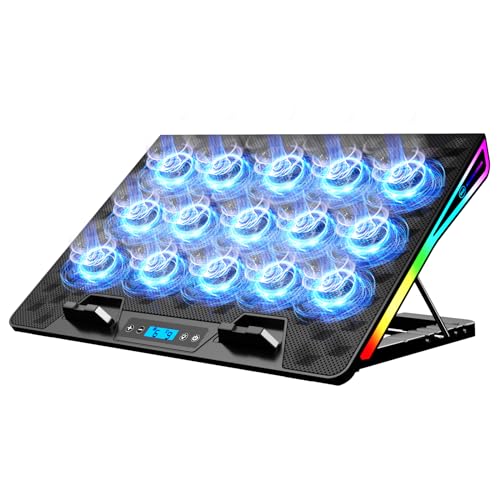
The KeiBn cooling pad pairs 15 quiet fans with RGB lighting and four height settings. It is listed for laptops from 10 to 17.3 inches and has two USB ports. That feature set makes it stand out among the options, but a high fan count alone cannot show how well it will cool a Surface Pro 4.
Its wide range should suit a desk used for gaming laptops and other gear, while the adjustable supports help change screen angle. The RGB look may appeal to users who want a more colorful setup. For a Surface Pro 4, check that the tablet rests safely and that its edge vents remain clear.
The mesh deck can be dusted or wiped with a soft cloth. Its many fans and lighting add features, but also make this a larger, busier stand than a basic cooler. It makes most sense when you will use it with a full-size laptop as well.
Why It’s Great
- Fifteen fans offer broad airflow across a laptop-sized deck.
- RGB lighting adds a distinct look to a desk.
- Four height settings let users adjust the viewing angle.
- Two USB ports provide extra connection options.
- The listed size range also suits larger laptops.
Good to Know
- Its large surface can be excessive for a Surface Pro 4.
- More fans do not ensure better cooling for this tablet.
- RGB lighting and multiple fans may not suit a quiet, minimal setup.
4.Targus Dual-Fan Lap Chill Mat
 Targus Dual-Fan Lap Chill Mat
” />
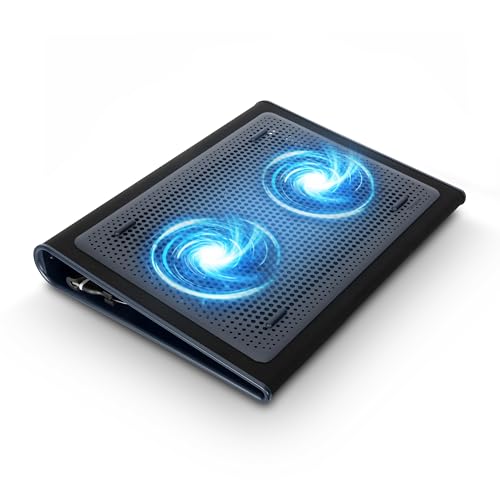
The Targus Lap Chill Mat uses two USB-A fans and a soft neoprene surface. It is designed for laptops up to 17 inches, so it gives a Surface Pro 4 a broad base rather than a close-fitting tablet stand. Its main appeal is cushioned use on a lap or desk, not a promise of measured temperature reduction.
This mat suits someone who moves between a sofa and a desk and wants a softer surface beneath a laptop. A Surface Pro 4 can be placed on it, but its kickstand and viewing angle may not work as neatly as they do on a firm stand. Keep the tablet stable and its edges open.
The neoprene cover can be cleaned with a lightly damp cloth and allowed to dry. A soft base feels comfortable, though it is less rigid than an adjustable stand. It is a useful option if lap comfort matters more than height control.
Why It’s Great
- Soft neoprene offers a cushioned surface for lap use.
- Two USB-A fans provide powered airflow.
- Large listed size range suits many laptops.
- A mat format is easy to move between rooms.
- It can serve as a simple desk or lap base.
Good to Know
- It does not offer adjustable height settings.
- The large laptop shape may not secure a small tablet.
- Its soft surface may not provide the firm support some users want.
5.ICE COOREL Aluminum Cooling Pad
 ICE COOREL Aluminum Cooling Pad
” />
The ICE COOREL aluminum cooling pad has two fans, seven height settings, and two USB ports. It is listed for laptops from 12 to 15.6 inches. Its metal stand and wide range of angles make it a strong ergonomic option, though buyers should confirm that the Surface Pro 4 is held securely.
The adjustable height can help improve screen position at a desk, and the stand may suit people who use a laptop and tablet in the same space. Its two fans offer airflow, but Surface Pro 4 cooling gains are not guaranteed. Keep the device’s side vents clear and use a stable angle.
The aluminum surface can be wiped clean with a soft cloth. Metal gives the stand a firmer feel, while its adjustable parts add bulk compared with a slim pad. It offers useful flexibility if you value an elevated, reusable desk stand.
Why It’s Great
- Aluminum construction gives the stand a firm feel.
- Seven height settings offer many viewing angles.
- Two fans add powered airflow.
- Two USB ports provide extra connections.
- The listed size range suits compact laptops.
Good to Know
- The 12-inch minimum listing does not ensure a snug Surface fit.
- Two fans may have limited effect on tablet temperatures.
- Its adjustable frame may be less portable than a slim pad.
Final Thoughts: The Verdict
My personal top pick is the Kootek 5-Fan Laptop Cooling Pad for its five fans, six height settings, and extra USB hubs. It is a flexible desk choice, especially if you also use a larger laptop. Remember, no pad here is proven to lower Surface Pro 4 temperatures, and safe support matters as much as airflow.
For a smaller footprint, consider the KYOLLY Slim Two-Fan Cooling Pad; choose the Targus mat if cushioned lap use is your priority. The ICE COOREL suits shoppers who want a metal stand with many height choices. For the best cooling pad for surface pro 4, check fit, stability, and your budget before buying.