
A laptop cooling pad lifts your computer and moves air beneath it. It can help students, remote workers, and gamers who use a 15.6-inch laptop for long sessions. People buy one for added airflow, a more comfortable screen height, or both. This guide compares options for the best cooling pad for 15.6 inch laptop.
A wobbly stand, a loud fan, or a blocked vent can turn a simple upgrade into a daily annoyance. Some buyers focus on fan count and miss the laptop’s vent layout, pad size, or desk space. Others expect a cooling pad to fix every heat problem, even when dust or heavy software is the real cause. The right choice should fit your laptop, stay steady while you type, and suit your noise needs. A little care now can save you from a cluttered desk and a purchase that gathers dust.
I compare these models by their listed size range, fan setup, height options, ports, and likely use. I also consider practical trade-offs, such as a simple USB design versus a larger gaming pad with lights. This guide does not promise a set temperature drop; cooling depends on the laptop and its vents. My aim is to help you find the best cooling pad for 15.6 inch laptop use with a clear fit, useful features, and fair value.
What you’ll learn
- How to match a cooling pad to your laptop size and vent layout.
- Which fan and stand features matter for work, study, and gaming.
- What trade-offs to expect from USB ports, lights, and larger pads.
- How to choose a cooling pad that fits your desk and budget.
In This Article
How To Choose The Best best cooling pad for 15.6 inch laptop
The best cooling pad for 15.6 inch laptop use should fit your computer and your routine, not just look powerful in a listing. A large fan count does not prove that air will reach your laptop’s vents. A low-quality frame may wobble, while a bright gaming pad may take up more desk space than you expect. Check the listed laptop size, fan controls, stand angles, USB setup, and return terms before you buy. Also keep vents clear and clean the laptop itself; a pad cannot fix every cause of heat.
Check Laptop Fit and Airflow
Start with your laptop’s size and the position of its air intakes. A pad listed for 15.6-inch laptops is a sensible starting point, but the computer should sit securely with its vents over open mesh or fan airflow. Do not assume that more fans always mean better cooling; fan placement and your laptop’s vent design matter too. A slim, simple pad may suit a work laptop, while a broad model can better support a larger gaming laptop. Measure your desk and laptop before ordering, and avoid a pad that leaves the computer perched on an edge.
Balance Fan Noise and Cooling Needs
Cooling pads use USB-powered fans, so think about where and when you work. A quiet setup matters in a shared room, library, or video call. A larger multi-fan pad may appeal to a gaming user, but fan count alone cannot confirm how loud it will sound or how much it will cool your laptop. Look for speed control when you want to adjust airflow, and check whether the product description lists noise details. If the laptop gets hot only under heavy load, a pad with adjustable airflow may be more useful than a basic stand. Keep expectations realistic: results vary by model and use.
Choose a Stable Stand and Useful Ports
A cooling pad can also improve screen height and typing comfort. Check how many height settings it offers and whether the laptop has a stop or grip to keep it in place. More angle choices can help you find a comfortable position, though a steep tilt may feel awkward for long typing sessions. Review the USB port setup as well. Some pads use a laptop port for power and provide an extra port, but that may not replace a full USB hub. Pick a simple, compact stand for light travel, or a larger stand if stability and gaming features matter more.
Quick Comparison
| Model | Category | Best For | Key Spec | Amazon |
|---|---|---|---|---|
| havit HV-F2056 | Best Overall | Simple everyday cooling and lift | Three fans; two height settings | Amazon |
| KeiBn S039 | Adjustable Value | Users who want more stand angles | Two fans; five height settings | Amazon |
| AIMIUZI Five-Fan Pad | Flexible Stand | Quiet-use setups and angle choice | Five fans; five adjustable angles | Amazon |
| ChillCore A21 Blue | Gaming Features | Large laptops and gaming desks | Nine fans; eight height settings | Amazon |
| llano V12 | High-Airflow Design | Gaming laptops and focused airflow | 5.5-inch turbofan; three-port USB hub | Amazon |
In-Depth Reviews for best cooling pad for 15.6 inch laptop
1.havit HV-F2056 Cooling Pad
 havit HV-F2056 Cooling Pad
” />
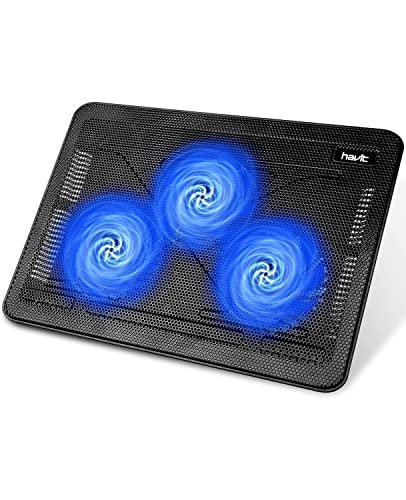
The havit HV-F2056 supports laptops from 15.6 to 17 inches, making it a flexible pick for many common computers. Three USB-powered fans move air below the laptop, while the mesh surface allows airflow through the stand. Two height settings add a useful lift. For shoppers seeking the best cooling pad for 15.6 inch laptop use, its simple feature mix stands out.
Its slim, black design suits a home desk, study space, or office. The two height options let you raise the screen and adjust your viewing angle without adding a complex setup. The fans are described as quiet, which may suit work and study, though actual sound can vary. It is best for users who want basic airflow and a modest ergonomic lift.
The open mesh design is easy to wipe, and the lightweight form is simple to move between desks. Keep the fans and laptop vents free of dust for steady airflow. It offers a straightforward set of features, but buyers should check their laptop’s footprint and port needs before purchase.
Why It’s Great
- Three fans spread airflow beneath the laptop.
- Fits the listed range from 15.6 to 17 inches.
- Two height settings can improve screen position.
- USB power keeps setup simple.
- Slim form is easy to move and store.
Good to Know
- Only two height settings are listed, so angle choice is limited.
- The product description does not give a measured noise level or cooling result.
- USB power uses a laptop port, so check your available ports.
2.KeiBn S039 Laptop Cooling Pad
 KeiBn S039 Laptop Cooling Pad
” />
The KeiBn S039 is listed for laptops from 10 to 15.6 inches, so it can suit compact systems as well as a standard 15.6-inch laptop. It has two fans, five height stands, and two USB ports. That blend gives it more position options than a basic pad. It is a practical contender for the best cooling pad for 15.6 inch laptop shoppers who value adjustability.
The raised stand can help bring the display closer to eye level, while the five settings offer room to find a comfortable tilt. Its two-fan layout keeps the design simpler than large gaming pads. This model may suit students, home workers, and casual users who want several angle choices without a large footprint. Check the laptop’s base dimensions for a secure fit.
The stand’s open structure should be easy to dust with a soft cloth. Its USB ports add convenience, but buyers should confirm how the ports work in their setup. With useful angle choice and a broad listed size range, it offers good everyday value if its build and dimensions suit your needs.
Why It’s Great
- Five height settings give useful angle choice.
- Listed for laptops up to 15.6 inches.
- Two fans provide active airflow.
- Two USB ports add connection flexibility.
- The smaller fan layout may suit a compact desk.
Good to Know
- Two fans may offer less broad airflow than multi-fan designs.
- The product details do not state a measured noise level.
- Confirm the laptop’s base size before relying on the listed fit.
3.AIMIUZI Five-Fan Cooling Pad
 AIMIUZI Five-Fan Cooling Pad
” />
The AIMIUZI cooling pad is made for laptops from 12 to 15.6 inches and pairs five fans with five adjustable angles. That combination offers active airflow and more stand positions than a simple flat pad. The listed fans are described as quiet, a helpful feature for focused work. It may suit buyers comparing the best cooling pad for 15.6 inch laptop use with a flexible stand.
Its black stand design fits a work or study desk, while the five angle settings let users adjust screen height and tilt. The five-fan layout may appeal to those who want airflow across a broader area, but cooling depends on fan placement and laptop vents. It is best suited to people who want several viewing positions in a stationary setup.
The mesh surface and fan openings can be cleaned with a soft cloth or light dusting. Its adjustable frame offers useful flexibility, though buyers should check how it fits their laptop base. The feature set can be good value for users who will make use of both the fans and angle options.
Why It’s Great
- Five fans provide airflow under the laptop.
- Five angle settings support varied desk positions.
- Listed for laptops up to 15.6 inches.
- Fans are described as quiet.
- Black styling suits a range of desk setups.
Good to Know
- The listing does not provide a measured noise level.
- Five fans do not guarantee a specific temperature drop.
- Its 15.6-inch maximum makes exact laptop dimensions worth checking.
4.ChillCore A21 Blue Cooling Pad
 ChillCore A21 Blue Cooling Pad
” />
The ChillCore A21 Blue is listed for laptops from 15.6 to 19.3 inches. It combines nine fans, RGB lights, eight height settings, and two USB ports. The broad size range may appeal to gaming laptop owners who want a feature-rich stand. For the best cooling pad for 15.6 inch laptop buyers who like lights and many tilt options, this model offers plenty to consider.
Its larger frame and many angle settings are suited to a gaming desk or a fixed home setup. RGB lighting adds a visual touch, while the two USB ports offer extra connection options. This stand may be best for users who value gaming style and broad laptop support more than a small, easy-to-pack design. Check desk space before choosing it.
The open fan layout can be dusted with a soft brush or cloth, but the larger surface may take more care than a slim pad. Its many features offer value for users who want lights and several height choices. Buyers seeking a quiet or compact stand should compare simpler models as well.
Why It’s Great
- Nine fans cover a broad area under the laptop.
- Eight height settings offer many viewing angles.
- RGB lighting adds a gaming-focused look.
- Two USB ports provide added connection options.
- Listed support extends to larger 19.3-inch laptops.
Good to Know
- The larger frame may take up more desk space.
- RGB lights may not suit a quiet or minimal work setup.
- The listing does not confirm a specific cooling or noise result.
5.llano V12 Gaming Laptop Cooler
 llano V12 Gaming Laptop Cooler
” />
The llano V12 is designed for 15.6- to 19-inch laptops and uses a 5.5-inch adjustable-speed turbofan with an airtight pressure chamber. It also lists dust protection and a three-port USB hub. This focused design differs from pads that spread several small fans across a surface. It may interest shoppers seeking the best cooling pad for 15.6 inch laptop gaming sessions.
The V12’s speed control lets users adjust the fan to their needs, while its larger build is aimed at gaming laptops. The three-port hub can help add connections, though it is wise to check how it works with your computer. This stand best suits users who prioritize focused airflow and extra ports over a light, compact design.
The dustproof design may help limit dust entering the fan area, but routine cleaning is still sensible. Its larger fan housing and pressure chamber make it more specialized than a basic mesh pad. It may offer strong value for users who will use its speed control and hub, but it is a bigger desk accessory.
Why It’s Great
- A 5.5-inch turbofan provides focused airflow.
- Adjustable speed gives users control over fan output.
- The airtight pressure chamber sets it apart from open mesh pads.
- Three USB ports add connection options.
- Listed for gaming laptops up to 19 inches.
Good to Know
- The larger fan design may take more room than a slim cooling pad.
- A concentrated airflow design may not suit every laptop vent layout.
- The listing does not provide a guaranteed temperature reduction.
Final Thoughts: The Verdict
My personal top pick is the havit HV-F2056 for its simple three-fan design, broad fit, and useful height settings. It is a balanced choice for everyday work and study. For the best cooling pad for 15.6 inch laptop use, remember that fit and vent alignment matter as much as fan count.
For more angle options, consider the KeiBn S039. The AIMIUZI suits buyers who want five fans and adjustable angles, while ChillCore and llano offer larger gaming-focused designs. Check your laptop size, desk space, and port needs, then choose the model that fits your budget and daily use.