
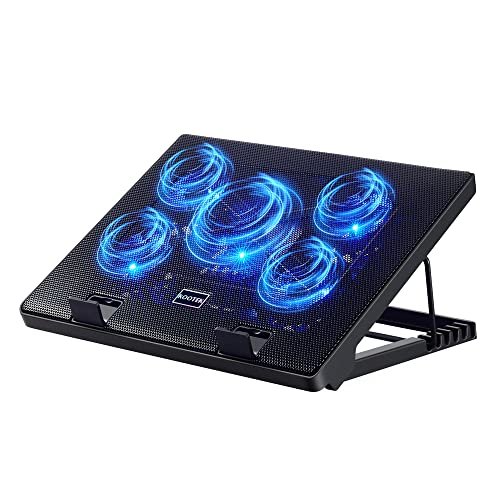
A laptop cooling pad is a raised stand with fans that move air beneath your computer. It can help gamers, remote workers, and students manage heat during long sessions. If you are searching for the best cooling pad for laptop quora, the right pick can also improve desk comfort and airflow.
A poor cooling pad can be more noise than help. Small fans may not line up with your laptop vents, weak stands can wobble, and bright lights can distract during late work. Buyers also sometimes focus on fan count alone, then find the pad too loud or too small. That is frustrating when your laptop still runs hot and your desk feels crowded. Matching the pad to your laptop size, vent layout, and noise needs matters more than flashy claims. A good fit makes daily use feel calmer and more comfortable.
I write about practical computer gear and compare cooling pads by fit, fan layout, adjustment, ports, and everyday use. I reviewed the listed features and considered where each model may suit different laptops and work styles; I do not treat maker claims as lab results. This best cooling pad for laptop quora guide puts comfort, clear trade-offs, and value first.
What you’ll learn
- How laptop size and vent placement affect cooling pad fit
- Which fan layouts may suit work, gaming, or quiet spaces
- What to expect from height settings, USB ports, and extras
- How to compare features without relying on fan count alone
In This Article
How To Choose The Best best cooling pad for laptop quora
The best cooling pad for laptop quora is not always the one with the most fans. A pad that blocks your laptop vents, sits at an awkward angle, or makes too much noise can spoil the benefit. Check your laptop size and where its air intakes sit before you buy. Look at fan control, stand stability, and the number of USB ports too. A simple model may be a better fit than a flashy one if it suits your desk and daily routine.
Match the Pad to Your Laptop
Start with your laptop’s size, weight, and vent locations. A pad should support the computer without covering its air intake. Check the maker’s stated size range, then compare it with your laptop’s dimensions. Larger gaming laptops may need a wide base, while a compact work laptop can sit well on a smaller stand. Do not assume that a high fan count means a better fit. The best cooling pad for laptop quora should keep the vents clear and hold your laptop steady. If possible, check the pad’s measurements before ordering.
Balance Fan Power and Noise
More fans can spread airflow across a wider area, but fan count alone does not tell you how well a pad cools your laptop. Fan size, placement, speed control, and your computer’s vent layout all matter. If you work in a quiet room, look for a model described as quiet or one with adjustable speed. Gaming users may prefer stronger airflow and may be more willing to accept fan noise. Avoid treating marketing terms as measured performance. The best cooling pad for laptop quora is the one that suits your real work space and use.
Check Comfort, Ports, and Build
A stable stand can help your neck and wrists feel better during long sessions. Look for height settings that suit your desk, plus a broad base and secure laptop stops. USB hubs can be handy, but check whether the pad uses a port on your laptop and whether it has pass-through support. RGB lights and phone holders are useful only if you want them. For the best cooling pad for laptop quora, value the features you will use each day. A sturdy, simple design can beat a crowded feature list.
Quick Comparison
| Model | Category | Best For | Key Spec | Amazon |
|---|---|---|---|---|
| Kootek 5-Fan Cooling Pad | Best Overall | Flexible everyday laptop use | Five fans, six height settings | Amazon |
| ICE COOREL 8-Fan Cooling Pad | Gaming Pick | RGB fans and phone stand | Eight fans, six height settings | Amazon |
| ChillCore 9-Fan Cooling Pad | Feature Rich | Large laptops and RGB setups | Nine fans, eight height settings | Amazon |
| havit HV-F2056 Cooling Pad | Budget Reliable | Simple everyday cooling | Three fans, two height settings | Amazon |
| llano V12 Cooling Pad | High Airflow | Large gaming laptops | 5.5-inch turbofan, speed control | Amazon |
In-Depth Reviews for best cooling pad for laptop quora
1.Kootek 5-Fan Laptop Cooling Pad
 Kootek 5-Fan Laptop Cooling Pad
” />
The Kootek cooling pad has five fans designed to spread airflow across compatible 12- to 17-inch laptops. Its USB-powered design includes two extra USB hubs, and six height settings let you change your viewing angle. For shoppers seeking the best cooling pad for laptop quora, this blend of airflow and useful adjustability makes it a strong all-round option.
The broad size range gives this stand a place in mixed home or office setups. Its blue LED lights add a gaming touch, while the adjustable height can help bring the screen up to a more comfortable view. It may suit students, remote workers, and casual gamers who want a practical stand with more than one fan.
The design combines a metal mesh surface with a plastic frame, so routine dust removal should be simple with a soft cloth. Keep the USB cable and fan area clear. Its added hubs and height choices offer solid everyday value, though buyers should check laptop fit before ordering.
Why It’s Great
- Five fans provide airflow across a wider laptop area.
- Six height settings offer more desk-position choices.
- Two extra USB hubs help connect small accessories.
- The stated 12- to 17-inch range suits many common laptops.
- USB power keeps setup simple without a separate power brick.
Good to Know
- The USB-powered fans use a laptop port, so plan for that connection.
- Blue LEDs may not suit users who prefer a plain, dark setup.
- Check your laptop’s vent locations; fan placement may not match every model.
2.ICE COOREL 8-Fan RGB Cooling Pad
 ICE COOREL 8-Fan RGB Cooling Pad
” />
The ICE COOREL cooling pad uses eight fans and supports laptops listed from 15 to 17.3 inches. Its RGB lighting gives a gaming desk a bright look, while six height settings let users raise the screen. Two USB ports and a phone stand add useful extras. It is a feature-rich option in this best cooling pad for laptop quora roundup.
This stand is aimed at gamers and users who like a more involved desk setup. The phone holder can keep a mobile device nearby, and the adjustable frame offers several viewing angles. Its size range suits many mid-sized gaming laptops, but it is worth checking the full dimensions and vent placement before purchase.
The flat fan surface is easy to wipe when dust builds up, and the stand’s extra features add desk value. RGB parts and moving fan components call for gentle care. Choose it for its feature set, not as proof of a specific temperature drop.
Why It’s Great
- Eight fans offer broad airflow coverage for supported laptops.
- Six height settings make it easier to tune the screen angle.
- RGB lighting suits users who want a gaming-style desk.
- The included phone stand keeps a second screen close at hand.
- Two USB ports add convenient connections for accessories.
Good to Know
- RGB lighting may feel distracting in a dim room or office.
- The 15- to 17.3-inch range may not fit smaller laptops well.
- Eight fans do not guarantee quieter or stronger cooling than every rival.
3.ChillCore 9-Fan RGB Laptop Cooler
 ChillCore 9-Fan RGB Laptop Cooler
” />
The ChillCore pad lists nine fans for laptops from 15.6 to 19.3 inches, making it a fit to consider for larger machines. It has RGB lights, two USB ports, and eight height settings. That mix offers broad coverage and plenty of setup choice for buyers comparing the best cooling pad for laptop quora options.
The larger stated size range may appeal to gaming laptop owners who need a broad support surface. Eight stand positions let users adjust the angle for desk work or play. Its RGB style is made for a visible gaming setup, while buyers with small laptops may find this model more pad than they need.
A soft cloth can clear dust from the top, but care around the fan openings is sensible. The extra adjustment points add flexibility, though the larger frame needs room on a desk. It offers useful value when its size, lighting, and multiple fans match your needs.
Why It’s Great
- Nine fans are arranged for wide coverage on larger laptops.
- Eight height settings offer many ways to adjust the stand.
- The stated range reaches laptops up to 19.3 inches.
- RGB lighting adds color to a gaming setup.
- Two USB ports provide extra connection options.
Good to Know
- Its large size may take up more desk space than compact pads.
- The RGB look may not fit a low-key work area.
- Fan count alone cannot confirm cooling results or noise levels.
4.havit HV-F2056 Laptop Cooling Pad
 havit HV-F2056 Laptop Cooling Pad
” />
The havit HV-F2056 keeps its design simple, with three USB-powered fans for laptops listed from 15.6 to 17 inches. Its mesh surface lets air circulate below the computer, and two height settings add a modest lift. For readers who want the best cooling pad for laptop quora without a long feature list, it is an easy model to consider.
This lightweight style suits students, office users, and anyone who wants a basic stand for everyday work. The two height choices offer less range than multi-position rivals, but they can still improve the screen angle. Its plain black look is easy to pair with most desks and laptop designs.
The open surface is easy to wipe, and the uncomplicated layout keeps daily care straightforward. Its light frame is easy to move, though it may feel less substantial than heavier stands. This can be good value for buyers who want basic airflow and a modest lift.
Why It’s Great
- Three fans provide simple airflow without a crowded feature set.
- The stated size range covers many 15.6- to 17-inch laptops.
- Two height settings offer a useful basic screen lift.
- USB power makes the setup easy to connect.
- The plain design works well in home and office spaces.
Good to Know
- Two height settings provide less adjustment than many competing stands.
- It has fewer fans and extras than RGB gaming models.
- The product listing does not state a temperature reduction figure.
5.llano V12 Turbofan Cooling Pad
 llano V12 Turbofan Cooling Pad
” />
The llano V12 uses a 5.5-inch turbofan and an airtight pressure chamber design for listed 15.6- to 19-inch laptops. It also offers adjustable speed and a three-port USB hub. This distinct setup may suit users looking beyond several small fans when weighing the best cooling pad for laptop quora choices.
The broad laptop range makes this model worth a look for owners of larger gaming machines. Adjustable fan speed lets users choose a setting for their space, while the hub can help with desk accessories. It is best for people who value airflow control and do not mind a more specialized stand.
Dust care matters around the fan and chamber openings, so use a soft cloth and avoid pushing debris inside. The three-port hub and speed control add practical value. Check the stand’s footprint and your laptop dimensions, since this is a larger, more focused cooling option.
Why It’s Great
- A 5.5-inch turbofan gives the design a different airflow approach.
- Adjustable speed lets users tune fan operation for their space.
- The stated fit reaches laptops up to 19 inches.
- Three USB ports can support several desk accessories.
- The pressure chamber design aims to direct airflow beneath the laptop.
Good to Know
- The larger fan design may be louder at higher speed settings.
- Its specialized design may not suit smaller or lightweight laptops.
- The stand’s fit and vent alignment should be checked before buying.
Final Thoughts: The Verdict
My personal top pick is the Kootek 5-Fan Laptop Cooling Pad. Its five fans, six height settings, broad laptop range, and extra USB hubs make it a balanced choice for work and play. It is not a lab-tested cooling promise, but its useful mix of airflow and comfort makes it a strong answer for readers seeking the best cooling pad for laptop quora.
For a gaming look, consider the ICE COOREL 8-Fan RGB Cooling Pad; the havit HV-F2056 is a simpler pick for everyday use, while llano’s V12 suits users who want adjustable fan speed. Compare your laptop size, vent layout, desk space, and noise needs before you buy. Choose the model that fits your setup and budget.
1 thought on “Best Cooling Pad For Laptop Quora: What Users Recommend”
Comments are closed.