
A cooling pad is a fan-equipped stand that moves air beneath a computer and can also lift it for a better working angle. Surface Pro owners may want one for a cooler-feeling workspace or more comfortable desk use. This guide to the best cooling pad for Surface Pro compares practical options.
Buying the wrong pad can turn a simple setup into a daily annoyance. A large stand may crowd a small desk, while a wobbly frame can make typing feel awkward. Some fans add more noise than useful airflow, and extra ports may not work as expected with every device. Surface Pro models also vary in size and cooling design, so a laptop pad is not a guaranteed fix for heat. Choosing carefully helps you avoid paying for features you will not use and find a stand that feels stable, quiet, and useful.
I focus on practical laptop accessories and compare their listed size ranges, fan setups, height options, and connection needs. For this guide, I reviewed the product details and considered how each stand may suit a compact Surface Pro on a desk. The best cooling pad for Surface Pro should offer useful airflow and a steady, comfortable setup without promising more cooling than its design can deliver.
What you’ll learn
- How to match a cooling pad’s size to your Surface Pro setup.
- Which fan and stand features matter most at a desk.
- What to check before connecting a USB-powered pad.
- How the five listed cooling pads compare for daily use.
In This Article
How To Choose The Best best cooling pad for surface pro
The right cooling pad can make a desk setup more comfortable, but no laptop stand can promise a specific temperature drop for every Surface Pro. A pad that is too large may waste desk space, and a flimsy one can wobble under a tablet and its kickstand. Check the listed size range, stand shape, fan controls, and USB needs before you buy. Think about where the Surface Pro draws or releases heat, too. Choose a stable stand for your actual use, not the model with the most fans alone.
Check Size and Surface Pro Support
Start with the pad’s supported laptop size, then compare its platform with your Surface Pro and keyboard cover. Screen size is not the same as the full device width, so do not assume a pad marked for a 15-inch laptop will be a perfect fit. Look for a secure surface and a front stop that will not block the tablet’s kickstand or make it sit at an odd angle. Compact models can save desk space, while wider stands may suit a larger setup. When choosing the best cooling pad for Surface Pro, prioritize a stable fit over a broad size claim.
Balance Fan Setup and Noise
More fans can spread airflow across a wider area, but fan count alone does not prove better cooling. Consider where the fans sit and whether they line up with your device’s heat-prone areas. The Surface Pro may not have the same underside vents as a typical laptop, so airflow beneath it may offer limited benefit. If you work in a quiet room, fan noise matters as much as airflow. Avoid assuming every fan is quiet unless the product details say so. For light desk use, a simple stand may be enough; for long sessions, choose a pad with a fan layout that suits your setup.
Review Height, USB, and Desk Stability
Adjustable height can help you set a more comfortable screen angle, but a raised stand must still feel firm when you tap or type. Check the number of height settings and the pad’s footprint before ordering. USB-powered fans need a compatible port or adapter, and a hub on the pad may not replace a full dock. Keep cables clear of the Surface Pro kickstand and nearby work items. A stable, well-placed stand is often more useful than extra features. The best cooling pad for Surface Pro is the one that fits your desk, device, and daily routine.
Quick Comparison
| Model | Category | Best For | Key Spec | Amazon |
|---|---|---|---|---|
| Kootek Laptop Cooling Pad | Best Overall | Adjustable desk setups | 5 fans; 6 height settings | Amazon |
| KeiBn Laptop Cooling Pad S039 | Compact Pick | Smaller laptops and tablets | 2 fans; 5 height settings | Amazon |
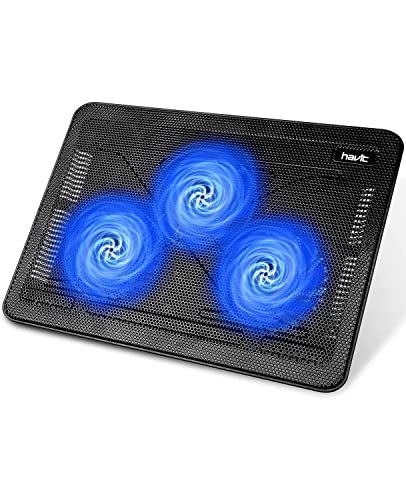
| havit HV-F2056 | Multi-Fan Pick | A broad laptop platform | 3 fans; 2 height settings | Amazon |
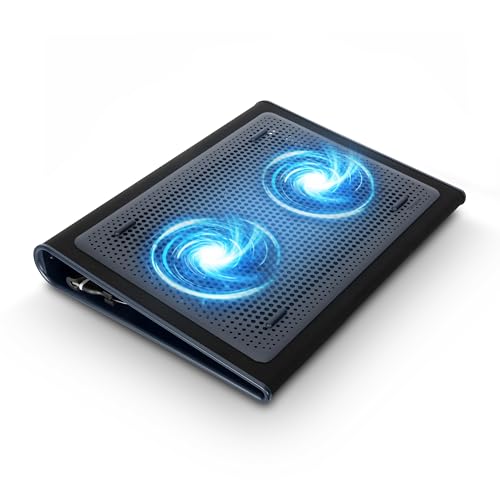
| Targus 17 Inch Lap Chill Mat | Lap Comfort | Soft lap use | Neoprene mat; dual fans | Amazon |
| ICE COOREL Aluminum Cooling Pad | Adjustable Stand | A metal stand with many angles | Aluminum; 7 height settings | Amazon |
In-Depth Reviews for best cooling pad for surface pro
1.Kootek 5-Fan Cooling Pad Stand
 Kootek 5-Fan Cooling Pad Stand
” />
The Kootek cooling pad has five quiet fans, six height settings, and support for laptops listed from 12 to 17 inches. Its USB-powered fan setup aims to spread air across the platform, while two extra USB hubs add connection options. For the best cooling pad for Surface Pro, its adjustable design stands out, though results depend on device placement and airflow.
This stand suits users who want several angle choices for desk work. Set it low for a relaxed view or raise it to bring the screen closer to eye level. The blue LED gives the fans a visible glow, which some users may enjoy and others may prefer to switch off. Check that your Surface Pro and kickstand sit securely before use.
The platform’s plastic build keeps it practical for a desk, and its flat surfaces should be easy to dust. Its multiple settings and extra USB hubs add useful value if you will use them. It is a feature-rich option, but its larger footprint may not suit small desks.
Why It’s Great
- Five fans aim to distribute airflow across the platform.
- Six height settings give users several viewing angles.
- Two extra USB hubs add connection options.
- The listed size range includes compact laptop setups.
- USB power avoids the need for a separate fan power brick.
Good to Know
- The 12-to-17-inch range may make the stand feel large beside a Surface Pro.
- A Surface Pro may not benefit as much from underside airflow as a vented laptop.
- Blue LED lighting may be distracting in a dark room.
2.KeiBn Compact Two-Fan Cooling Pad
 KeiBn Compact Two-Fan Cooling Pad
” />
The KeiBn S039 cooling pad is listed for 10-to-15.6-inch laptops and uses two fans to move air below a device. It offers five height settings and two USB ports, combining basic cooling support with an adjustable stand. Its smaller stated size range may suit a Surface Pro setup better than a full-size laptop pad, though fit still depends on the device and keyboard.
This model is a practical match for users who want a compact desk stand with a choice of viewing angles. The five height positions help adjust the screen for reading or typing, while the two USB ports can add convenience. It is best for a Surface Pro user who values adjustability and a smaller footprint over a larger multi-fan platform.
The simple design should be easy to wipe clean with a soft, dry cloth. Review the stand’s contact points and balance before placing a tablet on it. It offers useful features in a compact package, but its value depends on a secure fit and the need for its extra ports.
Why It’s Great
- The listed 10-to-15.6-inch range is suited to smaller devices.
- Five height settings let users adjust the viewing angle.
- Two USB ports add handy connection options.
- Two fans provide airflow without a five-fan layout.
- Its compact focus may take less desk space than larger pads.
Good to Know
- The listing does not state fan noise levels.
- Two fans may provide less broad airflow than larger multi-fan pads.
- Check that your Surface Pro sits securely with its kickstand and keyboard.
3.havit HV-F2056 Three-Fan Cooling Pad
 havit HV-F2056 Three-Fan Cooling Pad
” />
The havit HV-F2056 uses three quiet USB-powered fans to circulate air below a laptop. It is listed for 15.6-to-17-inch laptops and has two height settings for a raised working angle. This cooling pad stands out for its straightforward fan layout, but its stated size range targets larger laptops. Measure your Surface Pro setup before treating it as the best cooling pad for Surface Pro.
The simple stand may suit someone who already owns a larger laptop or wants a broad platform for desk use. Two height choices offer a modest lift, while USB power keeps the setup simple. For a Surface Pro, check where the device rests and whether its kickstand can open without slipping. It is more suited to users who value an easy, no-frills stand.
The flat pad should be easy to wipe clean, and its simple layout has few extra features to manage. Its value is strongest for compatible larger laptops. Surface Pro owners should weigh the wide size range against their available desk space and device support.
Why It’s Great
- Three fans circulate air under the laptop.
- Fans are described as quiet in the product details.
- USB power makes setup straightforward.
- Two height settings provide a choice of working angle.
- A simple design is easy to use at a desk.
Good to Know
- The 15.6-to-17-inch size range is aimed at larger laptops.
- Only two height settings are listed.
- A wide platform may use more desk space than a Surface Pro needs.
4.Targus 17-Inch Lap Chill Mat
 Targus 17-Inch Lap Chill Mat
” />
The Targus Lap Chill Mat pairs a soft neoprene surface with two USB-A connected fans. It is made for laptops up to 17 inches and smaller, with a design intended to help disperse heat during use. Unlike a rigid desk stand, its soft mat style may feel more comfortable on a lap. For a Surface Pro, think of it as a comfort option, not a guaranteed cooling fix.
This mat is best for users who work from a sofa or chair and want a soft layer between a laptop and their legs. The dual fans connect through USB-A, so check that your setup has a suitable port or adapter. A Surface Pro can be light, but make sure it rests securely and does not slide when you touch the screen.
Neoprene is soft to handle and can be cleaned with a gentle wipe when needed. The flexible design favors comfort over a rigid, raised typing angle. It may offer good value for lap use, but desk users may prefer a stand with height adjustment.
Why It’s Great
- Soft neoprene offers a gentler surface for lap use.
- Two fans are designed to help disperse heat.
- USB-A connection keeps the fan power setup familiar.
- The listed fit includes laptops smaller than 17 inches.
- The mat offers an alternative to hard, raised stands.
Good to Know
- The soft mat does not provide listed height settings.
- Its broad 17-inch design may feel oversized for a Surface Pro.
- USB-A power may require an adapter with some Surface Pro setups.
5.ICE COOREL Aluminum Cooling Stand
 ICE COOREL Aluminum Cooling Stand
” />
The ICE COOREL cooling pad uses an aluminum stand, two fans, and seven height settings. It is listed for 12-to-15.6-inch laptops and includes two USB ports. Its adjustable frame offers many choices for screen height, which may appeal to Surface Pro users who want a more flexible desk setup. Fan airflow can help move air below a device, but it cannot ensure lower temperatures.
This stand is best for desk users who value a metal design and several angle choices. Its listed size range may be a closer starting point for a Surface Pro than a 17-inch pad, though the actual platform fit still matters. Check that the stand supports your tablet securely and leaves room for the kickstand before using it for touch or typing.
Aluminum gives the stand a different feel from all-plastic pads, and the smooth surface should be simple to wipe clean. Two USB ports add practical value if you need them. The seven height settings are useful, but the stand’s stability and fit should guide your choice.
Why It’s Great
- Aluminum construction offers a metal stand design.
- Seven height settings allow fine angle adjustments.
- Two fans add airflow beneath a device.
- The 12-to-15.6-inch listing suits smaller laptop setups.
- Two USB ports provide extra connection options.
Good to Know
- The listing does not specify fan noise levels.
- The seven settings do not guarantee a stable fit for every tablet.
- A Surface Pro’s kickstand may need room on the platform.
Final Thoughts: The Verdict
My personal top pick is the Kootek Laptop Cooling Pad. Its five fans, six height settings, and extra USB hubs make it the most versatile choice in this group. Its size range includes smaller laptop setups, though you should check the Surface Pro’s fit and kickstand placement. The best cooling pad for Surface Pro should support a steady, comfortable desk setup, not just promise more airflow.
For a more compact choice, consider the KeiBn Laptop Cooling Pad S039, with two fans and five height settings. The havit suits larger laptop setups, while the Targus mat is better for soft lap use. Choose based on your device fit, desk space, connection needs, and budget.
1 thought on “Best Cooling Pad For Surface Pro: Smart Cooling Guide”
Comments are closed.