
Laptop cooling pads raise a notebook and use fans to move air beneath it. They can help gamers, remote workers, and students who use a laptop for long stretches. People buy them to improve airflow, support a more comfortable desk setup, and find the best cooling pads laptop for their needs.
A weak cooling pad can be more noise than help. Fans may not line up with a laptop’s air vents, a flimsy stand can wobble, and bright lights can distract during work. Some buyers focus only on fan count and miss the fit, airflow direction, or desk height. That can leave a large laptop sitting awkwardly while the pad adds little practical value. Choosing with care matters: a good match can support airflow and comfort, while a poor one takes up space and frustrates you every day.
I compare cooling pads by laptop fit, fan layout, stand design, ports, and the details that matter at a real desk. For this guide, I reviewed the supplied product specifications and weighed each model against common use cases, from quiet office work to gaming. My aim is to make the best cooling pads laptop easier to choose, with clear strengths, limits, and practical buying advice.
What you’ll learn
- How fan layout and laptop size affect cooling pad fit.
- Which features matter for gaming, work, and everyday use.
- What to expect from USB ports, lights, and adjustable stands.
- How to compare strengths and limits before you buy.
In This Article
How To Choose The Best best cooling pads laptop
The right cooling pad should fit your laptop, line up with its air intake, and feel steady on your desk. A common mistake is choosing by fan count alone. More fans do not always mean better airflow, and a low-cost stand may wobble or block vents. Check your laptop size, vent location, fan noise, and stand height before you buy. The best cooling pads laptop are the ones that suit your actual setup, not just the ones with the most lights or the biggest claims.
Match the Pad to Your Laptop Size
Start with your laptop’s screen size and base dimensions. A small pad may not support the full base of a large gaming laptop, while an oversized stand can take up needless desk space. Check the maker’s stated size range, then compare it with your laptop’s width and depth. Also look at where the laptop draws in air. Fans that sit beneath solid panels may do less than a well-placed fan under an intake vent. This simple check helps you find the best cooling pads laptop for a snug, stable fit.
Choose Airflow and Noise for Your Use
Fan count is only one part of cooling. Fan size, speed control, and placement also shape airflow and noise. A multi-fan pad can spread air across a broad base, while a focused turbine design may suit some gaming setups. Neither style guarantees a specific drop in temperature, since laptop design and room conditions matter too. If you work or study in a quiet space, look for speed control and noise details. For gaming, prioritize a layout that works with your laptop vents and lets you adjust fan speed.
Check Stand Comfort, Ports, and Build
A cooling pad is also a laptop stand, so check how its height and angle feel for your desk. Several height settings can help you find a more comfortable screen position, but a steep angle may not suit long typing sessions. Look for a front lip or other support to help keep the laptop in place. USB-powered models may use a port on your laptop, so extra pass-through ports can be useful. Choose a sturdy frame that is easy to clean, and treat RGB lighting as a style feature rather than a cooling benefit.
Quick Comparison
| Model | Category | Best For | Key Spec | Amazon |
|---|---|---|---|---|
| Kootek 5-Fan Cooling Pad | Best Overall | Everyday laptop use | Five fans, six height settings | Amazon |
| ICE COOREL 8-Fan Cooling Pad | RGB Gaming | RGB gaming setups | Eight fans, phone stand | Amazon |
| ChillCore 9-Fan Cooling Pad | Large Laptop | Large gaming laptops | Nine fans, eight height settings | Amazon |
| havit HV-F2056 Cooling Pad | Simple Value | Quiet desk use | Three fans, two height settings | Amazon |
| llano V12 Gaming Cooling Pad | High Airflow | Gaming and larger laptops | 5.5-inch turbofan, speed control | Amazon |
In-Depth Reviews for best cooling pads laptop
1.Kootek 5-Fan Laptop Cooling Pad
 Kootek 5-Fan Laptop Cooling Pad
” />
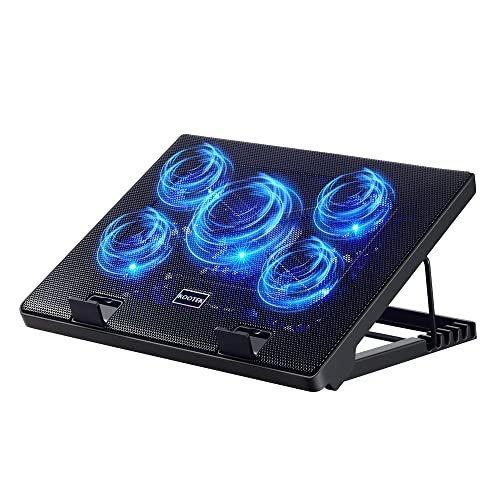
The Kootek cooling pad uses five fans to move air beneath laptops from 12 to 17 inches. Its USB-powered design includes two extra USB ports, and six height settings let you raise the screen to a useful angle. This balanced feature set makes it a flexible pick among the best cooling pads laptop for everyday work and play.
The stand suits students, office users, and casual gamers who want airflow and a raised screen in one accessory. Its broad fan layout aims to cover more of the laptop base than a single small fan. Blue LED lights add a subtle visual cue, while the adjustable frame helps users set a more comfortable viewing height.
The open design should be simple to dust with a soft cloth. Check that the laptop sits securely on the raised stand before typing. Its fan spread, height range, and extra ports offer useful value for buyers who want one versatile pad without a specialized gaming setup.
Why It’s Great
- Five fans spread airflow beneath compatible 12- to 17-inch laptops.
- Six height settings support a more comfortable screen position.
- Two extra USB ports add useful connectivity.
- USB power keeps setup simple for a desk.
- Blue lighting gives the stand a clean, understated look.
Good to Know
- The listed size range may not suit laptops outside 12 to 17 inches.
- USB power uses a laptop port while the fans run.
- Fan placement may not line up with every laptop’s air vents.
2.ICE COOREL 8-Fan RGB Cooling Pad
 ICE COOREL 8-Fan RGB Cooling Pad
” />
The ICE COOREL cooling pad is designed for 15- to 17.3-inch laptops and uses eight fans to move air across the base. Six height settings let you adjust the stand, while RGB lighting adds color to a gaming desk. Two USB ports and a phone stand round out its feature set for users comparing the best cooling pads laptop.
This model is best suited to gamers who want a broad fan layout and a more eye-catching setup. The raised frame can help lift the display, and the phone stand keeps a small screen close by. Its listed size range is more focused than that of pads made for smaller notebooks, so check your laptop dimensions first.
The mesh surface gives dust a place to collect, so a quick wipe can help keep it tidy. The product listing provides several useful desk features, but RGB lights are a style choice, not a cooling measure. It may offer good value for buyers who will use its stand and ports.
Why It’s Great
- Eight fans provide broad airflow across a compatible laptop base.
- Six height settings offer several viewing angles.
- RGB lighting suits colorful gaming setups.
- Two USB ports add convenient connections.
- A built-in phone stand keeps a second screen nearby.
Good to Know
- The stated fit is limited to laptops from 15 to 17.3 inches.
- RGB lights may be distracting in a quiet work area.
- A higher fan count alone does not ensure better cooling.
3.ChillCore 9-Fan RGB Laptop Cooling Pad
 ChillCore 9-Fan RGB Laptop Cooling Pad
” />
ChillCore’s cooling pad is built for laptops from 15.6 to 19.3 inches and uses nine fans beneath the mesh surface. Eight height settings give it a wide range of positions, while RGB lighting adds a gaming look. The two USB ports help with desk gear. Its large stated fit makes it stand out among the best cooling pads laptop.
This model is aimed at people with large gaming laptops who want a raised stand and a wide fan array. The many height options can help users find a comfortable screen angle for play or video. Before buying, measure the laptop base, since screen size alone does not confirm a secure fit.
The mesh top and open fan layout should be easy to wipe when dust builds up. Its large size and adjustable frame may suit a permanent desk setup better than a small travel bag. Buyers should weigh those features against desk space and their actual cooling needs.
Why It’s Great
- Nine fans cover a broad area under compatible laptops.
- The stated fit includes large laptops up to 19.3 inches.
- Eight height positions allow fine stand adjustment.
- Two USB ports support a tidier desk setup.
- RGB lighting gives gaming stations a bright style.
Good to Know
- Its large frame may take up substantial desk space.
- The product title does not specify detailed noise levels.
- RGB lighting and extra fans may be unnecessary for basic office use.
4.havit HV-F2056 Three-Fan Cooling Pad
 havit HV-F2056 Three-Fan Cooling Pad
” />
The havit HV-F2056 keeps its design simple with three USB-powered fans for laptops from 15.6 to 17 inches. The fans circulate air beneath the laptop, and two height settings raise the screen from the desk. It skips complex lighting and extra controls, making it an easy option to consider among the best cooling pads laptop for everyday use.
This pad suits students, office workers, and anyone who wants a basic stand with added airflow. Its straightforward layout is easier to understand than a feature-heavy gaming model. The two height choices provide some flexibility, though they offer less fine adjustment than stands with many positions.
The simple open surface should be quick to wipe clean. Its three-fan layout and low-fuss design focus on core needs rather than extras. Check your laptop’s size before ordering, and consider whether two height settings offer enough comfort for your desk and typing style.
Why It’s Great
- Three fans circulate air below compatible laptops.
- USB power makes the setup straightforward.
- Two height settings can improve viewing comfort.
- The simple design avoids distracting RGB lighting.
- Its 15.6- to 17-inch range suits many common laptops.
Good to Know
- It has only two height settings.
- The stated size range does not cover smaller laptops.
- It lacks the larger fan count and extra features of gaming models.
5.llano V12 Turbofan Gaming Cooling Pad
 llano V12 Turbofan Gaming Cooling Pad
” />
The llano V12 takes a different approach from multi-fan pads. It uses a 5.5-inch turbofan and an airtight pressure chamber, with adjustable speed for laptops from 15.6 to 19 inches. A three-port USB hub adds desk utility. This focused design makes it an option for gaming users who want a more specialized pick among the best cooling pads laptop.
This stand is best for gamers and owners of larger laptops who want adjustable fan speed and an enclosed airflow design. Its RGB finish gives it a gaming look, while the speed control lets users tune the fan to their setup. Check the laptop’s vent location and the pad’s fit before making a choice.
The pressure chamber may need occasional dust care to keep its intake clear. Its listed size range, USB hub, and speed control give it a feature-rich design, though its specialized build may be more than a light-use laptop needs. It is worth weighing those extras against desk space and noise.
Why It’s Great
- A 5.5-inch turbofan offers a focused airflow design.
- Adjustable speed gives users more control over fan output.
- The stated fit covers laptops from 15.6 to 19 inches.
- A three-port USB hub adds useful connections.
- The pressure-chamber design sets it apart from flat fan pads.
Good to Know
- Its specialized airflow design may not suit every laptop vent layout.
- The product title does not give a specific noise rating.
- The larger gaming-focused design may be excessive for light office use.
Final Thoughts: The Verdict
My personal top pick is the Kootek 5-Fan Laptop Cooling Pad. It balances broad airflow, six height settings, and two extra USB ports in one practical stand. That mix makes it a strong all-round choice for work, study, and casual gaming. It is a sensible place to start when comparing the best cooling pads laptop, though fit and vent placement still matter.
For a large gaming laptop, consider the llano V12 Gaming Cooling Pad for its adjustable turbofan and USB hub. The havit HV-F2056 is a simpler alternative for buyers who want three fans and few extras. Check your laptop size, fan position, and desk space, then choose the model that best fits your needs and budget.