
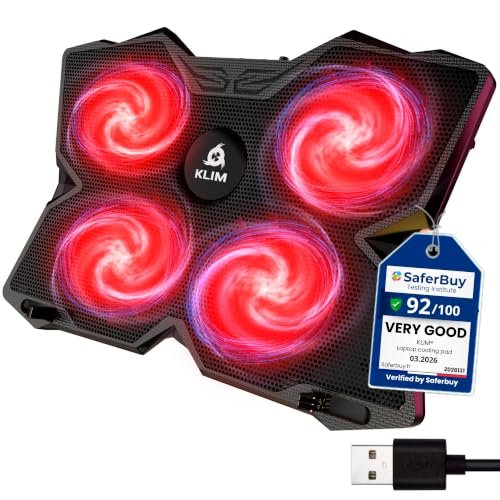
A laptop cooling pad is a fan-equipped stand that helps move air beneath a warm computer. It can suit students, remote workers, and gamers whose laptops have rear vents. People buy the best cooling pad for rear vent to support airflow, lift the screen, and make long sessions more comfortable.
A weak pad can add noise without moving much air, while a poor fit may leave your laptop wobbling or block its vents. It is easy to be swayed by fan counts or bright lights and miss the basics: laptop size, vent location, stand stability, and USB needs. That mistake can turn a simple cooling aid into desk clutter. A good match matters most during long work or play sessions, when steady airflow and a comfortable angle can make your setup feel less tiring.
I compared the listed models by their stated fan layout, size range, stand features, and USB extras, then weighed those details against common desk needs. This is a spec-based guide, not a claim of lab testing or measured temperature drops. My focus is practical fit, usable features, honest trade-offs, and help choosing the best cooling pad for rear vent.
What you’ll learn
- How laptop size and vent placement affect pad fit.
- Which fan layouts and stand features suit different users.
- What each listed cooling pad offers and what it lacks.
- How to choose a pad without expecting guaranteed temperature drops.
In This Article
How To Choose The Best best cooling pad for rear vent
The right cooling pad should fit your laptop and work with its vent layout, not simply look powerful on a product page. A pad that is too small can feel unstable, and one with a poor fan position may not help air reach the areas your laptop needs. Before buying the best cooling pad for rear vent, check your laptop size, where its vents sit, and how you plan to use the stand. Treat fan counts as one clue, not proof of better cooling.
Match Laptop Size and Vent Location
Start by checking your laptop’s screen size and underside vent layout. The pad should support the computer without covering its air intake or pushing against a rear exhaust. A broad stand may fit a large gaming laptop, while a smaller laptop may work well on a compact mat. Do not assume that more fans mean better airflow for your model; fan placement matters too. If your laptop sends hot air out the back, leave that path clear. This fit check is key when shopping for the best cooling pad for rear vent.
Choose Fans, Noise, and Power Wisely
Look at the fan count, stated speed, and how the pad gets power. More fans can spread airflow across a wider area, but they do not guarantee a lower laptop temperature. A USB-powered model is simple to set up, though it uses a port that may be useful for other gear. If you work in a quiet room, fan noise may matter more than lights or a high fan count. Check whether the listed details include speed control before you buy. Choose a simple, quiet layout for office use or a feature-rich model for gaming.
Check Stand Stability and Useful Extras
A cooling pad should hold your laptop steady at a comfortable angle. Look for firm front stops, adjustable height, and a surface that supports your laptop’s footprint. These details matter when you type, game, or use the laptop for hours. Extra USB ports can be handy, but check whether they meet your needs and remember that the pad still draws power through USB. A phone stand or lighting may be useful, yet neither replaces a stable base. The best cooling pad for rear vent is the one that fits your desk habits, not the one with the longest feature list.
Quick Comparison
| Model | Category | Best For | Key Spec | Amazon |
|---|---|---|---|---|
| Four-Fan Laptop Cooling Pad | Best Overall | Everyday laptop and console use | 4 fans; 1200 RPM; adjustable incline | Amazon |
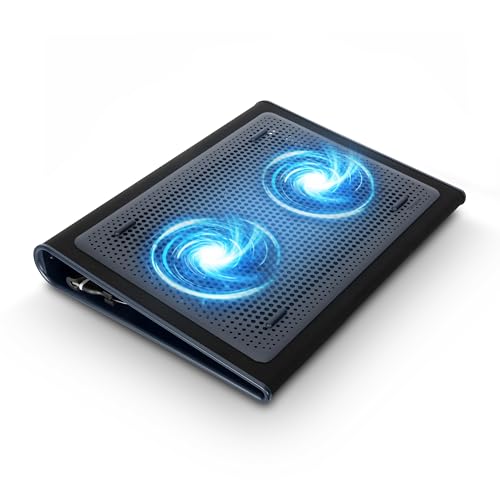
| Targus 17-Inch Lap Chill Mat | Soft Lap Mat | Lap use with laptops up to 17 inches | Neoprene mat; dual USB-A fans | Amazon |
| ChillCore 9-Fan RGB Cooling Pad | Feature Rich | Large gaming laptops | 9 fans; 8 height settings | Amazon |
| Kootek 5-Fan Cooling Pad | Adjustable Stand | Users who want height options and extra USB ports | 5 fans; 6 height settings; 2 USB hubs | Amazon |
| ICE COOREL 8-Fan RGB Cooling Pad | Gaming Value | 15- to 17.3-inch gaming laptops | 8 fans; 6 height settings; phone stand | Amazon |
In-Depth Reviews for best cooling pad for rear vent
1.Four-Fan Laptop Cooling Pad with Adjustable Stand
 Four-Fan Laptop Cooling Pad with Adjustable Stand
” />
This USB cooling pad has four fans rated at 1200 RPM and an adjustable rear stand. Front pegs help keep a laptop in place as you raise the angle. Its simple layout suits daily work and play. For shoppers seeking the best cooling pad for rear vent, these practical basics stand out more than flashy extras.
The stand offers a raised working angle, while the front stops help limit sliding. The product listing also notes support for PCs and consoles, so it may fit a shared desk setup. Check your device size and vent position before use. It is best for people who want a straightforward stand with active airflow.
The open fan surface should be easy to dust with a soft cloth. The listing gives no detailed materials or warranty information, so check current seller details before ordering. Its useful stand features and four fans make it a practical value choice for shoppers who need a simple cooling aid.
Why It’s Great
- Four fans provide airflow across the pad surface.
- Listed fan speed is 1200 RPM.
- Adjustable rear legs let you raise the laptop.
- Front pegs help hold a device in place.
- USB power keeps setup simple.
Good to Know
- The listing does not state a supported laptop size range.
- Fan speed control and noise level are not specified.
- Keep the laptop’s rear exhaust clear; a cooling pad cannot replace proper vent clearance.
2.Targus 17-Inch Dual-Fan Lap Chill Mat
 Targus 17-Inch Dual-Fan Lap Chill Mat
” />
The Targus Lap Chill Mat pairs a soft neoprene surface with two USB-A fans. It is made for most laptops up to 17 inches and is designed for lap use as well as desk use. This less rigid style may appeal to people who want a cooling surface instead of a tall stand.
Its cushioned mat design offers a different feel from a hard gaming stand. Plug the fans into a USB-A port, then place the laptop so its vents remain open. The simple layout suits students, casual users, and anyone who works from a sofa or bed. Check your laptop’s size and underside before choosing.
The soft outer surface may need gentle spot cleaning, and the fan area needs occasional dusting. Neoprene gives it a lap-friendly design, but it is less like a rigid height-adjustable desk stand. It can be a useful pick if comfort and flexible use matter more than many fan settings.
Why It’s Great
- Soft neoprene suits lap use.
- Fits most laptops up to 17 inches, according to the listing.
- Dual USB-A fans make power connection straightforward.
- A mat format offers an alternative to rigid stands.
- Simple design avoids a large set of gaming extras.
Good to Know
- It has two fans, fewer than several multi-fan stands here.
- The listing does not specify height adjustment.
- Check lap comfort and vent clearance for your laptop before extended use.
3.ChillCore 9-Fan RGB Laptop Cooling Pad
 ChillCore 9-Fan RGB Laptop Cooling Pad
” />
The ChillCore stand combines nine fans with RGB lighting and eight height settings. Its listed size range covers laptops from 15.6 to 19.3 inches, making it a large option for gaming machines. Two USB ports add connection flexibility. This feature-rich layout may suit buyers who want a striking desk stand with broad support.
The many height choices can help users set a more comfortable screen angle, while the large stated fit range suits bigger laptops. RGB lighting adds a gaming look, not a promise of better cooling. Check vent placement and desk space first. This model is best suited to large laptop users who enjoy adjustable stands.
The open stand design should allow routine dust removal with a soft brush or cloth. Its many features may offer good value to buyers who will use the size range, height settings, and lighting. It may be more stand than needed for a small laptop or a minimal desk.
Why It’s Great
- Nine fans are listed for broad airflow coverage.
- The stated range fits laptops from 15.6 to 19.3 inches.
- Eight height settings support flexible positioning.
- RGB lights suit gaming desk setups.
- Two USB ports add connection options.
Good to Know
- Its large size may take up substantial desk space.
- The listing does not provide fan speed or noise details.
- Lighting and fan count do not guarantee a specific temperature drop.
4.Kootek 5-Fan Laptop Cooling Pad Stand
 Kootek 5-Fan Laptop Cooling Pad Stand
” />
The Kootek cooling pad has five fans, two extra USB hubs, and six adjustable height settings. The listing says it fits laptops from 12 to 17 inches. Its blue LED lighting gives the stand a clear gaming look. This mix of size range and stand options makes it a flexible pick for home or school desks.
Six height choices let users adjust the screen angle to suit their desk, while the USB hubs can help add ports to a setup. The pad is best for people who want an adjustable stand for a common laptop size. Check that the laptop rests securely and that its vents line up with open areas.
The fan surface can be cleaned with a soft cloth or brush when the pad is unplugged. Its listed size range and USB hubs offer useful features in one stand. Buyers who prefer a quiet, plain design may want a simpler model, since noise details are not provided.
Why It’s Great
- Five fans offer more coverage than a dual-fan mat.
- Six height settings allow several working angles.
- The listed fit range covers 12- to 17-inch laptops.
- Two extra USB hubs can add useful ports.
- Blue LED lighting adds a simple visual accent.
Good to Know
- The listing calls the fans quiet but gives no measured noise level.
- Blue lighting may not suit a low-key desk.
- Confirm the actual laptop fit and vent alignment before use.
5.ICE COOREL 8-Fan RGB Cooling Pad
 ICE COOREL 8-Fan RGB Cooling Pad
” />
The ICE COOREL stand lists eight cooling fans and support for laptops from 15 to 17.3 inches. It also has RGB lighting, six height settings, two USB ports, and a phone stand. Those features make it a strong match for a gaming setup. Buyers should still check airflow and vent alignment for their laptop.
Six height choices can help users find a comfortable screen angle, while the phone holder keeps a small device close by. The stand is best suited to people with a mid-size gaming laptop who want several extras. Its stated size range is narrower than the ChillCore’s, so measure before buying.
Unplug the pad before cleaning, then remove dust from its fan area with a soft brush or cloth. Its lighting, phone stand, and USB ports add convenience for some desks. For buyers who use those features, it may offer solid value; others may prefer a simpler pad.
Why It’s Great
- Eight fans are listed for broad airflow.
- The stated laptop range is 15 to 17.3 inches.
- Six height settings offer flexible positioning.
- Two USB ports add connection options.
- A phone stand is useful for a gaming or work desk.
Good to Know
- The listing does not provide fan speed or noise figures.
- Its stated size range may not suit smaller laptops.
- RGB lights and extra features may be unnecessary for basic desk use.
Final Thoughts: The Verdict
My personal top pick is the Four-Fan Laptop Cooling Pad with Adjustable Stand. Its 1200 RPM fans, adjustable incline, and front stops cover everyday needs without a long list of extras. It is a practical starting point when choosing the best cooling pad for rear vent, as long as the laptop fits and its exhaust stays clear.
For lap use, consider the Targus 17-Inch Dual-Fan Lap Chill Mat. For larger gaming laptops and more height settings, the ChillCore 9-Fan RGB Cooling Pad is another option. Check size, vent placement, and desk space before you buy, then choose what fits your needs and budget.