
A computer cooling stand lifts a laptop or desktop tower to support airflow, comfort, or both. It can help students, remote workers, and gamers manage heat and improve desk setup. This guide to the best computer cooling stand compares fan-powered laptop pads, a passive riser, and a wheeled tower stand.
A stand can look sturdy in a photo and still wobble when you type. Small fans may add noise without moving much air, while a stand that blocks your laptop’s vents can make heat worse. Buyers also mix up laptop coolers and tower stands, even though they solve different problems. The wrong size or a slippery surface can turn a simple desk upgrade into daily annoyance. Choosing the right fit matters: your laptop needs clear airflow and steady support, while a desktop tower needs space, stability, and easy access.
I focus on practical computer accessories and compare the listed designs, fit ranges, fan counts, height settings, and connection needs. I selected these options to cover different desk setups, from quiet office work to gaming and tower airflow. This guide to the best computer cooling stand prioritizes clear trade-offs, useful features, and a good match for your device.
What you’ll learn
- How fan-powered laptop pads differ from passive risers.
- Which features matter for laptop size, airflow, and comfort.
- What to expect from a cooling stand for a desktop tower.
- How to choose a model that suits your desk and budget.
In This Article
How To Choose The Best best computer cooling stand
Choosing the best computer cooling stand starts with your device, not the fan count. A laptop pad cannot serve as a desktop tower base, and a stand that is too small may leave vents covered or the computer unsteady. Some low-cost fans can be noisy, while weak hinges and slick surfaces can frustrate you every day. Check your device size, vent location, and desk space first. Then compare fan power, height options, ports, and build. A good fit matters more than flashy lights or a long feature list.
Match the Stand to Your Computer
Start by checking whether you need a laptop cooling pad, a passive laptop riser, or a tower stand. They are not interchangeable. Compare your laptop’s screen size with the stand’s supported range, and make sure the base will not cover its air vents. For a desktop tower, check the case footprint and wheel clearance. A snug but not cramped fit helps the computer stay stable and lets air move around it. Avoid buying by screen size alone if your laptop has an unusually wide body. Matching the stand to your device is the first step toward the best computer cooling stand for your setup.
Consider Airflow, Fan Noise, and Power
A fan pad may help move air beneath a laptop, but more fans do not always mean better cooling. Look for a layout that lines up with your laptop’s vents and consider how the pad gets power. These models use USB, so check whether you can spare a port or use the included pass-through ports. Fan noise matters in a quiet office or during calls. If your laptop runs hot under heavy gaming loads, a powered cooler may suit you better than a passive riser. For light work, a ventilated stand can lift the device without adding fan sound.
Check Stability, Height, and Daily Use
A useful stand should feel steady when you type and offer a viewing angle that suits your desk. Check the number of height settings, the grip points, and whether the stand folds for travel. A taller angle may improve screen position, but it can make typing less comfortable without an external keyboard. On a tower stand, locking wheels help keep the case in place while still making it easier to move for cleaning. Do not assume RGB lighting adds cooling power. Prioritize secure support, easy setup, and the features you will use most when choosing the best computer cooling stand.
Quick Comparison
| Model | Category | Best For | Key Spec | Amazon |
|---|---|---|---|---|
| Kootek 5-Fan Laptop Cooling Pad | Fan Cooling Pad | Large laptops and adjustable airflow | Five fans, six height settings | Amazon |
| havit HV-F2056 Laptop Cooling Pad | Fan Cooling Pad | 15.6–17-inch laptops | Three USB-powered fans | Amazon |
| Gogoonike Adjustable Laptop Stand | Passive Laptop Riser | Portable desk setups | Foldable, ventilated metal design | Amazon |
| KeiBn S039 Laptop Cooling Pad | Fan Cooling Pad | Compact gaming and work laptops | Two fans, five height settings | Amazon |
| Hovadova Dual-Fan Tower Stand | Desktop Tower Stand | Moving a desktop tower | Two fans, four locking wheels | Amazon |
In-Depth Reviews for best computer cooling stand
1.Kootek 5-Fan Laptop Cooling Pad
 Kootek 5-Fan Laptop Cooling Pad
” />
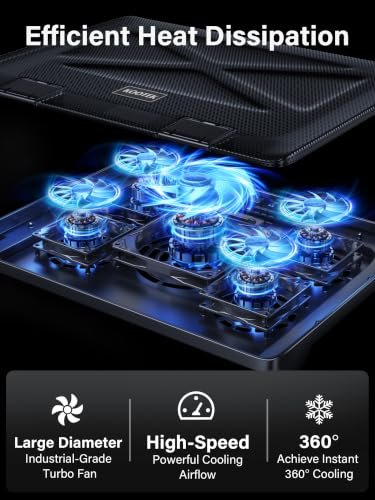
The Kootek cooling pad pairs five fans with a broad, ventilated surface for laptops from 12 to 17 inches. Its adjustable fan setup aims to spread airflow under the computer, while two extra USB ports help offset the port used for power. Six height settings make this a flexible best computer cooling stand choice for varied desks.
The raised platform can bring a laptop screen closer to eye level and offers several angles for desk use. Blue LEDs show when the fans are running, and the USB power setup keeps the connection simple. It suits students, home workers, and gamers who want active airflow and more height options than a basic laptop riser.
The mesh surface is easy to wipe, and the stand folds for storage. Check the hinges and laptop stops before use, especially with a larger device. Its fan count, height range, and added USB ports make it a versatile option for the price.
Why It’s Great
- Five fans provide broad airflow coverage beneath a compatible laptop.
- Six height settings allow more desk angle choices.
- Two extra USB ports add useful connection flexibility.
- The stated 12-to-17-inch range covers many common laptop sizes.
- A folding design is easier to store than a fixed stand.
Good to Know
- A five-fan layout may be more than needed for light office work.
- The added USB ports do not replace a powered USB hub.
- The blue LEDs may not suit users who prefer a dark, plain setup.
2.havit HV-F2056 Laptop Cooling Pad
 havit HV-F2056 Laptop Cooling Pad
” />
The havit HV-F2056 uses three USB-powered fans to move air below laptops in the 15.6-to-17-inch range. Its broad platform is aimed at larger notebooks, and two height settings offer a simple way to raise the screen. For buyers seeking the best computer cooling stand without many controls, this is a straightforward option.
The slim design can fit a work desk or travel bag more easily than a bulky gaming pad. Plug it into a USB port and place the laptop on the surface, then adjust between the two available angles. It is best suited to people with larger laptops who value a simple setup over many height choices.
The open surface is easy to dust, and the lightweight form is convenient to move. Its simple frame keeps setup uncomplicated, though it offers fewer adjustments than larger pads. It can be a good-value pick if your laptop fits and you want basic fan-assisted airflow.
Why It’s Great
- Three fans offer active airflow beneath a large laptop.
- The stated size range suits many 15.6-to-17-inch models.
- USB power makes setup simple.
- Two height settings can improve screen position.
- The slim design is easier to carry than many large cooling pads.
Good to Know
- It has only two height settings.
- The large size may be awkward for compact desks.
- Fan speed controls are not listed in the supplied product details.
3.Gogoonike Foldable Laptop Stand
 Gogoonike Foldable Laptop Stand
” />
The Gogoonike is a ventilated metal riser, not a powered fan pad. Its open design lifts compatible laptops and tablets from 10 to 15.6 inches, leaving space for air to move around the device. For anyone who wants the best computer cooling stand without fan noise or a USB power lead, this is a practical choice.
The foldable form is suited to small desks, shared work areas, and travel. Raising the screen can support a more comfortable viewing angle, though a separate keyboard may help if you type for long periods. This stand works best for users who want a simple laptop riser rather than active cooling for demanding games.
The metal frame can be wiped clean and folds away when not in use. There are no fans or cables to maintain, which keeps care easy. Confirm the stand is stable on your desk and fits your device before buying for lasting everyday value.
Why It’s Great
- A passive design runs without fan noise or power.
- Ventilation leaves space around the laptop.
- The foldable frame is easy to carry and store.
- It supports laptops and tablets in the listed size range.
- A metal build offers a simple alternative to a fan pad.
Good to Know
- It does not include fans, so it cannot provide powered airflow.
- The listed size range ends at 15.6 inches.
- A raised laptop may be less comfortable for typing without an external keyboard.
4.KeiBn S039 Laptop Cooling Pad
 KeiBn S039 Laptop Cooling Pad
” />
The KeiBn S039 combines two fans with five height settings for laptops from 10 to 15.6 inches. It also lists two USB ports, giving users a way to keep a connection available while powering the cooler. This best computer cooling stand option balances active airflow and adjustability in a more compact size.
Its smaller footprint can work well on a home desk or gaming station with limited room. The five height positions let users change the viewing angle, while the two fans help circulate air under a compatible laptop. It is best suited to owners of smaller notebooks who want a powered pad without a large platform.
The ventilated surface is easy to dust, and the compact frame should be simple to move between desks. Check that your laptop fits securely before use. Its fan support, height options, and USB ports offer useful value if you do not need a larger pad.
Why It’s Great
- Two fans provide active airflow in a compact pad.
- Five height settings add useful angle choices.
- The stated range includes laptops from 10 to 15.6 inches.
- Two USB ports add connection options.
- The smaller form can suit crowded desks.
Good to Know
- Two fans may offer less coverage than larger multi-fan pads.
- It is not listed for laptops larger than 15.6 inches.
- Check your laptop’s vent location to ensure the fan layout is a good match.
5.Hovadova Dual-Fan Tower Stand
 Hovadova Dual-Fan Tower Stand
” />
The Hovadova stand is made for desktop towers, not laptops. It combines two cooling fans with an adjustable base, RGB lighting, and a fan controller. Four locking wheels help move the computer for access or cleaning, then keep it in place. This best computer cooling stand choice targets PC owners who want airflow and easier tower movement.
The wheeled base can help when a tower sits on the floor or carpet and needs to be moved for cleaning. Its adjustable design is intended to fit most PC cases, but measuring your case first is wise. This stand suits desktop users who want a raised, mobile base rather than a laptop cooling pad.
The open base is easy to reach for dust removal, and the wheels support simpler access to the case. Check the case footprint and lock the wheels before use. The fans and lighting add features, while the stand’s value depends on a secure fit for your tower.
Why It’s Great
- Designed for desktop towers rather than laptop use.
- Two fans are included to support airflow below the case.
- Four locking wheels make the tower easier to move.
- An adjustable base aims to fit a range of PC cases.
- A fan controller and RGB lighting add setup options.
Good to Know
- It is not a laptop stand or laptop cooling pad.
- Measure your tower before purchase to confirm the base fit.
- The product details do not state fan speed or noise levels.
Final Thoughts: The Verdict
My personal top pick is the Kootek 5-Fan Laptop Cooling Pad. Its broad laptop size range, five fans, six height settings, and two USB ports make it a flexible best computer cooling stand for many desks. The havit HV-F2056 is a simpler runner-up for larger laptops, while the Gogoonike suits users who want a quiet, foldable passive riser.
For smaller laptops, consider the adjustable KeiBn S039; desktop owners should look at the Hovadova tower stand instead. Each product serves a different setup, so check your device size, vent locations, and available desk space before choosing. A cooling pad can help move air, but it cannot fix blocked vents or internal hardware issues. Pick the best computer cooling stand for your device and budget, and choose the features you will use every day.