
Computer docks add ports, displays, network access, and sometimes charging through one connection. They help laptop users build a tidy desk for work, study, or creative tasks. I picked these best computer docks for shoppers who want fewer cable swaps and a smoother way to connect daily gear.
A dock can look like a simple plug-in fix, but the wrong one can turn a calm workday into a cable hunt. Some docks lack the power your laptop needs, while others promise several screens that your computer cannot drive. Cheap or poorly matched models may also offer slow ports, confusing display limits, or no charger in the box. Before buying, check your laptop’s ports, operating system, screen needs, and power draw. The right match helps avoid wasted money and makes your desk feel ready when you sit down.
I focus on laptop docks and the small details that shape daily use: power delivery, display support, port choice, and host compatibility. I compared the listed features and likely use cases for these models, while noting where computer or operating-system limits may apply. This guide puts clear specs, practical trade-offs, and a good fit for your setup ahead of flashy claims.
What you’ll learn
- How to match dock power and ports to your laptop.
- Which models fit a multi-monitor desk or a simple travel setup.
- Why display support can vary by laptop and operating system.
- What trade-offs to check before choosing among the best computer docks.
In This Article
How To Choose The Best Computer Docks
A dock should make your work setup simpler, not add new snags. Check that it suits your laptop before you compare port counts or shop for a deal. A low-cost model may lack enough power, while a dock with many display ports may not run every screen from every computer. Read the host laptop’s port and display limits, then compare them with the dock’s specs. The best computer docks are the ones that work with your actual gear, not just the most impressive feature list.
Check Laptop Compatibility and Power
Start with your laptop’s USB-C or Thunderbolt port and confirm that it supports the features your dock needs. A USB-C port may handle data but not video or charging, so check the laptop maker’s specs. Next, compare the dock’s power delivery with your laptop’s needs. A dock with a high power figure may still share power across ports, and some models need a separate charger. Avoid assuming that one cable will charge every laptop. These checks matter for all the best computer docks, especially for work laptops that run demanding apps.
Match Display Ports to Your Screens
Count your screens and note their resolution and refresh rate before choosing a dock. HDMI, DisplayPort, and VGA are not interchangeable if your monitors use different inputs. More ports do not always mean more independent screens: your laptop, operating system, and dock all affect what can display at once. Some Macs mirror displays where a Windows laptop may extend them. Check the model’s display limits and your laptop’s support for MST or other display features. This helps avoid a dock that fits the cable but fails to give you the workspace you expected.
Choose Useful Ports and a Practical Design
Think about the gear you plug in each day. A keyboard, mouse, wired network, headset, and memory card can call for very different ports. Look for the right mix of USB-A, USB-C, Ethernet, audio, and card slots rather than chasing the biggest number. Check data speeds too, since a port’s shape does not tell you how fast it is. A compact hub can work well for light travel, while a larger desktop dock may suit a permanent desk. The best computer docks fit your routine and leave room for the cables you already own.
Quick Comparison
| Model | Category | Best For | Key Spec | Amazon |
|---|---|---|---|---|
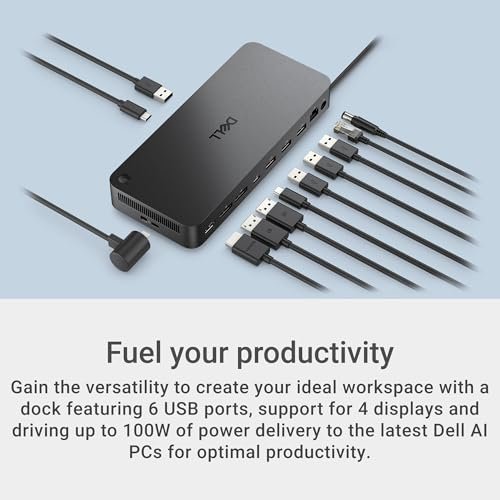
| Dell Pro Dock WD25 | Best Overall | Office laptop users | USB-C, up to 100W, multi-display ports | Amazon |
| Anker Prime 14-in-1 Dock | Premium | Busy multi-device desks | Dual 4K HDMI, 10Gbps data | Amazon |
| USB-C Quad Display Dock | Flexible Ports | Users needing varied video outputs | HDMI, DisplayPort, and VGA | Amazon |
| Anker 8-in-1 USB-C Hub | Compact Value | Basic dual-screen setups | Dual HDMI, up to 85W PD | Amazon |
In-Depth Reviews for best computer docks
1.Dell Pro Dock WD25
 Dell Pro Dock WD25
” />
The Dell Pro Laptop Docking Station WD25 is a strong desk hub for compatible USB-C laptops. It offers up to 100W power delivery, Ethernet, USB-A, USB-C, DisplayPort, and HDMI connections. Its broad port mix helps reduce cable swaps and makes it useful for office work. Among the best computer docks, it stands out for a familiar business-focused setup and flexible connections.
Connect your laptop once, then leave your keyboard, network cable, and screens attached to the dock. That simple routine can make a busy desk feel less cluttered. The WD25 suits office users who need wired network access and several peripherals in one place. Check your laptop’s charging needs and display support first, since actual power and screen use depend on the host device.
Its fixed desk design keeps daily connections together, and the port range adds practical value for work. Confirm what is included and whether your laptop supports the features you need. For compatible office systems, it can be a useful, tidy hub.
Why It’s Great
- Offers up to 100W power delivery for compatible laptops.
- Combines Ethernet, USB-A, USB-C, DisplayPort, and HDMI.
- Supports a tidy one-cable desk routine.
- Suits office users with several connected accessories.
- Dell branding may make it a natural fit for compatible Dell work setups.
Good to Know
- Your laptop must support the dock’s video and USB-C charging features.
- Actual charging power can vary by laptop and connected devices.
- Check the supported display count and resolution for your specific computer.
2.Anker Prime 14-in-1 Dock
 Anker Prime 14-in-1 Dock
” />
The Anker Prime 14-in-1 Dock packs a wide set of connections into one desk hub. Its listed features include dual 4K HDMI, Ethernet, audio, and data transfer up to 10Gbps. The product also lists 160W maximum output, but that figure is not the same as guaranteed laptop charging power. It earns a place among the best computer docks for users who value a full-featured workstation.
A large port selection can keep monitors, storage, and other gear connected without reaching for extra adapters. This dock is best suited to people with a busy home or office setup and compatible USB-C laptops. Check your computer’s operating system and display support before expecting two extended screens. Also confirm the power needs of your laptop and devices rather than relying on a total output figure alone.
The desktop-focused design can help keep cables in one spot, and the many ports offer broad use. Check the included accessories and host compatibility before buying. It may be good value for users who will make regular use of its extra connections.
Why It’s Great
- Provides a wide 14-in-1 selection of ports.
- Lists dual 4K HDMI for compatible host systems.
- Offers data transfer speeds up to 10Gbps on supported connections.
- Includes Ethernet and audio connections for a fuller desk setup.
- Works well for users who connect many devices at once.
Good to Know
- The listed 160W maximum output does not promise 160W laptop charging.
- Dual-screen support depends on the laptop and operating system.
- A large port set may be more than a simple laptop setup needs.
3.USB-C Quad Display Dock
 USB-C Quad Display Dock
” />
This eight-in-one USB-C dock offers a mix of HDMI, DisplayPort, and VGA video outputs, along with USB ports and power delivery support. That range may help users connect to newer screens and older projectors without carrying several adapters. It is one of the more flexible best computer docks for varied display gear, though the exact screen setup depends on your host laptop.
The mix of video connectors can be handy in shared offices, classrooms, and meeting rooms. It is best for users who need different screen inputs, including VGA, and want several connections from one USB-C port. Before buying, check the dock’s display limits and your computer’s ability to extend to multiple screens. A port count alone does not confirm that every output works at once.
Its compact hub format can reduce the number of loose adapters in a bag. Build details and included power accessories may vary, so check the listing carefully. It offers useful flexibility when its video ports match your screens.
Why It’s Great
- Includes HDMI, DisplayPort, and VGA video connections.
- Can help link newer monitors and older projectors.
- Combines display and USB connections in one hub.
- Useful for shared desks with mixed screen types.
- A flexible choice for users who need several video connector styles.
Good to Know
- The product’s quad-display wording does not guarantee four independent screens on every laptop.
- Multiple-screen support depends on the host computer and operating system.
- VGA is an older analog format and may not match modern high-resolution needs.
4.Anker 8-in-1 USB-C Hub
 Anker 8-in-1 USB-C Hub
” />
The Anker 8-in-1 USB-C hub offers dual HDMI, Ethernet, a card reader, and other useful ports in a compact design. It lists up to 85W power delivery, while the required charger is not included. This makes it a practical pick for a simpler desk or travel kit. Among the best computer docks, it favors core features over a large desktop footprint.
Its small size suits laptop users who want to connect a screen, wired network, and everyday accessories without carrying a full-size dock. It is best for people with a USB-C laptop that supports video output and charging. Check display limits for your operating system, especially if you need two extended screens. Add a compatible power adapter to use the charging feature.
The compact hub takes little desk or bag space, and its range of ports can replace several small adapters. Since the charger is not included, factor that cost into your budget. It offers good everyday value when its limits suit your setup.
Why It’s Great
- Combines dual HDMI with Ethernet in a compact hub.
- Lists up to 85W power delivery for compatible laptops.
- Includes SD and TF card reader slots.
- Works well for travel or a small home desk.
- Offers useful core connections without the size of a large dock.
Good to Know
- The charger is not included, so budget for a compatible power adapter.
- Dual-screen behavior depends on the laptop and operating system.
- Check your computer’s USB-C video support before relying on HDMI outputs.
Final Thoughts: The Verdict
My personal top pick is the Dell Pro Dock WD25 for a work desk that needs power, network access, and a useful mix of ports. Its listed 100W delivery and DisplayPort and HDMI options make it a well-rounded choice, as long as your laptop supports the setup. It is my leading pick among these best computer docks for office users who want fewer cable changes.
For a port-rich desk, consider the Anker Prime 14-in-1 Dock; the Anker 8-in-1 hub suits a smaller setup or travel bag. Each has different power and display limits, so check your computer’s specs before ordering. Choose the dock that fits your screens, laptop, and budget, not just the one with the most ports.