
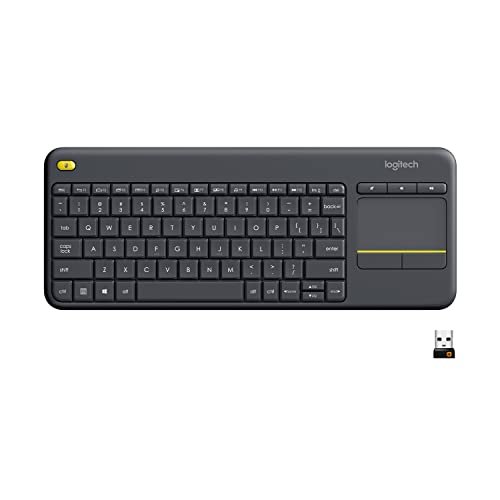
A conference room wireless keyboard lets people control a meeting computer without crowding around the desk. It suits offices, shared spaces, and home meeting rooms where easy typing matters. Buyers want a neat setup, simple pairing, and dependable control during presentations or video calls.
A keyboard that drops its connection or feels cramped can turn a quick meeting task into a slow, awkward pause. Some buyers also choose a TV keyboard with a touchpad when they need a full typing setup, or buy a Bluetooth model that cannot pair with the room computer. Small keys, unclear compatibility, and missing receivers can cause real frustration. The best conference room wireless keyboard should fit the host device and the way people work, so you can focus on the meeting instead of fixing the controls.
I compared these options by connection type, layout, useful controls, and fit for shared meeting spaces. I also separated keyboards made for TV control from full-size models better suited to routine office typing. This guide puts compatibility, ease of use, and practical value first, so you can choose the best conference room wireless keyboard for your room and team.
What you’ll learn
- How wireless connection types affect room computer compatibility.
- Which keyboard layouts work best for meetings and shared desks.
- Why some touchpad keyboards suit TV rooms better than conference tables.
- How to match a keyboard to your room, device, and budget.
In This Article
How To Choose The Best best conference room wireless keyboard
A good keyboard keeps meeting tasks smooth, whether someone is entering notes or changing a slide. A poor fit can mean missed keystrokes, pairing delays, or a receiver that does not match the room computer. Before choosing the best conference room wireless keyboard, check the connection type, layout, and host device. Do not assume Bluetooth and USB receivers are interchangeable. Also think about who will use it and where it will sit. These simple checks can save time and avoid a keyboard that works well at home but fails in your meeting room.
Check the Wireless Connection
Start by checking how the keyboard connects to the room computer. A USB receiver can be simple for a fixed PC, but the host needs the right USB port and a free slot. Bluetooth avoids a receiver, yet the computer must support Bluetooth pairing and allow users to connect it. Some models offer both types, which can help when the keyboard moves between devices. Do not buy based on the word wireless alone. For a dedicated conference PC, a receiver-based option like the K270 can be convenient. If your team uses varied devices, review their connection needs before choosing the best conference room wireless keyboard.
Choose a Layout for Real Meeting Tasks
Think about what people type during a meeting. A full-size layout with a number pad can help with data entry, room bookings, and notes. A compact model saves table space, while a touchpad can make cursor control easier when no mouse is nearby. Those features are not a substitute for comfortable typing if people enter long notes. Check key size, spacing, and whether the layout suits your users. The best conference room wireless keyboard is not always the smallest one; it is the one people can use quickly without searching for common keys.
Match Features to the Room and Users
A shared room benefits from simple controls and a design that is easy to keep tidy. Media keys can help when a PC is connected to a display, while a bundled mouse may suit a fixed desktop setup. Spill resistance is useful, but it does not make a keyboard waterproof. Consider battery needs, where the keyboard will be stored, and whether users can keep track of a small receiver. Avoid paying for TV-focused touch controls if your main task is typing meeting notes. Compare the actual features with your room’s needs to find the best conference room wireless keyboard for your team.
Quick Comparison
| Model | Category | Best For | Key Spec | Amazon |
|---|---|---|---|---|
| Logitech K400 Plus | Touchpad keyboard | PC-connected TV control | 2.4 GHz receiver and built-in touchpad | Amazon |
| Arteck Universal Touch TV Keyboard | Multi-device touchpad | TV and mixed-device use | 2.4G wireless and Bluetooth | Amazon |
| Dell KM520 | Keyboard and mouse set | Fixed PC meeting stations | 2.4 GHz USB receiver and hot keys | Amazon |
| Logitech K250 | Bluetooth keyboard | Bluetooth-ready rooms | Compact layout with number pad | Amazon |
| Logitech K270 | Full-size keyboard | Everyday meeting room typing | USB-A receiver and eight media keys | Amazon |
In-Depth Reviews for best conference room wireless keyboard
1. Logitech K400 Plus Wireless Touch Keyboard

The Logitech K400 Plus combines a wireless keyboard with a built-in touchpad. Its 2.4 GHz USB receiver supports a simple connection to a compatible computer. Media controls add convenience when a PC connects to a TV. This design stands out for couch-based control, though it is less suited to people who need a standard conference keyboard.
The compact layout keeps the keyboard easy to move and gives users cursor control without a separate mouse. It suits a small room where one person manages a display or shared PC. For typing a few search terms or changing a slide, it can be handy. For long meeting notes, a full-size keyboard may feel more natural.
The touchpad keeps desk clutter down, and the simple shape is easy to store. Check the receiver and device fit before buying. It offers good value for TV control, but teams seeking the best conference room wireless keyboard for heavy typing may prefer a full-size model.
Why It’s Great
- Built-in touchpad removes the need for a separate mouse.
- Wireless receiver suits compatible PC-connected TV setups.
- Media controls make common playback tasks easier.
- Compact shape is simple to store between meetings.
- Works with several listed operating systems and device types.
Good to Know
- Its TV-focused layout may not suit long typing sessions.
- The included USB receiver needs a compatible USB port.
- A touchpad is not as precise as a separate mouse for some users.
2. Arteck Universal Wireless Touch TV Keyboard
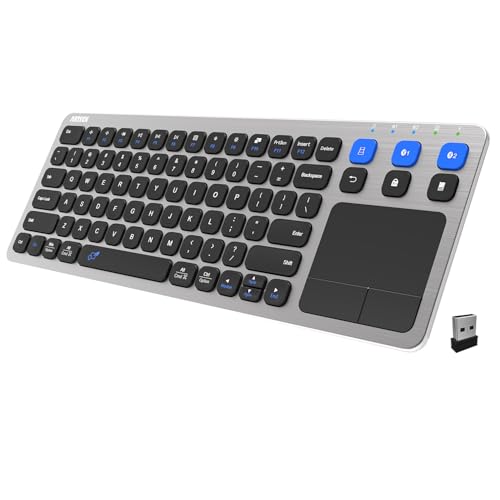
The Arteck Universal keyboard pairs a keyboard layout with a built-in touchpad and easy media control. It offers both 2.4G wireless and Bluetooth connection options, which can make it flexible across compatible devices. Its key draw is all-in-one control for a TV, TV box, or computer. That mix can help in rooms with varied equipment.
The touchpad lets users move a pointer without setting a mouse on the table. Its multi-device focus can suit a small meeting room that also serves as a media space. Before choosing it as the best conference room wireless keyboard, confirm that its connection mode works with the room computer and that the touchpad fits your team’s workflow.
An integrated pointing surface helps reduce loose gear and makes the keyboard easy to pack away. The value depends on whether you will use its extra connection options. It is a practical fit for mixed media use, but not every office needs a touchpad keyboard.
Why It’s Great
- Offers both 2.4G wireless and Bluetooth connection modes.
- Built-in touchpad supports pointer control without a mouse.
- Media control features suit TV and computer use.
- Designed for several device types, including TV boxes and computers.
- Can reduce desk clutter in a compact shared space.
Good to Know
- Check device compatibility and connection mode before purchase.
- The touchpad layout may take time to learn.
- It is designed for TV control, not necessarily extended office typing.
3. Dell KM520 Wireless Keyboard and Mouse

The Dell KM520 bundles a wireless keyboard and mouse for a ready-made desk setup. It uses a 2.4 GHz interface with a USB wireless receiver, and the keyboard includes volume and mute hot keys. This pairing makes it a useful option for a fixed room PC. The set is especially appealing when the room needs both typing and cursor control.
A separate mouse gives users familiar pointer movement, while the dedicated hot keys can help with audio tasks during presentations. It is best suited to a meeting station with space for both devices and a compatible USB port. As the best conference room wireless keyboard for a complete desktop setup, it avoids the need to source a mouse separately.
The matched set keeps the basic workstation simple, and the listed one-year limited warranty adds a clear support detail. Check receiver compatibility before ordering. Its value is strongest when both keyboard and mouse are needed, rather than when a compact single device matters most.
Why It’s Great
- Includes a wireless mouse for a complete desktop setup.
- 2.4 GHz connection uses a USB wireless receiver.
- Volume and mute hot keys suit presentation use.
- A familiar layout can work well at a fixed meeting desk.
- Includes a listed one-year limited warranty.
Good to Know
- The receiver requires a compatible USB port on the host.
- The keyboard and mouse need more storage space than one compact unit.
- Check the exact device and operating system fit before purchase.
4. Logitech K250 Compact Bluetooth Keyboard

The Logitech K250 is a compact Bluetooth keyboard with a full number pad and deep-profile keys. It connects by Bluetooth only, so it does not include a USB receiver. Its mix of a smaller footprint and number entry can suit desks where space is limited but numeric input still matters. It is listed for Windows and macOS use.
This model may work well in a room with a Bluetooth-ready computer and users who prefer a familiar number pad. Its spill-resistant design adds a little reassurance around shared desks, but it is not waterproof. Check Bluetooth access before choosing it as the best conference room wireless keyboard, especially if your room PC is locked down or lacks Bluetooth.
The compact size can make storage easier, while the deeper keys offer a distinct typing feel. Its value depends on a compatible Bluetooth host. Buyers who need a plug-in receiver should look at a different model, but this can suit a tidy, Bluetooth-enabled workstation.
Why It’s Great
- Compact form helps save space on a shared table.
- Includes a full number pad for numeric entry.
- Bluetooth connection avoids keeping a USB receiver attached.
- Spill-resistant design adds practical protection for everyday use.
- Listed for Windows and macOS.
Good to Know
- Bluetooth is the only listed connection method.
- It does not include a USB receiver.
- The room computer must support Bluetooth pairing.
5. Logitech K270 Full-Size Wireless Keyboard
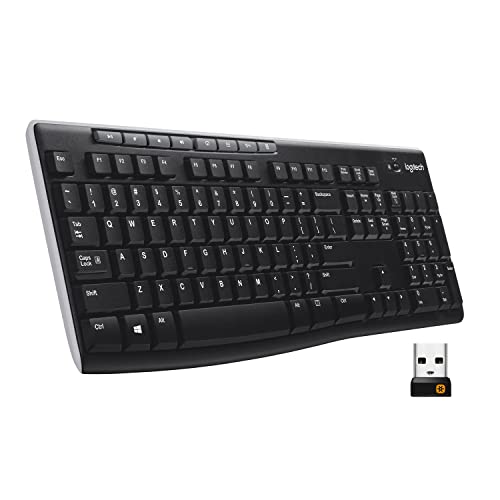
The Logitech K270 is a full-size wireless keyboard with a number pad, eight multimedia keys, and a USB-A receiver. Its straightforward layout suits routine typing, data entry, and basic control of a room PC. The listed two-year battery life can reduce battery-change interruptions. These practical features make it a strong candidate for the best conference room wireless keyboard in a fixed setup.
The familiar full-size layout gives different users room to type without learning a compact design. The number pad helps with figures, while the media keys add quick access to common controls. It is best for a conference room with a compatible USB-A port and a stable place to keep the receiver. It does not include a built-in touchpad or mouse.
Its simple design is easy to wipe and store, and the long listed battery life supports low-fuss daily use. The receiver-based setup is easy to understand, but check the computer ports first. For teams seeking reliable everyday typing at a sensible level of complexity, the K270 offers strong practical value.
Why It’s Great
- Full-size layout supports familiar, comfortable everyday typing.
- Number pad helps with figures and spreadsheet work.
- Eight multimedia keys offer quick access to common controls.
- Includes a USB-A receiver for compatible PCs.
- Listed two-year battery life can limit battery upkeep.
Good to Know
- It needs a USB-A port for the included receiver.
- It does not include a mouse or built-in touchpad.
- The full-size layout takes more table and storage space than compact models.
Final Thoughts: The Verdict
My personal top pick is the Logitech K270. Its full-size keys, number pad, media keys, and included USB-A receiver make it a clear fit for everyday typing at a fixed meeting PC. It is a practical choice for teams that want a simple, familiar best conference room wireless keyboard without extra controls they may not use.
For a room that needs a mouse as well, the Dell KM520 is a useful alternative. Choose the Arteck or K400 Plus for TV-style pointer control, or the K250 if your computer supports Bluetooth. Check your ports, room layout, and typing needs before you buy, and let your budget guide the final choice.