
A universal docking station adds useful ports and desktop connections to a laptop through one cable. It can support monitors, USB gear, wired internet, and, on some models, laptop charging. The best cheap universal docking station suits students, home workers, and office users who want a tidier desk without buying a costly setup.
A dock can look like a bargain until a screen stays blank, a laptop fails to charge, or the ports do not match your gear. Some models also need special software, and “dual display” does not always mean two extended screens on every computer. Those surprises waste time and can turn a neat desk into a knot of cables. Before you buy, check your laptop’s ports, operating system, screen needs, and power limits. The right match makes daily work feel simple; the wrong one can leave you troubleshooting instead of getting things done.
I focus on laptop docks, port needs, and the small compatibility details that matter in daily use. For this guide, I compared the listed models by connection type, display support, charging claims, included features, and software needs. I also considered who each dock may suit best. My goal is to help you find the best cheap universal docking station for your laptop, screens, and budget.
What you’ll learn
- How USB-C and USB 3.0 docks differ in daily use
- Why display support and laptop compatibility need a close check
- Which listed docks offer charging and which may need drivers
- How to match a dock to your desk, screens, and budget
In This Article
How To Choose The Best best cheap universal docking station
A dock should make your desk easier to use, not add another puzzle to solve. Check your laptop’s ports and operating system before you shop, since universal does not mean every feature works on every computer. A low-cost model may lack laptop charging, need a driver, or support fewer screens than you expect. Match the dock to your actual needs: screen count and resolution, USB devices, wired network, and power. This quick check helps you find the best cheap universal docking station without paying for ports you will not use.
Check Laptop Ports and Operating System
Start by checking the ports on your laptop. A USB-C port may support data only, or it may also support video and charging; the port shape alone does not tell you. USB 3.0 docks can work with more older laptops, but many use DisplayLink software to send video. That can mean a driver install and some feature limits. Check the dock maker’s compatibility notes for your exact operating system. The best cheap universal docking station is the one that works with your laptop as you use it, not just one that fits its port.
Match Display Support to Your Screens
Count your screens and check their resolution and refresh needs. A dock that says dual monitor may support two displays at 1080p, while a USB-C model may offer higher resolutions only with the right laptop and setup. Some Macs also limit how many separate screens they can use through a dock. Read the exact display details, not just the headline. If you mostly use office apps, a basic dual-1080p dock may be enough. For sharper screens or a newer ThinkPad setup, look closely at the Lenovo or Dell options and confirm laptop support first.
Compare Charging, Ports, and Total Cost
List the gear you plan to connect: keyboard, mouse, drives, headset, network cable, and laptop charger. Then compare the dock’s ports and power delivery. A dock with 100W or 130W charging claims may still deliver less to your laptop, depending on the model and adapter. A USB 3.0 dock may add ports but not charge the laptop at all. Check what is included, especially the power supply and host cable. The best cheap universal docking station saves money only if it has the ports, power, and support you need.
Quick Comparison
| Model | Category | Best For | Key Spec | Amazon |
|---|---|---|---|---|
| Dell Pro WD25 USB-C Dock | Best Overall | Compatible USB-C laptop setups | 100W power, multiple display outputs | Amazon |
| Plugable UD-3900Z | Best for 1080p | USB-C or USB 3.0 laptop users | Dual 1080p HDMI, 10 ports | Amazon |
| Plugable UD-3900 | Budget Pick | Basic dual-screen work | Two HDMI, six USB ports | Amazon |
| Lenovo ThinkPad 40AY USB-C Dock | Higher Display Support | Compatible ThinkPad and USB-C laptops | Dual 4K at 60Hz, 90W adapter | Amazon |
| Dell D6000 Universal Dock | Renewed Value | Multi-screen desk setups | USB 3.0 and USB-C, 130W adapter | Amazon |
In-Depth Reviews for best cheap universal docking station
1. Dell Pro WD25 USB-C Dock

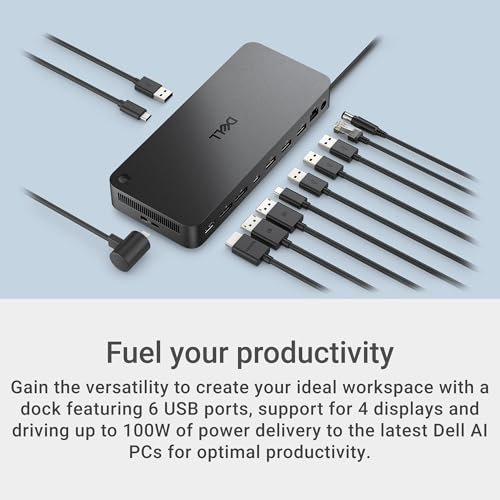
The Dell Pro WD25 is a USB-C dock for a desk with several screens and accessories. Its listed features include 100W power delivery, DisplayPort, HDMI, Ethernet, USB-A, and USB-C ports. Dell also promotes quad-display support, but the result depends on the laptop, screens, and setup. This mix makes it a strong contender for the best cheap universal docking station.
One cable can link a compatible laptop to displays, wired network, and everyday USB gear. The port mix suits office desks where fewer loose cables make a real difference. It is best for users with a USB-C laptop that supports the needed video and charging features. Check the laptop’s port limits before buying, especially if you plan to connect several high-resolution screens.
The dock’s practical port layout can help keep a desk neat, while its separate power supply supports a tidy setup. Check the listing for included cables and power details before purchase. It may offer strong value if your laptop matches its features, but its benefits matter less if your laptop cannot use the display or charging options.
Why It’s Great
- Offers a useful mix of USB-A, USB-C, video, and Ethernet ports.
- 100W power delivery can reduce the need for a separate laptop charger on compatible systems.
- DisplayPort and HDMI make it easier to connect common monitor types.
- Designed to support multi-display office setups when the host laptop allows it.
- A practical choice for users who want one main cable at the desk.
Good to Know
- Quad-display support depends on the laptop, operating system, and display setup.
- The listed 100W power figure does not ensure every laptop receives its full required charge rate.
- Check the box contents and compatibility details before purchase.
2. Plugable UD-3900Z Dual HDMI Dock

The Plugable UD-3900Z is a 10-port universal dock for USB-C and USB 3.0 laptops. It supports two 1080p HDMI displays and adds ports for common desk accessories. Plugable lists plug-and-play use for Windows and ChromeOS, while macOS needs a driver. For office screens and everyday tasks, it offers a practical route to a simpler desk.
Its appeal is broad connection support: users with newer USB-C laptops and some older USB 3.0 systems can add monitors and peripherals through one dock. It is best suited to office work, browsing, and video calls rather than demanding graphics tasks. Before choosing it, confirm the driver and display behavior for your operating system and laptop.
The dock’s port count can replace several small adapters and help limit cable clutter. As with other USB graphics docks, performance and compatibility depend on the computer and software. It can be good value for two 1080p screens, but buyers should not expect laptop charging unless their setup and the dock’s listed features support it.
Why It’s Great
- Connects to laptops with USB-C or USB 3.0, subject to compatibility.
- Supports two HDMI displays at up to 1080p as listed.
- Ten ports can handle common peripherals and desk accessories.
- Windows and ChromeOS users can get a straightforward setup according to the product details.
- A sensible pick for users seeking the best cheap universal docking station for basic dual-screen work.
Good to Know
- macOS use requires a driver, so it is not a driver-free choice for every user.
- The listed display support is aimed at 1080p rather than high-resolution screen setups.
- Confirm charging support separately; do not assume the dock powers every laptop.
3. Plugable UD-3900 USB 3.0 Dock

The Plugable UD-3900 is a USB 3.0 universal laptop dock with two HDMI outputs, Gigabit Ethernet, audio, and six USB ports. It can work with USB-C laptops that support USB data through a suitable connection. Its key draw is a broad set of everyday ports for older or basic desk setups, not advanced high-resolution display use.
This model suits people who want a simple home or office station for email, documents, and web tasks. Its USB 3.0 host connection can help support older laptops, while the two HDMI ports offer a way to add screens. Windows and Mac users should plan for driver setup, and should check current system support before relying on it.
The dock can reduce adapter clutter by bringing common connections together in one place. Its USB 3.0 design is less modern than a full-featured USB-C dock, but it may still offer useful value for basic work. Check your laptop’s software support and screen needs before choosing this budget-friendly option.
Why It’s Great
- Provides two HDMI outputs for compatible dual-screen workflows.
- Adds six USB ports for keyboards, mice, and other accessories.
- Gigabit Ethernet offers a wired network option.
- Audio connections can help keep a headset or speaker setup at the desk.
- Can suit basic workstations that do not need advanced video features.
Good to Know
- Driver installation is required, so setup is not fully plug and play.
- Display support and performance depend on the operating system and computer.
- It is not the best fit for users who need modern USB-C charging or high-resolution display features.
4. Lenovo ThinkPad 40AY USB-C Dock

The Lenovo ThinkPad Universal USB-C Dock 40AY is aimed at users who want a capable multi-screen desk. The listed package includes the dock, a 90W power adapter, HDMI and DisplayPort cables, a USB-C cable, and a cloth. It is specified for dual 4K displays at 60Hz, though the host laptop and display setup must support that output.
Its included cables may make setup easier for a compatible ThinkPad or USB-C laptop. This model suits users who need sharp screens for office work, design tasks, or a large desktop workspace. Check the laptop’s video support and power needs before ordering. A dock’s screen claims do not override the limits of the computer connected to it.
The bundle includes useful setup items, and its desk-focused design can help keep cables organized. The higher display target may be more than many budget buyers need, so compare its price with simpler docks. It offers better value when your laptop can use the display and power features included.
Why It’s Great
- Listed support for two 4K displays at 60Hz suits a sharper multi-screen desk.
- The package includes a power adapter and several useful cables.
- USB-C connectivity offers a single host connection for a compatible laptop.
- A good match for users who want a dock built around a ThinkPad-style work setup.
- Offers more display headroom than basic dual-1080p options.
Good to Know
- Dual 4K output depends on the laptop’s USB-C video capabilities and configuration.
- A 90W adapter does not mean every connected laptop receives 90W.
- It may cost more than needed if you only use one basic monitor.
5. Dell D6000 Universal Dock, Renewed

The renewed Dell D6000 is a universal dock with USB 3.0 and USB-C connection options and a 130W power adapter. It is designed for a multi-monitor desk and can add common ports through one host connection. Since it is renewed, its condition and included items may vary by seller, so check the listing carefully.
This dock may suit a mixed desk where users connect a compatible laptop, external screens, and USB accessories. Its broad host connection options can be useful, but display support depends on the laptop, software, and setup. Confirm the exact monitor limits and charging behavior for your computer before relying on it for daily work.
A renewed dock can offer value when the price and condition are right, but it is worth checking the seller’s return terms and package details. Its power adapter and port selection may help simplify a desk. The best cheap universal docking station is a good deal only when it works well with your own laptop.
Why It’s Great
- Offers both USB 3.0 and USB-C host connection options.
- A 130W power adapter is included in the listed product description.
- Designed to support a multi-monitor desk setup.
- Can bring several desk connections together in one place.
- Renewed pricing may make it appealing to budget-conscious buyers.
Good to Know
- This is a renewed product, so condition and accessories can vary.
- Check the listing for return terms and the exact items included.
- Charging and display support depend on the laptop and connection used.
Final Thoughts: The Verdict
My personal top pick is the Dell Pro WD25 USB-C Dock for a compatible laptop, thanks to its useful port mix, 100W power claim, and office-ready design. Check your laptop’s display and charging support first, since features vary by system. It stands out as a flexible choice for anyone seeking the best cheap universal docking station.
For two basic 1080p screens, the Plugable UD-3900Z is a practical runner-up, especially if you use Windows or ChromeOS. Choose the Lenovo for compatible dual-4K needs, or the renewed Dell D6000 if its condition and return terms suit you. Compare your laptop, screens, ports, and budget before deciding.