
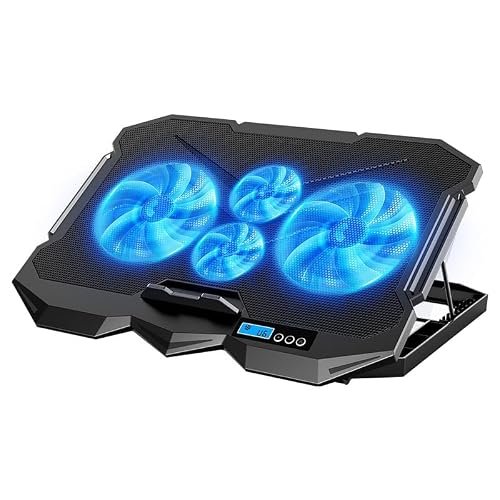
A laptop cooling pad lifts your Acer and moves air beneath its case. It can help with airflow, comfort, and a steadier work setup. The best cooling pad for acer aspire depends on your laptop size, fan needs, and desk space, so students, home users, and gamers should compare more than looks.
A poor fit can block vents, wobble under your hands, or leave the laptop sitting at an awkward angle. Some pads also add fan noise without moving enough air to matter. It is easy to buy by fan count alone, but size, airflow direction, stand stability, and power needs matter just as much. A pad cannot fix dust buildup or a failing laptop fan, either. Choosing carefully can make long work sessions more comfortable and help you avoid a noisy accessory that takes up desk space but does little.
I reviewed the listed models by comparing their stated size range, fan layout, height settings, ports, and intended use. I focused on practical fit for Acer Aspire laptops rather than assuming that more fans always mean better cooling. This guide prioritizes clear trade-offs, useful features, and a sensible match for your laptop and budget.
What you’ll learn
- How to match a cooling pad to your Acer Aspire screen size
- Why fan layout and stable height settings matter
- Which models offer useful USB ports and controls
- How to choose a pad for work, travel, or gaming
In This Article
How To Choose The Best best cooling pad for acer aspire
The right cooling pad should fit your Acer Aspire, hold it securely, and suit the way you work. A pad that is too small may leave the laptop unstable, while a large model can crowd a small desk. Cheap stands may wobble or have loud fans, and buying by fan count alone is a common mistake. Check the pad’s size range, stand design, USB needs, and fan placement first. A cooling pad can support airflow, but it cannot replace cleaning or laptop repairs.
Match the Pad to Your Acer Aspire Size
Start with your laptop’s screen size and case dimensions. Acer Aspire models vary, so check the exact model before you buy. A pad rated for 12 to 17 inches covers many common laptops, while wider gaming stands may suit a large Aspire better. The laptop should sit within the stand’s support edges, not hang over them. Do not assume that a listing with “Acer” in its title fits every Aspire. A close fit helps keep the laptop steady and lets air reach its base.
Choose Useful Airflow, Not Just More Fans
Fan count is only one part of cooling. Look at fan size, placement, and whether the layout lines up with the vents on your Acer Aspire. A pad with several small fans may spread airflow, while fewer larger fans may be simpler and quieter; actual results can vary by laptop and workload. Check whether fan speed can be adjusted if noise matters to you. Avoid expecting a pad to solve overheating caused by blocked vents, dust, or a worn internal fan.
Check Stand Stability, Height, and Ports
A sturdy stand can make long sessions more comfortable, especially if you type on the laptop itself. Look for a secure front stop, firm hinges, and height settings that suit your desk. Extra USB ports are handy, but most pads use a laptop USB port for power, so check how the connection works. A pass-through port can help preserve a port, though it may not replace a full-speed hub. For travel, choose a lighter, simpler pad; for a desk, more height choices may be worth the extra size.
Quick Comparison
| Model | Category | Best For | Key Spec | Amazon |
|---|---|---|---|---|
| Acer Series 4-Fan Cooling Pad | Best Overall | Most Aspire users | 4 fans, LCD, 4 heights | Amazon |
| Kootek 5-Fan Cooling Pad | Runner Up | Large laptops and desk use | 5 fans, 6 height settings | Amazon |
| AICHESON S035 5-Fan Cooler | Feature-Rich | Up to 17.3-inch laptops | 5 fans, 2 USB ports | Amazon |
| ChillCore 9-Fan RGB Cooling Pad | Large Laptop Pick | Large gaming laptops | 9 fans, 8 height settings | Amazon |
| KeiBn 2-Fan Cooling Pad | Compact Pick | Smaller laptops and simple setups | 2 fans, 5 height settings | Amazon |
In-Depth Reviews for best cooling pad for acer aspire
1.Acer Aspire 4-Fan Cooling Pad with LCD
 Acer Aspire 4-Fan Cooling Pad with LCD
” />
This four-fan laptop cooling pad is listed for Acer Aspire and several other laptop lines, with support for 13- to 17-inch laptops. Its LCD display, four height settings, and two USB-A ports add practical control and convenience. For shoppers seeking the best cooling pad for acer aspire, its broad stated compatibility makes it a flexible desk option.
The adjustable stand can help raise the screen and improve the feel of a desk setup. The display gives you a quick way to check its settings, while the USB ports add room for accessories. This model suits students, remote workers, and everyday Aspire users who want a cooling stand with useful extras rather than a bare platform.
The flat top should be easy to wipe with a soft cloth when unplugged. Its feature set offers good value if you will use the display and ports. Check your laptop’s size and vent placement before buying, since fit and cooling results can vary by model.
Why It’s Great
- Four fans provide airflow across more than one area of the laptop base.
- LCD display makes settings easier to check at a glance.
- Four height choices help tailor the screen angle to your desk.
- Two USB-A ports add convenience for basic accessories.
- Listing names several Acer laptop families, including Aspire.
Good to Know
- Four fans do not guarantee lower temperatures; results depend on laptop design and workload.
- The pad needs a USB connection and takes up more desk space than a simple stand.
- Confirm the exact Aspire size and vent layout before ordering.
2.Kootek 5-Fan Laptop Cooling Pad
 Kootek 5-Fan Laptop Cooling Pad
” />
The Kootek cooling pad is designed for laptops from 12 to 17 inches and uses five fans for broad airflow beneath the case. It also offers six height settings and two extra USB hubs. Those features make it a strong best cooling pad for acer aspire option for users who want a stand that can handle varied laptop sizes.
Its height range gives you room to adjust your screen and typing angle for a desk or shared workspace. The blue LED lights add a clear visual touch, while the USB hubs can help with simple accessories. This model suits Aspire owners who want a larger stand and several adjustment choices for regular home or office use.
The mesh surface is easy to dust with a soft, dry cloth after unplugging the pad. Its wide size range and adjustable stand offer solid everyday value. Check your laptop’s footprint and USB needs, as the stand may feel large on a compact desk.
Why It’s Great
- Five fans spread airflow across a wide laptop area.
- Six height settings offer more adjustment than many basic stands.
- Rated for laptops from 12 to 17 inches.
- Two extra USB hubs can support simple desk accessories.
- The blue lighting gives the stand a visible gaming-style look.
Good to Know
- The larger footprint may not suit a small desk or frequent travel.
- Blue LEDs may distract users who prefer a plain work setup.
- Fan noise and cooling results can vary with speed and laptop design.
3.AICHESON S035 5-Fan Laptop Cooler
 AICHESON S035 5-Fan Laptop Cooler
” />
The AICHESON S035 has five fans and is listed for laptops up to 17.3 inches. Its blue LED lights and two USB ports give it a practical, gaming-ready style. For an Acer owner comparing the best cooling pad for acer aspire, the larger stated size range may suit a 17-inch model better than a compact cooling stand.
This model is aimed at users who want a broad platform for a large notebook and prefer visible fan lighting. Two USB ports can help connect basic accessories, while the five-fan layout spreads airflow under the laptop. It may suit desk-based Aspire users who value coverage and a simple stand over easy packing or minimal design.
The surface can be cleaned with a soft cloth when the cooler is unplugged. Its wide laptop support and port features make it a useful option at a sensible price. Check the stand’s dimensions against your desk and laptop before choosing it.
Why It’s Great
- Supports laptops up to 17.3 inches, per the product listing.
- Five fans offer broad airflow coverage beneath the laptop.
- Two USB ports add practical connection options.
- Blue LEDs suit users who like a gaming-style setup.
- A useful alternative for larger Acer Aspire laptops.
Good to Know
- Blue lighting may not suit a quiet or professional-looking workspace.
- Large laptop support can mean a bigger footprint on your desk.
- The listing does not establish cooling results for every Aspire model.
4.ChillCore 9-Fan RGB Laptop Cooling Pad
 ChillCore 9-Fan RGB Laptop Cooling Pad
” />
The ChillCore cooling pad uses nine fans and is listed for laptops from 15.6 to 19.3 inches. It adds RGB lighting, eight height settings, and two USB ports. For users with a large Acer Aspire, this best cooling pad for acer aspire candidate offers a wide stand and many angle choices for a fixed desk setup.
The wide size range is aimed at large gaming laptops, and the eight settings let you adjust the screen height to suit your chair and desk. RGB lighting gives the pad a bold look. It is best suited to Aspire users who value a large platform and flexible positioning more than a light, travel-friendly design.
Unplug the pad before wiping its surface with a soft cloth, and keep dust clear of the fan openings. Its feature list is generous for a large laptop stand. Still, measure your desk first, since this model may be too wide for compact work areas.
Why It’s Great
- Nine fans cover a broad area beneath a large laptop.
- Eight height settings allow many desk and screen positions.
- Listed for laptops up to 19.3 inches.
- RGB lighting adds a customizable gaming look.
- Two USB ports offer added accessory convenience.
Good to Know
- Its large size may not fit smaller desks or travel bags.
- RGB lighting and multiple fans may not suit users who prefer quiet simplicity.
- More fans do not by themselves prove better cooling performance.
5.KeiBn Compact 2-Fan Laptop Cooling Pad
 KeiBn Compact 2-Fan Laptop Cooling Pad
” />
The KeiBn cooling pad uses two fans and is listed for laptops from 10 to 15.6 inches. It includes five height settings and two USB ports in a simpler format than large multi-fan stands. For a smaller Acer Aspire, this best cooling pad for acer aspire option may offer a useful blend of airflow, lift, and desk convenience.
Its smaller size can work well for users with a compact Aspire who do not need a wide gaming stand. Five height choices help adjust the screen, while the two USB ports support basic desk accessories. It is best for everyday work, study, and browsing, rather than users seeking a large platform for a gaming laptop.
The simpler surface should be easy to wipe clean when unplugged, and fewer fans mean fewer openings to dust. Its compact feature set may offer good value for a smaller laptop. Check your Aspire’s dimensions, because some models may exceed the listed size range.
Why It’s Great
- Compact design may suit smaller desks and work areas.
- Five height settings help adjust the laptop position.
- Two fans keep the layout simple.
- Two USB ports add useful accessory connections.
- Listed size range suits many smaller laptops.
Good to Know
- The 15.6-inch stated limit may exclude larger Aspire models.
- Two fans offer less coverage than larger multi-fan pads.
- Check the laptop’s case width and vent position for a secure fit.
Final Thoughts: The Verdict
My personal top pick is the Acer Series 4-Fan Cooling Pad with LCD. Its four fans, display, height settings, and USB ports make it a balanced choice for many Acer Aspire users. It is my leading best cooling pad for acer aspire pick because it combines practical features with broad stated laptop compatibility. Remember, no pad can promise a specific temperature drop for every laptop.
For a larger laptop, consider the Kootek 5-Fan Laptop Cooling Pad for its six height settings and wide fit. The KeiBn is a simpler choice for smaller laptops, while ChillCore suits users who want a large RGB stand. Measure your Aspire and compare desk space, noise needs, and budget before choosing the best cooling pad for acer aspire.