
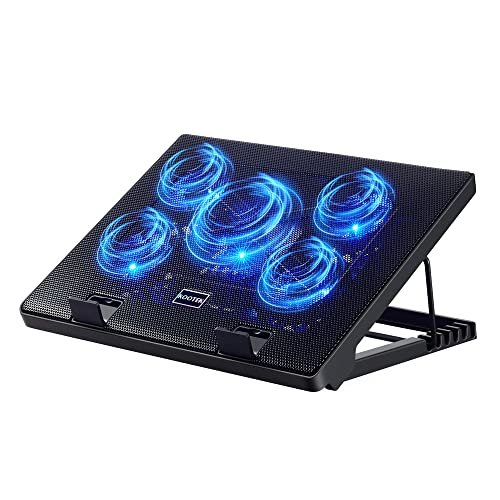
A laptop cooling pad is a raised stand with built-in fans that moves air beneath a notebook. It can help gamers, remote workers, and students manage heat while improving desk comfort. The best cooling pad notebook combines a suitable size, useful airflow, and a stable stand.
A weak fan can add noise without making a useful difference, while a stand that slips or blocks your laptop’s vents can cause fresh frustration. Buyers also sometimes choose by fan count alone, then find the pad too large, too bright, or short on USB ports. These small misses matter during a long game or work call. The right cooling pad should fit your laptop, sit firmly, and match your tolerance for sound and lights. A careful choice can make a hot, cramped setup feel far more comfortable.
I compare laptop cooling gear by checking its listed size range, fan layout, stand settings, ports, and practical trade-offs. For this guide, I reviewed the supplied product details and focused on features buyers can verify before ordering, rather than claiming lab test results. My goal is to help you find the best cooling pad notebook for your laptop, desk, and daily routine.
What you’ll learn
- How to match pad size and fan placement to your laptop.
- Which stand and port features can make daily use easier.
- How five popular cooling pads differ in design and use.
- What trade-offs to check before you buy.
In This Article
How To Choose The Best best cooling pad notebook
The right cooling pad should fit your notebook and your desk, not just look impressive in a listing. A poor fit may cover vents, wobble under a heavy laptop, or push fan noise into your work space. Fan count alone is a common buying trap; fan size, placement, and speed control matter too. Check the supported laptop size, stand angle, power connection, and port layout before you buy. This simple check helps you choose the best cooling pad notebook for real daily use.
Match Laptop Size and Airflow
Start with your laptop’s screen size and the location of its air intake vents. A cooling pad should support the laptop’s width and leave its vents clear. A small notebook may not need a large multi-fan stand, while a broad gaming laptop needs a stable base with airflow across the bottom. Do not assume that more fans always mean better cooling; fan position and laptop vent design matter. Check the listed size range and compare it with your device before ordering. That is the first step toward the best cooling pad notebook for your setup.
Choose Useful Fan and Noise Controls
Think about when and where you use your laptop. Several smaller fans can spread airflow, while a large blower-style fan may suit users seeking a more focused cooling setup. Either design can make noise, so look for controls that let you adjust fan speed or switch fans off. RGB lights are fun for a gaming desk, but they may distract in a quiet office or bedroom. Avoid choosing by fan count or light effects alone. The best cooling pad notebook is one whose airflow and sound suit your daily work or play.
Check Stand Comfort, Ports, and Build
A cooling pad also acts as a laptop stand, so its height settings and grip matter. A raised screen can make long desk sessions more comfortable, but an unstable stand can feel risky with a heavy notebook. Check for firm laptop stops, a suitable angle, and the number of USB ports you need. Remember that USB-powered pads may use a port on your laptop. Consider weight and storage too if you move between rooms. A well-matched stand can make the best cooling pad notebook a useful part of your setup, not just another accessory.
Quick Comparison
| Model | Category | Best For | Key Spec | Amazon |
|---|---|---|---|---|
| Kootek 5-Fan Cooling Pad | Best Overall | Flexible everyday desk use | Five fans; six height settings | Amazon |
| ICE COOREL 8-Fan Pad | Gaming Pick | RGB gaming setups | Eight fans; phone stand | Amazon |
| ChillCore 9-Fan Cooling Pad | Feature Rich | Large laptop users | Nine fans; eight height settings | Amazon |
| havit HV-F2056 Cooling Pad | Simple Value | Simple, quiet desk cooling | Three USB-powered fans | Amazon |
| llano V12 Gaming Cooling Pad | Blower Style | Gaming laptops needing focused airflow | 5.5-inch turbofan; three-port hub | Amazon |
In-Depth Reviews for best cooling pad notebook
1.Kootek 5-Fan Laptop Cooling Pad
 Kootek 5-Fan Laptop Cooling Pad
” />
The Kootek cooling pad uses five USB-powered fans to spread airflow beneath laptops from 12 to 17 inches. Its listed design includes two extra USB hubs and blue LED lights. Six height settings let you change the viewing angle. This mix of broad size support and adjustable setup makes it a versatile best cooling pad notebook choice.
The stand suits people who want airflow and a raised screen in one desk accessory. Its six height options offer room to find a comfortable angle for work or play. The blue lights give the pad a gaming look, while the USB hubs can help with small accessories. It is best for users who want several practical features in one stand.
The metal mesh top gives air a path and offers a wipeable surface for routine dust cleanup. Check that your laptop rests securely on the stand before use. Its fan, angle, and hub features offer useful value, though buyers should compare its footprint and fan noise with their space.
Why It’s Great
- Five fans spread airflow across the laptop base.
- Supports a broad 12-to-17-inch laptop range.
- Six height settings help adjust desk posture.
- Two extra USB hubs add connection options.
- Blue LEDs give the setup a gaming accent.
Good to Know
- The fan count and lights may not suit users who prefer a quiet, plain desk.
- USB-powered fans use a laptop port, so check your available connections.
- The larger stand may take up more room than a simple laptop riser.
2.ICE COOREL 8-Fan RGB Cooling Pad
 ICE COOREL 8-Fan RGB Cooling Pad
” />
The ICE COOREL cooling pad pairs eight fans with RGB lighting for laptops listed at 15 to 17.3 inches. Its stand has six height settings, two USB ports, and a phone stand. This feature-rich layout can suit a gaming desk where airflow, display, and device access matter. Check your laptop size before choosing this best cooling pad notebook.
The raised design gives users several angle choices for gaming, streaming, or desk work. The built-in phone stand can keep a second screen in view, while the two USB ports offer extra connection options. This pad is best suited to owners of mid-size gaming laptops who like RGB effects and want a more organized setup.
The mesh surface should be simple to dust with a soft cloth, and the stand folds into a desk-friendly accessory. Confirm that the phone holder and laptop fit your space. Its fan and lighting features may offer good value for gaming users, but the added parts bring more to manage.
Why It’s Great
- Eight fans provide a broad fan layout.
- Six height settings support an adjustable desk angle.
- RGB lighting suits colorful gaming setups.
- A phone stand keeps a mobile screen close.
- Two USB ports add handy connection options.
Good to Know
- The 15-to-17.3-inch listed range may not suit smaller notebooks.
- RGB lighting may distract in a shared room or office.
- Confirm how the USB ports fit your laptop and accessory needs.
3.ChillCore 9-Fan RGB Laptop Cooler
 ChillCore 9-Fan RGB Laptop Cooler
” />
ChillCore lists nine fans for laptops from 15.6 to 19.3 inches, making this one of the larger cooling stands in this guide. RGB lights and eight height settings add gaming style and setup flexibility. Two USB ports round out its features. For owners of large notebooks, this best cooling pad notebook offers a broad, adjustable platform.
The wide size range may suit users with a large gaming laptop who want more than a basic flat stand. Eight height settings let you tune the desk angle, while RGB lighting adds a visual accent. It is best for a spacious gaming station where a larger cooler and its extra features have room.
Wipe dust from the surface and fan openings as needed, following the maker’s care guidance. Check the stand’s footprint and your laptop’s weight before buying. Its many fans and angle settings offer strong feature value on paper, but a larger pad may be less convenient to move or store.
Why It’s Great
- Nine fans provide a multi-fan cooling layout.
- The listed range reaches laptops up to 19.3 inches.
- Eight height settings allow flexible positioning.
- RGB lighting adds color to a gaming station.
- Two USB ports offer extra connectivity.
Good to Know
- Its large listed size range may mean a bulky desk footprint.
- The product details do not state a noise level.
- Check your laptop dimensions and stand stability before use.
4.havit HV-F2056 Laptop Cooling Pad
 havit HV-F2056 Laptop Cooling Pad
” />
The havit HV-F2056 keeps its design simple, with three USB-powered fans for laptops listed at 15.6 to 17 inches. Two height settings can lift the screen and change the typing angle. This no-frills layout may appeal to people who want a basic best cooling pad notebook without RGB lights or a long list of extras.
Its slim, straightforward form is suited to everyday desk use with a compatible laptop. The two height choices offer some flexibility, while the three fans provide airflow beneath the notebook. It is best for students and office users who prefer a simple stand and do not need a phone holder or many added ports.
A soft cloth can help clear dust from the pad and its fan openings. The compact feature set may be easier to fit into a basic work area than larger gaming models. Check the listed size range and your preferred screen angle to judge its value for your routine.
Why It’s Great
- Three fans keep the design simple.
- Listed for 15.6-to-17-inch laptops.
- USB power makes it easy to connect to a laptop.
- Two height settings raise the screen.
- A plain design suits work or study spaces.
Good to Know
- It has only two height settings.
- Its three-fan layout has fewer fans than several gaming options.
- The listed details do not include extra USB hubs or RGB lighting.
5.llano V12 Gaming Laptop Cooling Pad
 llano V12 Gaming Laptop Cooling Pad
” />
The llano V12 uses a 5.5-inch turbofan and an airtight pressure chamber, rather than a row of small fans. It is listed for 15.6-to-19-inch laptops and offers adjustable speed, dust protection, and a three-port USB hub. This different design may suit users seeking a focused best cooling pad notebook for a large gaming laptop.
Its gaming-focused stand adds RGB lighting and adjustable fan speed, giving users more control over the setup. The broad listed size range can fit many large notebooks, while the USB hub helps connect accessories. It is best for gaming laptop owners who want a blower-style cooler and do not mind a more specialized design.
Keep the fan area free of dust and follow the maker’s cleaning guidance for the pressure chamber. Check your laptop’s underside and the pad’s fit before use. The larger fan and hub add useful features, though this specialized stand may cost more or take more room than a basic pad.
Why It’s Great
- A 5.5-inch turbofan offers a different airflow design.
- Listed for laptops from 15.6 to 19 inches.
- Adjustable speed gives users fan control.
- The three-port USB hub supports accessories.
- Dust protection is part of the listed design.
Good to Know
- A blower-style design may sound different from small-fan pads.
- Check the fit of the airtight chamber with your laptop’s vents.
- Its gaming features may be more than a basic work setup needs.
Final Thoughts: The Verdict
My personal top pick is the Kootek 5-Fan Laptop Cooling Pad. Its five fans, wide laptop size range, six height settings, and extra USB hubs make it a balanced choice for work and play. It brings useful features without focusing only on gaming style. For many people seeking the best cooling pad notebook, that mix is a practical place to start.
For an RGB gaming desk, consider the ICE COOREL 8-Fan RGB Cooling Pad, with its phone stand and six height settings. The havit is a simpler option for users who want three fans and a plain design, while the llano suits buyers drawn to a turbofan and USB hub. Compare fit, noise needs, and desk space, then choose the best cooling pad notebook for your needs and budget.