

A laptop cooling pad is a fan-equipped stand that helps move air beneath your computer while raising it off the desk. It can suit gamers, remote workers, and students whose laptops run warm during long sessions. The best cooling pad laptop table also adds a more comfortable viewing angle and keeps useful ports within reach.
A poor stand can wobble, block vents, or send a steady buzz across a quiet room. Some buyers focus only on fan count, then find the pad is too small, too loud, or awkward to adjust. A laptop that feels hot during a deadline or game can be stressful, especially when the stand slips or the cable gets in the way. The right fit matters: check your laptop size, where its air intakes sit, and whether you need extra height or ports before you buy.
I write about practical laptop gear and judge cooling stands by the details that matter at a real desk: fit, fan layout, height options, ports, and ease of use. I compared the listed specs and design features of these five models, while avoiding claims that need hands-on temperature tests. This guide puts comfort, useful airflow, and clear trade-offs first, so you can find the best cooling pad laptop table for your setup.
What you’ll learn
- How to match a cooling pad to your laptop size and vent layout.
- Which fan, height, and port features matter most at a desk.
- How five cooling pads differ in design and intended use.
- What to check before buying a stand for work, school, or gaming.
In This Article
How To Choose The Best best cooling pad laptop table
The best cooling pad laptop table should fit your computer, suit your desk, and keep its fans from becoming a distraction. A stand that is too small may leave part of the laptop unsupported; a noisy fan can make calls and study time less pleasant. Do not assume more fans always mean better results. Check your laptop’s size and air intake positions, then compare fan placement, height settings, USB needs, and stability. These checks help you avoid a cheap stand that looks useful but feels awkward every day.
Match the Pad to Your Laptop Size
Start with the laptop’s screen size and the maker’s stated fit range. A 12-to-17-inch stand offers broad use, while a model sized for 12-to-15.6-inch laptops may suit a smaller work or school computer. Also look at the laptop’s underside vents. Fans should sit where they can move air near those openings, not just spin under a solid panel. A common mistake is buying by fan count alone and missing the actual fit. If you own a large gaming laptop, choose a wider stand with firm stops; for a compact laptop, a slim pad may be easier to carry and store.
Compare Fan Layout and Noise
Fan count is only one part of cooling. A cluster of fans can spread airflow across a broad base, while two large fans may keep a simpler layout. Look for a mesh surface and a fan position that lines up with your laptop vents. Noise matters if you work in a quiet room, join calls, or study at night. Product listings may use terms such as quiet or whisper-quiet, but sound can depend on the computer, desk, and room. For a balanced best cooling pad laptop table, weigh airflow coverage and noise claims together instead of treating a high fan count as a guarantee.
Check Height, Ports, and Stability
Height adjustment can help you set a more natural screen angle, but the stand should remain steady at the level you use. Check the number of USB ports and whether the cooler needs one port for power. Extra ports can help with a mouse or other small device, though they may not replace a full hub. A phone holder or LED lights can be handy extras, but they should not outweigh fit and stability. Choose a portable slim pad if you move between rooms; a taller stand with more settings may work better for a fixed desk.
Quick Comparison
| Model | Category | Best For | Key Spec | Amazon |
|---|---|---|---|---|
| Kootek 5-Fan Laptop Cooling Pad | Best Overall | Large laptops and adjustable desk setups | Five fans; six height settings | Amazon |
| TECKNET Slim Laptop Cooling Pad | Quiet Slim Pick | Work, school, and portable use | Slim build; dual USB ports | Amazon |
| LIENS Adjustable Laptop Cooling Pad | Compact Choice | Smaller laptops and simple setups | Two 5.1-inch fans; adjustable height | Amazon |
| ICE COOREL 8-Fan Gaming Cooler | Gaming Pick | Large gaming laptops and RGB fans | Eight fans; six height settings | Amazon |
| 3-Fan Laptop Cooler with Phone Holder | Value Pick | Everyday work, class, and gaming | Three fans; five height levels | Amazon |
In-Depth Reviews for best cooling pad laptop table
1.Kootek 5-Fan Laptop Cooling Pad
 Kootek 5-Fan Laptop Cooling Pad
” />
The Kootek cooling pad combines five fans with a mesh surface for broad airflow under laptops from 12 to 17 inches. Its listing highlights quiet operation, blue LED lights, and USB power. Six height settings let you raise the screen, while two extra USB ports add useful connections. This flexible feature mix makes it a strong all-around best cooling pad laptop table.
The wide size range suits many home and desk setups, from everyday work to gaming. You can adjust the stand to find a screen angle that feels comfortable, then use the built-in stops to help keep the laptop in place. The USB-powered design keeps setup simple. It is best for users who want several fans and more height choices than a slim, fixed stand provides.
The mesh surface should be easy to wipe with a soft, dry cloth. Its plastic-and-mesh design keeps the feature set practical, though it adds more parts than a slim pad. Consider the space it needs on your desk. For buyers who value adjustability and ports, it offers strong everyday versatility.
Why It’s Great
- Five fans spread airflow across a wide laptop base.
- Six height settings support a more tailored screen angle.
- Fits a stated range of 12-to-17-inch laptops.
- Two extra USB ports can add convenient connections.
- Blue LED lighting gives the stand a clear gaming look.
Good to Know
- The wide frame may take up more desk space than a slim cooler.
- USB-powered fans use a laptop port or compatible USB power source.
- LED lights and multiple fans may not suit users who want a plain, silent setup.
2.TECKNET Slim Laptop Cooling Pad
 TECKNET Slim Laptop Cooling Pad
” />
The TECKNET cooling pad is a slim laptop cooler for computers from 12 to 17 inches. Its listing notes a metal mesh surface, dual USB ports, and a working LED indicator. TECKNET describes its cooling efficiency as 60 percent, though that listing claim is not a promise of a set temperature drop. The low-profile design is its main draw for simple desks.
This model may suit students, office users, and anyone who moves a laptop between rooms. Its slim shape should be easier to pack away than a taller stand, while the mesh base supports airflow beneath the computer. Two USB ports add flexibility for small desk accessories. Choose it if portability and a quieter design matter more to you than many fan or height settings.
The metal mesh surface is simple to wipe and has a clean, understated look. Its slim form may store neatly in a bag, but check the product dimensions before travel. With basic ports and a broad fit range, it can be a practical value for users who want fewer extras.
Why It’s Great
- Slim profile suits desks where space is limited.
- Metal mesh surface is designed to support airflow.
- Fits a stated range of 12-to-17-inch laptops.
- Dual USB ports provide added connection options.
- LED indicator makes powered operation easy to spot.
Good to Know
- The listed 60 percent cooling efficiency is a product claim, not an independent result.
- A slim design may offer fewer height and posture options than an adjustable stand.
- Check fan and port needs before choosing it over a multi-fan model.
3.LIENS Adjustable Laptop Cooling Pad
 LIENS Adjustable Laptop Cooling Pad
” />
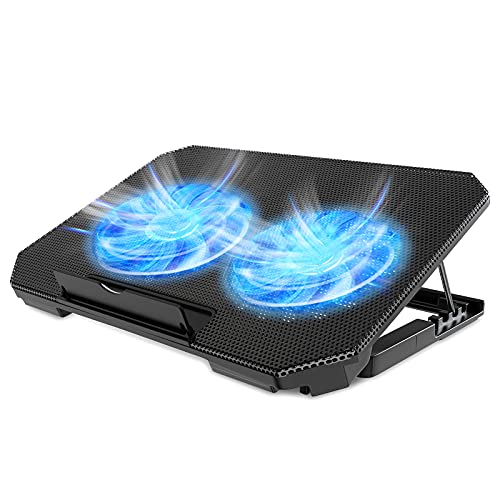
The LIENS cooling pad uses two 5.1-inch fans and an adjustable-height stand for laptops from 12 to 15.6 inches. Its simple layout may appeal to buyers who want a cooler without a row of extra lights or a large fan array. Two USB ports add convenience for a mouse or another small accessory. It is a focused option for compact laptops.
The adjustable stand can help bring a smaller laptop screen closer to eye level, which may feel better during long work or study sessions. Its narrower stated fit range makes it less suited to large gaming computers, so check your laptop size first. This model is best for students or home users who want basic airflow and a raised position.
The compact footprint may be easier to place on a small desk. Wipe the surface with a soft cloth and keep the fan openings clear of dust. With two fans and height adjustment, it gives smaller laptop owners a straightforward setup without a long list of extras.
Why It’s Great
- Two large 5.1-inch fans offer a simple fan layout.
- Height adjustment can help improve screen position.
- Fits many compact and mid-size laptops up to 15.6 inches.
- Two USB ports add practical desk flexibility.
- A focused feature set avoids unnecessary lighting effects.
Good to Know
- Its stated size range does not cover many 17-inch laptops.
- Two fans may provide less broad coverage than models with more fans.
- Check the available height positions and desk fit before buying.
4.ICE COOREL 8-Fan Gaming Cooler
 ICE COOREL 8-Fan Gaming Cooler
” />
The ICE COOREL gaming cooler packs eight fans into a stand made for 15-to-17.3-inch laptops. It includes six height settings, RGB lighting, two USB ports, and a phone stand. That feature-rich layout is aimed at users who want a broad cooling surface and gaming style in one place. It stands out among options for larger laptops.
The larger size may suit a gaming desk better than a small work table. Height adjustment lets you set a preferred angle, while the phone stand can keep a second screen close by. The RGB design adds visible color, so this model is best for gamers who enjoy a more vivid setup. Check your desk space and laptop footprint before ordering.
The mesh-style fan area will need occasional dust removal to keep its openings clear. Its many fans and extras make it less minimal than a slim cooler. For gamers who want adjustability, lighting, and a phone rest, the design brings several desk features together.
Why It’s Great
- Eight fans cover a broad area beneath larger laptops.
- Six height settings offer multiple viewing angles.
- RGB lighting adds color to a gaming setup.
- A phone stand keeps a mobile device close at hand.
- Two USB ports provide extra connection options.
Good to Know
- The larger frame may not fit small desks or compact bags.
- RGB lighting may be distracting in a quiet or low-light room.
- Eight fans and added features make it a less minimal choice.
5.3-Fan Laptop Cooler with Phone Holder
 3-Fan Laptop Cooler with Phone Holder
” />
This laptop cooling pad combines three quiet fans with a stand for laptops from 12 to 17 inches. It has five height levels, two USB ports, and a phone holder. The mix of airflow, screen lift, and small-device storage makes it a practical choice for study, work, or casual gaming. It offers useful features without the eight-fan layout of a larger gaming cooler.
The adjustable stand can help you find a screen angle that feels right at a desk or during an online class. Its phone holder keeps a mobile device nearby, while the two USB ports can support small accessories. This model is best suited to users who want an everyday best cooling pad laptop table with a few helpful extras.
Keep the fan openings free of dust and wipe the stand with a soft cloth as needed. Its three-fan setup keeps the design simpler than a large gaming pad, while the height settings add daily comfort. It may offer good value for users who will use its stand and phone holder.
Why It’s Great
- Three fans provide a middle ground between two- and eight-fan layouts.
- Five height levels help tailor the screen angle.
- Fits a stated range of 12-to-17-inch laptops.
- A phone holder keeps a mobile device within reach.
- Two USB ports add useful connections for everyday use.
Good to Know
- The listing does not state individual fan sizes or measured cooling results.
- A phone holder may be unnecessary if you prefer a bare desk.
- Check your laptop’s vent placement against the fan positions before buying.
Final Thoughts: The Verdict
My personal top pick is the Kootek 5-Fan Laptop Cooling Pad. Its broad laptop fit, five fans, six height settings, and extra USB ports make it a flexible choice for many desks. It is a strong place to start if you want the best cooling pad laptop table with room to adjust your setup.
For a slim work or school option, consider the TECKNET Slim Laptop Cooling Pad. Gamers with larger laptops may prefer ICE COOREL’s eight-fan design, while LIENS suits smaller laptops and the three-fan model adds a phone holder. Check fit, fan placement, and desk space, then choose the features that match your needs and budget.
1 thought on “Best Cooling Pad Laptop Table: Choices For Comfort”
Comments are closed.